Introduction
This manual provides detailed instructions for the installation, operation, and maintenance of your Jensen MS2013BT Waterproof Bluetooth Stereo. Designed for marine and outdoor environments, this stereo features AM/FM radio, USB playback for MP3/WMA files, and Bluetooth connectivity for audio streaming and control. Its robust construction ensures durability with IPX5 waterproofing, corrosion resistance, and UV resistance.
Safety Information
Please read all safety instructions carefully before installing and operating the unit. Failure to follow these instructions may result in injury or damage to the unit or vehicle.
- Ensure proper wiring connections to prevent short circuits and electrical hazards.
- Do not operate the unit in a manner that distracts you from driving or operating your vessel safely.
- The unit is IPX5 waterproof rated, meaning it is protected against low-pressure water jets from any direction. However, it is not designed for submersion.
- Always disconnect the vehicle's battery before beginning installation to avoid electrical shock or damage.
- Use only specified fuses. Using incorrect fuses can cause fire or damage.
Package Contents
Verify that all items are present in the package before proceeding with installation:
- Jensen MS2013BT Stereo Unit
- Wiring Harness
- Mounting Bracket
- Mounting Hardware (nuts, screws)
- Side Cover Caps (2)
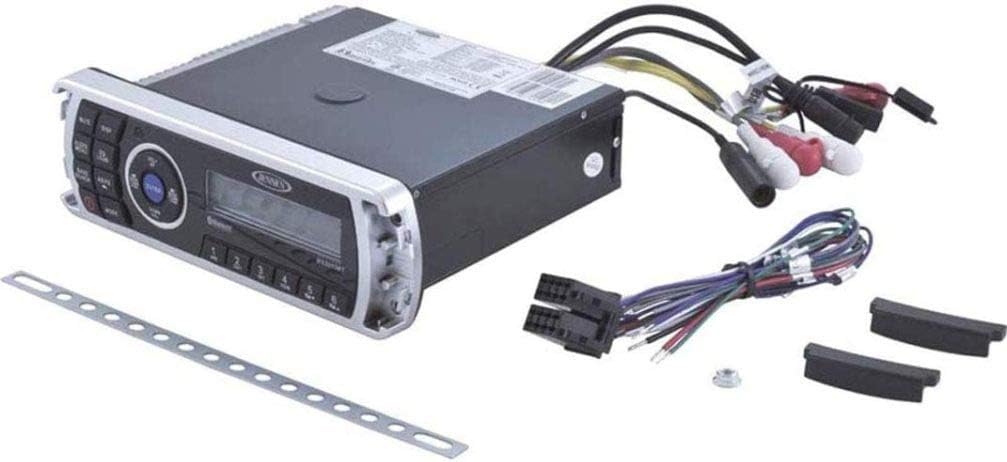
Figure 1: The Jensen MS2013BT stereo unit displayed alongside its wiring harness, mounting bracket, and two side cover caps, illustrating the complete package contents.

Figure 2: A detailed view of the wiring harness, mounting bracket, and a nut, which are essential accessories for installing the Jensen MS2013BT stereo.
Installation
Mounting the Unit
The MS2013BT uses a standard DIN chassis for installation. Ensure there is sufficient space behind the mounting surface for the unit and all wiring connections.
- Carefully slide the mounting sleeve into the dashboard or mounting panel opening.
- Bend the tabs on the mounting sleeve outwards to secure it in place.
- Slide the stereo unit into the mounting sleeve until it clicks into place.
Wiring Connections
Refer to the wiring diagram below and the labels on the wiring harness for correct connections. Incorrect wiring can damage the unit or vehicle's electrical system. Professional installation is recommended.

Figure 3: The rear panel of the Jensen MS2013BT stereo, showing the various input and output ports with the main wiring harness and RCA auxiliary cables connected, ready for installation.
- Yellow Wire: Constant 12V (Battery Positive)
- Red Wire: Switched 12V (Ignition/Accessory)
- Black Wire: Ground (Chassis Ground)
- Speaker Wires: Connect to appropriate speaker terminals (e.g., White/White-Black for Front Left, Gray/Gray-Black for Front Right, Green/Green-Black for Rear Left, Purple/Purple-Black for Rear Right).
- Blue Wire: Remote Turn-On (for external amplifier or power antenna)
- RCA Outputs: Pre-amp line out for external amplifiers.
- Auxiliary Input (RCA): Connect external audio devices.
- USB Input: Connect USB flash drives for media playback.
- Wired Remote Control: Connect optional wired remote controls (MWR150, MWR100, MWR75, sold separately).
Operation
Front Panel Controls

Figure 4: The front panel of the Jensen MS2013BT stereo, showing the display, control buttons, and rotary knob for various functions.
- Power Button (①): Press to turn the unit ON/OFF.
- MUTE Button: Mutes or unmutes the audio output.
- DISP Button: Changes display information (e.g., clock, frequency).
- AUDIO MENU Button: Accesses audio settings like Bass, Treble, Balance, Fader.
- EQ LOUD Button: Toggles Loudness feature ON/OFF, and cycles through EQ presets.
- BAND SEARCH Button: In tuner mode, cycles through AM/FM bands. In other modes, may initiate search.
- AS/PS Button: In tuner mode, performs Auto Store/Preset Scan.
- MODE Button: Cycles through available sources (AM/FM, Bluetooth, USB, AUX).
- Rotary Knob (VOL+/VOL- / ENTER):
- Rotate to adjust volume.
- Press to confirm selections in menus.
- Seek/Tune Buttons (◀◀ / ▶▶):
- In tuner mode, short press for manual tuning, long press for seek tuning.
- In USB/Bluetooth mode, short press for track skip, long press for fast forward/rewind.
- Preset Buttons (1-6): Store and recall radio stations. In USB/Bluetooth mode, may have additional functions (e.g., 1: Play/Pause, 2: Repeat, 3: Intro, 4: Random).
Bluetooth Operation
The MS2013BT supports Bluetooth A2DP for audio streaming and AVRCP for control.
- Pairing:
- Turn on the stereo and select Bluetooth mode using the MODE button.
- Enable Bluetooth on your mobile device and search for "MS2013BT".
- Select "MS2013BT" from the list to pair. No password is typically required.
- Once paired, the Bluetooth icon on the stereo display will illuminate.
- Audio Streaming: Play audio from your paired device. Use the stereo's controls (Play/Pause, Skip Track) or your device's controls.
- Disconnecting: Disconnect from your device's Bluetooth settings or turn off Bluetooth on your device.
USB Playback
Insert a USB flash drive containing MP3/WMA audio files into the USB port. The unit will automatically switch to USB mode and begin playback. Use the Seek/Tune buttons to navigate tracks.
AM/FM Tuner
- Band Selection: Press the BAND SEARCH button to cycle through FM1, FM2, FM3, AM1, AM2.
- Manual Tuning: Short press the Seek/Tune buttons to change frequency step by step.
- Seek Tuning: Long press the Seek/Tune buttons to automatically search for the next strong station.
- Storing Presets: Tune to the desired station, then long press one of the preset buttons (1-6) until the display flashes, indicating the station is stored.
- Recalling Presets: Short press a preset button (1-6) to recall a stored station.
- Auto Store/Preset Scan (AS/PS): Long press AS/PS to automatically scan and store the strongest stations. Short press AS/PS to briefly play each stored preset station.
Maintenance
Proper maintenance will ensure the longevity and performance of your MS2013BT stereo.
- Cleaning: Use a soft, damp cloth to clean the unit's surface. Do not use abrasive cleaners or solvents.
- Water Exposure: While IPX5 rated, avoid direct high-pressure water sprays. Ensure all connections are secure to maintain water resistance.
- UV and Corrosion Resistance: The unit is built with UV resistant materials and a corrosion resistant finish, but regular cleaning helps maintain its appearance and integrity in harsh environments.
- Fuse Replacement: If a fuse blows, replace it only with a fuse of the same type and rating. Consult the wiring diagram for fuse locations and ratings.
Troubleshooting
If you experience issues with your MS2013BT, refer to the following common problems and solutions:
| Problem | Possible Cause | Solution |
|---|---|---|
| No Power | Blown fuse; Incorrect wiring; Loose power connection. | Check and replace fuse; Verify all power and ground connections are secure. |
| No Sound | Volume too low; Mute activated; Incorrect speaker wiring; Amplifier not turning on. | Increase volume; Deactivate Mute; Check speaker connections; Verify remote turn-on wire for amplifier. |
| Bluetooth Not Connecting | Device not in pairing mode; Stereo not in Bluetooth mode; Interference. | Ensure stereo is in Bluetooth mode; Put device in pairing mode; Move device closer to stereo; Restart both devices. |
| USB Not Reading | Unsupported file format; USB drive corrupted; USB drive too large. | Ensure files are MP3/WMA; Try a different USB drive; Format USB drive (FAT32); Use a smaller capacity USB drive. |
| Low Battery Warning | Vehicle battery voltage is low. | Check vehicle battery and charging system. |
Specifications
| Brand | Jensen |
| Model | MS2013BT |
| Output Power | 160 Watts (4x40W Max) |
| Tuner Technology | AM/FM Electronic Tuner (US/Euro selectable) |
| Bluetooth | A2DP (Audio Streaming), AVRCP (Controls) |
| USB Input | MP3/WMA Playback |
| Waterproof Rating | IPX5 |
| Auxiliary Input | Rear RCA |
| Pre-amp Output | RCA Line Out |
| Dimensions (Product) | 30.91 x 27.71 x 16.1 cm (1.62 kg) |
| Chassis Type | Standard DIN |
| Special Features | Conformal Coated Circuit Boards, UV Resistant Materials (ASTMD4329), Corrosion Resistant Finish (ASTMB117), Zero Current Memory Draw |
Warranty and Support
This product is sold as an Amazon Renewed item. Amazon Renewed products are professionally inspected and tested to work and look like new. If not satisfied with the purchase, renewed products are eligible for replacement or refund under the Amazon Renewed Guarantee.
For further assistance, troubleshooting, or warranty claims related to your Amazon Renewed purchase, please contact Amazon customer support directly.


