
BAFANG TFT C18
BAFANG C18 Electric Bicycle Display User Manual
Comprehensive guide for installation, operation, and maintenance of your BAFANG C18 display.
Introduction
The BAFANG C18 Electric Bike Display is a high-quality bicycle speed meter designed for seamless integration with BAFANG mid-drive motors. This display provides essential real-time data including power, speed, distance, battery level, and time, enhancing your e-biking experience. Its user-friendly interface is intuitive and easy to read, featuring a robust design that is touch-proof, waterproof, and dustproof with an IP65 protection rating.
This manual provides detailed instructions to help you set up, operate, and maintain your BAFANG C18 display, ensuring optimal performance and longevity.
Compatibility
The BAFANG C18 display is specifically designed to be compatible with the following BAFANG Mid Drive motors:
- BBS01B
- BBS02B
- BBSHD
Ensure your motor is one of these models for proper functionality.
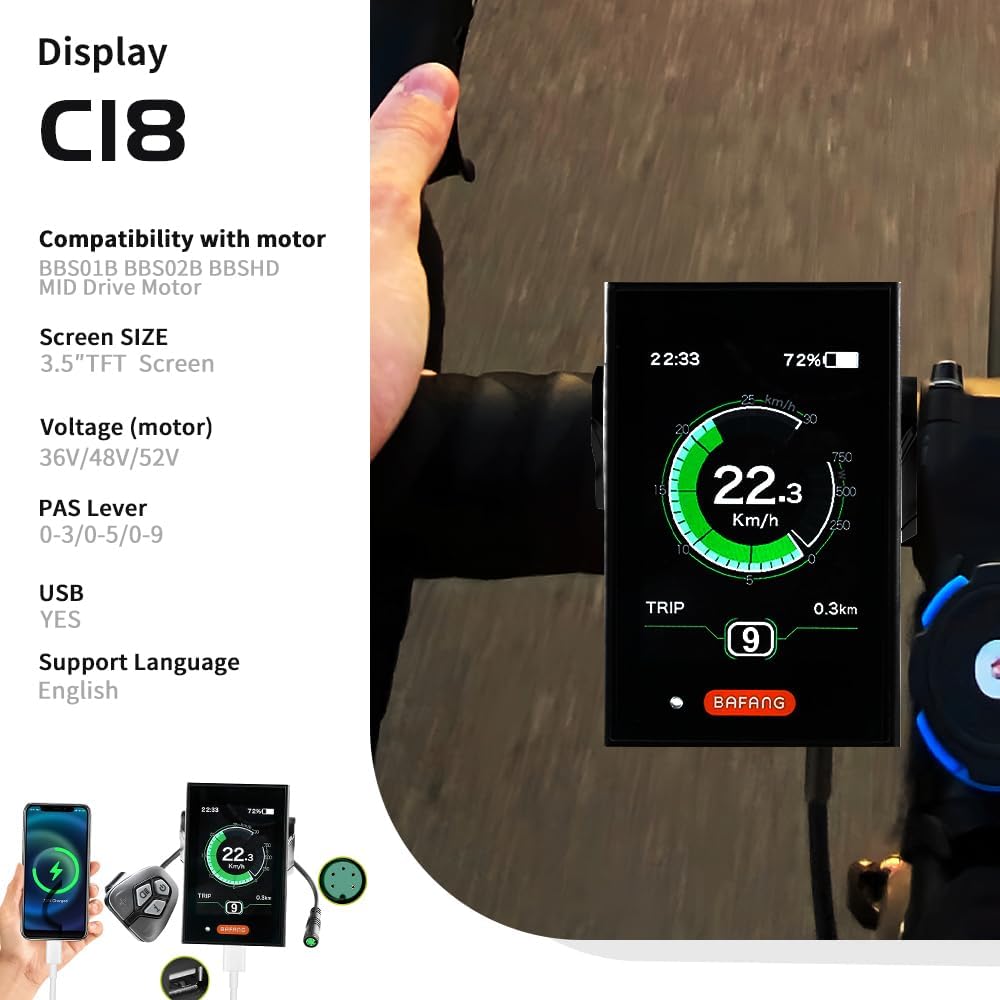
Image: BAFANG C18 display highlighting its compatibility with BBS01B, BBS02B, and BBSHD mid-drive motors, and its 3.5" TFT screen size.
Setup and Installation
Follow these steps to properly install your BAFANG C18 display on your electric bicycle.
1. Mounting the Display
Mount the BAFANG C18 display securely on your bicycle's handlebar. Ensure it is positioned for easy viewing and access to controls while riding.
2. Connecting the Cables
The display connects to your BAFANG mid-drive motor via a 5-PIN cable. It is crucial to ensure the wiring diagram of your display cable matches that of your motor's 1T4 cable. Incorrect wiring will prevent the display from functioning.

Image: Detailed wiring diagram showing the pin assignments for the display cable (Red: Positive, Yellow: RXD, Green: TXD, Orange: Display Lock Wire, Black: Ground) and the corresponding motor cable connections.
Carefully align the connectors and push them firmly together until they click into place. Ensure the connection is secure and waterproof.
Operating Instructions
The BAFANG C18 display offers a range of features to enhance your e-biking experience. Here's how to operate it:
Display Interface Overview

Image: The BAFANG C18 display showing current speed (36.5 km/h), battery level (76%), time (11:25), trip distance (265.9 km), and current assist level (Mode 3, ECO).
The display provides real-time information at a glance, including:
- Speed Indicator: Real-time, Average (AVG), and Maximum (MAX) speed.
- Mileage Indicator: Odometer (ODO), Trip distance, and Riding time.
- Battery Level: Visual representation of remaining battery charge.
- Voltage/Power Indicator: Current power output.
- Clock: Current time.
- Assist Level: Indication of the current pedal assist level (0-3, 0-5, or 0-9, depending on settings).
- Lock Indicator: If applicable.
Pedal Assist System (PAS)
The display supports 9-level assist settings (0-3, 0-5, or 0-9, optional). Use the control buttons to adjust the assist level according to your riding needs. Level 0 typically means no assist, while higher numbers provide more motor assistance.
USB Charging Port
The BAFANG C18 display is equipped with a USB charging port. This port can be used to charge your mobile phone or other small mobile devices while you ride.

Image: The BAFANG C18 display connected via its USB port to a smartphone, indicating charging functionality.
Headlight Light Sensor
If the light sensor setting is enabled on your display, the bicycle's headlights will automatically turn on when the surrounding environment becomes dark. This feature enhances safety during low-light conditions.

Image: Illustration showing the BAFANG C18 display's headlight light sensor feature, where headlights automatically activate in dark environments after the setting is enabled.
Maintenance
Proper maintenance ensures the longevity and optimal performance of your BAFANG C18 display.
- Cleaning: Wipe the display screen and body with a soft, damp cloth. Avoid using abrasive cleaners, solvents, or harsh chemicals, as these can damage the screen or casing.
- Water and Dust Resistance: The display has an IP65 rating, meaning it is protected against dust ingress and low-pressure water jets from any direction. While it is resistant to rain and splashes, avoid submerging the display in water.
- Connections: Periodically check all cable connections to ensure they are secure and free from corrosion or damage.
- Storage: When not in use for extended periods, store the display in a dry, cool place, away from direct sunlight and extreme temperatures.
Troubleshooting
If you encounter issues with your BAFANG C18 display, refer to the following common problems and solutions:
- Display Does Not Turn On:
- Check the battery level of your e-bike. Ensure the battery is charged and properly connected.
- Verify all cable connections between the display and the motor are secure and correctly seated.
- Confirm that the wiring diagram of your display cable matches that of your motor's 1T4 cable. If the wiring is different, the display will not function.
- Incorrect Speed or Distance Readings:
- Ensure the wheel circumference setting in the display's menu is correctly configured for your bicycle's wheel size.
- Check the speed sensor and its magnet for proper alignment and cleanliness.
- Buttons Not Responding:
- Ensure the buttons are clean and free from dirt or debris.
- If the issue persists, a factory reset (if available in the settings) might resolve minor software glitches. Refer to the display's advanced settings menu.
- Display Screen is Dim or Flickering:
- Adjust the brightness setting in the display's menu.
- Ensure the battery voltage is within the operating range (24V/36V, 48V optional).
If you are unable to resolve an issue using these steps, please contact BAFANG customer support or your local dealer for further assistance.
Specifications
Below are the technical specifications for the BAFANG C18 Electric Bicycle Display:
| Feature | Specification |
|---|---|
| Brand | BAFANG |
| Model Name | TFT C18 |
| Color | C18 |
| Display Type | LCD |
| Connectivity Technology | Bluetooth |
| International Protection Rating (IP) | IP65 |
| Mounting Type | Handlebar Mount |
| Human Interface Input | Buttons |
| Product Shell Material | PC (Polycarbonate) |
| Liquid Crystal Display Material | Hardened PMMA |
| Battery Supply | 24V/36V (48V optional) |
| Rated Operating Current | 10mA |
| Max Operating Current | 30mA |
| Off Leakage Current | <1uA |
| Max Output Current to Controller | 50mA |
| Assist Levels | 9-level (0-3/0-5/0-9, optional) |
| Operating Temperature | -20~70℃ (-4~158℉) |
| Storage Temperature | -30~80℃ (-22~176℉) |
| USB Charge Port | Yes |
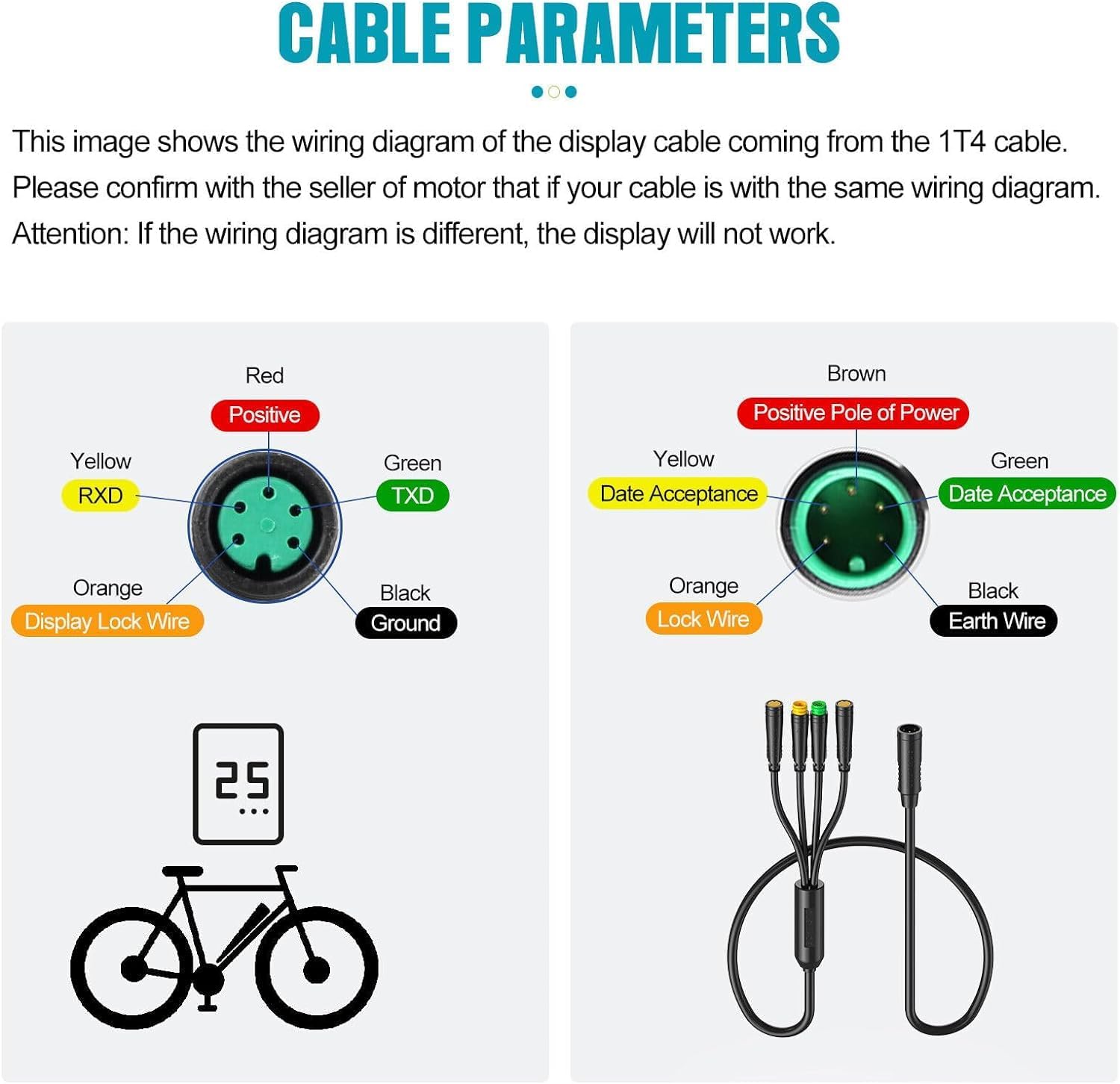
Image: Diagram illustrating the dimensions of the BAFANG C18 display, showing a width of 6.2 cm and a height of 9.6 cm.

Image: A comparison table showing specifications for various BAFANG displays, including the C18, detailing voltage, PAS levels, USB presence, brightness, headlight indicator, and speed limit.
Warranty Information
BAFANG offers a warranty for its e-bike accessories. For the BAFANG C18 display, a 3-month warranty is provided from the date of purchase. This warranty covers manufacturing defects and material faults under normal use.
Please retain your proof of purchase for any warranty claims. The warranty does not cover damage caused by misuse, accidents, unauthorized modifications, or improper installation.
Customer Support
For further assistance, technical support, or warranty inquiries, please contact BAFANG customer service. You can find more information and contact details on the official BAFANG website or through your authorized dealer.
Visit the official BAFANG store for product information and support: BAFANG Store on Amazon
Related documentsTFT C18


Ask a question about this manual
Ask about setup, troubleshooting, compatibility, parts, safety, or missing instructions. Manuals+ will review the question and use this page’s manual context to help answer it.