
1. Product Overview
The DALY Smart BMS (Battery Management System) is designed to provide comprehensive protection and intelligent management for LifePO4 lithium battery packs. This system ensures the safety and extends the lifespan of your battery by monitoring various parameters and offering advanced communication capabilities.
This manual provides detailed instructions for the installation, operation, and maintenance of your DALY Smart BMS.

2. Key Features
- Enhanced Battery Safety: Provides protection against overcharging, over-discharging, overcurrent, short circuits, and extreme temperatures.
- 2-in-1 Bluetooth/Wi-Fi Dongle: Enables easy connection to a mobile application via Bluetooth for local monitoring, or Wi-Fi for long-distance remote control (requires connection to a Wi-Fi router).
- Remote Monitoring: Monitor battery status and adjust parameters via the mobile app or PC software from various locations.
- Parallel Circuit Support: Built-in parallel circuit supports the parallel use of multiple battery packs and 485/CAN Bus parallel communication, compatible with mainstream inverters.
- High Current Resistance: Designed for robust performance in high-current applications.
- Waterproof Design: Offers protection against moisture.
- Integrated Indicator Light: Provides visual feedback on working conditions.

3. Package Contents
Verify that all items are present in your package:
- S-type Smart BMS (x1)
- B-P-Output Line (x1)
- 2-in-1 BT/Wi-Fi Dongle (x1)
- Sampling Cable (x1)
- NTC (x1)
- CAN/485 5-pin (x1)
- User Manual (x1)

4. Specifications
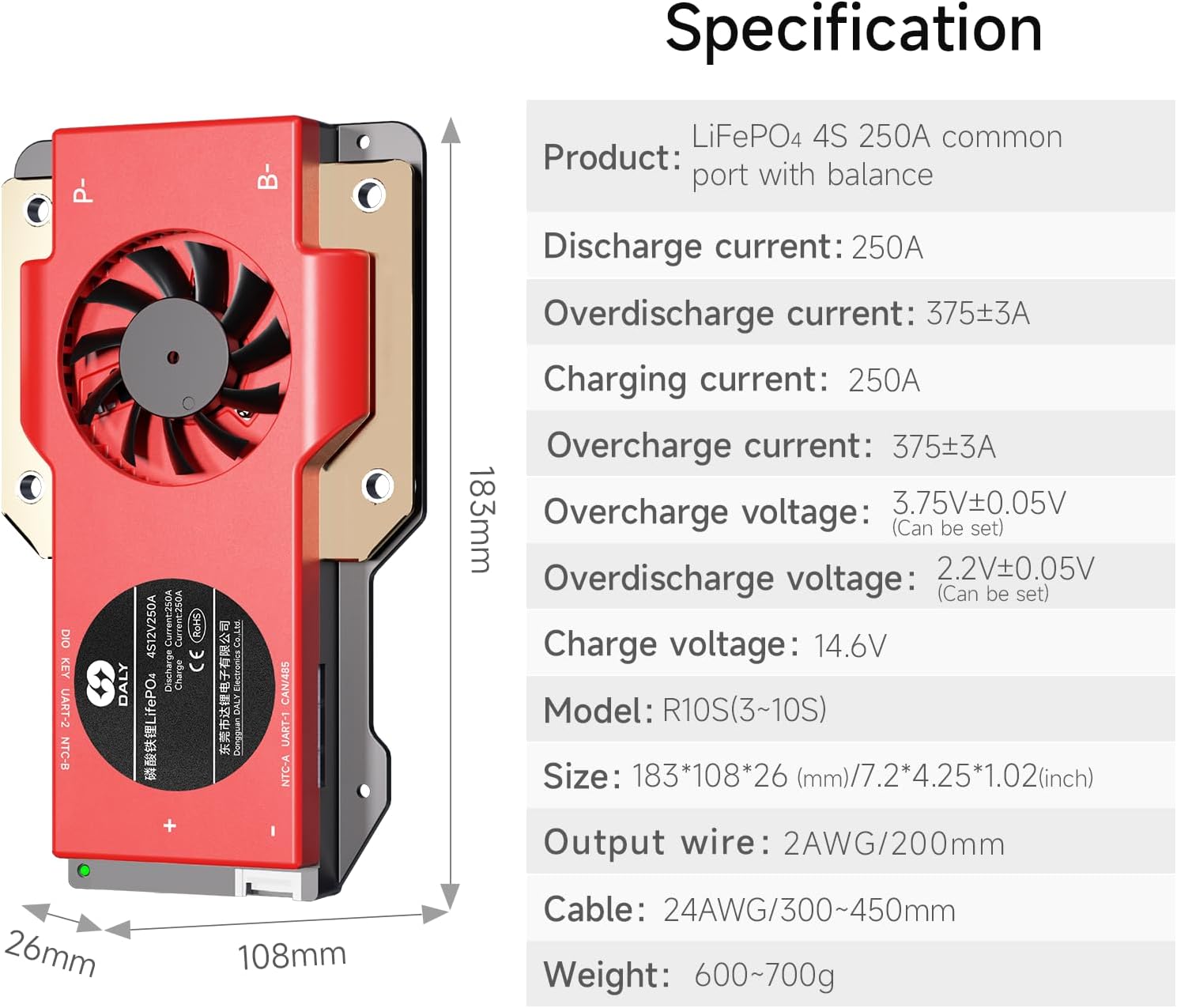
| Parameter | Value (for 4S 250A model) |
|---|---|
| Product Type | LiFePO4 4S 250A common port with balance |
| Discharge Current | 250A |
| Overdischarge Current | 375±3A |
| Charging Current | 250A |
| Overcharge Current | 375±3A |
| Overcharge Voltage | 3.75V±0.05V (Can be set) |
| Overdischarge Voltage | 2.2V±0.05V (Can be set) |
| Charge Voltage | 14.6V |
| Model | R10S (3~10S) |
| Size (L x W x H) | 183 x 108 x 26 mm (7.2 x 4.25 x 1.02 inches) |
| Output Wire | 2AWG/200mm |
| Cable | 24AWG/300~450mm |
| Weight | 600~700g (1.5 pounds) |
5. Installation and Wiring
Proper installation is crucial for the safe and effective operation of the BMS. Follow these steps carefully:
- Solder the Sampling Cables:
- The first black cable in the sampling cable set connects to the negative terminal of the battery.
- The second red cable connects to the positive terminal of the first string of batteries.
- Continue connecting subsequent red cables to the positive terminals of each successive battery string until all cables are connected.
- Check the Cables: After connecting the cables, use a multimeter to measure the voltage between two adjacent cables starting from the header. Ensure there are no incorrect connections or missing connections. The voltage between B+ and B- should be consistent.
- Connect the Output Wires: Connect the B- wire of the BMS to the total negative terminal of the battery pack. Then, plug the sampling cable to the BMS. After activating the BMS, confirm that the voltage (battery voltage) between B+ & B- and the voltage between P+ & P- are consistent.

6. Operation
The DALY Smart BMS offers intelligent monitoring and control through its dedicated mobile application and PC software.
6.1. App Connectivity
The included 2-in-1 Bluetooth/Wi-Fi dongle allows for flexible connectivity:
- Bluetooth: For local monitoring and parameter adjustment, connect directly to the BMS via Bluetooth using the mobile app.
- Wi-Fi: For long-distance remote control, connect the dongle to a Wi-Fi router. This enables remote monitoring of battery status and adjustment of parameters from anywhere with internet access.
The mobile app supports both iOS and Android systems and can automatically switch with the system language. It provides real-time data on State of Charge (SOC), voltage, current, temperature, and cycle number, along with alarm notifications.

6.2. Parallel Communication
The BMS supports 485/CAN Bus parallel communication, allowing multiple battery packs to operate in parallel. This feature is compatible with various mainstream inverters, facilitating scalable power solutions.
6.3. Video Overview
Watch this video for a comprehensive overview of the DALY S-Series Smart BMS features and capabilities:
7. Applications
The DALY Smart BMS is suitable for a wide range of high-current scenarios, including but not limited to:
- RV energy storage systems
- Forklifts
- Golf carts
- Large sightseeing cars
- Low-speed scooters
- Industrial AGVs (Automated Guided Vehicles)

8. Safety Information
Always adhere to safety precautions when working with lithium batteries and BMS systems:
- Ensure all connections are secure and correctly wired before applying power.
- Avoid short circuits at all times.
- Do not expose the BMS to extreme temperatures or moisture beyond its specified operating conditions.
- Consult a qualified professional if you are unsure about any installation or wiring steps.
- Keep the BMS away from flammable materials.
9. Troubleshooting
If you encounter issues with your DALY Smart BMS, consider the following general troubleshooting steps:
- No Power/No Indication: Check all power connections and ensure the battery pack is adequately charged. Verify the sampling cable is correctly plugged in.
- App Connectivity Issues: Ensure Bluetooth is enabled on your device and the BMS dongle. For Wi-Fi, confirm the dongle is connected to a stable Wi-Fi network and the router is functioning correctly. Restart the app and the BMS if necessary.
- Incorrect Readings: Double-check all wiring, especially the sampling cables, for proper connection and contact. Ensure the app or PC software is updated to the latest version.
- Over-protection Triggered: If the BMS triggers an over-protection (e.g., overcurrent, overvoltage), identify the cause (e.g., excessive load, faulty charger) and rectify it before resetting the BMS.
For persistent issues, refer to the detailed troubleshooting section in the full product manual or contact DALY customer support.
10. Warranty and Support
The DALY Smart BMS comes with a 3-year warranty. For warranty claims or technical support, please contact DALY customer service through their official channels. Ensure you have your purchase details and product model number available.
The product is ISO/FCC/RoHS/PSE/CE APPROVED, ensuring compliance with international quality and safety standards.


