
1. Product Overview
The ATS25 Max Decoder II is a versatile full-band radio receiver designed for comprehensive radio reception. It incorporates advanced decoding capabilities and a user-friendly interface, making it suitable for various listening and communication needs. This manual provides essential information for setting up, operating, and maintaining your device.
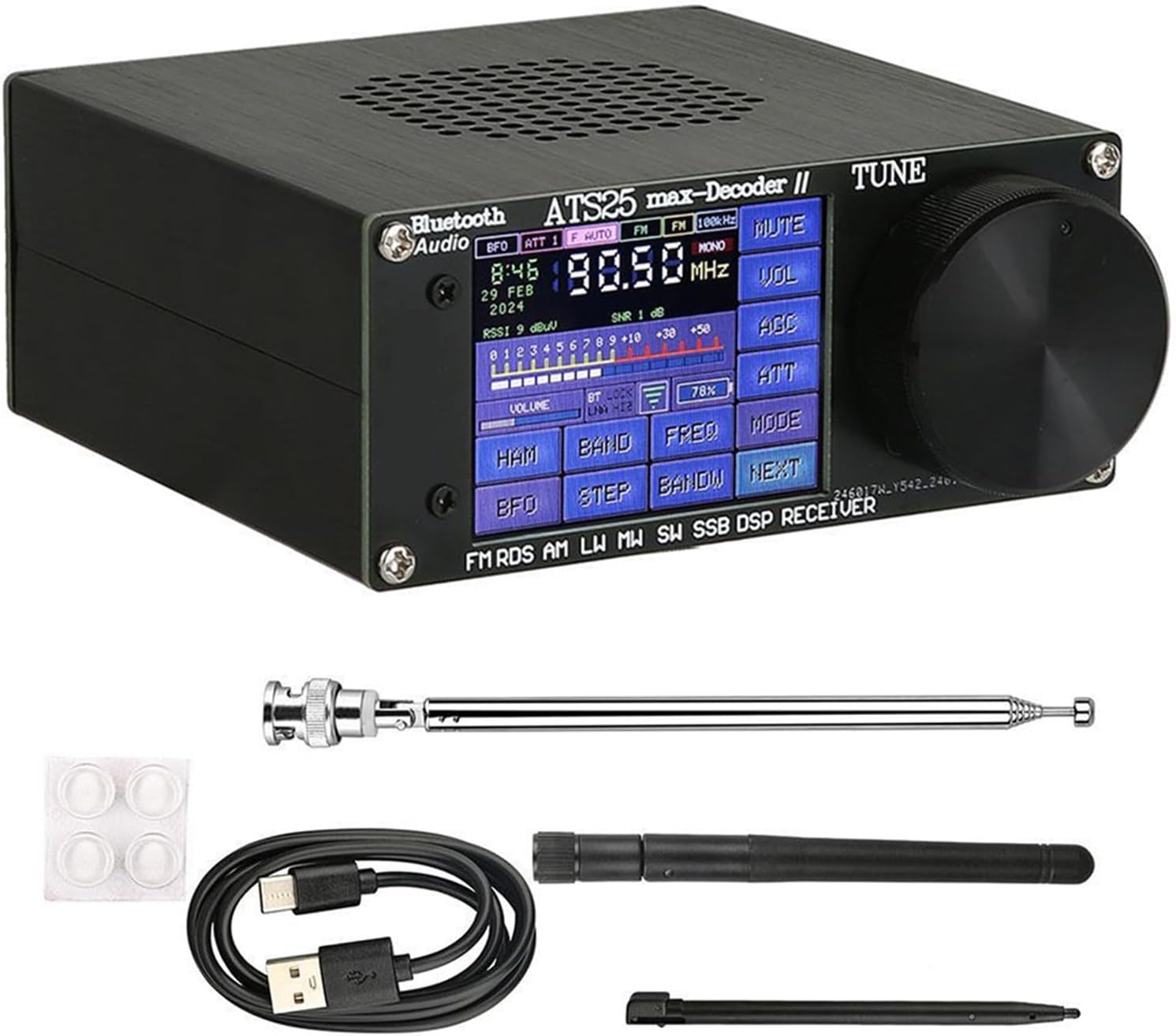
Figure 1.1: Front view of the ATS25 Max Decoder II radio receiver. The screen shows the current frequency (90.50 MHz), time (8:46), date (29 FEB 2024), signal strength (RSSI), and various operational buttons like VOLUME, HAM, BAND, FREQ, MODE, MUTE, VOL, AGC, ATT, BFO, STEP, BANDW, and NEXT. A large tuning knob is visible on the right.
2. Key Features
- Version 4.17 Enhancements: Includes integrated foam code and digital communication decoder functions.
- License Key: Features a 12-bit license key with registered software supporting future upgrades.
- Connectivity: Bluetooth compatible function for wireless audio.
- Battery Life: Increased 4000 mAh battery capacity for extended operational duration.
- Antenna Input: HI-Z antenna input impedance.
- Signal Processing: LNA (Low Noise Amplifier) function and integrated band-pass filter circuit for interference shielding.
- Decoding Modes: Supports PSK mode in DIGI mode (unique to Decoder products) and other decoding functions like CW.
- Audio Output: Integrated full-frequency stereo external speaker.
- Display: 2.4-inch touchscreen with brightness adjustment, battery percentage display, and backlight control.
- Interface: BNC interface for antenna connection.
- Operational Modes: Supports LSB, AM, USB, CW, DIGI (PSK/FT4/FT8/RTTY L/RTTY U/HELL), CWR, SYNC L, SYNC U.
- Frequency Input: Direct frequency input via numeric keypad.
- Scanning: Radio frequency spectrum scanning function.
- Bandwidth Support: AM bandwidth 1-6, SSB bandwidth 0.5-4.0 K.
3. Package Contents
Please check the box for the following items:
- 1 x ATS25 Max Decoder II Host Unit
- 1 x Cleaning Cloth
- 1 x Wi-Fi Antenna
- 1 x Rod Antenna
- 1 x 2-in-1 Touch Stylus
- 1 x Type-C Charging Cable
- 1 x Protective Mat
- 1 x User Manual

Figure 3.1: Contents of the ATS25 Max Decoder II package. This image displays the main radio unit, two types of antennas (a long rod antenna and a shorter black antenna), a USB Type-C charging cable, a stylus for touchscreen interaction, and a cleaning cloth.
4. Setup
4.1 Initial Charging
Before first use, fully charge the device using the provided Type-C charging cable. Connect the cable to the USB charge/download port on the rear of the unit and the other end to a compatible USB power source (e.g., computer USB port or wall adapter). The 'led charge' indicator will illuminate during charging.
4.2 Antenna Connection
Attach the desired antenna to the 'ANT' BNC connector on the rear of the unit. For general reception, the rod antenna is suitable. For Wi-Fi functionality, ensure the Wi-Fi antenna is connected to the 'WIFI' port.

Figure 4.1: Rear panel of the ATS25 Max Decoder II. From left to right, it shows the 'Bluetooth Audio' indicator, 'USB charge download' Type-C port, 'POWER OFF/ON' switch, 'led charge' indicator, 'phone head' (headphone) jack, 'ANT' BNC connector for the main antenna, and 'WIFI' connector for the Wi-Fi antenna.
4.3 Powering On/Off
Locate the 'POWER OFF/ON' switch on the rear panel. Slide the switch to the 'ON' position to power on the device. Slide it to 'OFF' to power off.
5. Operating Instructions
5.1 Basic Operation
- Tuning: Use the large 'TUNE' knob on the right side of the unit to adjust the frequency.
- Mode Selection: Press the 'MODE' button on the touchscreen to cycle through available reception modes (LSB, AM, USB, CW, DIGI, CWR, SYNC L, SYNC U).
- Volume Control: Adjust the volume using the 'VOLUME' button on the touchscreen or the dedicated volume control if available.
- Direct Frequency Input: Utilize the numeric keypad function on the touchscreen to directly enter a desired frequency.
5.2 Advanced Functions
- Spectrum Scanning: Access the radio frequency spectrum scanning function via the menu to visualize and identify active frequencies.
- Bluetooth Connectivity: To enable Bluetooth, navigate to the 'SETUP' menu on the touchscreen. Toggle the Bluetooth option to 'ON'.

Figure 5.1: The touchscreen interface showing the 'SETUP' menu. This screen allows configuration of various settings, including Bluetooth and Wi-Fi connectivity. The Bluetooth toggle switch is highlighted, indicating it can be turned on or off.
- Display Settings: Adjust backlight brightness and enable/disable backlight via the display settings menu.
- HAM Band Quick Channel: Use the 'HAM' button to quickly access predefined HAM band channels.
6. Maintenance
6.1 Cleaning
Use the provided cleaning cloth to gently wipe the screen and exterior of the device. Avoid using abrasive cleaners or solvents that could damage the surface.
6.2 Battery Care
To prolong battery life, avoid fully discharging the battery frequently. Charge the device regularly, especially if it will be stored for an extended period.
6.3 Storage
Store the receiver in a cool, dry place away from direct sunlight and extreme temperatures. Disconnect all antennas and cables before storage.
7. Troubleshooting
7.1 No Power
- Ensure the power switch on the rear is in the 'ON' position.
- Check battery charge level. Connect the device to a power source using the Type-C cable.
7.2 Poor Reception
- Verify that the antenna is securely connected to the 'ANT' port.
- Try extending the rod antenna fully for better signal capture.
- Relocate the device to an area with less interference.
- Check the selected mode (AM, SSB, FM) matches the broadcast type.
7.3 Touchscreen Unresponsive
- Gently clean the screen with the provided cloth.
- Restart the device by powering it off and then on again.
- Use the provided stylus for more precise input.
8. Specifications
| Feature | Specification |
|---|---|
| Brand | SPORTARC |
| Model Number | 2T6H303MY4VY5401KS83AUJJ18YFC5 |
| Frequency Range (FM) | 64-108 MHz / RDS |
| Frequency Range (LW) | 153-500 kHz |
| Frequency Range (MW) | 520-1710 kHz |
| Frequency Range (SW) | 1730-30000 kHz |
| Frequency Range (SSB) | 17030 kHz |
| Display | 2.4-inch Touchscreen |
| Shell Material | Aluminum Alloy |
| Battery | Integrated 3.7V / 4000mA Lithium Battery |
| Dimensions (L x W x H) | 11.1 x 10.5 x 4.7 cm (4.37 x 4.13 x 1.85 inches) |
| Weight | 525 g (1.16 lbs) |
| AM Bandwidth Support | 1-6 |
| SSB Bandwidth Support | 0.5-4.0 K |
9. Warranty and Support
This product comes with a standard manufacturer's warranty. For specific warranty terms and conditions, please refer to the documentation included with your purchase or contact the retailer. For technical support or inquiries, please reach out to the customer service provided by your point of purchase.