
Introduction
This user manual provides detailed instructions for the Lepro Headlamp Bundle, which includes two distinct models: the 320014-2 LED Rechargeable Headlamp and the PR320019 Super Bright Headlamp with Motion Sensor. Please read this manual carefully before using the products to ensure proper operation, maximize performance, and maintain product longevity. Keep this manual for future reference.
Product Overview
The Lepro Headlamp Bundle offers versatile lighting solutions for various activities, from camping and hiking to everyday tasks. Each headlamp is designed with specific features to meet different illumination needs.
Model 320014-2 LED Rechargeable Headlamp
This headlamp features a traditional design with a powerful spotlight and floodlight, offering multiple lighting modes including white and red light. It is highly bright and suitable for long-range illumination.

Image: The Lepro Headlamp Bundle, showcasing both the 320014-2 traditional headlamp and the PR320019 wide-beam headlamp, along with their respective charging cables.
Model PR320019 Super Bright Headlamp with Motion Sensor
This headlamp features a wide 230° COB light bar for broad area illumination and an adjustable spotlight. Its motion sensor functionality allows for hands-free operation, enhancing convenience during use.
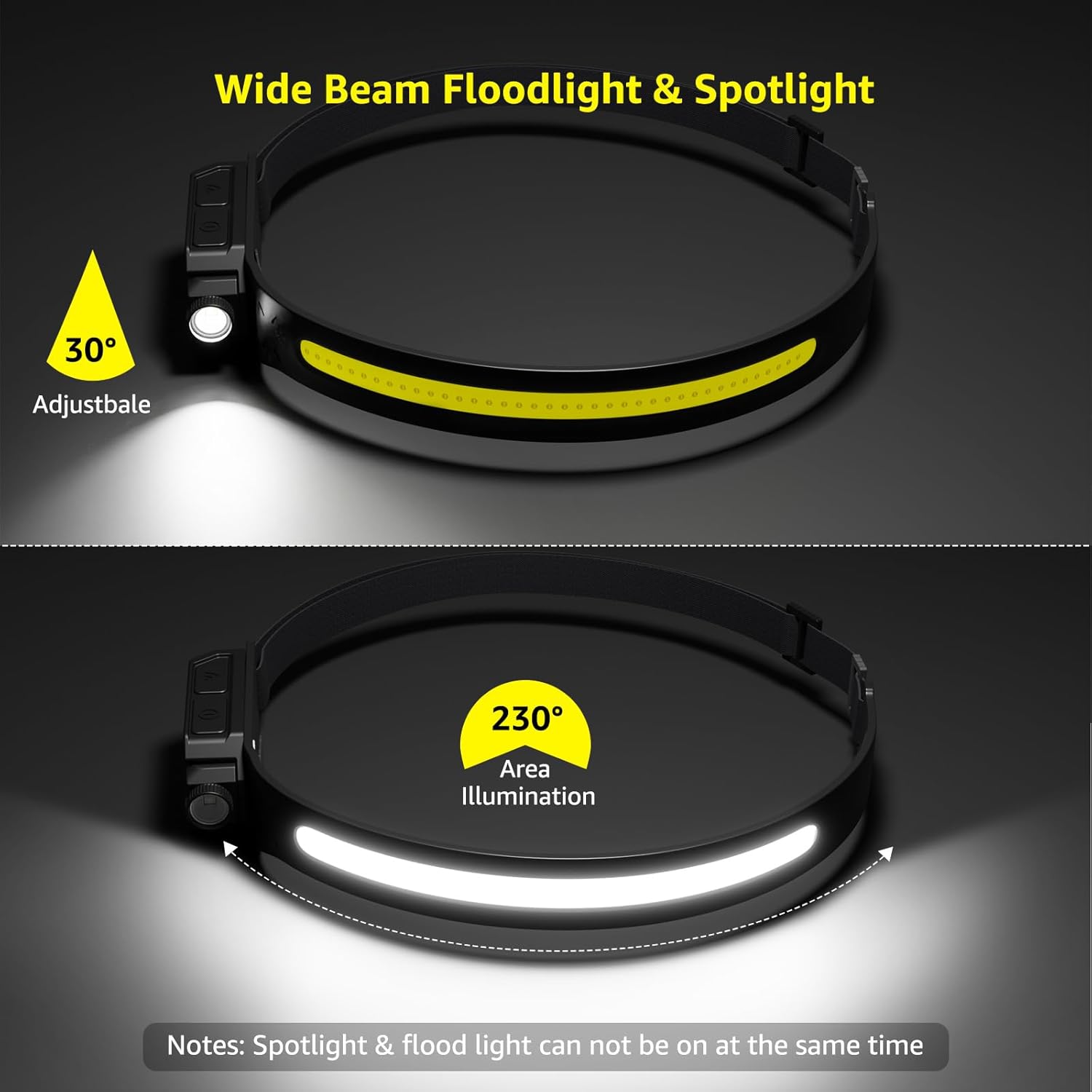
Image: The Lepro PR320019 headlamp, illustrating its 230-degree wide beam floodlight and a 30-degree adjustable spotlight. Note: Spotlight and floodlight cannot be on simultaneously.
Setup
Charging the Headlamps
Both headlamps are USB rechargeable. Before first use, fully charge the headlamps to ensure optimal performance and battery life.
- Locate the Micro USB charging port on the headlamp.
- Connect the provided USB charging cable to the headlamp's port.
- Plug the other end of the USB cable into a standard USB power adapter (not included), a computer USB port, or a power bank.
- An indicator light will show the charging status (e.g., red for charging, green/blue for fully charged).
- Charging time for Model 320014-2 is approximately 3-4 hours for up to 15 hours of runtime.
- Charging time for Model PR320019 is approximately 4 hours for 4-10 hours of usage.

Image: The Lepro 320014-2 headlamp connected to a laptop via its Micro USB charging cable, illustrating the charging process and indicating approximate runtimes at different brightness levels.

Image: The Lepro PR320019 headlamp being charged via its USB-C port from a wall adapter, highlighting its 1200mAh rechargeable battery and indicating a 4-hour full charge time for 4-10 hours of usage.
Wearing the Headlamp
Adjust the elastic headband to fit comfortably and securely around your head. The lamp unit can typically be tilted to direct the light beam as needed.
Operating Instructions
Model 320014-2 Operation
This headlamp features 6 lighting modes, including white spot light, white flood light, and red light.

Image: A visual guide to the 6 lighting modes of the Lepro 320014-2 headlamp: High Spot Light, Low Spot Light, High Flood Light, Low Flood Light, Red Light (steady), and Red Flash Light.
- Power On/Off: Press the power button once to turn on the headlamp. Press and hold to turn off.
- Mode Cycling: With the headlamp on, short press the power button to cycle through the 6 lighting modes:
- Spot Light (High)
- Spot Light (Low)
- Flood Light (High)
- Flood Light (Low)
- Red Light (Steady)
- Red Light (Flash)

Image: Depiction of the Lepro 320014-2 headlamp's spotlight (25° beam angle, up to 150 meters/500 feet) and floodlight (85° beam angle) capabilities, showing their respective illumination patterns.
Model PR320019 Operation
This headlamp features a 230° wide beam COB light and an adjustable spotlight, along with a motion sensor function.

Image: A visual guide to the 5 lighting modes of the Lepro PR320019 headlamp: High Flood Light (350lm), Low Flood Light (110lm), Motion Sensor (for COB light), High Spot Light (150lm), and Low Spot Light (60lm).
- Power On/Off: Press the power button once to turn on the headlamp. Press and hold to turn off.
- Mode Cycling: Short press the power button to cycle through the lighting modes:
- COB Flood Light (High)
- COB Flood Light (Low)
- Spot Light (High)
- Spot Light (Low)
- Motion Sensor Activation: Press the dedicated motion sensor button to activate this feature. When active, you can wave your hand in front of the sensor to turn the COB light on or off without pressing the power button.
Maintenance
- Charging: To prolong battery life, charge the headlamp regularly, especially if it has not been used for an extended period. Avoid completely draining the battery before recharging.
- Cleaning: Wipe the headlamp with a soft, damp cloth. Do not use abrasive cleaners or solvents.
- Storage: Store the headlamp in a cool, dry place away from direct sunlight and extreme temperatures.
- Water Resistance:
- Model 320014-2: Features IPX4 water resistance, meaning it is protected against splashing water from any direction. It is not designed for submersion.
- Model PR320019: Features IP44 waterproof and dustproof rating, offering protection against solid objects larger than 1mm and splashing water from any direction.

Image: The Lepro 320014-2 headlamp with water droplets, illustrating its IPX4 water resistance, which prevents splashing water from all directions.

Image: A person running in the rain while wearing the Lepro PR320019 headlamp, demonstrating its IP44 waterproof and dustproof capabilities.
Troubleshooting
- Headlamp not turning on:
- Ensure the battery is charged. Connect to a power source and check the charging indicator.
- Press and hold the power button for a few seconds to ensure it's not just a quick press.
- Light is dim or flickering:
- The battery level may be low. Recharge the headlamp fully.
- Ensure the lens is clean and free of debris.
- Headlamp not charging:
- Check the USB cable for damage and ensure it is securely connected to both the headlamp and the power source.
- Try a different USB port or power adapter.
- Motion sensor not responding (PR320019):
- Ensure the motion sensor function is activated by pressing its dedicated button.
- Ensure there are no obstructions covering the sensor.
- Wave your hand clearly and within the sensor's detection range.
Specifications
| Feature | Model 320014-2 | Model PR320019 |
|---|---|---|
| Light Source Type | LED | LED (COB & Spotlight) |
| Brightness | Up to 2000 lux / 2000 Lumens | 350 Lumens (COB High), 150 Lumens (Spot High) |
| Beam Distance | Up to 500 ft / 150 m | Not specified for spotlight, 230° wide beam for COB |
| Lighting Modes | 6 (Spot High/Low, Flood High/Low, Red Steady/Flash) | 5 (COB High/Low, Spot High/Low, Motion Sensor) |
| Battery Capacity | 1200 mAh Lithium-Ion | 1200 mAh Lithium-Ion |
| Runtime | Up to 15 hours | 4-10 hours |
| Rechargeable | Yes, Micro USB | Yes, USB-C |
| Water Resistance | IPX4 Water Resistant | IP44 Waterproof and Dustproof |
| Special Features | Adjustable Light | Motion Sensor, Adjustable Spotlight, 230° Wide Beam |
| Included Components | USB Cable | USB Cable |
Warranty and Support
For warranty information, please refer to the documentation included with your purchase or visit the official Lepro website. Lepro products typically come with a manufacturer's warranty covering defects in materials and workmanship.
If you encounter any issues or have questions not covered in this manual, please contact Lepro customer support through their official website or the retailer where you purchased the product. Provide your product model numbers (320014-2, PR320019) and a detailed description of the issue for faster assistance.
You can visit the Lepro Store on Amazon for more information: Lepro Amazon Store


