Introduction
Thank you for choosing the Ensenior 18 Inch LED Under Cabinet Lighting. This manual provides detailed instructions for the safe installation, operation, and maintenance of your new lighting fixture. Please read this manual thoroughly before installation and retain it for future reference.
Safety Information
- Electrical Safety: Always disconnect power at the circuit breaker before installing, servicing, or cleaning the fixture. Ensure all electrical connections comply with local codes and ordinances. If you are unsure about wiring, consult a qualified electrician.
- Installation: Install the fixture securely to a stable surface. Do not install near heat sources or in areas with excessive moisture.
- Usage: This product is designed for indoor use only. Do not attempt to modify the fixture.
- Cleaning: Use a soft, dry cloth for cleaning. Avoid abrasive cleaners or solvents that may damage the finish.
Package Contents
Verify that all components are present before beginning installation:
- 1x 18 Inch LED Under Cabinet Light Fixture
- Mounting Hardware (screws, clips)
- Power Cord (for plug-in installation)
- Hardwire Connector
- Jumper Cable
- End-to-End Connector
- Instruction Manual
Product Features
- Hand Wave Control: Motion sensor allows for touchless operation to toggle brightness settings.
- 2.4G Wireless Control: Control multiple linked lights simultaneously from a single unit.
- Versatile Installation: Supports both hardwired and plug-in installation methods.
- 5CCT & Stepless Dimming: Adjustable color temperature (2700K-5000K) and dimming from 10% to 100%.
- Energy-Efficient: 10W LED with 650LM output, designed for long-term durability.

Image: Key features of the Ensenior LED Under Cabinet Light, including built-in dimmer, 5CCT, 650LM, 10W, CRI≥90, and wireless control.
Specifications
| Attribute | Specification |
|---|---|
| Model Number | 7c157e35-92 |
| Light Source | LED |
| Size | 18 Inch (47.75 cm) |
| Wattage | 10W |
| Voltage | 120V |
| Color Temperature (CCT) | 5CCT (2700K/3000K/3500K/4000K/5000K) |
| Luminous Flux | 650 LM |
| Color Rendering Index (CRI) | Ra>90 |
| Dimming | Yes (0%-100% Stepless) |
| Certifications | FCC & ROHS |
| Working Temperature | -10°C to 40°C |
| Lifespan | 50,000 hours |
| Material | Aluminum |
Setup and Installation
The Ensenior LED Under Cabinet Light offers two primary installation methods: hardwired or plug-in. It also supports linking multiple fixtures.
1. Choose Installation Method: Hardwired or Plug-in
- Plug-in Installation: If hardwiring is not feasible, use the provided power cord to plug the fixture into a standard 120V outlet.
- Hardwired Installation: For a permanent setup, connect the fixture directly to your home's electrical wiring using the hardwire connector. Ensure power is off at the circuit breaker before proceeding. Consult a qualified electrician if needed.

Image: Visual guide illustrating the two installation methods: Hardwired and Plug-in.
2. Mounting the Fixture
- Identify the desired location under your cabinet. Ensure the surface is clean and dry.
- Use the provided mounting hardware (screws and clips) to securely attach the light fixture to the underside of the cabinet.
3. Linking Multiple Fixtures (Optional)
Multiple Ensenior under cabinet lights can be linked together to operate as a single unit.
- Jumper Cable: Use the jumper cable to connect two fixtures that are spaced apart.
- End-to-End Connector: For seamless, continuous lighting, use the end-to-end connector to join two fixtures directly.
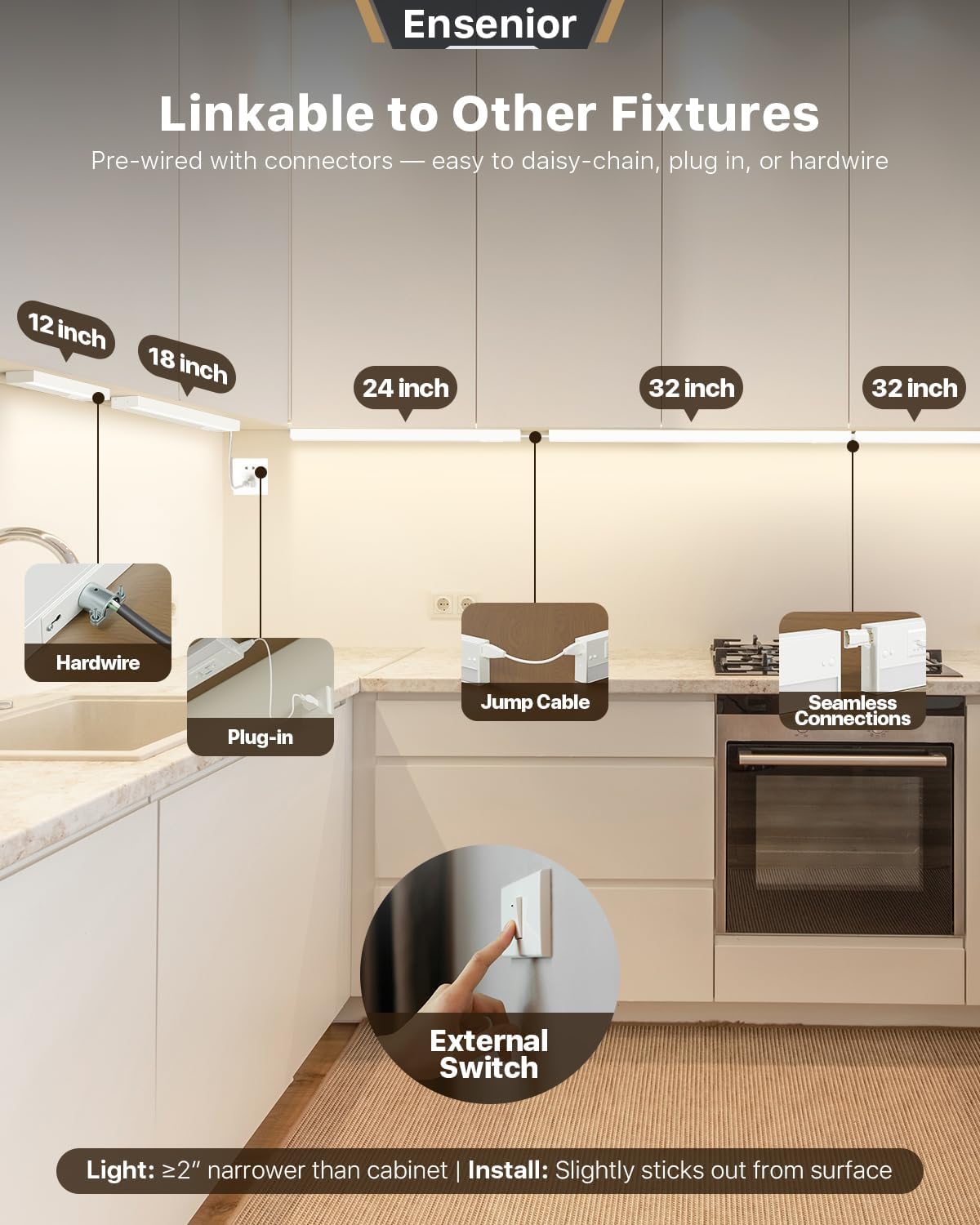
Image: Illustration of how to link multiple fixtures using jumper cables or end-to-end connectors, alongside hardwire and plug-in options.
Operating Instructions
1. Hand Wave Control
The fixture features a motion sensor for convenient, touchless operation.
- To Turn On/Off: Wave your hand within 2 inches (5 cm) of the sensor switch.
- To Adjust Brightness: Wave your hand again to cycle between maximum and minimum brightness settings.

Image: Demonstrates the hand wave motion sensor for easy operation, with a sensing distance of up to 2 inches.
2. 2.4G Wireless Control
For installations with multiple linked fixtures, the 2.4G wireless control allows you to manage all lights from a single point.
- Control the switch, color temperature, and brightness of all connected lights by interacting with just one fixture.

Image: Illustrates the 2.4G Multi Wireless Control feature, allowing effortless management of multiple cabinet lights simultaneously in one space.
3. 5CCT and Stepless Dimming
Customize your lighting experience with adjustable color temperature and brightness.
- Color Temperature Adjustment: Locate the CCT switch on the fixture. Flip the dial setting to choose from 5 color temperatures: 2700K (Warm White), 3000K, 3500K, 4000K, and 5000K (Daylight White).
- Stepless Dimming: Long press on the main switch to smoothly adjust the brightness from 10% to 100%. Release the button when the desired brightness is reached.

Image: Shows the built-in 10%-100% stepless dimming function, controlled by a long press on the switch.

Image: Displays the 5CCT options available for selection, ranging from 2700K to 5000K, allowing users to choose their preferred light color.
Maintenance
To ensure the longevity and optimal performance of your Ensenior LED Under Cabinet Lighting, follow these maintenance guidelines:
- Cleaning: Regularly wipe the fixture with a soft, dry, or slightly damp cloth. Do not use harsh chemicals, abrasive cleaners, or sprays directly on the light.
- Inspection: Periodically check for any loose connections or damage to the wiring. If any damage is found, disconnect power immediately and contact customer support.
- LED Lifespan: The LEDs are designed for a long lifespan of 50,000 hours and do not require replacement under normal operating conditions.
Troubleshooting
If you encounter issues with your Ensenior LED Under Cabinet Lighting, refer to the following common problems and solutions:
| Problem | Possible Cause | Solution |
|---|---|---|
| Light does not turn on | No power, loose connection, faulty switch. | Check power supply, ensure plug is fully inserted or hardwire connections are secure. Verify circuit breaker is on. |
| Hand wave sensor is erratic or unresponsive | Obstruction near sensor, sensor dirty, external interference. | Ensure no objects are within 2 inches of the sensor. Clean the sensor area. Avoid installing near strong electromagnetic fields. |
| Lights are not dimming or changing CCT | Incorrect operation, internal fault. | Refer to "Operating Instructions" for correct dimming and CCT adjustment procedures. If issue persists, contact support. |
| Linked lights are not syncing | Improper linking, distance issues. | Ensure all lights are properly connected via jumper cables or end-to-end connectors. Verify they are within the effective range for 2.4G wireless control. |
If troubleshooting steps do not resolve the issue, please contact Ensenior customer support for further assistance.
Warranty and Support
This Ensenior LED Under Cabinet Lighting fixture comes with a 5-year warranty from the date of purchase. This warranty covers defects in materials and workmanship under normal use.
For warranty claims, technical support, or any questions regarding your product, please contact Ensenior customer service through the retailer where the product was purchased or visit the official Ensenior website for contact information.


