
eppfun AK3040Pro MAX
eppfun Bluetooth USB-C Transmitter User Manual
Model: AK3040Pro MAX
1. Introduction
Thank you for choosing the eppfun Bluetooth USB-C Transmitter. This device is designed to provide high-quality wireless audio transmission using the latest Bluetooth 5.4 LE Audio technology. It supports various audio codecs, ensuring a stable and efficient connection for an enhanced audio experience across multiple platforms.

Image 1.1: The eppfun Bluetooth USB-C Transmitter, a compact device with a gold-plated USB-C connector and a small blue LED indicator, shown alongside a 3.5mm audio jack adapter.
2. Product Overview
The eppfun AK3040Pro MAX is a versatile USB-C audio transmitter. It features a single multi-function button and an LED indicator that changes color to show the active audio codec.
2.1. Key Features
- Bluetooth 5.4 with LE Audio for low power consumption and superior audio quality.
- Supports multiple audio codecs: LE Audio (LC3), APTX Lossless, APTX Adaptive, APTX LL, APTX HD, and SBC.
- Broad compatibility with USB-C audio output devices including PC, Mac, smartphones, Nintendo Switch, and PS5.
- Plug-and-play functionality with no driver installation required.
2.2. LED Indicator and Codec Status
The LED indicator on the transmitter displays the currently active audio codec. Refer to the table below for color meanings:
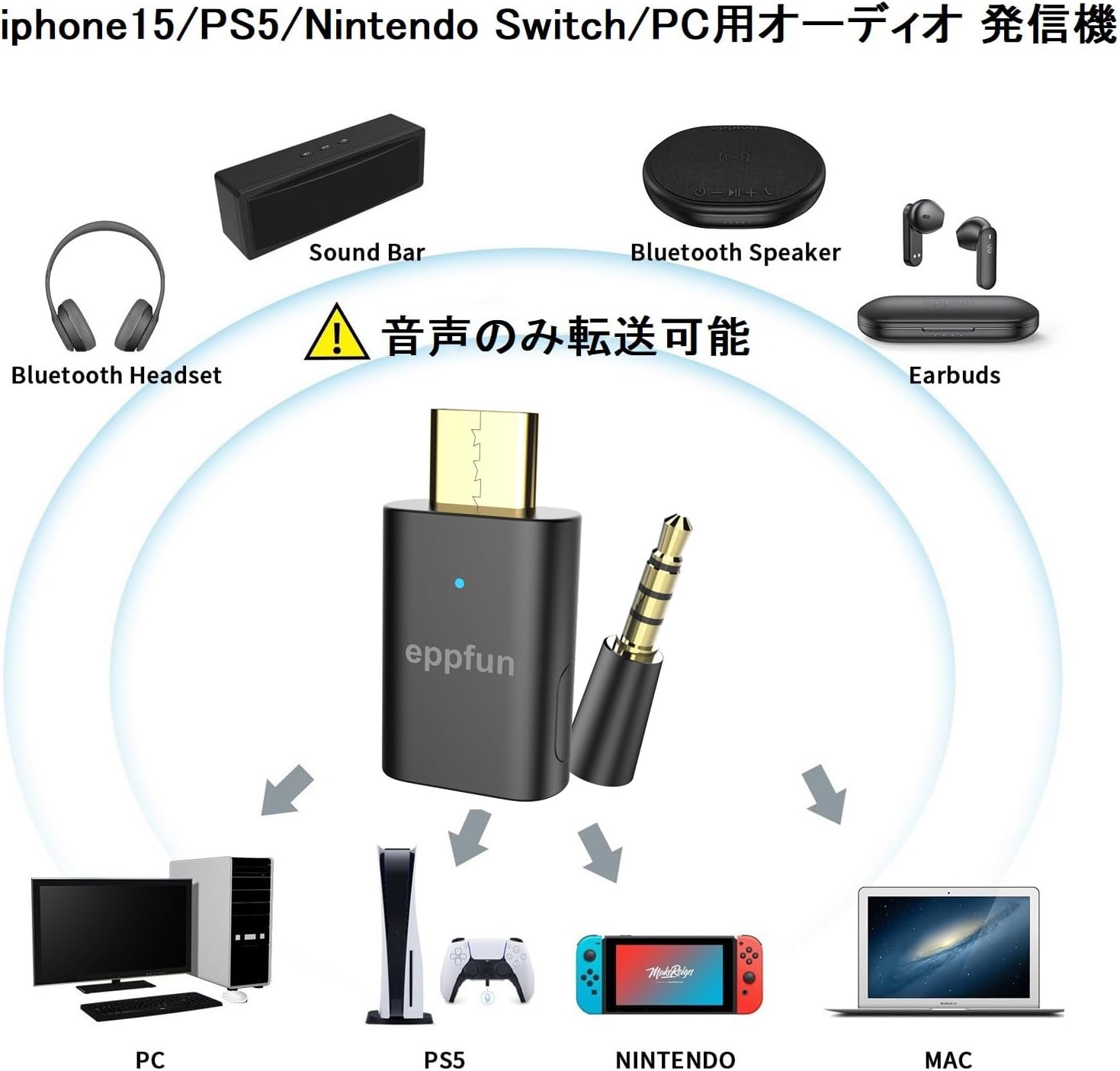
Image 2.1: Diagram showing the eppfun transmitter with an arrow pointing to the LED indicator and a legend of LED colors corresponding to different audio codecs: Orange (APTX-Adaptive 96KHz), White (APTX-Adaptive 48KHz), White (APTX LL), Green (APTX HD), Red (APTX Lossless 44.1KHz), Cyan (APTX), Blue (SBC).
| LED Color | Audio Codec |
|---|---|
| Orange | APTX-Adaptive (High Quality 96KHz) |
| White | APTX-Adaptive (Low Latency 48KHz) |
| White | APTX LL |
| Green | APTX HD |
| Red | APTX Lossless (44.1KHz) |
| Cyan | APTX |
| Blue | SBC |
3. Setup
The eppfun AK3040Pro MAX is designed for simple plug-and-play operation. No drivers are required for most compatible devices.
3.1. Connecting the Transmitter
- Insert the eppfun AK3040Pro MAX into a USB-C port of your audio source device (e.g., PC, Mac, Nintendo Switch, PS5, compatible smartphone).
- Ensure your Bluetooth headphones or earbuds are in pairing mode.
- The transmitter will automatically search for and connect to nearby Bluetooth audio devices. The LED indicator will show the connected codec.

Image 3.1: A diagram illustrating the simple plug-and-play setup of the eppfun AK3040Pro MAX with a Nintendo Switch, showing the transmitter plugged into the console.
3.2. Compatibility Notes
- For Android smartphones, the USB-C interface must support DP (DisplayPort) technology for audio transmission.
- If your headset is already connected to another Bluetooth device, clear its pairing information before attempting to connect to the eppfun transmitter.
- This device is designed for audio transmission only. It does not support data transfer for devices like mice, keyboards, printers, mobile phones (for calls), game controllers, TVs, amplifiers, cars, or musical instruments.

Image 3.2: A diagram showing the eppfun transmitter as a central hub, connecting to various audio output devices like PC, PS5, Nintendo Switch, and Mac, and transmitting audio to Bluetooth headsets, soundbars, Bluetooth speakers, and earbuds. A warning icon indicates that only audio transmission is supported.
4. Operating Instructions
4.1. Codec Switching
The eppfun AK3040Pro MAX automatically selects the best available codec. To manually cycle through supported codecs, press the multi-function button on the transmitter. The LED color will change to indicate the active codec (refer to Section 2.2).
- For optimal performance, ensure your connected headset also supports the desired audio codec.
- Multiple simultaneous connections are only supported in LC3 mode (LE Audio).
- LC3 codec can achieve low latency of 30ms, provided your headset also supports LC3.
- AirPods Pro are not compatible with APTX codecs and will connect via SBC.
4.2. Microphone Function (Call Mode)
To enable the microphone function of your connected headset (e.g., for voice chat on PC), double-click the multi-function button on the AK3040Pro MAX. The LED will blink blue (1.5-second intervals) to indicate call mode. Note that audio quality may be reduced in call mode.

Image 4.1: A person wearing a gaming headset and playing a video game on a monitor, with a PS5 console visible, demonstrating a typical use case for the transmitter.
5. Maintenance
To ensure the longevity and optimal performance of your eppfun Bluetooth USB-C Transmitter, keep it clean and free from dust. Avoid exposing the device to extreme temperatures or moisture. Store it in a dry place when not in use.
6. Troubleshooting
If you encounter issues with your eppfun AK3040Pro MAX, please refer to the following common solutions:
- Headset Not Connecting / Occupied: If your headset is already paired with another Bluetooth device, clear its pairing information first. Then, put your headset into pairing mode and try connecting to the transmitter again. Sometimes, connecting the transmitter to a smartphone first to recognize the earphones, then re-inserting it into the desired device (e.g., PS5), can help.
- Current Noise / Static: If you experience current noise, try switching to a different audio codec that is supported by your earphones. This can often resolve interference issues.
- Pairing Instability: If pairing is unstable, try re-pairing the devices. Ensure no other strong wireless signals are interfering.
- Disconnections: If the device disconnects, try pressing the multi-function button once on the AK3040Pro MAX. This can often re-establish the connection.
- White Noise Over Time: This issue might be related to compatibility with certain USB-C ports or hubs. Try changing the USB-C port or hub where the AK3040Pro MAX is inserted.
- Firmware Update Issues: If you face issues with firmware updates (e.g., version showing 0.0.0), ensure you are using the correct firmware file. The latest firmware can be downloaded from eppfun.com/file-share. Look for files like "AK3040ProMAX V6.0(1215)". If the transmitter does not match Sennheiser earphones, updating the software is recommended.
- APTX Lossless Not Activating: For APTX Lossless to work with certain headphones (e.g., Denon PerL Pro), you might need to disable spatial audio and set the sample rate to 44100Hz or 48000Hz (16-bit or 24-bit) in your sound control panel settings (e.g., Windows 10).
- LE Audio Compatibility: As of December 2024, global standards for LE Audio are not fully widespread. This product primarily supports Qualcomm chipset-based LE Audio solutions. Compatibility with other brands' LE Audio receivers may vary.
7. Specifications
| Feature | Detail |
|---|---|
| Brand | eppfun |
| Model | AK3040Pro MAX |
| Color | Gray |
| Connector Type | USB Type C (Male to Male) |
| Compatible Devices | Game consoles (PS5, Nintendo Switch), Smartphones, Laptops, Headphones |
| Audio Codec Support | LE Audio (LC3), APTX Lossless, APTX Adaptive, APTX LL, APTX HD, SBC |
| Batteries Required | No |
| Item Weight | 2.5 grams |
| Package Dimensions | 12.1 x 8.9 x 1.7 cm |
| ASIN | B0CXSMZJX3 |
| First Available Date | March 12, 2024 |
8. Warranty & Support
The eppfun AK3040Pro MAX comes with a 1-year warranty from the date of purchase. If you encounter any issues or have questions regarding your product within the warranty period, please contact eppfun customer support. We aim to respond promptly to all inquiries.
For further assistance, please visit the official eppfun website or refer to the contact information provided with your product packaging.
Related documentsAK3040Pro MAX

Ask a question about this manual
Ask about setup, troubleshooting, compatibility, parts, safety, or missing instructions. Manuals+ will review the question and use this page’s manual context to help answer it.