
EUQQ Q16S
EUQQ Open Ear Bluetooth 5.4 Earbuds User Manual
Model: Q16S
Introduction
The EUQQ Open Ear Bluetooth 5.4 Earbuds (Model Q16S) are designed to provide a comfortable and immersive audio experience while maintaining awareness of your surroundings. Featuring an innovative open-ear design, these wireless headphones are ideal for sports, running, fitness, and daily use, ensuring comfort even during extended wear. With advanced Bluetooth 5.4 technology, they offer stable connectivity, low latency, and high-fidelity sound.
What's in the Box
- 2 x EUQQ Bluetooth 5.4 Over Ear Headphones (Left and Right)
- 1 x USB-C Charging Cable
- 1 x Charging Case
- 1 x User Manual
- 1 x Product Box

Image: All components included in the EUQQ Open Ear Bluetooth Earbuds package.
Product Overview
The earbuds feature an ergonomic ear hook design for a secure and comfortable fit without entering the ear canal. The charging case includes an LED digital display to show battery levels.
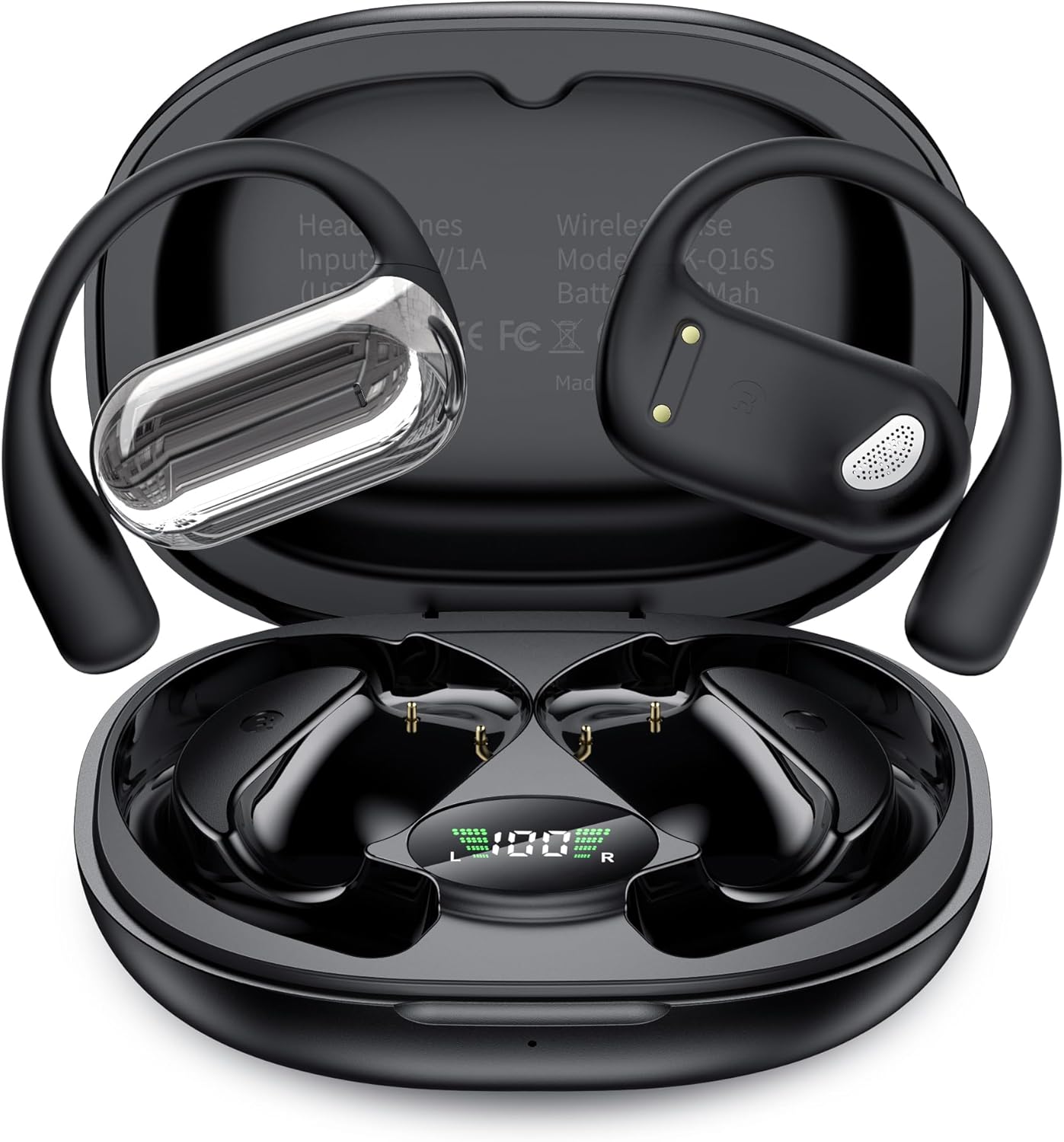
Image: The EUQQ Open Ear Bluetooth Earbuds in their charging case, displaying battery percentage.

Image: A detailed view of the ergonomically designed ear hooks, highlighting their unique shape for comfort without entering the ear canal.
Setup
1. Charging
Before first use, fully charge the earbuds and the charging case.
- Place the earbuds into the charging case. Ensure they are properly seated.
- Connect the provided USB-C charging cable to the charging port on the case and to a power source.
- The LED display on the charging case will show the charging progress. Once fully charged, the display will indicate 100%.
- The earbuds provide up to 10 hours of continuous playtime on a single charge, with the charging case offering an additional 40 hours, totaling 50 hours of playtime. The case fully charges in approximately 1 hour.

Image: The charging case with earbuds, illustrating 10 hours of single playtime and 50 hours total playtime with the case.
2. Pairing
The earbuds utilize Bluetooth 5.4 for fast and stable connections.
- Take the earbuds out of the charging case. They will automatically enter pairing mode, indicated by a flashing light (refer to the manual for specific light indicators).
- On your device (phone, tablet, or computer), enable Bluetooth.
- Search for "YYK-Q16" in the list of available Bluetooth devices.
- Select "YYK-Q16" to connect. Once connected, the earbud light will stop flashing.
- The earbuds support automatic reconnection to the last paired device.
Video: A demonstration of the EUQQ Open Ear Bluetooth 5.4 Earbuds, showcasing their design, features, and one-step pairing process.
Operating Instructions
1. How to Wear
The open-ear design ensures comfort and stability. Follow these steps for optimal fit:
- Take out the earphones from the case.
- Hang the end of the earphones on the ear bone.
- Turn the earphones and slide them behind the ear.
- Adjust the ear hook, wear, and pull down the ear hook for a secure fit.

Image: A visual guide demonstrating the four steps to correctly wear the EUQQ Open Ear Bluetooth Earbuds.

Image: A person wearing the EUQQ Open Ear Bluetooth Earbuds, highlighting their comfortable and secure fit.
2. Touch Controls
The earbuds feature flexible touch controls for easy operation:
- Play/Pause: Click once (L/R earbud).
- Switch Song: Click once (L for previous, R for next).
- Adjust Volume: Click twice (L for volume down, R for volume up).
- Reset: Click twice and hold for 2 seconds (L/R earbud).
- Answer/Hang Up Call: Click once (L/R earbud).
- Reject Call: Hold for 1 second (L/R earbud).
- Call Voice Assistant (Siri): Click three times (L/R earbud).
- Cancel Voice Assistant: Click three times (L/R earbud).

Image: A comprehensive diagram illustrating all touch control functions for the EUQQ Open Ear Bluetooth Earbuds.
Maintenance
Waterproof Specifications
The earbuds are designed with IPX7 life waterproof rating, making them suitable for activities involving sweating, light rain, and splashes. However, please note that the Bluetooth signal cannot be transmitted in water, and the earbuds are not designed for submersion or swimming.
Image: A visual representation of the earbuds' waterproof capabilities, indicating they are suitable for surface water exposure like sweat and rain, but not for being submerged underwater.
Troubleshooting
If you encounter any issues, try the following common solutions:
- No Sound/Connection Issues: Ensure earbuds are charged. Re-pair the earbuds with your device by turning off and on Bluetooth, or by resetting the earbuds (refer to Touch Controls for reset instructions).
- Earbuds Not Charging: Check if the charging cable is securely connected and the charging case has power. Ensure earbuds are correctly seated in the case.
- Uncomfortable Fit: Adjust the ear hooks and the position of the earbuds on your ear bone until a comfortable and secure fit is achieved.
- Sound Quality Issues: Ensure the earbuds are properly positioned. Check your device's volume settings.
For further assistance, please refer to the full user manual or contact EUQQ customer support.
Specifications
| Feature | Detail |
|---|---|
| Brand | EUQQ |
| Model Name | Q16S |
| Connectivity Technology | Wireless (Bluetooth 5.4) |
| Ear Placement | Open Ear |
| Form Factor | Over Ear (Ear Hook) |
| Control Type | Touch Control |
| Playtime (Single Charge) | Up to 10 hours |
| Total Playtime (with Charging Case) | Up to 50 hours |
| Charging Case Battery Charging Time | Approx. 1 hour (via Type-C) |
| Water Resistance Level | IPX7 Waterproof (Life Waterproof) |
| Item Weight (Each Earbud) | 0.26 ounces (approx. 7.5g) |
| Material | Plastic, Skin-friendly Silicone |
| Compatible Devices | Most Bluetooth-enabled audio devices (Smartphones, Tablets, Laptops) |
Warranty & Support
EUQQ products come with a standard manufacturer's warranty. For detailed warranty information, product support, or technical assistance, please refer to the warranty card included in your package or visit the official EUQQ website. You can also contact EUQQ customer service directly through the platform where you purchased the product.
Related documentsQ16S


Ask a question about this manual
Ask about setup, troubleshooting, compatibility, parts, safety, or missing instructions. Manuals+ will review the question and use this page’s manual context to help answer it.