
Introduction
Thank you for choosing the Mount-It! Universal Tablet Stand. This manual provides detailed instructions for the safe and efficient installation, operation, and maintenance of your new tablet stand. Designed for versatility and security, this stand is compatible with most tablets ranging from 9.7 inches to 13.1 inches, offering 180-degree tilt and 90-degree rotation for optimal viewing.

Image: The Mount-It! Universal Tablet Stand in white, showcasing its design and a tablet securely mounted.

Image: Various usage scenarios for the tablet stand, including home, business, and retail settings, highlighting its versatility.
Safety Information
Please read and understand all instructions before installation and use. Failure to do so may result in personal injury or property damage.
- Ensure all components are securely fastened before placing a tablet on the stand.
- Do not exceed the maximum weight capacity of 20 lbs (9.07 kg).
- Keep children away from the stand during installation and adjustment.
- Verify device compatibility (9.7"-13.1" tablets) before use.
- Avoid placing the stand in high-traffic areas where it could be accidentally knocked over.
Package Contents
Verify that all parts are included and undamaged. If any parts are missing or defective, please contact Mount-It! customer support.
- Tablet Mount
- Base
- Column
- Mounting Hardware (screws, hex wrench, plugs for freestanding option)
Product Overview and Features
The Mount-It! Universal Tablet Stand is constructed from durable alloy steel, designed for stability and security in various environments. Key features include:
- Universal Compatibility: Fits most tablets from 9.7" to 13.1", including iPad, Samsung Galaxy Tab S series, Microsoft Surface Pro, Lenovo Tab series, and Fire HD models.
- Anti-Theft Design: Secure enclosure helps prevent tampering, ideal for retail, hospitality, and public spaces.
- Adjustable Viewing: 180° tilt and 90° screen rotation for portrait or landscape orientation.
- Multiple Installation Options: Can be used as a freestanding countertop stand, bolt-down mounted, or grommet mounted.
- Integrated Cable Management: Built-in routing system to conceal and organize charging cords.
- Durable Construction: Cold-rolled steel frame supports tablets up to 20 lbs.

Image: Detailed dimensions of the tablet holder, illustrating its compatibility with various tablet sizes.
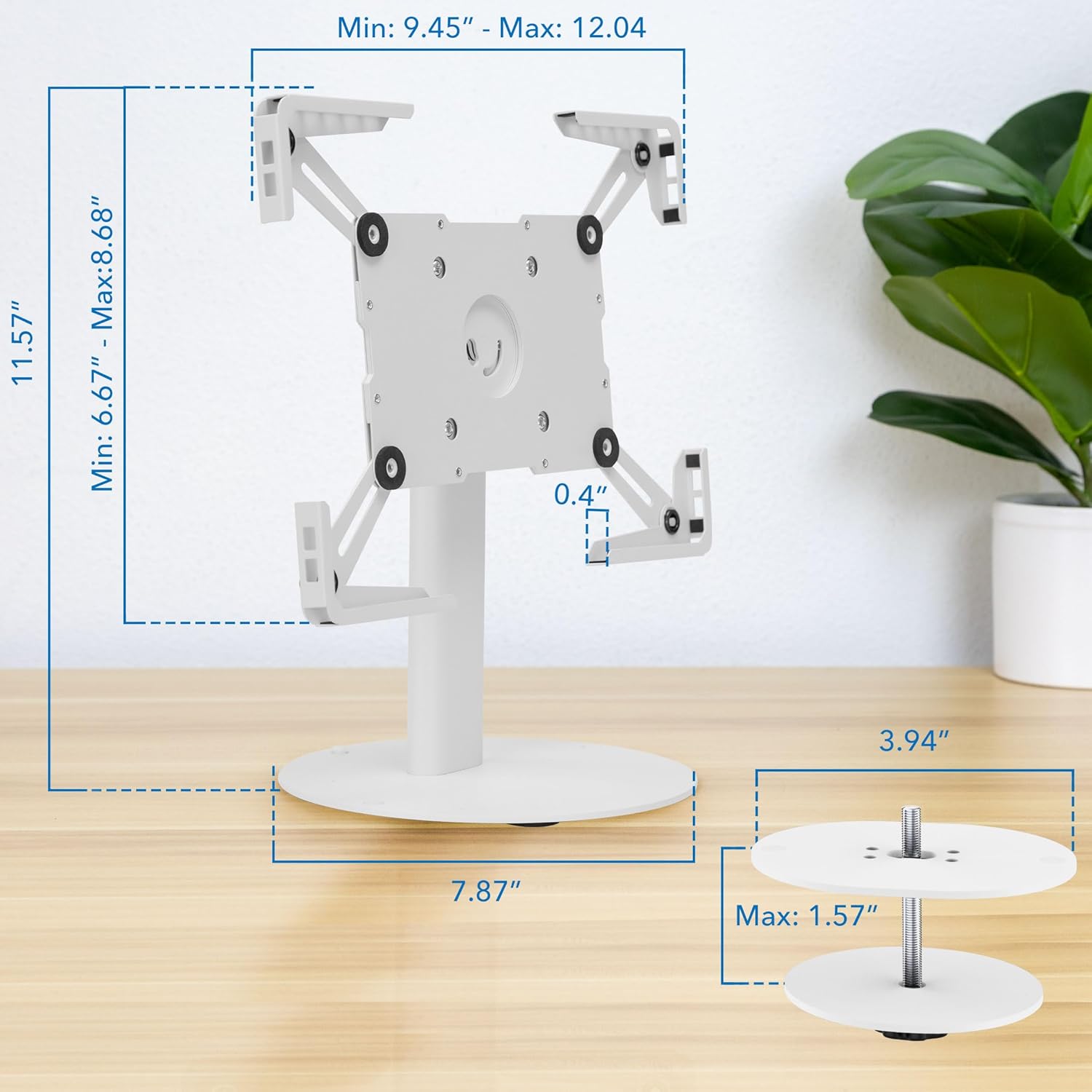
Image: Overall dimensions of the stand, including the base and height, with an illustration of the bolt-down mounting option.
Setup and Installation
Follow these steps to assemble and install your Mount-It! Universal Tablet Stand. A Phillips screwdriver is required (not included).
Video Installation Guide
Video: Official installation guide for the Mount-It! Universal Tablet Stand (MI-3881). This video demonstrates step-by-step assembly and mounting options.
Step-by-Step Instructions
- Attach Column to Base: Unscrew the bolts from underneath the column. Attach the column to the larger base using the provided hex wrench and bolts.
- Insert Plugs (Freestanding Option): If using the freestanding option, insert the provided plugs into the screw holes on the base.
- Screw-in Option: Alternatively, you can screw the base directly into a surface for added security.
- Grommet Option: For grommet mounting, pass the bolt through a pre-drilled hole in your desktop (up to 1.57" thick) and secure it from underneath.
- Expand to Fit Tablet: Loosen the bolts on the back of the tablet case with the hex wrench. Expand the case to a size larger than your tablet.
- Screw Tablet Case onto Column: Attach the tablet case to the end of the column using the four provided screws from the front.
- Insert and Adjust Tablet: Insert your tablet into the expanded case. Adjust the sides of the case until all four corners are snug around your tablet.
- Secure Tablet: Tighten the bolts on the back of the tablet case to secure your tablet in place.
- Cable Management: For a clean setup, run your charging cables through the cable pass-through hole at the base of the column and up through the column to plug into your device.

Image: Close-up of the stand's base, illustrating the bolt-down option and the cable routing system for a tidy setup.

Image: Demonstration of the grommet mounting option, showing how the stand can be secured through a desktop.

Image: Illustration of the tablet depth adjustment mechanism, allowing the holder to accommodate thinner devices.
Operating Instructions
The Mount-It! Universal Tablet Stand offers flexible positioning for optimal viewing and interaction.
Adjusting Tilt
The tablet holder can tilt up to 180 degrees. To adjust the tilt, loosen the joint bolt on each side behind the tablet case using the hex wrench. Adjust the tablet to your desired angle, then tighten the bolts to secure it.
Adjusting Rotation
The tablet holder can rotate 90 degrees, allowing for quick switching between portrait and landscape orientations without removing the tablet. Simply rotate the tablet holder to the desired orientation.

Image: Visual representation of the stand's full adjustability, including 180-degree tilt and 90-degree rotation for flexible viewing.
Product Overview Video
Video: An overview of the Mount-It! Universal Tablet Countertop Stand, demonstrating its features and versatility in various settings.
Maintenance
To ensure the longevity and optimal performance of your tablet stand, follow these maintenance guidelines:
- Cleaning: Wipe the stand with a soft, damp cloth. Avoid abrasive cleaners or solvents that could damage the finish.
- Check Fasteners: Periodically check all screws and bolts to ensure they are tight. Re-tighten if necessary to maintain stability.
- Inspect for Wear: Regularly inspect the stand for any signs of wear, damage, or loose parts. Address any issues promptly.
Troubleshooting
If you encounter any issues with your Mount-It! Universal Tablet Stand, refer to the following troubleshooting tips:
- Tablet Does Not Fit Securely: Ensure your tablet is within the 9.7"-13.1" size range. Loosen the adjustment bolts on the tablet case, expand the arms, insert the tablet, and then tighten the bolts for a snug fit.
- Stand Feels Unstable: Verify that all installation bolts (for the base and tablet case) are fully tightened. If using the freestanding option, ensure it is on a flat, stable surface. Consider using the bolt-down or grommet mounting options for maximum stability.
- Buttons or Camera are Blocked: The adjustable arms are designed to accommodate various tablet designs. Try slightly repositioning the tablet within the holder or adjusting the arm positions if possible. Note that some tablet designs may have buttons or cameras close to the edge, which might be partially covered depending on the tablet's exact dimensions and the arm's position.
- Difficulty Adjusting Tilt/Rotation: Ensure the joint bolts for tilt adjustment are sufficiently loosened before attempting to change the angle. Re-tighten once the desired position is achieved. Rotation should be smooth without needing to loosen bolts.
Specifications
| Brand | Mount-It! |
| Model Number | MI-3881WHT |
| Color | White |
| Compatible Devices | iPad, iPad Air, Samsung, Android Tablets (9.7"-13.1") |
| Mounting Type | Countertop, Desktop (Freestanding, Bolt-Down, Grommet) |
| Tilt Adjustment | 180° |
| Rotation Adjustment | 90° |
| Load Capacity | 20 lbs (9.07 kg) |
| Material | Alloy Steel |
| Stand Height | 7.1" (18 cm) |
Warranty and Support
The Mount-It! Universal Tablet Stand is backed by a Lifetime Warranty. Mount-It! is committed to providing high-quality products and excellent customer service.
For technical assistance, installation questions, or warranty claims, please contact our knowledgeable US-based technical specialists. Contact information can be found on the official Mount-It! website or through your retailer.