
1. Introduction
This manual provides essential information for the proper use and care of your BoxWave miniSync Retractable Sync Cable. Designed for portability and convenience, this cable allows for simultaneous charging and data synchronization with compatible devices, specifically the Bosscomm IFIX-969 (4.3 in).
Note: The Bosscomm IFIX-969 (4.3 in) device is not included with this cable.
2. Product Features
- Simultaneous Functionality: Charges and synchronizes your device concurrently.
- Hi-Speed USB 2.0: Supports fast data transfers.
- Retractable Design: Innovative retraction and recoil mechanism for tangle-free storage.
- Extended Length: Cable extends up to 25 inches (approximately 63.5 cm) for flexible use.
- Durable and Portable: Compact, lightweight, and built for durability.

This image displays the BoxWave miniSync retractable cable, highlighting its compact design and the USB-A and mini-USB connectors. A Bosscomm IFIX-969 device is shown alongside, illustrating the cable's intended use for charging and data transfer.
3. Setup
- Identify Connectors: The cable features a standard USB Type-A connector on one end and a mini-USB connector on the other.
- Connect to Device: Insert the mini-USB connector into the corresponding port on your Bosscomm IFIX-969 (4.3 in) device. Ensure the connection is firm.
- Connect to Power/Data Source: Insert the USB Type-A connector into a compatible USB port on a computer, wall adapter, or car charger for charging and/or data synchronization.

This image shows the BoxWave miniSync cable fully extended, clearly displaying the USB Type-A connector on one end and the mini-USB connector on the other, ready for connection to a device and a power/data source.
4. Operating Instructions
4.1 Extending the Cable
To extend the cable, gently pull both ends of the cable simultaneously away from the central retraction mechanism. Pulling only one end may cause the cable to jam or retract unevenly. Extend the cable to your desired length, up to 25 inches.
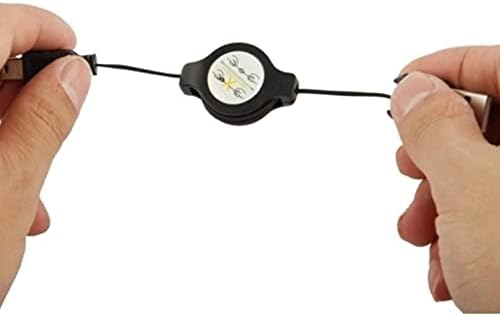
This image illustrates the correct method for extending the BoxWave miniSync cable. Two hands are shown pulling both the USB-A and mini-USB ends outwards from the central retraction spool, ensuring smooth extension.
4.2 Retracting the Cable
To retract the cable, gently pull both ends of the cable outwards again by a small amount (approximately 1-2 inches). This action will release the internal locking mechanism, allowing the cable to automatically retract into the central spool. Guide the cable as it retracts to prevent tangling.
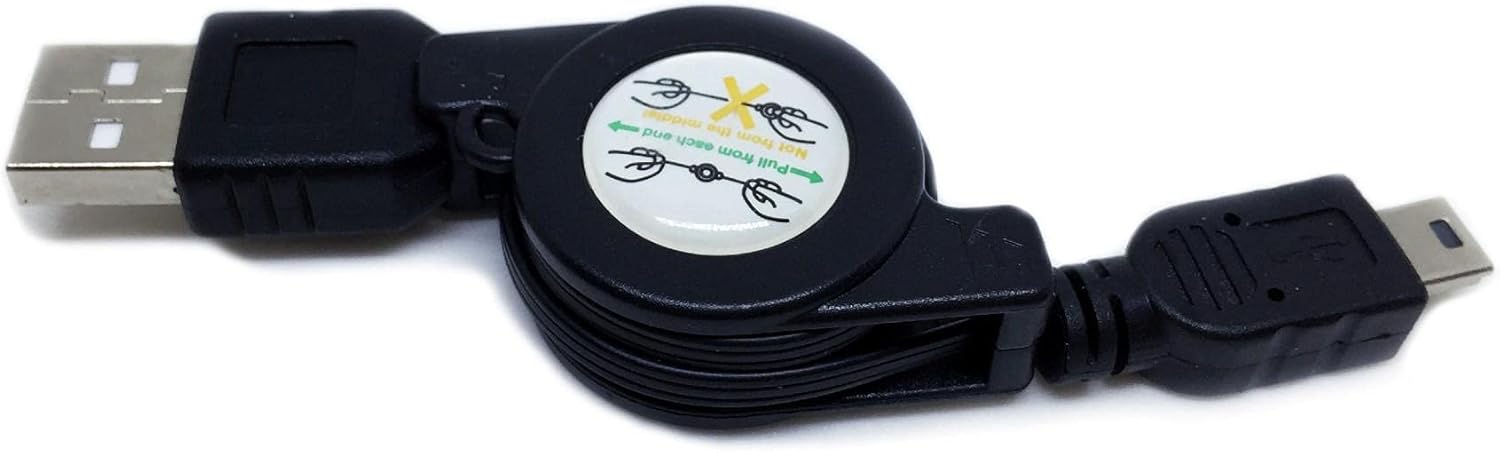
This close-up image focuses on the central retraction mechanism of the BoxWave miniSync cable. It clearly shows the printed instruction "Pull from each end" with arrows, guiding the user on how to properly extend and retract the cable.
4.3 Charging and Synchronization
Once connected to your device and a power/data source, the cable will automatically begin charging your Bosscomm IFIX-969 (4.3 in). For data synchronization, ensure your device is recognized by your computer and follow the instructions provided by your device's operating system or synchronization software.
5. Maintenance
- Cleaning: Use a soft, dry cloth to wipe the cable and connectors. Avoid using harsh chemicals or abrasive materials.
- Storage: Always retract the cable fully when not in use to prevent tangling and damage. Store in a cool, dry place.
- Handling: Avoid excessive force when extending or retracting the cable. Do not bend the connectors at sharp angles.
6. Troubleshooting
| Problem | Possible Cause | Solution |
|---|---|---|
| Cable does not extend or retract smoothly. | Improper pulling technique (only one end pulled). | Ensure you pull both ends of the cable simultaneously and gently. If stuck, try pulling both ends slightly further out before releasing for retraction. |
| Device not charging. | Loose connection; faulty power source; incompatible device. | Check that both ends of the cable are securely connected. Try a different USB port or power adapter. Confirm your device is the Bosscomm IFIX-969 (4.3 in). |
| Device not synchronizing data. | Loose connection; driver issues; software conflict. | Ensure secure connections. Restart your computer and device. Check your computer's device manager for driver issues. Consult your device's manual for synchronization software requirements. |
7. Specifications
- Product Name: BoxWave miniSync Retractable Sync Cable
- Model: miniSync
- Compatibility: Bosscomm IFIX-969 (4.3 in)
- Cable Type: USB Type-A to mini-USB
- Data Transfer Speed: Hi-Speed USB 2.0
- Extended Length: Up to 25 inches (approx. 63.5 cm)
- Item Weight: 1.5 ounces (approx. 42.5 grams)
- Manufacturer: BoxWave
- Country of Origin: China
- ASIN: B0CXRKHV4R
8. Warranty and Support
This product includes limited third-party technical support for the Bosscomm IFIX-969 (4.3 in) (up to 3 inquiries via electronic messaging). Please note that BoxWave is not affiliated with or endorsed by Bosscomm.
For further assistance or inquiries, please refer to the contact information provided with your purchase or visit the official BoxWave website.
Please retain your proof of purchase for any warranty claims or support requests.