
1. Product Overview
The Mount-It! MI-14010 is a heavy-duty full motion TV wall mount designed for extra-large televisions. Constructed from high-strength alloy steel, it provides secure support for TVs ranging from 60 to 120 inches and weighing up to 264 lbs. This mount offers extensive adjustability, including swivel, tilt, and extension capabilities, to optimize your viewing experience from various angles. When fully retracted, the TV sits close to the wall for a low-profile appearance.

A comprehensive view of the Mount-It! Heavy Duty Full Motion TV Wall Mount, showcasing its robust construction and articulating arms.
2. Safety Information
Please read and understand all instructions before installation and use. Improper installation can result in serious injury or damage. If you have any doubts, consult a qualified professional.
- Weight Capacity: Do not exceed the maximum weight capacity of 264 lbs (120 kg). This mount is designed for TVs between 60 and 120 inches.
- Two-Person Installation: Due to the durable steel construction and weight of the mount and TV, a two-person setup is strongly recommended for ease and safety during installation.
- Wall Type Compatibility: This mount is compatible with wood studs (16", 18", and 24" spacing), concrete walls, and brick walls. It is NOT compatible with metal studs or drywall-only installation. Ensure your wall structure can safely support the combined weight of the mount and your television.
- VESA Compatibility: Verify your TV's VESA mounting pattern (distance between mounting holes on the back of your TV) is within the range of 200x200mm to 900x600mm.
- Cable Management: Ensure all cables are routed safely and do not interfere with the mount's movement or pose a tripping hazard.
3. Package Contents
Before beginning installation, ensure all parts are present and undamaged. Refer to the included graphical guide for a complete list of hardware.
- TV Wall Mount Assembly
- Mounting Hardware Kit (various screws, washers, spacers)
- Installation Template
- Bubble Level
- Detailed Graphical Instruction Manual
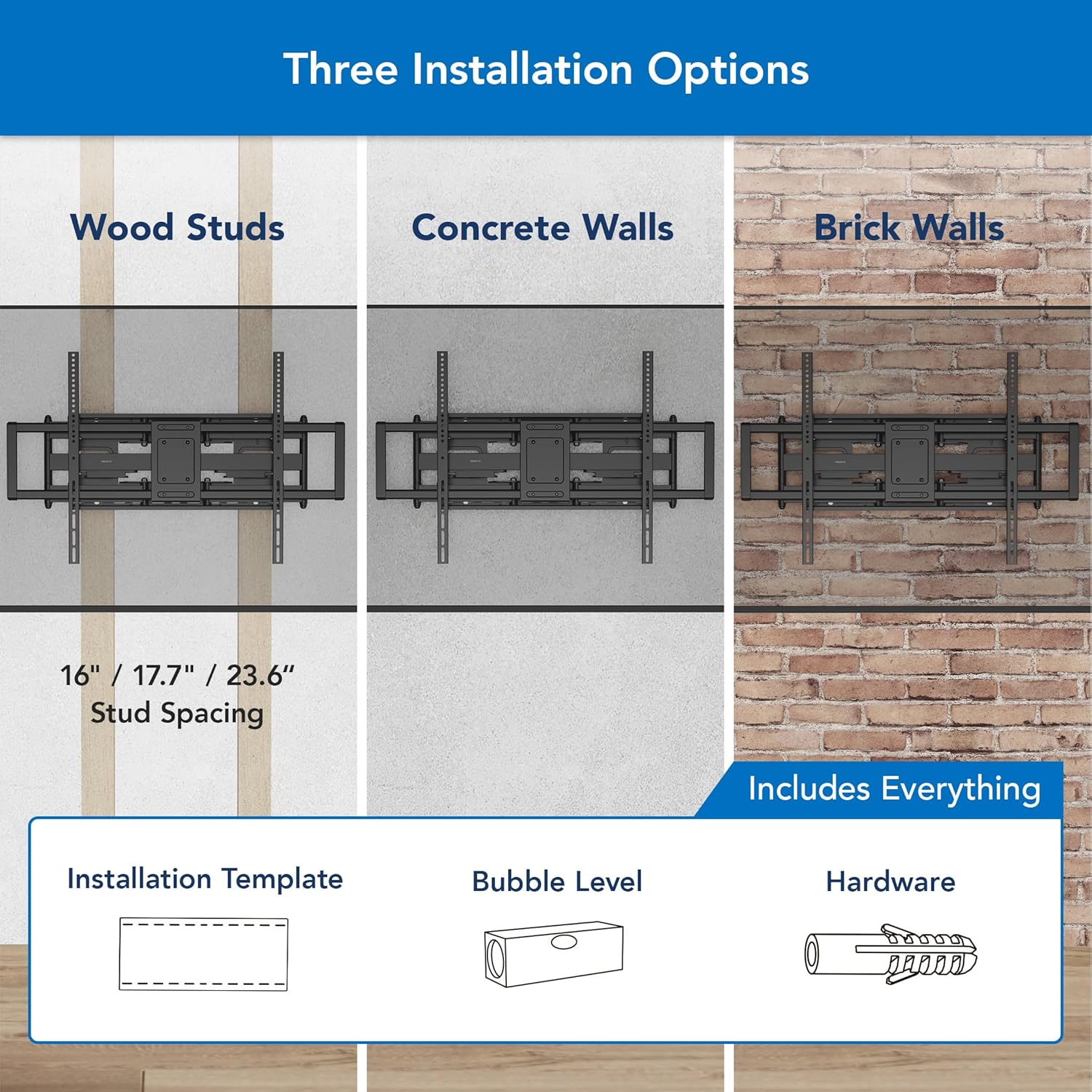
Visual guide showing the compatibility of the mount with wood studs (16", 17.7", 23.6" spacing), concrete walls, and brick walls. It also shows the included installation template, bubble level, and hardware.
4. Product Specifications
| Model Number | MI-14010 |
| Mounting Type | Wall Mount |
| Movement Type | Articulating, Swivel, Full Motion, Tilt |
| Material | Alloy Steel |
| Color | Black |
| Compatible Devices | Television |
| Minimum Supported Screen Size | 60 Inches |
| Maximum Supported Screen Size | 120 Inches |
| Maximum Load Capacity | 264 lbs (120 kg) |
| VESA Compatibility | 200x200mm to 900x600mm |
| Tilt Angle | +5° / -15° |
| Swivel Angle | +/-60° |
| Extension from Wall | 3 inches (retracted) to 27.7 inches (extended) |
| Screen Leveling | +/-5° |
| Compatible Stud Spacing | 16”, 18”, 24” |
| Item Weight | 18.6 Pounds |

Detailed dimensions of the MI-14010 TV wall mount, including extension, height, and width measurements.
5. Installation Guide
This section provides a general overview of the installation process. For detailed, step-by-step instructions, always refer to the graphical guide included in your package. Remember to have a second person assist you due to the weight of the mount and TV.
5.1 Pre-Installation Checks
- Verify your wall type and stud spacing are compatible.
- Confirm your TV's weight and VESA pattern are within the mount's specifications.
- Gather all necessary tools (e.g., drill, stud finder, level, wrench).
- Determine the desired height and position for your TV.
5.2 Installation Steps Overview
- Install the Wall Plate: Use the provided installation template to mark and drill pilot holes. Secure the main wall plate assembly to your wall studs or concrete/brick wall using the appropriate hardware. Ensure it is level.
- Attach VESA Brackets to TV: Carefully place your TV face down on a soft, clean surface. Attach the vertical VESA brackets to the back of your TV using the correct screws and spacers from the hardware kit. Ensure they are securely fastened.
- Hang the TV: With assistance, carefully lift the TV and hook the VESA brackets onto the wall plate. Engage the quick-release safety latches to secure the TV to the mount.

A visual representation of the three main installation steps: installing the wall plate, attaching the VESA plate to the TV, and hanging the TV onto the mount.
5.3 Installation Video
A step-by-step installation guide for the Mount-It! MI-14010 Heavy Duty Full Motion TV Wall Mount, providing visual instructions for mounting the bracket and securing the television.
6. Operation and Adjustments
The MI-14010 mount offers various adjustments to achieve your optimal viewing angle.
6.1 Extension and Retraction
Gently pull the TV away from the wall to extend the arms, or push it back towards the wall to retract. The mount allows for an extension from 3 inches (retracted) to 27.7 inches (extended).

This image illustrates the mount's extension range from 3 inches (retracted) to 27.7 inches (extended), along with its tilt adjustment from +5° to -15°.
6.2 Swivel Adjustment
The mount allows for a swivel of +/-60 degrees. Gently push the TV horizontally to the left or right to adjust the viewing angle.

An illustration demonstrating the swivel capability of the TV mount, allowing for angle adjustments up to +/-60 degrees.
6.3 Tilt Adjustment
The tilt feature allows you to adjust the vertical angle of your TV from +5 degrees (upward) to -15 degrees (downward) to reduce glare and improve viewing comfort. This is a tool-free adjustment.
6.4 Screen Leveling
After installation, if your TV is not perfectly horizontal, you can use the screen leveling feature to make minor adjustments of +/-5 degrees. This ensures perfect alignment without re-drilling.

An image demonstrating the screen leveling feature, which allows for a +/-5° adjustment to ensure perfect horizontal alignment after installation.
6.5 Quick-Release System
The mount features a unique quick-release system for convenient TV removal when needed. Consult your graphical manual for specific instructions on engaging and disengaging the safety latches.
6.6 Features Video
This video demonstrates the key features and capabilities of the Mount-It! MI-14010 Heavy Duty Full Motion TV Wall Mount, including its range of motion and robust design.
7. Maintenance
Regular maintenance helps ensure the longevity and safe operation of your TV mount.
- Cleaning: Wipe the mount with a soft, dry cloth to remove dust. Avoid abrasive cleaners or solvents.
- Periodic Checks: Periodically check all screws and bolts to ensure they remain tight and secure. Over time, vibrations can cause fasteners to loosen.
- Movement Check: Occasionally move the TV through its full range of motion to ensure smooth operation. If any stiffness is noted, check for obstructions or consult the troubleshooting section.
8. Troubleshooting
If you encounter issues with your Mount-It! TV wall mount, refer to the following common solutions:
- TV is not level after installation: Use the screen leveling adjustment feature (+/-5°) to correct the horizontal alignment. Refer to Section 6.4.
- Difficulty moving the TV (swivel/tilt/extension): Ensure no cables are snagged or obstructing movement. Check that all mounting bolts are secure but not overtightened, which could restrict motion. Verify the TV weight is within the specified capacity.
- TV feels unstable: Immediately remove the TV from the mount. Re-check all installation steps, especially the wall plate attachment and VESA bracket security. Ensure the wall type is appropriate and studs were properly located. Contact customer support if the issue persists.
- Missing parts: Refer to the package contents list and contact Mount-It! customer support for assistance.
9. Warranty & Support
The Mount-It! Heavy Duty Full Motion TV Wall Mount (Model MI-14010) comes with a LIFETIME warranty.
Our knowledgeable and responsive US-based customer support team is available to answer any questions you may have during standard business hours. For technical assistance, warranty claims, or general inquiries, please visit the official Mount-It! website or contact us directly using the information provided in your product packaging.


