
NBBX NBBX2024
NBBX Automatic Self-Cleaning Litter Box User Manual
Model: NBBX2024
Brand: NBBX
1. Overview
The NBBX Automatic Self-Cleaning Litter Box is designed to simplify cat care by automating the litter cleaning process. It features advanced sensors, app control, and a large waste capacity to provide a clean and odor-free environment for your cat and home.
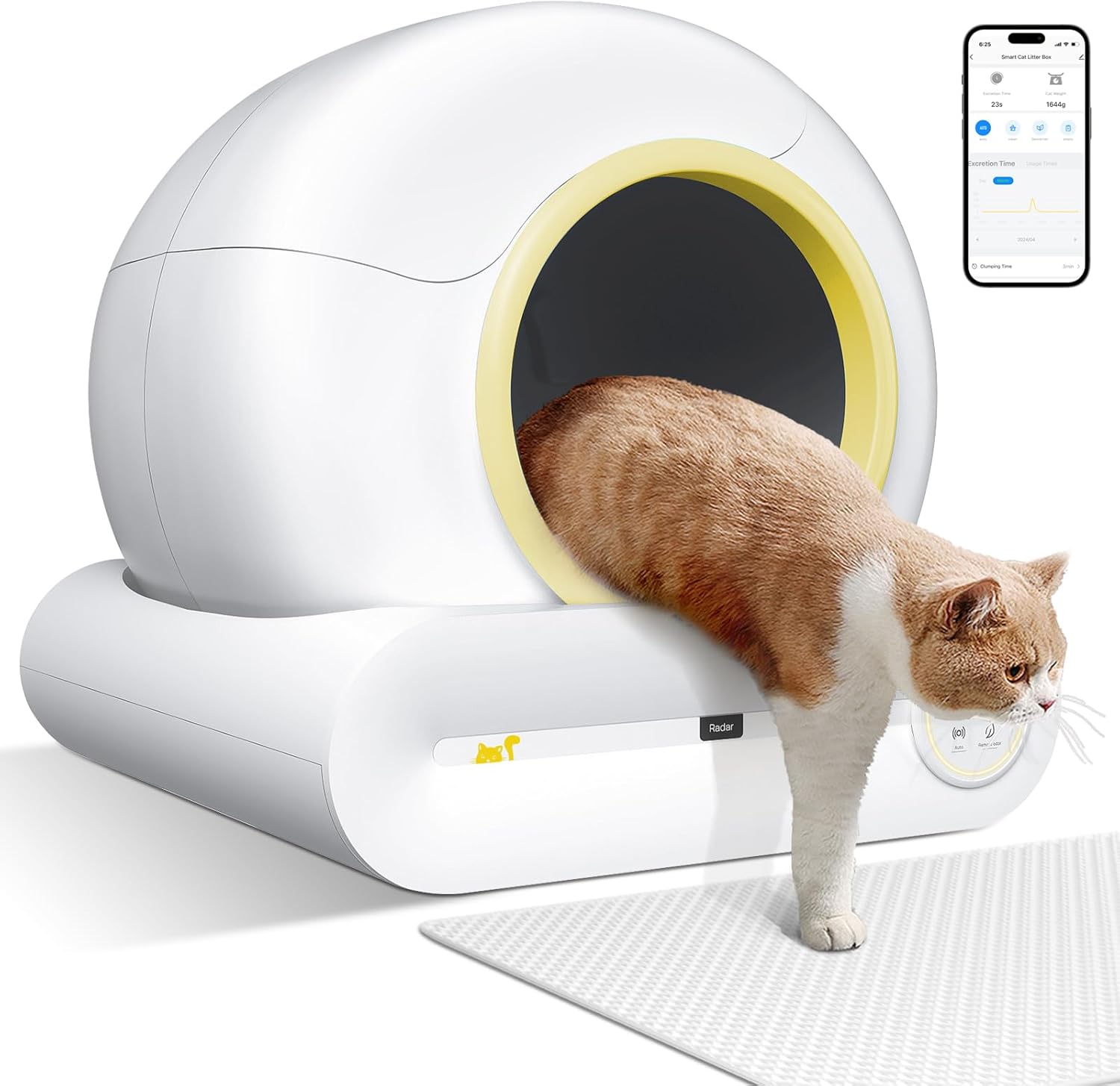
Video: An overview of the NBBX Automatic Self-Cleaning Cat Litter Box, highlighting its features and benefits.
Video: A detailed explanation of the NBBX Self-Cleaning Cat Litter Box's functionalities.
2. Package Contents
Verify that all items are present in the package:

- Self-Cleaning Litter Box Unit
- Cat Litter Mat
- Silicone Fine Brush
- Litter Shovel
- Litter Scoop
- Cleaning Brush
- Urine Baffle
- Operation Manual
- Garbage Bags
- Power Supply
3. Setup
3.1 Placement
Place the litter box on a firm, flat, and level surface. Ensure there is enough space around the unit for proper operation and access for cleaning.
3.2 Adding Cat Litter
Add cat litter to the drum. Ensure the litter level does not exceed the maximum fill line indicated inside the drum. The litter box is compatible with various types of cat litter, including Tofu, Mixed, Bentonite, and Mineral litter, provided the diameter is ≤0.12 inches and length is ≤0.59 inches.

Video: Instructions on how to properly add cat litter to the unit.
3.3 Power On and Self-Check
Connect the power supply to the litter box and plug it into a wall outlet. The machine will perform a self-check, which may take 3-8 minutes. Once the self-check is complete and the 'Auto' button light is on, the unit is ready for use.
Video: Demonstrates the initial power-on sequence and self-check process.
3.4 App Connection
Download the Tuya or Smart Life app from your mobile app store. Follow the in-app instructions to connect your litter box to the app for remote control and monitoring features.
4. Operating Instructions
4.1 Automatic Cleaning Mode
The litter box automatically detects when your cat uses it and initiates a cleaning cycle after a set delay. This mode ensures continuous cleanliness without manual intervention.
4.2 Manual Cleaning
To initiate a manual cleaning cycle, press the 'Clean' button on the control panel. The drum will rotate to separate waste from clean litter and deposit it into the waste bin.

4.3 Odor Removal Mode
Activate the 'Remove Odor' function via the control panel or app to neutralize unpleasant smells, ensuring your home remains fresh.

4.4 Safety Features
The NBBX litter box incorporates gravity sensors and infrared monitoring to ensure your cat's safety. If a cat enters or approaches the litter box during a cleaning cycle, the rotation will immediately stop.

5. Maintenance
5.1 Waste Bin Emptying
When the waste bin is full, the unit will notify you. To empty, hold the 'Clean' button for 2 seconds to rotate the drum to the waste bin opening position. Open the waste bin compartment, unwind the drawstring of the garbage bag, tie it tightly, and remove it. Replace with a new bag, ensuring the lower edge is clamped under the locating clip, then close the compartment. The device will automatically return to its normal position after 60 seconds.
Video: Step-by-step guide on how to change the garbage bag in the waste bin.
5.2 Cleaning the Unit
The litter box is designed for easy disassembly to facilitate thorough cleaning. Unfasten the buckle behind the litter box and take the roller off. The drum is washable. Avoid exposing components to scorching sun when drying.

6. App Control & Monitoring
The dedicated app allows you to control the litter box remotely and monitor your cat's daily activities, including excretion time, duration, and weight. This data helps you understand your cat's health patterns.

7. Specifications
| Feature | Detail |
|---|---|
| Model Name | NBBX2024 |
| Product Dimensions | 19"L x 20"W x 20"H |
| Item Weight | 15 Pounds |
| Litter Box Type | Automated Self-Cleaning Litter Box |
| Material | Plastic |
| Color | LIGHT YELLOW |
| Waste Bin Capacity | 9L |
| Internal Space for Cat | 65L |
| Noise Level | <32db |
8. Troubleshooting
If you encounter any issues with your NBBX Automatic Self-Cleaning Litter Box, please refer to the following common solutions:
- Connectivity Issues: Ensure your Wi-Fi network is stable and the litter box is within range. Try restarting both the litter box and your router.
- Cleaning Cycle Stops: Check for any obstructions inside the drum or if the waste bin is full. Ensure the gravity and infrared sensors are clean and unobstructed.
- Odor Persistence: Verify that the odor removal function is activated and that the waste bin is emptied regularly.
- Litter Spillage: Ensure the litter level is not above the max line. Check that the urine baffle is correctly installed if needed.
For persistent issues, please contact customer support.
9. Warranty
The NBBX Automatic Self-Cleaning Litter Box comes with a 1-year warranty from the date of purchase. Please retain your proof of purchase for warranty claims.
10. Support
For any questions, technical assistance, or warranty inquiries, please contact NBBX customer support. You can often find support information on the official NBBX website or through the contact details provided in your product packaging.
Scan the QR code on the product for instant customer support or email nbbxvip@gmail.com.
Ask a question about this manual
Ask about setup, troubleshooting, compatibility, parts, safety, or missing instructions. Manuals+ will review the question and use this page’s manual context to help answer it.