
1. Introduction
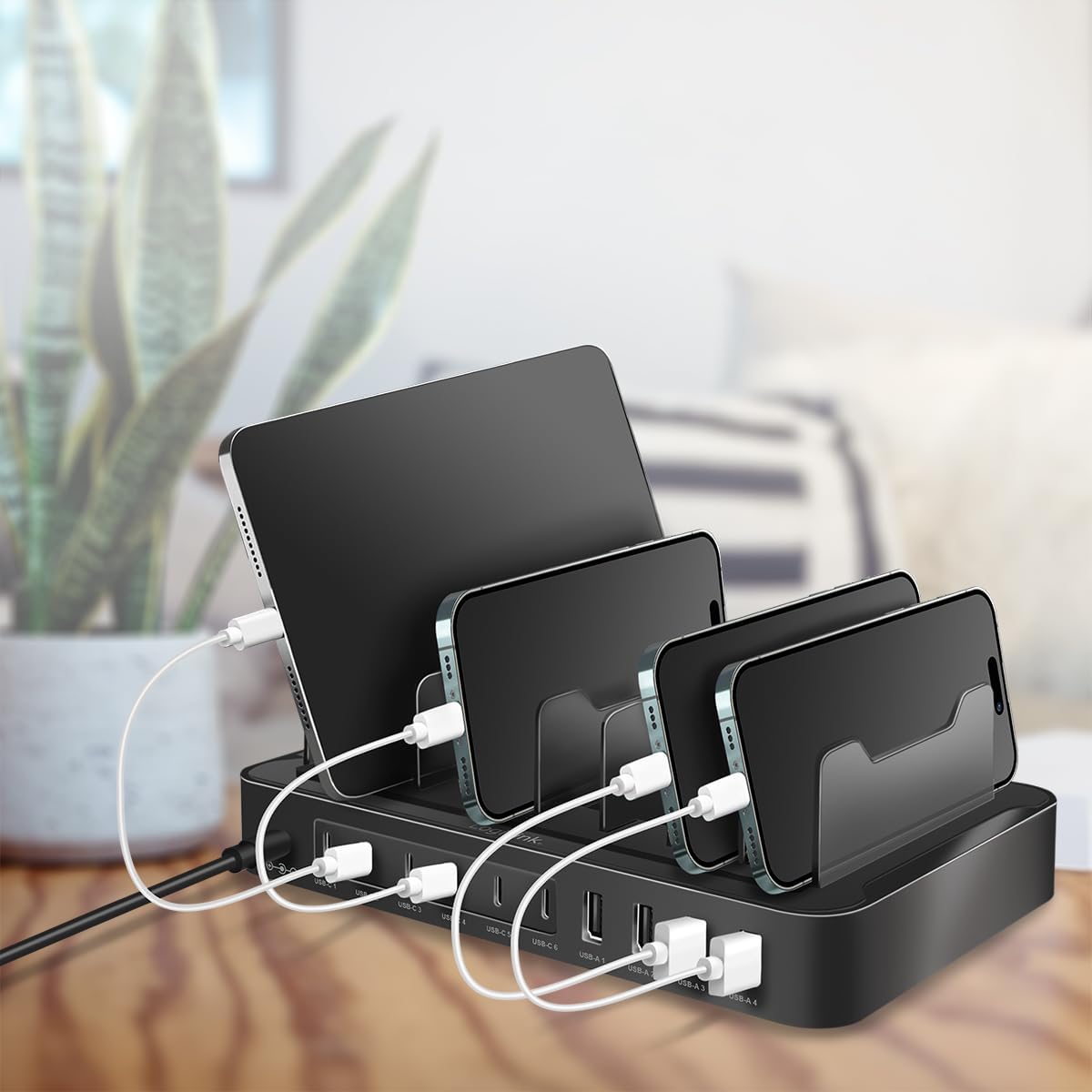
Thank you for choosing the LogiLink PA0327 USB-C Charging Station. This device is designed to efficiently charge up to 10 electronic devices simultaneously, offering a versatile solution for various environments such as homes, offices, schools, and public spaces. With a combination of USB-C and USB-A ports, it ensures broad compatibility with a wide range of smartphones, tablets, laptops, and other electronic gadgets. This manual provides essential information for the safe and optimal use of your charging station, helping you keep your devices organized and cables untangled.
2. Important Safety Information
Please read and understand all safety instructions before using this product. Failure to follow these instructions may result in electric shock, fire, or serious injury.
- This product is intended for indoor use only. Do not expose it to rain, moisture, or extreme temperatures.
- Do not disassemble, modify, or attempt to repair the device. Refer all servicing to qualified personnel.
- Keep the charging station away from water, liquids, and high humidity.
- Ensure adequate ventilation around the charging station. Do not cover it with cloths or place it in an enclosed space during operation.
- Use only the original power adapter supplied with the device. Using an incompatible power adapter may damage the product and void the warranty.
- Avoid dropping or subjecting the device to strong impacts.
- Unplug the charging station from the power outlet during lightning storms or when unused for extended periods.
- Do not operate the device if it has been damaged in any way.
3. Package Contents
Verify that all items listed below are included in your package:
- LogiLink PA0327 USB-C Charging Station
- Power Adapter
- Power Cable (Type F – 2 pins, Germany)
- User Manual (this document)

4. Product Overview
The LogiLink PA0327 charging station features 10 charging ports, including 6 USB-C ports and 4 USB-A ports, providing a total output of 120W. It incorporates Power Delivery 3.0 (PD 3.0), Quick Charge 3.0 (QC 3.0), and Smart Charging technologies to optimize charging speed for various devices while ensuring safety through built-in protections against overcharge, deep discharge, overload, and short circuits.


5. Setup Instructions
Follow these steps to set up your LogiLink PA0327 USB-C Charging Station:
- Unpack the Charging Station: Carefully remove all components from the packaging.
- Connect the Power Adapter: Insert the DC plug (5.5 x 2.1 mm) of the power adapter into the DC input port on the back of the charging station.
- Connect to Power Outlet: Plug the power cable into the power adapter, then connect the power cable to a suitable wall outlet (230V AC).
- Power On: The charging station will power on automatically, indicated by a blue LED light.
- Place Devices: Position your smartphones, tablets, or other devices into the designated slots on the charging station.
6. Operating Instructions
Once the charging station is set up, you can begin charging your devices:
- Identify Port Types: The charging station has 6 USB-C ports and 4 USB-A ports. Ensure you use the correct cable and port type for your device.
- Connect Devices: Plug your device's charging cable into the appropriate port on the charging station, then connect the other end to your device.
- Charging Indication: The blue LED indicator on the station confirms it is powered on. Your device's screen or indicator will show its charging status.
- Smart Charging: The station automatically detects the connected device and delivers the optimal charging current up to its maximum capacity, utilizing PD 3.0, QC 3.0, or Smart Charging protocols as applicable.
- Disconnecting Devices: Once your device is fully charged, or when you wish to stop charging, simply disconnect the charging cable from your device and the station.

7. Maintenance
To ensure the longevity and optimal performance of your charging station, follow these maintenance guidelines:
- Cleaning: Disconnect the charging station from the power outlet before cleaning. Use a soft, dry, lint-free cloth to wipe the surface. Do not use liquid cleaners, aerosols, or abrasive materials.
- Storage: When not in use for extended periods, store the charging station in a cool, dry place, away from direct sunlight and extreme temperatures.
- Cable Management: Keep cables neatly organized to prevent tangling and damage. Avoid bending cables sharply.
8. Troubleshooting
If you encounter issues with your LogiLink PA0327 charging station, refer to the table below for common problems and solutions:
| Problem | Possible Cause | Solution |
|---|---|---|
| Charging station is not powering on (no blue LED). | Power adapter not connected properly; Wall outlet not functioning; Faulty power adapter/cable. | Ensure power adapter is securely connected to the station and wall outlet. Test the wall outlet with another device. Try a different power cable if available. |
| Device is not charging. | Incorrect cable; Faulty cable; Device not compatible; Port malfunction. | Ensure you are using the correct and functional charging cable. Try a different port on the station. Verify device compatibility. |
| Device is charging slowly. | Cable quality; Device drawing less power; Multiple high-power devices connected. | Use a high-quality charging cable. Ensure the device supports fast charging protocols (PD/QC). If many devices are connected, the total 120W output is shared, which might reduce individual port speeds. |
| Charging station feels warm. | Normal operation under load; Insufficient ventilation. | It is normal for the station to feel warm during heavy use. Ensure it has adequate ventilation and is not covered. If it becomes excessively hot, disconnect immediately and contact support. |
9. Technical Specifications
| Feature | Specification |
|---|---|
| Model Number | PA0327 |
| Brand | LogiLink |
| Input Voltage | 19-21 V DC via DC jack (5.5 x 2.1 mm) |
| Total Output Power | 120 W Max |
| USB-C Ports | 6 ports (USB-C1 to USB-C6) |
| USB-C Single Port Output | 5 V/3 A, 9 V/3 A, 15 V/2 A (30 W Max per port) |
| USB-C Group Output (C1/C2, C3/C4, C5/C6) | 5 V/4.8 A (24 W Max per group) |
| USB-A Ports | 4 ports (USB-A1 to USB-A4) |
| USB-A1/A2 (QC 3.0) Output | 3.8-6 V/3 A, 6-9 V/2 A, 9-12 V/1.5 A (18 W Max per port) |
| USB-A3/A4 (Smart Charging) Output | 5 V/2.4 A (12 W Max per port) |
| USB-A Group Output (A1/A2) | 5 V/3.6 A (18 W Max for the group) |
| USB-A Group Output (A3/A4) | 5 V/2.4 A (12 W Max for the group) |
| Charging Technologies | Power Delivery 3.0, Quick Charge 3.0, Smart Charging |
| Protection Features | Overcharge, Deep Discharge, Overload, Short Circuit |
| Dimensions (L x W x H) | 21 x 14 x 6.7 cm (without power supply) |
| Weight | 466.5 Grams |
| Color | Black |
| Power Plug Type | Type F – 2 pins (Germany) |
| Compatible Devices | Smartphones, Tablets, Laptops, and other USB-powered devices |
10. Warranty and Support
LogiLink products are manufactured with high-quality standards and undergo strict quality control. This product is covered by a manufacturer's warranty against defects in materials and workmanship. Please refer to your local retailer or LogiLink's official website for specific warranty terms and conditions.
For technical support or warranty claims, please contact your point of purchase or the manufacturer directly:
- Manufacturer: 2direct GmbH
- Website: www.logilink.eu (Please check for regional support contact information)


