
1. Introduction
This manual provides instructions for the safe and effective operation of your MESTEK IR02C Infrared Thermometer. Please read this manual thoroughly before use and retain it for future reference. The MESTEK IR02C is a versatile temperature measurement device offering both non-contact infrared and contact K-type thermocouple measurement capabilities. It is designed for various applications, including industrial, automotive, culinary, and home maintenance tasks.

Image 1.1: MESTEK IR02C Infrared Thermometer with included K-type probe, storage pouch, and AAA batteries.
2. Safety Information
Always observe the following safety precautions to prevent injury and damage to the device:
- Do not point the laser directly at eyes or indirectly off reflective surfaces.
- Do not use the thermometer for measuring human body temperature.
- Do not expose the device to extreme temperatures, humidity, or direct sunlight.
- Keep the device away from strong electromagnetic fields.
- Ensure batteries are inserted with correct polarity. Remove batteries if the device will not be used for an extended period.
3. Product Components
The MESTEK IR02C package includes the following items:
- 1 x MESTEK IR02C Infrared Thermometer
- 1 x K-Type Temperature Probe
- 2 x 1.5V AAA Batteries
- 1 x User Manual (this document)
- 1 x Storage Pouch

Image 3.1: Contents of the MESTEK IR02C package, including the thermometer, K-type probe, batteries, and storage pouch.
4. Setup
4.1. Battery Installation
- Locate the battery compartment cover on the handle of the thermometer.
- Open the cover.
- Insert two 1.5V AAA batteries, ensuring correct polarity (+/-).
- Close the battery compartment cover securely.
4.2. Initial Power On
Press the trigger to power on the device. The color LCD display will illuminate, showing the current ambient temperature and humidity, along with other measurement parameters.
5. Operating Instructions
5.1. Non-Contact Infrared (IR) Measurement
- Point the thermometer at the target object.
- Press and hold the trigger. The laser pointer will activate, indicating the measurement area.
- The temperature reading will appear on the LCD screen within 0.5 seconds.
- Release the trigger to hold the reading on the display. The device will automatically power off after 30 seconds of inactivity.

Image 5.1: The IR02C features a high-precision sensor and laser guidance for accurate non-contact measurements.

Image 5.2: The device utilizes 13 laser points to define the measurement area, enhancing accuracy.
5.2. K-Type Probe Measurement
- Insert the K-type thermocouple probe into the designated port on the side of the thermometer.
- Press the 'MODE' button to switch to K-type measurement mode.
- Place the metal tip of the probe in contact with the object whose internal temperature you wish to measure.
- The temperature reading from the probe will be displayed on the LCD screen.
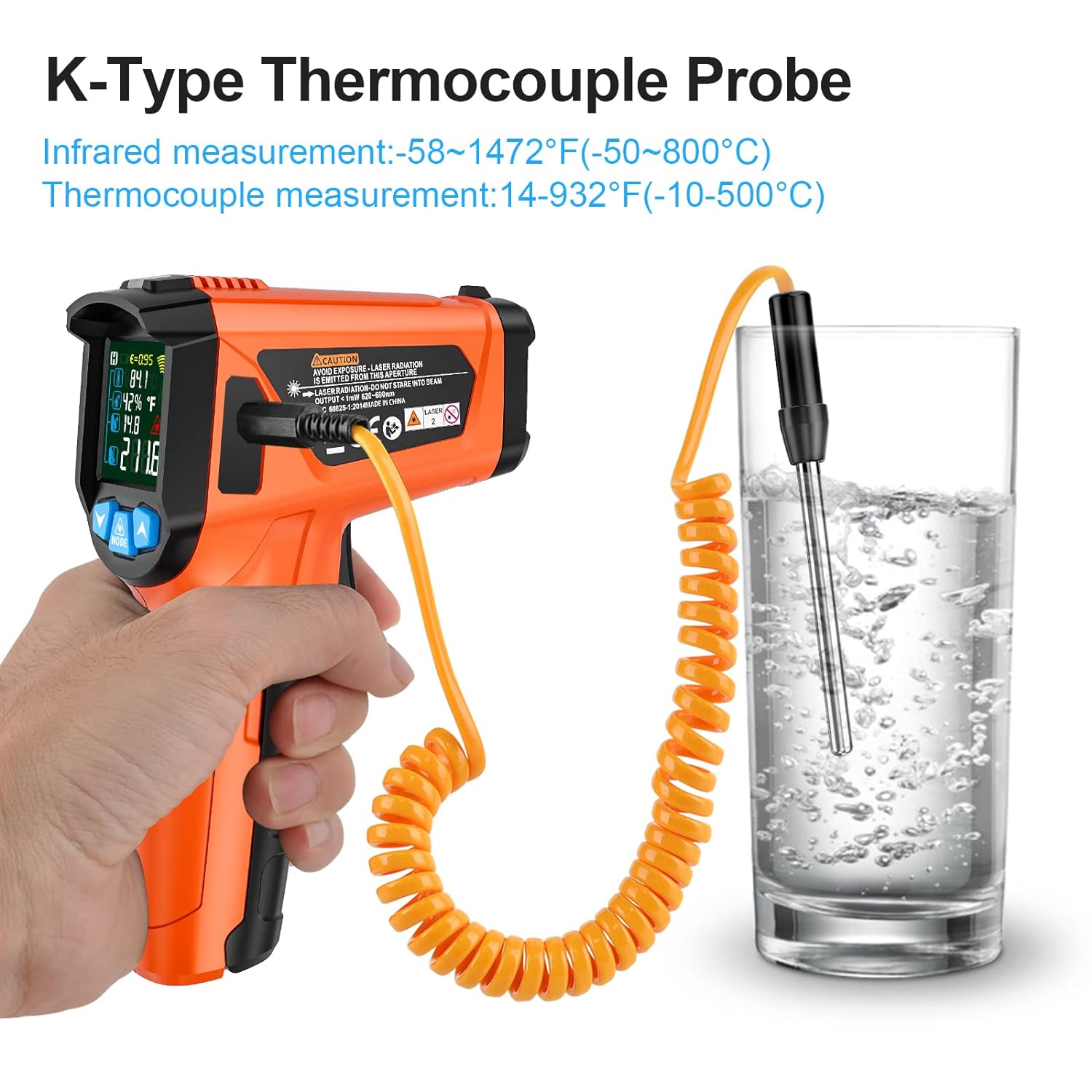
Image 5.3: Using the K-Type Thermocouple Probe for contact temperature measurement, such as in liquids.
5.3. Display Features and Settings
- Color LCD Display: Provides clear readings of temperature, humidity, dew point, and other parameters.
- Unit Conversion (℃/℉): Press the unit conversion button (often integrated with 'MODE' or a dedicated button) to switch between Celsius and Fahrenheit.
- MAX/HOLD Function: The device can display the maximum temperature measured during a scan or hold the current reading.
- Low Battery Indicator: An icon on the display will indicate when batteries need replacement.
- Auto-Off: The thermometer automatically shuts off after 30 seconds of inactivity to conserve battery life.

Image 5.4: The device allows for free conversion between Celsius (℃) and Fahrenheit (℉) temperature units.
5.4. Adjustable Emissivity
Emissivity is the ability of a material to emit thermal energy. Different materials have different emissivities. For accurate non-contact measurements, adjust the emissivity setting (range 0.10-1.00) to match the target material. Consult an emissivity table for common materials if precise measurements are required.

Image 5.5: The adjustable emissivity feature allows for accurate readings on diverse surfaces, from ice to wood.
5.5. Spoilage Alarm Mode
This mode is designed to detect potential spoilage or moisture issues in materials like wood, walls, or food. It triggers an alarm if the temperature difference between the object's surface and the ambient environment exceeds 5°C. This can indicate abnormal conditions such as mold growth or insulation problems.
5.6. High/Low Temperature Alarm
The device allows users to set high and low temperature thresholds. If a measured temperature falls outside these set limits, an alarm will sound, alerting the user to potential issues.
5.7. Applications
The MESTEK IR02C is suitable for a wide range of applications:
- Cooking: Measuring surface temperatures of ovens, grills, pizza stones, and internal temperatures of food with the K-type probe.
- Automotive: Checking engine components, tires, and cooling systems.
- HVAC: Identifying hot or cold spots in insulation, ducts, and radiators.
- Industrial: Monitoring machinery, electrical panels, and manufacturing processes.
- Home Maintenance: Detecting drafts, checking appliance temperatures, and identifying moisture issues.

Image 5.6: Examples of the IR02C in use for various applications, including baking, automotive diagnostics, grilling, and home heating system checks.

Image 5.7: The K-type probe is ideal for internal food temperature, while the IR function is suitable for automotive and electrical repairs.

Image 5.8: The thermometer is capable of measuring a wide range of temperatures, from the lower limit of -50°C to the upper limit of 800°C.
6. Maintenance
6.1. Cleaning
To clean the device, use a soft, damp cloth. Do not use abrasive cleaners or solvents. Ensure the lens is clean and free of dust or debris for accurate readings.
6.2. Storage
Store the thermometer in its protective pouch in a cool, dry place when not in use. Avoid storing in areas with high humidity or extreme temperatures.
6.3. Battery Replacement
When the low battery indicator appears on the display, replace both AAA batteries as described in Section 4.1.
7. Troubleshooting
If you encounter issues with your MESTEK IR02C, refer to the following common problems and solutions:
| Problem | Possible Cause | Solution |
|---|---|---|
| Device does not power on | Dead or incorrectly inserted batteries | Replace batteries or check polarity. |
| Inaccurate IR readings | Incorrect emissivity setting; dirty lens; target too far or too small | Adjust emissivity; clean lens; ensure target is within D:S ratio. |
| K-type probe not working | Probe not fully inserted; damaged probe | Ensure probe is securely connected; try a different probe if available. |
| Display is dim or flickering | Low battery power | Replace batteries. |
If the problem persists after attempting these solutions, please contact customer support.
8. Specifications
| Feature | Specification |
|---|---|
| IR Temperature Range | -50℃ to 800℃ (-58℉ to 1472℉) |
| K-Type Probe Temperature Range | -10℃ to 500℃ (14℉ to 932℉) |
| Accuracy | ±1.5% or ±2°C/4°F |
| Response Time | < 0.5 seconds |
| Distance Spot Ratio (D:S) | 12:1 |
| Adjustable Emissivity | 0.10 to 1.00 |
| Display Type | Color LCD with Backlight |
| Power Source | 2 x 1.5V AAA Batteries |
| Dimensions (L x W x H) | 14.99 x 9.91 x 3.56 cm |
| Weight | 310 grams |
| Exterior Material | Rubber |
| Certifications | CE, EMC, FCC |
9. Warranty and Support
The MESTEK IR02C Infrared Thermometer comes with a 24-month warranty from the date of purchase. This warranty covers manufacturing defects and ensures the product meets its specified performance standards under normal use.
For technical support, warranty claims, or any questions regarding the operation of your device, please contact MESTEK customer service. We aim to provide a response within 24 hours to address your concerns.
Please retain your purchase receipt as proof of purchase for warranty purposes.