
1. Introduction
Thank you for choosing the HeroSet Big and Tall Office Chair HS5202. This manual provides essential information for the safe assembly, operation, and maintenance of your new office chair. Please read these instructions carefully before assembly and retain them for future reference.
Safety Information
- This product has a maximum weight capacity of 500 pounds. Do not exceed this limit.
- Proper assembly is required for safe use. Always follow the assembly instructions provided.
- Ensure all screws and bolts are tightened securely before use. Periodically check and re-tighten as necessary.
- Keep small parts away from children during assembly.
- Use the chair on a level surface to prevent tipping.
2. Product Overview
The HeroSet HS5202 is a heavy-duty executive office chair designed for comfort and durability, especially for larger and taller individuals. It features adjustable lumbar support, a wide padded seat, and smooth-rolling casters.
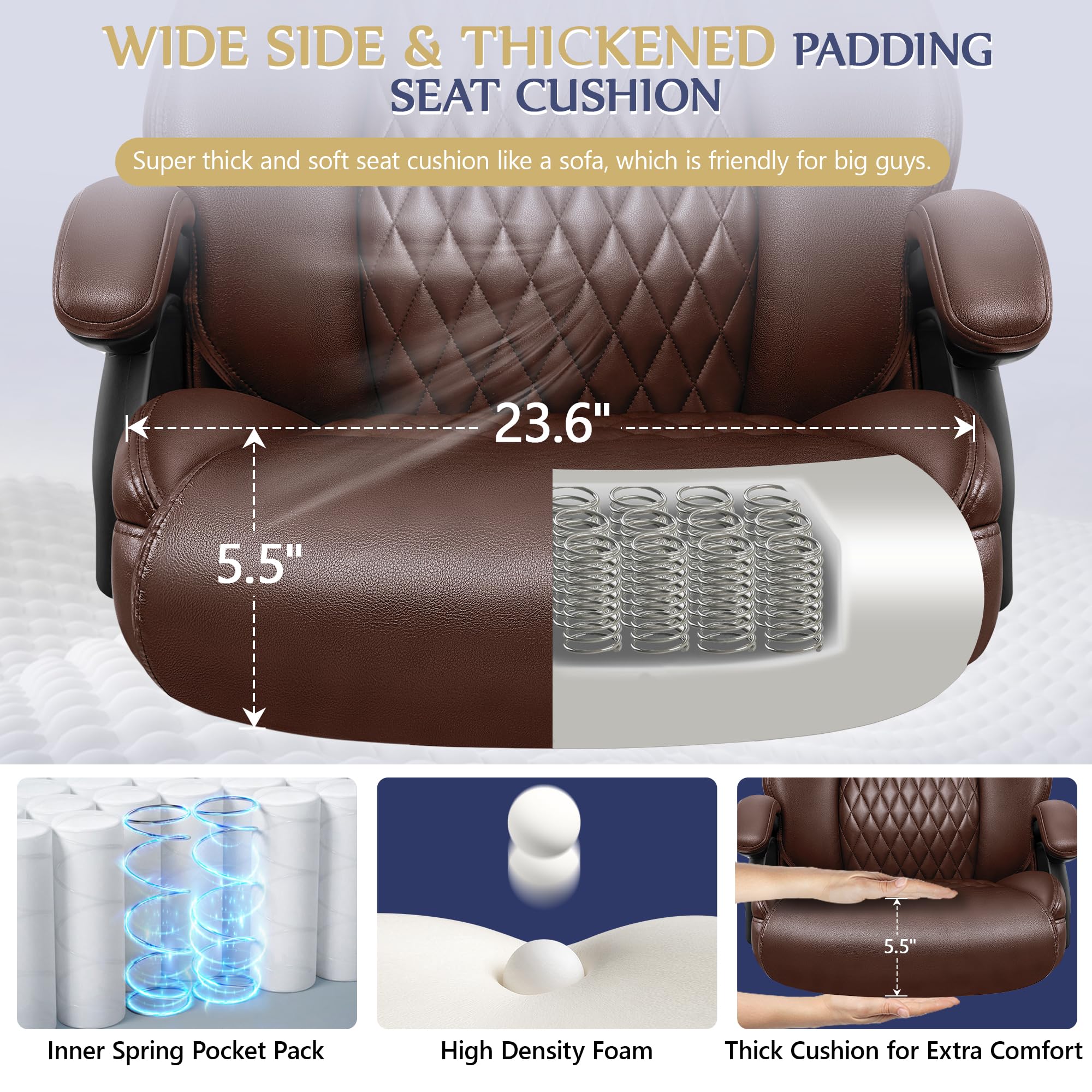
Figure 2.1: HeroSet Big and Tall Office Chair HS5202, brown leather.
Key Features
- Big and Tall Design: Accommodates larger and taller body types with a wider seating depth and large headrest.
- Adjustable Ergonomic Lumbar Support: Built-in lumbar support can be adjusted to fit your lower back curves, relieving back pain during long hours.
- Breathable PU Leather: High-quality PU leather with a diamond pattern promotes air circulation, resists scratches and stains, and is easy to clean.
- Heavy Duty Construction: Features an SGS certified Class 4 gas rod and a heavy-duty metal base with quiet, smooth PU wheels, supporting up to 500 lbs.
- Multi-Functional Adjustments: 360° free swivel, 3-inch height adjustment, and 30° backrest angle with tilt or rocking function (up to 120°).
Dimensions
- Product Dimensions (D x W x H): 22"D x 23.6"W x 45.7"H
- Seat Height: 19.7 Inches
- Seat Depth: 22 inches
- Seat Length: 23.6 Inches
- Item Weight: 44 Pounds
- Maximum Weight Recommendation: 500 Pounds
3. Setup and Assembly
Follow these steps to assemble your HeroSet Office Chair. It is recommended to have two people for certain steps.
Assembly Video Guide
Video 3.1: Installation guide for the HS5202 Series Office Chair. This video demonstrates the step-by-step assembly process.
Step-by-Step Assembly
- Assemble the Chair Base:
Insert the 5 split base tubes into the central base tube. Secure them with the provided M6x20mm screws using the Hexagon Wrench. Ensure all screws are firmly tightened.

Figure 3.1: Securing the base tubes to the central base with screws.
- Attach Casters and Air Rod:
Insert the 5 casters into the ends of the assembled base. Place the central base tube cover over the foot stool. Then, insert the air rod into the central hole of the base.

Figure 3.2: Attaching the casters and inserting the air rod into the base.
- Fix Base Plate to Seat Cushion:
Align the base plate with the bottom of the seat cushion. Secure it using two M8x35mm screws and two M8x25mm screws with the Hexagon Wrench. Ensure the 'FRONT' label on the base plate aligns with the front of the seat cushion.

Figure 3.3: Securing the base plate to the underside of the seat cushion.
- Connect Seat to Base:
Carefully place the assembled seat cushion onto the air rod, ensuring it is fully seated and stable.

Figure 3.4: Attaching the seat assembly to the chair base.
- Attach Armrests to Seat Cushion:
Fix the two armrests to the sides of the seat cushion using four M8x30mm screws. Caution: Tighten these 4 screws to 80% first.

Figure 3.5: Partially securing the armrests to the seat cushion.
- Attach Backrest:
Insert the backrest between the two armrests. Place the backrest on the cushion, then flip it over perpendicular to the cushion and fasten the screw holes on both sides. Tighten the remaining four M8x30mm screws to fix the backrest into the two armrests. Once the backrest is fitted, tighten all 8 armrest screws to 100%.

Figure 3.6: Securing the backrest between the armrests.
- Install Lumbar Support Adjuster:
Install the lumbar support adjuster on the bottom of the seat cushion using two M6x20mm screws. Tape the lines of the lumbar support adjuster in place on the bottom of the seat cushion.

Figure 3.7: Attaching and securing the lumbar support adjuster mechanism.
- Cover Screw Holes:
Cover the screw holes on both sides of the armrests with the 8 decoration caps. The assembly is now complete.

Figure 3.8: Applying decorative caps to finish the assembly.
4. Operating Instructions
Your HeroSet office chair offers several adjustable features to customize your seating experience for optimal comfort.
Features and Adjustments Video Guide
Video 4.1: Overview of the HS5202 Leather Executive Office Chair features, including adjustments and comfort elements.
Adjusting Your Chair
- Seat Height Adjustment:
Locate the lever on the right side under the seat. Pull the lever upwards to raise the seat. To lower the seat, remain seated and pull the lever upwards. Release the lever at the desired height. The chair offers approximately 3 inches of height adjustment.

Figure 4.1: Illustration of height adjustment and rocking function.
- Rocking/Tilt Function:
Pull the lever on the right side (same as height adjustment) outwards to unlock the rocking function. The chair can rock back and forth between 90° and 120°. Push the lever inwards to lock the chair in an upright position.
- Tilt Tension Adjustment:
The round knob located under the seat, at the front, controls the tilt tension. Turn the knob clockwise to increase tension (making it harder to recline) or counter-clockwise to decrease tension (making it easier to recline).
- Adjustable Lumbar Support:
Use the knob on the side of the seat cushion (installed in assembly step 7) to adjust the built-in lumbar support. Turn the knob to extend the lumbar support forward or backward, allowing you to customize it to your back's natural curve.

Figure 4.2: Diagram showing the adjustable lumbar support and its control knob.
- 360° Swivel:
The chair features a full 360° swivel for easy movement and access to different areas of your workspace.
5. Maintenance
Proper care and maintenance will extend the life of your HeroSet office chair.
- Cleaning: Wipe clean with a damp cloth. Avoid harsh chemicals or abrasive cleaners that could damage the PU leather.
- Regular Checks: Periodically inspect all bolts and screws to ensure they are tight. Re-tighten if necessary to maintain stability and safety.
- Caster Care: Keep the casters free of hair, dust, and debris to ensure smooth rolling and prevent floor scratches.
- Avoid Direct Sunlight: Prolonged exposure to direct sunlight can cause the PU leather to fade or crack.
6. Troubleshooting
If you encounter any issues with your chair, refer to the following common problems and solutions:
- Chair does not raise or lower:
Ensure the height adjustment lever is fully engaged. Check if the gas lift cylinder is properly inserted into the base and seat plate. If the issue persists, the gas lift may need replacement.
- Chair wobbles or feels unstable:
Check all assembly screws, especially those connecting the armrests to the seat and backrest, and the base to the central tube. Tighten any loose fasteners. Ensure the casters are fully inserted into the base.
- Casters do not roll smoothly:
Inspect the casters for accumulated hair, dust, or debris. Clean them thoroughly. Ensure the chair is used on an appropriate surface (hard floor recommended).
- Backrest does not recline or lock:
Verify that the rocking/tilt lever is in the correct position (pulled out for rocking, pushed in for locking). Adjust the tilt tension knob to ensure it's not too tight, preventing movement.
- Lumbar support is not adjusting:
Check if the lumbar adjustment knob is turning freely. Ensure the internal cables are not pinched or disconnected. Refer to assembly step 7 to verify the adjuster's installation.
7. Specifications
| Feature | Specification |
|---|---|
| Brand | HeroSet |
| Model Name | HS5202 |
| Model Number | 5202 |
| Color | Brown |
| Material | PU Leather, Foam, Alloy Steel |
| Product Dimensions (D x W x H) | 22"D x 23.6"W x 45.7"H |
| Item Weight | 44 Pounds |
| Maximum Weight Recommendation | 500 Pounds |
| Seat Height | 19.7 Inches |
| Seat Depth | 22 inches |
| Seat Length | 23.6 Inches |
| Gas Lift Class | Class 4 (SGS Certified) |
| Adjustable Features | Lumbar Support, Height, Tilt/Rocking Function |
| Swivel | 360° |
| Back Style | Solid Back |
| Pattern | Diamond Pattern |
| Required Assembly | Yes |
8. Warranty and Support
Warranty Information
HeroSet stands behind the quality of its products. This chair is covered by a limited warranty against manufacturing defects. Please retain your proof of purchase for warranty claims. Specific warranty terms and duration may vary; refer to the product packaging or contact customer support for details.
Customer Support
For any questions, assistance with assembly, troubleshooting, or warranty inquiries, please contact HeroSet customer support:
- Email: cs@herosets.com
- Phone: +1 (978) 647-3329
You can also reach out through your Amazon account:
- Login to your Amazon Account.
- Go to 'Your Orders'.
- Find the order for this product.
- Click 'Contact Seller'.

Figure 8.1: HeroSet customer support contact details.