
ROMOSS PAC20 White
ROMOSS PAC20 Portable Charger User Manual
Model: PAC20 White | Brand: ROMOSS
1. Introduction
Thank you for choosing the ROMOSS Touch Button PAC20 Portable Charger. This high-capacity 20000mAh power bank features PD 22.5W fast charging, built-in Lightning and USB-C cables, and multiple output/input ports for versatile charging. This manual provides essential information for safe and efficient use of your device.
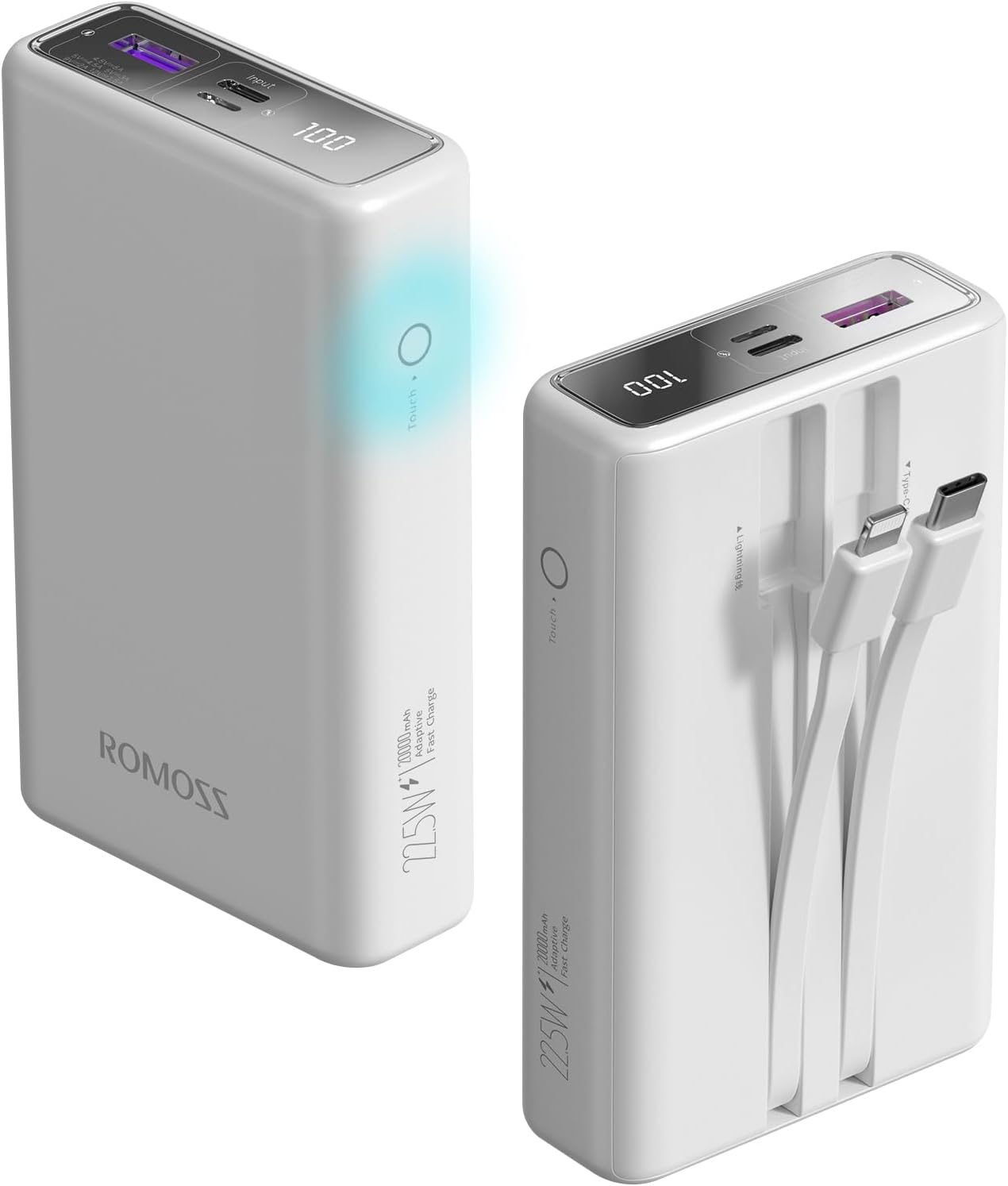
Image: The ROMOSS PAC20 Portable Charger, showcasing its sleek design, LED display, and touch button.
2. Safety Information
Please read and follow these safety instructions carefully to prevent injury or damage to your device:
- Do not expose the power bank to extreme temperatures (above 60°C/140°F or below 0°C/32°F), direct sunlight, or fire.
- Avoid dropping, impacting, or disassembling the device.
- Keep away from water, moisture, and corrosive materials.
- Do not use if the device is damaged, swollen, or leaking.
- Use only certified charging cables and adapters.
- Keep out of reach of children.
- Dispose of the device responsibly according to local regulations.
- This power bank is compliant with IATA standards for air travel, making it a suitable companion for flights.

Image: The ROMOSS PAC20 Portable Charger is designed to be travel-friendly and is allowed on flights, adhering to international aviation standards.
3. Package Contents
Please check the package for the following items:
- 1 x ROMOSS PAC20 Portable Charger
- 1 x USB Charging Cable (for recharging the power bank)
- 1 x User Manual (this document)

Image: The ROMOSS PAC20 Portable Charger shown alongside its retail packaging and included user manual.
4. Product Overview
Familiarize yourself with the various components and features of your PAC20 portable charger:
- Built-in Cables: Integrated Lightning and USB-C cables for direct device charging.
- USB-A Output Port: Additional port for charging devices using your own USB-A cable.
- Type-C Input Port: For recharging the power bank.
- Lightning Input Port: For recharging the power bank.
- LED Digital Display: Shows the exact remaining battery percentage (0-100%).
- Touch Button: Activates the LED display to check battery status.

Image: The ROMOSS PAC20 highlighting its convenient built-in USB-C and Lightning fast-charge cables.

Image: A detailed view of the ROMOSS PAC20, illustrating its Lightning output, Type-C output, USB-A output, Type-C input, and Lightning input ports.

Image: Close-up of the ROMOSS PAC20 showing the location of the touch-sensitive on-off button for checking power status.
5. Setup
Before first use, it is recommended to fully charge your ROMOSS PAC20 portable charger. This ensures optimal battery performance and accuracy of the LED display.
- Connect the provided USB charging cable to the Type-C or Lightning input port on the power bank.
- Connect the other end of the USB cable to a compatible USB wall charger (not included).
- The LED display will show the charging progress. The power bank is fully charged when the display shows "100".
6. Operating Instructions
6.1 Recharging the Power Bank
To recharge your PAC20 power bank:
- Use the Type-C input port for fast recharging (up to 20W).
- Alternatively, use the Lightning input port.
- A full charge takes approximately 6 hours with an 18W fast charger.

Image: A graph illustrating the faster recharge time of the ROMOSS PAC20 when using an 18W fast charger compared to standard charging.
6.2 Charging Your Devices
The PAC20 offers multiple ways to charge your devices:
- Using Built-in Cables: Simply pull out the integrated Lightning or USB-C cable and connect it directly to your compatible device.
- Using USB-A Output: Connect your device's charging cable to the USB-A output port on the power bank.
- The power bank supports up to 22.5W fast charging for compatible devices.
- The built-in Lightning cable supports PD 20W fast charging, capable of charging an iPhone 14 from 0% to 60% in approximately 30 minutes.

Image: A comparison showing the fast charging capability of the ROMOSS PAC20's PD 20W Lightning cable, charging an iPhone 14 significantly faster than an ordinary 10W cable.
6.3 Simultaneous Charging
You can charge up to three devices simultaneously using a combination of the built-in cables and the USB-A output port.

Image: The ROMOSS PAC20 demonstrating its ability to charge three devices concurrently, sharing power efficiently.
6.4 Checking Battery Level
To check the remaining battery percentage, simply touch the on-off button located on the side of the power bank. The LED digital display will illuminate, showing the precise percentage from 0 to 100.
7. Maintenance
Proper care will extend the lifespan of your ROMOSS PAC20 portable charger:
- Cleaning: Wipe the device with a soft, dry cloth. Do not use harsh chemicals or abrasive cleaners.
- Storage: Store in a cool, dry place away from direct sunlight and extreme temperatures. If storing for a long period, charge the power bank to about 50-70% capacity.
- Battery Health: The high-quality lithium polymer battery is designed to maintain 85% health after 750 discharge cycles, ensuring long-term reliability.

Image: An illustration highlighting the trusted quality of the batteries used in ROMOSS power banks, designed for long-term performance.
8. Troubleshooting
If you encounter issues with your PAC20, refer to the following common problems and solutions:
- Power Bank Not Charging:
- Ensure the charging cable is securely connected to both the power bank's input port and the wall adapter.
- Verify that the wall adapter is functioning correctly and providing sufficient power (e.g., 5V/2A or 9V/2A for fast charging).
- Try a different charging cable or wall adapter.
- Device Not Charging from Power Bank:
- Ensure the power bank has sufficient charge (check LED display).
- Verify that the built-in cable or your external cable is securely connected to both the power bank and your device.
- Try a different output port or cable.
- Some devices may require a specific charging protocol; ensure compatibility.
- Slow Charging:
- Ensure both the power bank and the device support fast charging protocols (PD, QC).
- Use a high-quality, fast-charging compatible cable.
- Charging multiple devices simultaneously may reduce individual charging speeds.
- LED Display Not Working:
- Gently touch the on-off button to activate the display.
- If the power bank is completely depleted, the display may not light up until it receives some charge.
9. Specifications
| Feature | Specification |
|---|---|
| Model Number | PAC20 White |
| Battery Capacity | 20000mAh |
| Battery Cell Composition | Lithium Polymer |
| Product Dimensions | 11.9 x 7.2 x 3.2 cm |
| Item Weight | 355 Grams |
| Input Ports | Type-C, Lightning |
| Output Ports | Built-in Type-C, Built-in Lightning, USB-A |
| Max Output Power | 22.5W |
| Max Input Power | 20W (Type-C) |
| Recommended Uses | Tablets, Phones (iPhone, Galaxy, Google etc.) |
| Manufacturer | ROMOSS |
| Country of Origin | China |
| Date First Available | 10 March 2024 |
10. Warranty and Support
ROMOSS provides a worry-free 12-month guarantee for the PAC20 Portable Charger from the date of purchase. This warranty covers manufacturing defects and issues arising from normal use.
For any problems, questions, or support needs, please contact our friendly customer service team. We are available 7 days a week, 24 hours a day, and aim to resolve your inquiries within 24 hours.
Contact Information:
- Please refer to the contact details provided on your purchase platform or the official ROMOSS website.
Related documentsPAC20 White


Ask a question about this manual
Ask about setup, troubleshooting, compatibility, parts, safety, or missing instructions. Manuals+ will review the question and use this page’s manual context to help answer it.