
1. Introduction
The DALY Smart BMS (Battery Management System) is designed to manage and protect 7-series 24V Li-ion battery packs with a 40A current rating. This system integrates advanced features such as WiFi and Bluetooth connectivity for remote monitoring, CAN and RS485 communication interfaces, and comprehensive protection mechanisms to ensure the safety and longevity of your battery. This manual provides essential information for the proper installation, operation, and maintenance of your DALY Smart BMS.

Figure 1: DALY Smart BMS 7S 24V 40A Li-ion Module
Key Features:
- Multiple Protection: Includes overcharge, overdischarge, overcurrent, short circuit, and temperature protection.
- Smart Monitoring: WiFi and Bluetooth modules enable remote monitoring and alerts via a smartphone app.
- Advanced Communication: Features CAN, RS485, and dual UART communication interfaces for rich expansion applications.
- Enhanced Performance: Offers parallel protection, pre-charging function, 100mA passive equalization current, low temperature rise, and consistent charge/discharge current.
Video 1: Overview of DALY K-Series Smart BMS features and upgrades.
2. Specifications
The following table details the electrical and physical specifications for the DALY Smart BMS 7S 24V 40A Li-ion model.
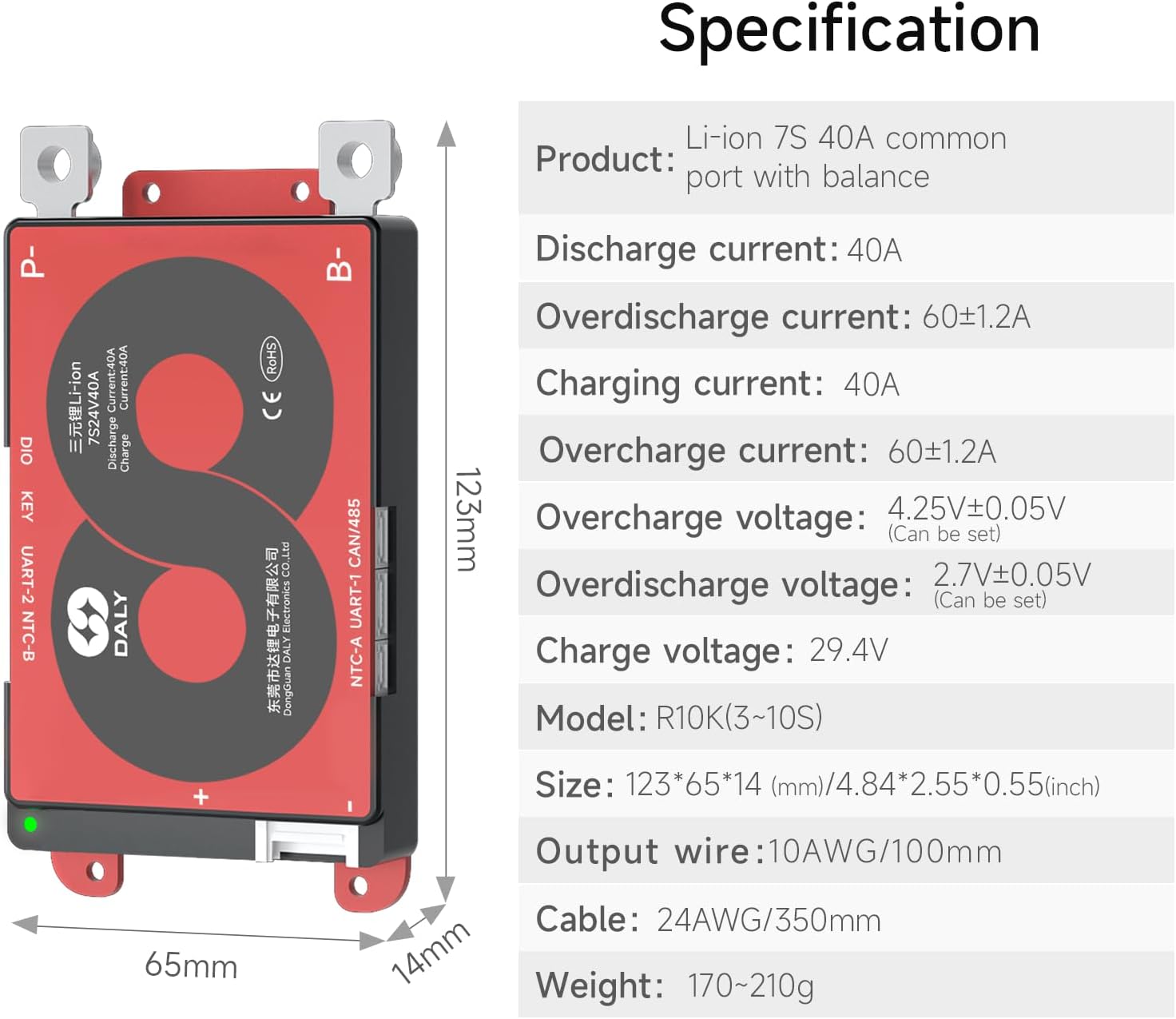
Figure 2: Detailed Specifications and Dimensions
| Parameter | Value |
|---|---|
| Product Type | Li-ion 7S 40A common port with balance |
| Discharge Current | 40A |
| Overdischarge Current | 60 ± 1.2A |
| Charging Current | 40A |
| Overcharge Current | 60 ± 1.2A |
| Overcharge Voltage | 4.25 ± 0.05V (Adjustable) |
| Overdischarge Voltage | 2.7 ± 0.05V (Adjustable) |
| Charge Voltage | 29.4V |
| Model | R10K (3-10S) |
| Size (L x W x H) | 123 x 65 x 14 mm (4.84 x 2.55 x 0.55 inches) |
| Output Wire | 10AWG/100mm |
| Cable | 24AWG/350mm |
| Weight | 170-210g |
Packing List:
Verify that all components are present upon unboxing. The packing list below is based on a 24S 60A BMS as an example, but the core items are similar.

Figure 3: Example Packing List
- K series BMS Unit
- User Manual
- B-P- Output line (gift)
- WiFi Module (gift)
- Cables
- NTC Temperature Sensor
- CAN/485 5pin Connector
3. Setup and Installation
Proper installation is crucial for the safe and efficient operation of your DALY Smart BMS. Always ensure the battery pack is disconnected from any power source before beginning installation. The following steps outline the wiring process, using a K series 60A BMS as a general example.

Figure 4: Installation and Wiring Diagram
Wiring Steps:
- Solder Sampling Cables: The first cable in the sampling cable set (typically black) connects to the overall negative terminal of the battery (B-). Subsequent cables (typically red) connect to the positive terminal of the first string of batteries, then the second string, and so on, until all cell balance cables are connected in sequence. Ensure correct order to avoid damage.
- Check Cable Connections: After connecting the balance cables, use a multimeter to measure the voltage between two adjacent cells, starting from the header. Verify that there are no incorrect connections or missing connections.
- Connect Output Wires: Connect the B- wire of the BMS to the overall negative terminal of the battery pack. Then, plug the sampling cable set into the BMS. After activating the BMS, confirm that the voltage (battery voltage) between B+ & B- and the voltage between P+ & P- are consistent.
For communication modules (WiFi, Bluetooth, CAN, RS485), connect them to their respective ports on the BMS as per their individual instructions. These modules facilitate smart features and remote monitoring.
4. Operating Instructions
The DALY Smart BMS offers intelligent monitoring and control capabilities through its dedicated smartphone application and communication interfaces.
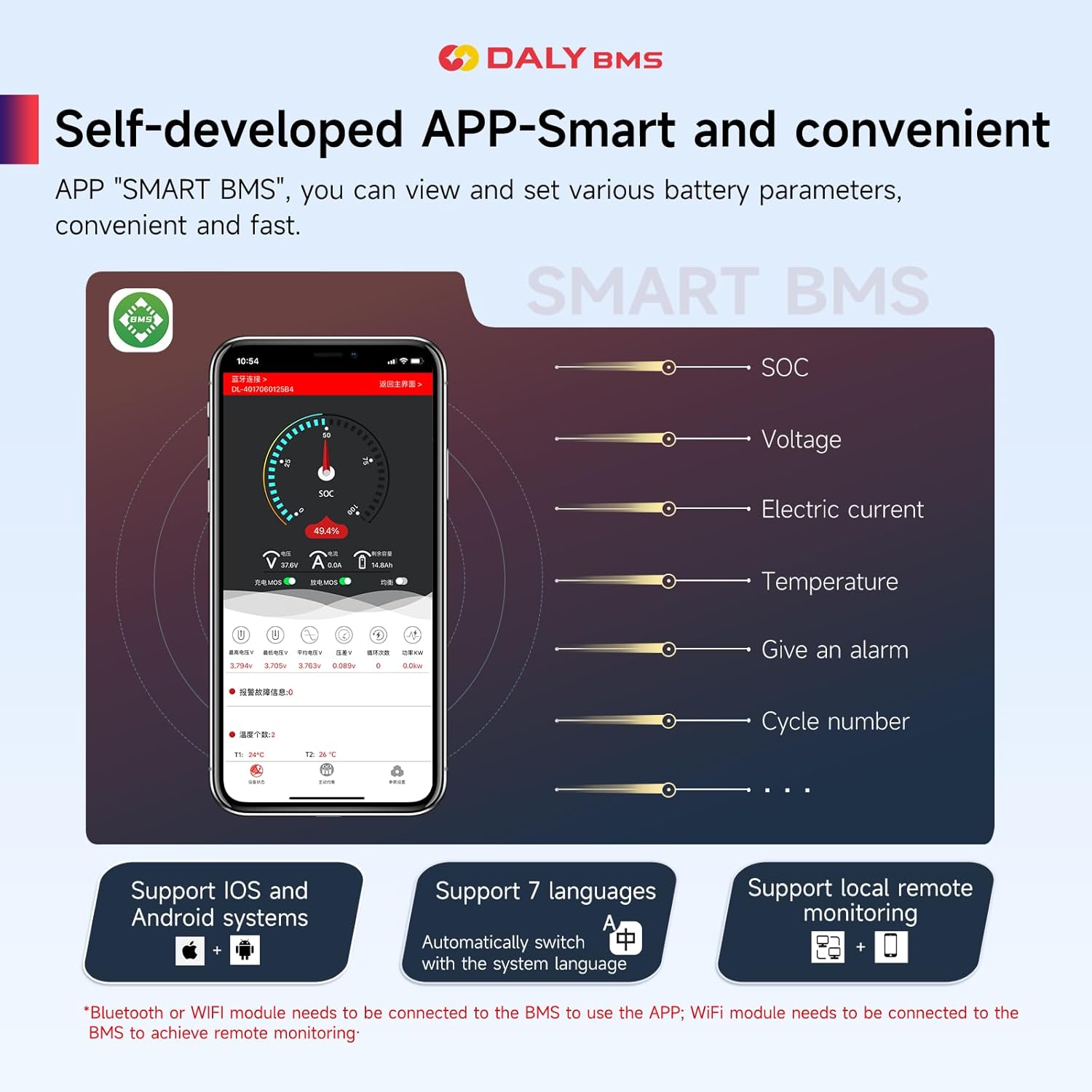
Figure 5: DALY Smart BMS Smartphone Application
Smartphone App (SMART BMS):
- Download the "SMART BMS" app from your device's app store (supports iOS and Android).
- Connect the BMS to your smartphone via the Bluetooth module for local monitoring.
- For remote monitoring over the internet, ensure the WiFi module is connected to the BMS and configured for network access.
- The app allows you to view real-time battery parameters such as State of Charge (SOC), voltage, electric current, temperature, and cycle number.
- Receive alerts for any detected abnormalities in the battery pack.
- Adjust various battery parameters and settings as needed.
Communication Interfaces (CAN, RS485, UART):
The BMS supports multiple communication protocols for integration with other systems:
- UART: Used for connecting the Bluetooth and WiFi modules, and for PC software communication.
- CAN & RS485: These interfaces provide robust communication for industrial applications, allowing the BMS to interact with external controllers, displays, or other devices. Refer to the specific protocol documentation for detailed integration instructions.
5. Maintenance
Regular maintenance and understanding the BMS's protective functions will extend the life and ensure the safety of your battery pack.
Passive Balancing:

Figure 6: Passive Balancing Module
The DALY Smart BMS features a 100mA passive equalization current. This function helps to balance the voltage across individual cells in the battery pack, preventing overcharge or overdischarge of specific cells and maximizing the overall battery capacity and lifespan. This process occurs automatically when cell voltage differences are detected.
Temperature Protection:

Figure 7: Battery Pack Temperature Protection
The BMS continuously monitors the battery pack's temperature. If the temperature exceeds safe operating limits during charging or discharging, the BMS will activate protection mechanisms to prevent damage and ensure safety. Ensure the NTC temperature sensor is correctly installed and positioned to accurately measure battery temperature.
General Care:
- Keep the BMS and battery pack in a clean, dry environment, away from direct sunlight and extreme temperatures.
- Regularly check all wiring connections for tightness and signs of corrosion.
- Avoid exposing the BMS to water or excessive moisture, despite its upgraded waterproof function.
6. Troubleshooting
This section addresses common issues you might encounter with your DALY Smart BMS.
Common Issues and Solutions:
| Problem | Possible Cause | Solution |
|---|---|---|
| BMS not powering on/no output | Incorrect wiring, low battery voltage, BMS in sleep mode. | Verify all wiring connections. Check individual cell voltages. Activate BMS if in sleep mode (refer to specific model activation method). |
| Overcharge/Overdischarge protection triggered | Cell voltage exceeded limits, imbalanced cells. | Check individual cell voltages via app. Allow passive balancing to work. Reduce charge/discharge rate. |
| Overcurrent/Short circuit protection triggered | Load current too high, external short circuit. | Reduce load. Disconnect and inspect for short circuits. Remove the load to reset protection. |
| Temperature protection triggered | Battery pack overheating/too cold. | Allow battery to cool down or warm up to operating temperature range. Ensure proper ventilation. |
| App not connecting to BMS | Bluetooth/WiFi module not connected, module faulty, app permissions. | Ensure Bluetooth/WiFi module is securely connected and powered. Check app permissions on your smartphone. Restart app and BMS. |
For detailed error codes or persistent issues, refer to the DALY Smart BMS app for specific alerts and diagnostic information. If problems persist, contact customer support.
7. Warranty and Support
Warranty Information:
DALY provides a 1-year product warranty for this Smart BMS. This warranty covers manufacturing defects and malfunctions under normal use conditions. Please retain your proof of purchase for warranty claims.
Technical Support:
For any questions, technical assistance, or warranty claims, please contact DALY customer service. We offer 24-hour one-on-one customer service and lifetime technical support.
You can typically find contact information on the DALY official website or through the seller's platform where the product was purchased. When contacting support, please provide your product model number (7S BMS 24V 40A) and a detailed description of the issue.


