Product Overview
The Sony ULT Field 1 is a compact, ultra-portable Bluetooth speaker designed for powerful sound and durability. It features a dedicated ULT button for enhanced bass, an IP67 rating for water, dust, rust, and shock resistance, and a 12-hour battery life. Its versatile design includes a detachable multi-way strap for easy carrying, making it ideal for various environments and activities.
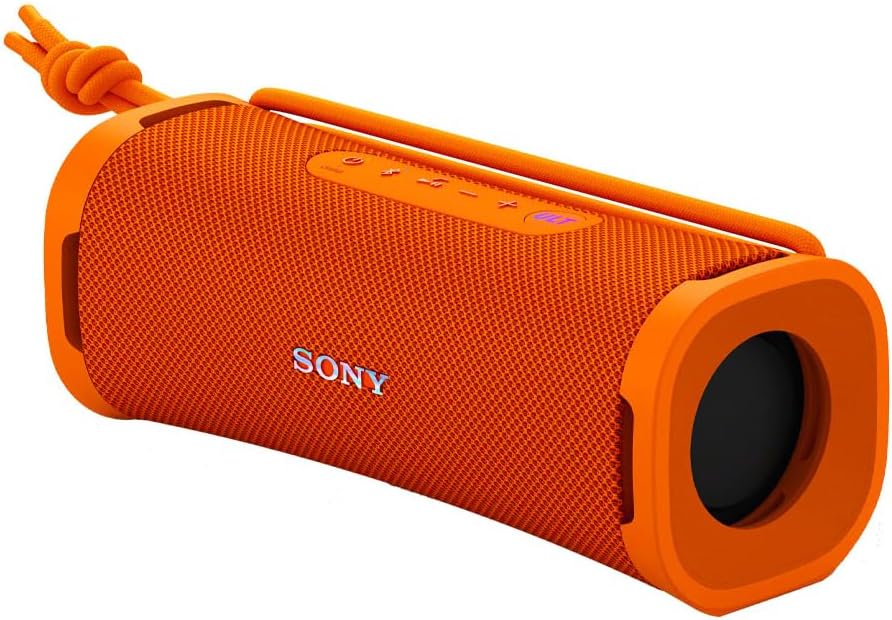
Image: Sony ULT Field 1 Portable Bluetooth Speaker in Orange, showcasing its compact design.
Getting Started
What's in the Box
- Speaker
- Strap belt
- USB Type-C Cable (A to C)
Charging the Speaker
Connect the supplied USB Type-C cable to the speaker's charging port and a compatible USB power adapter (not included). The CHARGE indicator will illuminate during charging and turn off when fully charged. A full charge provides up to 12 hours of playback.
Power On/Off
Press and hold the Power button located on the top panel until the power indicator lights up to turn the speaker on. To turn off, press and hold the Power button again until the indicator turns off.
Bluetooth Pairing
When the speaker is turned on for the first time, it automatically enters Bluetooth pairing mode. The Bluetooth indicator will flash rapidly. On your device, enable Bluetooth and select "ULT FIELD 1" from the list of available devices. Once connected, the Bluetooth indicator will stop flashing and remain lit. For subsequent connections, the speaker will automatically connect to the last paired device.
Video: Sony ULT Field 1 Wireless Portable Speaker Overview. This video provides a visual guide to the speaker's features and basic operation.
Operating Your Speaker
Controls
The top panel of the speaker features intuitive controls:
- Power Button: Turns the speaker on/off.
- Bluetooth Button: Initiates Bluetooth pairing mode.
- Play/Pause Button: Controls media playback.
- Volume +/- Buttons: Adjusts the speaker's volume.
- ULT Button: Activates or deactivates the ULT Power Sound mode for enhanced bass.

Image: Detailed view of the speaker's control panel, emphasizing the ULT button.
ULT Power Sound Mode
Press the ULT button to activate the ULT Power Sound mode. This feature enhances the bass and overall sound pressure, providing a deeper and more impactful audio experience. Press the button again to toggle the mode off.
Hands-Free Calling
The speaker includes a built-in microphone with echo-canceling technology, allowing for clear hands-free calls. When a call comes in, press the Play/Pause button to answer, and press it again to end the call.

Image: Users engaging in a hands-free call using the Sony ULT Field 1 speaker, demonstrating its clear call quality.
Stereo Pairing
For an immersive audio experience, you can pair two Sony ULT Field 1 speakers together to create a stereo sound setup. Refer to the Sony Music Center app for detailed instructions on how to enable stereo pairing.

Image: Two Sony ULT Field 1 speakers positioned to illustrate stereo sound pairing.
Maintenance and Care
Durability Features
The Sony ULT Field 1 boasts an IP67 rating, making it:
- Waterproof: Can be submerged in water up to 1 meter for 30 minutes.
- Dustproof: Protected against dust ingress.
- Rustproof: Resistant to rust, suitable for use near saltwater.
- Shockproof: Designed to withstand impacts and drops.
Ensure the cap covering the USB-C port is securely fastened to maintain its waterproof and dustproof performance.

Image: The Sony ULT Field 1 speaker demonstrating its IP67 waterproof capability by being partially submerged in water.
Cleaning
To clean the speaker, wipe it with a soft, dry cloth. For stubborn dirt, use a cloth lightly dampened with water. Avoid using alcohol, benzene, thinners, or any abrasive cleaning agents, as these can damage the surface.


