
1. Introduction
The Vanemar Model 0204 Gateway is a sophisticated boat and yacht monitoring system designed to provide comprehensive security and surveillance for your vessel. This system is expandable with a range of Vanemar wireless sensors, offering detailed monitoring features tailored for a complete maritime experience. It is adaptable for various boat sizes and styles, ensuring easy and efficient setup without complex wiring or drilling. The durable, waterproof construction ensures consistent performance in marine environments.
2. Product Overview
The Vanemar Model 0204 system includes the main Gateway unit and essential accessories for installation and operation. Key features include 24/7 GPS location tracking, geofence boundary alerts, battery monitoring with low battery alerts, anti-tamper features, a backup battery, and an integrated accelerometer.
2.1. Components
- Vanemar Gateway Unit (Model 0204)
- Power Cable
- GPS Antenna
- Mounting Kit
- Integrated Lithium Ion Battery
2.2. Device Features
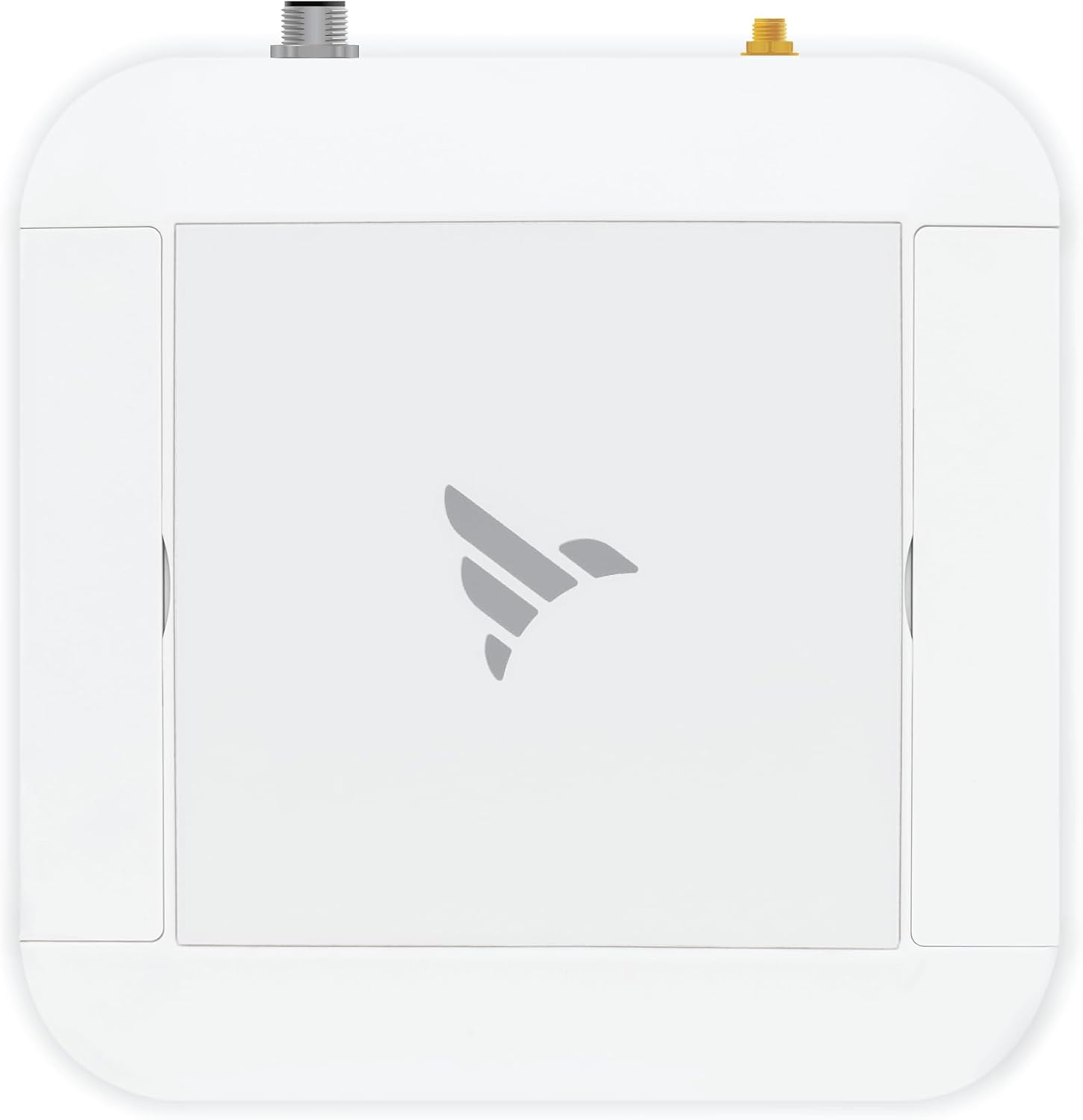
Figure 1: Top view of the Vanemar Gateway Unit, showing its compact, white, and water-resistant design.

Figure 2: Rear view of the Vanemar Gateway Unit, highlighting the GPS Antenna Input, Buzzer, and Power Input ports for external connections.

Figure 3: Detailed view of the Vanemar Gateway Unit, pointing out the Status Light for visual feedback, the Power/Reset Button for device control and factory reset, and the Proximity Sensor for detecting displacement.
3. Setup
The Vanemar Model 0204 is designed for easy, DIY installation. Follow these steps to set up your system.
3.1. Unboxing and Initial Inspection
- Carefully unpack all components from the box.
- Verify that all items listed in the "What's in the Box" section are present: Gateway unit, power cable, GPS antenna, and mounting kit.
- Inspect all components for any signs of damage. Contact customer support if any items are missing or damaged.
3.2. Mounting the Gateway Unit
Choose a suitable location on your boat for the Gateway unit. Ensure the location is dry, protected from direct sunlight, and allows for optimal GPS signal reception. The unit is waterproof, but proper placement enhances longevity.
- Use the provided mounting kit to securely attach the Gateway unit to a flat surface.
- Ensure the unit is mounted in a position that allows the GPS antenna to have a clear view of the sky for best signal acquisition.

Figure 4: An example of the Vanemar Gateway Unit being installed inside a boat cabin, demonstrating its compact size and ease of placement.
3.3. Connecting the GPS Antenna and Power
- Connect the external GPS antenna to the designated GPS Antenna Input port on the Gateway unit (refer to Figure 2).
- Connect the power cable to the Power Input port on the Gateway unit (refer to Figure 2).
- Connect the other end of the power cable to your boat's 12/24V power supply.
- The internal Lithium Ion battery will provide backup power if the main power supply is interrupted.
4. Operating Instructions
The Vanemar Model 0204 system is managed primarily through its dedicated mobile application. Ensure your device is powered on and connected to the network.
4.1. Powering On/Off and Reset
- To power on the device, press and hold the Power/Reset Button until the Status Light illuminates.
- To power off, press and hold the Power/Reset Button until the Status Light turns off.
- To reset to factory settings, refer to the detailed instructions in the mobile application or contact support.
4.2. Mobile Application Usage
Download the Vanemar mobile application from your device's app store. The app provides real-time monitoring and control over your security system.
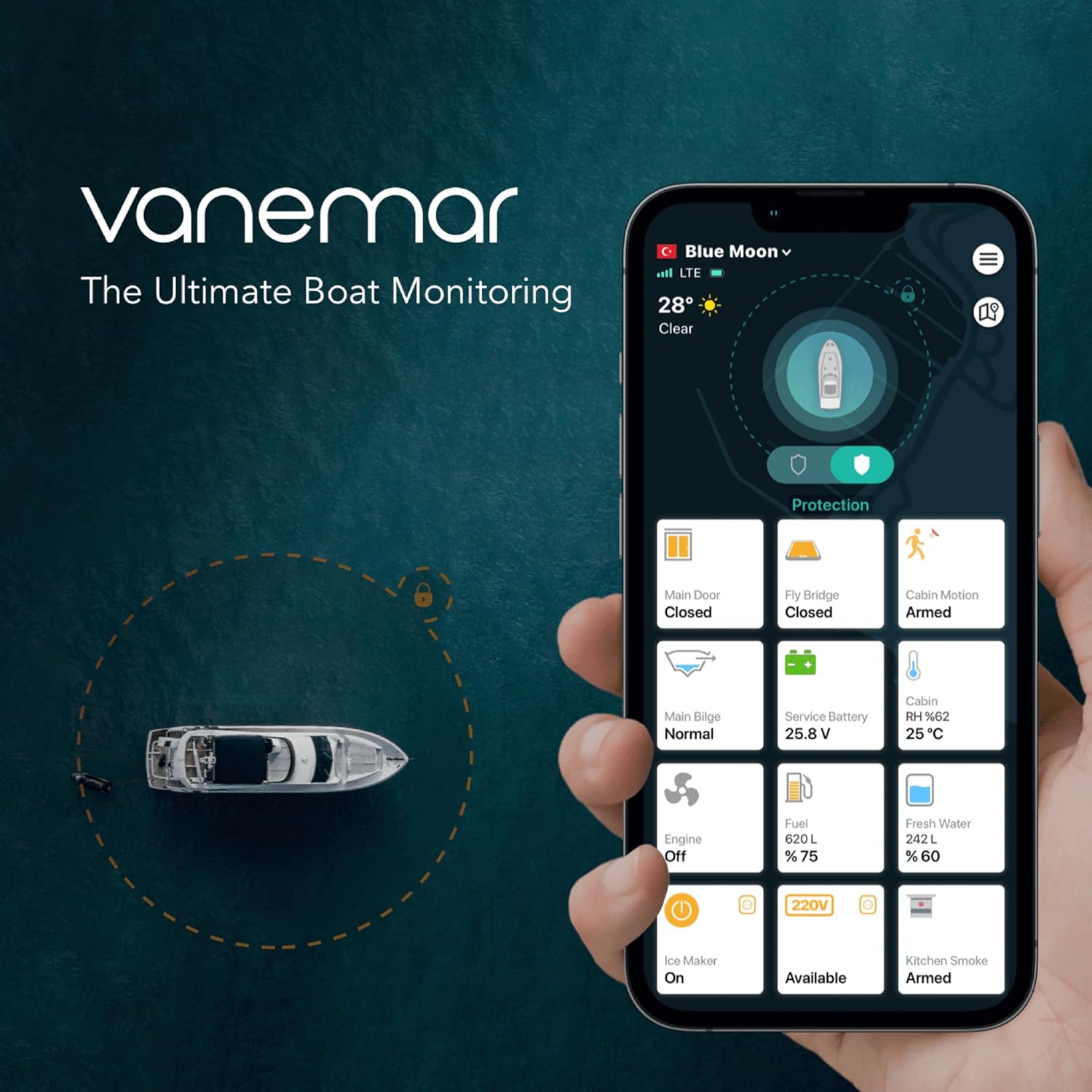
Figure 5: The Vanemar mobile application interface, displaying real-time data for main door status, cabin motion, bilge level, battery voltage, engine status, and water tank levels.

Figure 6: Multiple views of the Vanemar mobile application, illustrating battery sensor data over time and various alarm notifications for different monitored parameters.
4.2.1. GPS Location Tracking
View the real-time location of your boat on the app's map interface. The system provides 24/7 tracking capabilities.
4.2.2. Geofence Boundary Alerts
Set up custom geofence boundaries within the app. You will receive instant alerts if your boat enters or exits these predefined areas.
Video 1: This video demonstrates how to set up and manage geofence boundaries for your boat using the Locmarine app, providing visual alerts for vessel movement.
4.2.3. Battery Monitoring and Alerts
The app continuously monitors your boat's battery levels. Configure alerts to be notified when the battery drops below a specified threshold, ensuring you are aware of potential power issues.
4.2.4. Anti-Tamper Features and Integrated Accelerometer
The integrated accelerometer detects unusual movements or tampering attempts. The proximity sensor also triggers alerts if the device is displaced. These features enhance the security of your vessel.
4.2.5. Expandable Wireless Sensors
The Vanemar Gateway is designed to be expandable. You can integrate additional Vanemar wireless sensors (sold separately) to monitor other aspects of your boat, such as water levels, bilge pump activity, motion detection, shore power status, and entry points.
Video 2: This video provides an overview of the Skyhawk Oversea Hub and its various wireless sensors, demonstrating how they integrate with a boat monitoring system for comprehensive surveillance.
5. Maintenance
Regular maintenance ensures the optimal performance and longevity of your Vanemar Model 0204 system.
5.1. Battery Care
- The internal Lithium Ion battery is rechargeable. Ensure it is regularly charged, especially during periods of inactivity or when the boat's main power is off.
- Monitor battery levels via the mobile application to prevent complete discharge.
5.2. Waterproofing
- While the unit is waterproof, regularly inspect all cable connections and port covers to ensure they are securely sealed.
- Avoid submerging the unit unless specifically designed for such conditions.
5.3. Cleaning
- Clean the exterior of the Gateway unit with a soft, damp cloth.
- Do not use harsh chemicals or abrasive cleaners.
6. Troubleshooting
If you encounter issues with your Vanemar Model 0204 system, refer to the following common troubleshooting steps:
6.1. No GPS Signal
- Ensure the GPS antenna is securely connected and has a clear, unobstructed view of the sky.
- Relocate the Gateway unit if necessary to improve signal reception.
6.2. Device Not Responding
- Check the power cable connection and ensure the unit is receiving power.
- Verify the internal battery is charged.
- Perform a soft reset by powering the device off and then on again.
6.3. App Connectivity Issues
- Ensure your mobile device has a stable internet connection.
- Verify that the Vanemar Gateway unit is powered on and has network connectivity.
- Restart the mobile application or your mobile device.
7. Specifications
| Feature | Detail |
|---|---|
| Product Dimensions | 5.9 x 5.9 x 1.6 inches |
| Item Weight | 15.9 ounces |
| Model Number | 0204 |
| Batteries | 1 Lithium Ion batteries required (included) |
| Connectivity Technology | Wireless |
| Special Feature | Universal compatibility, GPS Tracking, Geofence, Battery Monitoring, Anti-Tamper, Accelerometer |
| Supported Application | GPS Tracking Applications, Location-based Services |
| Material | Plastic, Water-resistant materials |
| Color | White |
| Manufacturer | Vanemar, Inc. |
8. Warranty & Support
For warranty information, technical support, or to inquire about additional wireless sensors, please refer to the contact information provided with your product packaging or visit the official Vanemar website.

Figure 7: A "Protected by Vanemar Boat Monitoring" sticker displayed on the hull of a boat, indicating the presence of the security system.


