
Konix 3328170001175
Konix Hello Kitty Wireless Bluetooth 5.3 Headphones User Manual
Model: 3328170001175
Introduction
Thank you for purchasing the Konix Hello Kitty Wireless Bluetooth 5.3 Headphones. This manual provides essential information for setting up, operating, maintaining, and troubleshooting your new headphones. Please read this manual thoroughly before use to ensure optimal performance and longevity of your device.

Image: Front view of the Konix Hello Kitty Wireless Bluetooth 5.3 Headphones, showcasing the white and pink design with Hello Kitty graphics on the earcups.
Product Features
- Comfortable Design: Lightweight construction with padded ear cushions and an adjustable headband for extended wear comfort.
- Wireless Connectivity: Equipped with Bluetooth 5.3 for stable and efficient wireless connection to PC, smartphones, and tablets.
- Long Battery Life: Enjoy up to 30 hours of music playback on a single charge.
- Built-in Microphone: Facilitates clear communication for calls and voice commands.
- Versatile Connectivity: Includes a 3.5mm jack cable for wired audio connection, offering flexibility when wireless is not preferred or battery is low.
- High-Quality Audio: Features 40mm speakers for an immersive listening experience.
- Integrated Controls: Direct controls on the headphone for volume adjustment, voice assistant activation (Siri/Android compatible), and call management.

Image: A person wearing the Konix Hello Kitty headphones, with icons illustrating key features such as Bluetooth 5.3 connectivity, a built-in microphone, and the inclusion of a 3.5mm audio jack and Type-C charging cable.
Package Contents
- Konix Hello Kitty Wireless Bluetooth 5.3 Headphones
- 3.5mm Audio Jack Cable
- USB Type-C Charging Cable
- User Manual (this document)

Image: The front of the retail packaging for the Konix Hello Kitty Bluetooth headset, showing the product image and key features.
Setup
1. Charging the Headphones
Before first use, fully charge your headphones. Connect the USB Type-C charging cable to the charging port on the headphones and the other end to a USB power source (e.g., computer USB port, wall adapter). The charging indicator light will show the charging status.
- Charging Time: Approximately 2.5 hours.
- Battery Life: Up to 30 hours of playtime on a full charge.
- Standby Time: Up to 200 hours.

Image: The Konix Hello Kitty headphones with an overlay indicating a 30-hour playtime, 200-hour standby time, and 2.5-hour charging time.
2. Bluetooth Pairing
- Ensure the headphones are charged and powered off.
- Press and hold the Power button until the LED indicator light flashes, indicating pairing mode.
- On your device (smartphone, tablet, PC), enable Bluetooth and search for available devices.
- Select "Konix Hello Kitty" (or similar name) from the list of found devices.
- Once paired, the LED indicator will change (e.g., solid blue) and you will hear an audible confirmation.
3. Wired Connection (Optional)
If you prefer a wired connection or if the battery is depleted, you can use the included 3.5mm audio jack cable.
- Plug one end of the 3.5mm audio cable into the audio jack on the headphones.
- Plug the other end into the 3.5mm audio output port of your device.
- The headphones will automatically switch to wired mode.
Operating Instructions
Power On/Off
- Power On: Press and hold the Power button for approximately 3 seconds.
- Power Off: Press and hold the Power button for approximately 5 seconds.
Music Playback
- Play/Pause: Press the Multi-function button.
- Volume Up: Press the Volume Up button.
- Volume Down: Press the Volume Down button.
- Next Track: Press and hold (or double-press, depending on model) the Volume Up button.
- Previous Track: Press and hold (or double-press, depending on model) the Volume Down button.
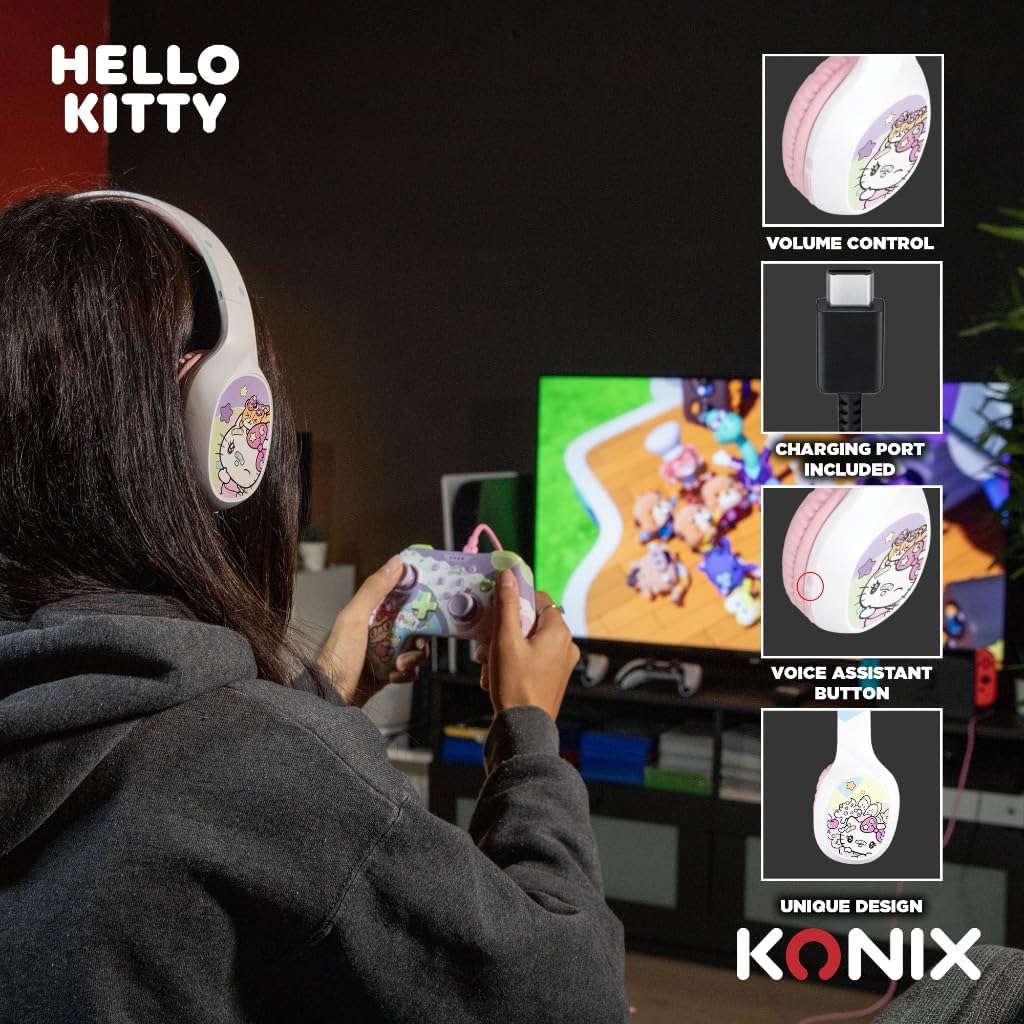
Image: A user interacting with the Konix Hello Kitty headphones, with insets highlighting the volume control, charging port, and voice assistant button located on the earcup.
Call Management
- Answer/End Call: Press the Multi-function button.
- Reject Call: Press and hold the Multi-function button.
- Redial Last Number: Double-press the Multi-function button.
Voice Assistant
Activate your device's voice assistant (Siri, Google Assistant, etc.) directly from the headphones.
- Activate Voice Assistant: Press the dedicated Voice Assistant button.
Maintenance and Care
- Cleaning: Wipe the headphones with a soft, dry cloth. Do not use abrasive cleaners or solvents.
- Storage: Store the headphones in a cool, dry place away from direct sunlight and extreme temperatures.
- Battery Care: To prolong battery life, avoid fully discharging the battery frequently. Charge the headphones regularly, even if not in use for extended periods.
- Water Resistance: These headphones are not waterproof. Avoid exposure to water or excessive moisture.
- Handling: Do not drop, disassemble, or attempt to repair the headphones yourself. This may void the warranty and cause damage.
Troubleshooting
| Problem | Possible Cause | Solution |
|---|---|---|
| Headphones do not power on. | Low battery. | Charge the headphones fully. |
| Cannot pair via Bluetooth. | Headphones not in pairing mode; Device Bluetooth off; Too far from device. | Ensure headphones are in pairing mode; Turn on Bluetooth on your device; Move headphones closer to your device (within 10 meters). |
| No sound or low volume. | Volume too low on headphones or device; Incorrect audio output selected; Headphones not properly connected (wired). | Increase volume on both headphones and device; Check device's audio output settings; Ensure 3.5mm cable is fully inserted. |
| Microphone not working. | Microphone muted on device; Incorrect input device selected. | Check microphone settings on your device; Ensure "Konix Hello Kitty" is selected as the input device. |
| Intermittent connection. | Interference; Too far from device; Obstacles between devices. | Move away from other wireless devices; Reduce distance to paired device; Remove obstacles. |
Specifications
| Feature | Detail |
|---|---|
| Model Number | 3328170001175 |
| Connectivity | Wireless (Bluetooth 5.3), Wired (3.5mm Jack) |
| Bluetooth Version | 5.3 |
| Speaker Size | 40mm |
| Frequency Range | 20 Hz - 20,000 Hz |
| Battery Life (Playtime) | Up to 30 hours |
| Standby Time | Up to 200 hours |
| Charging Time | Approx. 2.5 hours |
| Microphone | Built-in |
| Color | White, Pink |
| Weight | 290 grams (approx.) |
| Dimensions (Package) | 20.1 x 18.8 x 8 cm |
| Noise Control | Hybrid Noise Cancellation |
Warranty and Support
Konix products are designed and manufactured to the highest quality standards. For information regarding warranty coverage and customer support, please refer to the warranty card included with your product or visit the official Konix website. Please retain your proof of purchase for warranty claims.
For technical assistance or inquiries, please contact Konix customer support through their official channels.
Ask a question about this manual
Ask about setup, troubleshooting, compatibility, parts, safety, or missing instructions. Manuals+ will review the question and use this page’s manual context to help answer it.