
Product Overview
The ZeroKor Portable Power Station R100 is a versatile and compact power solution designed for both indoor and outdoor use. With its robust features and multiple output options, it ensures your essential devices remain powered wherever you are.

Figure 1: ZeroKor Portable Power Station R100 - Front View

Figure 2: ZeroKor Portable Power Station R100 - Labeled Ports and Features
Setup Guide
Before first use, ensure your power station is fully charged. The unit can be charged via wall adapter, car charging cable, or a compatible solar panel.
Initial Charging (Wall Adapter)
- Connect the provided AC power adapter to the 'INPUT' port on the power station.
- Plug the AC adapter into a standard wall outlet (110V).
- The LCD screen will indicate charging status with a blinking percentage.
- Charge until the battery indicator shows 100% and stops blinking.
Solar Panel Setup (Solar Panel not included)
For outdoor charging, the ZeroKor R100 is compatible with solar panels. A 40W foldable solar panel is recommended for optimal performance.
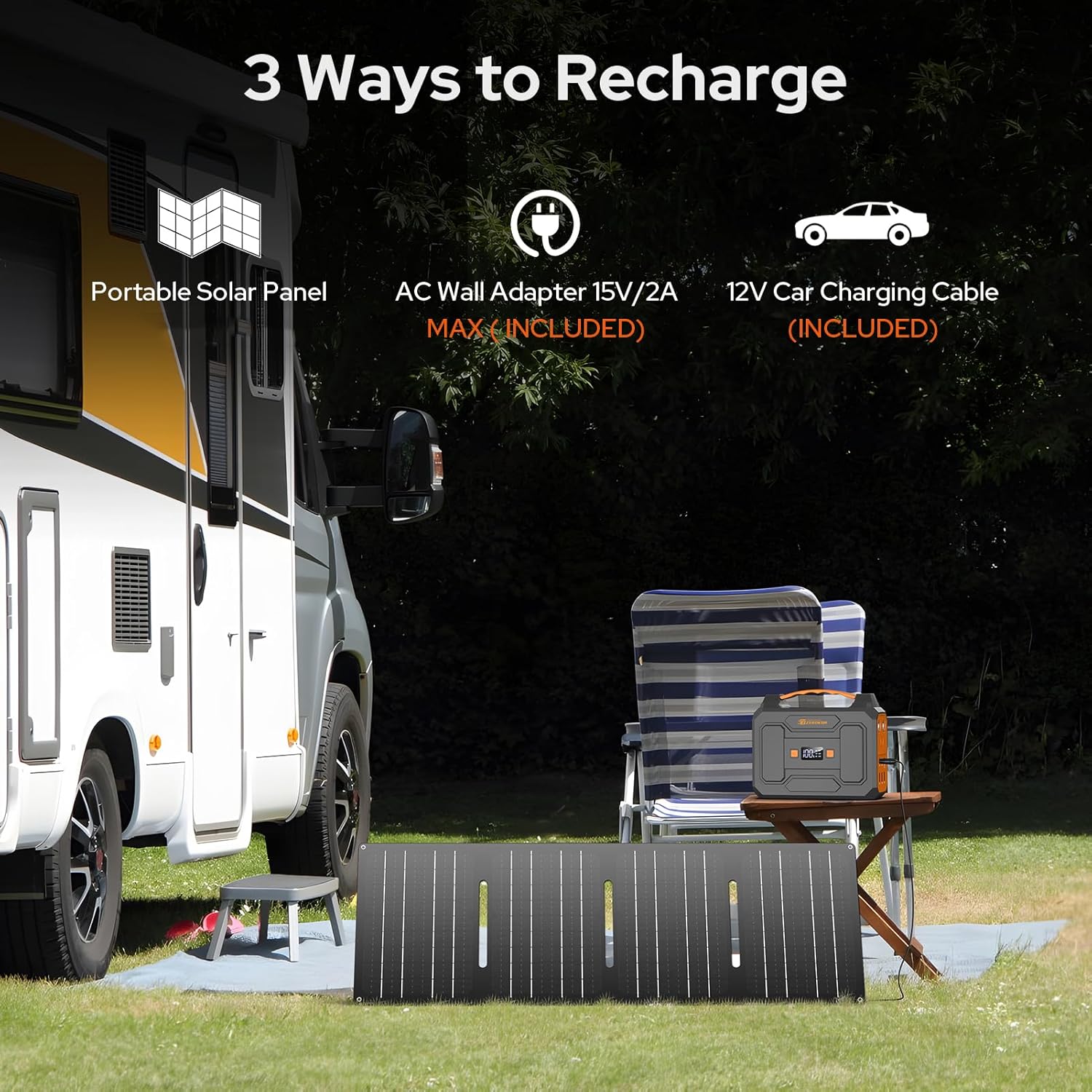
Figure 3: Three Ways to Recharge the ZeroKor Power Station
- Unfold the solar panel and place it in direct sunlight.
- Connect the solar panel's output cable to the 'INPUT' port on the power station. Ensure the connection is secure.
- Position the solar panel to receive maximum sunlight. The LCD screen will show charging progress.
Video 1: Official ZeroKor demonstration of solar charging the portable power station.
Operating Instructions
The ZeroKor R100 offers various output options to power your devices.
Powering AC Devices
- Press the 'AC' button on the power station to activate the AC outlets. The AC indicator on the LCD screen will light up.
- Plug your AC device (e.g., laptop charger, small fan) into one of the 110V AC outlets.
- Ensure your device's power consumption does not exceed 100W.
Video 2: Official ZeroKor demonstration of powering a laptop with the portable power station.
Powering USB and DC Devices
- Connect your USB device (e.g., smartphone, tablet) to any of the USB-A or USB-C ports.
- For DC 12V devices, connect them to the DC 12V output port.
- The power station will automatically detect and begin charging your devices.
Using the LED Flashlight
- Press the flashlight button (usually marked with a lightbulb icon) to turn on the LED flashlight.
- Press again to cycle through different modes: steady light, strobe, and SOS.
- Press and hold to turn off the flashlight.

Figure 4: ZeroKor Power Station's LED Flashlight in use during camping.
Maintenance
- Keep the power station dry and away from moisture.
- Avoid exposing the unit to extreme temperatures (hot or cold).
- Clean the exterior with a soft, dry cloth. Do not use harsh chemicals or abrasives.
- Store the power station in a cool, dry place when not in use, ideally with a partial charge (50-80%) to prolong battery life.
- Recharge the unit every 3-6 months if not used regularly to prevent deep discharge.
Troubleshooting
| Problem | Possible Cause | Solution |
|---|---|---|
| Power station not charging | Loose connection; insufficient sunlight (for solar); faulty adapter/cable | Check all connections; ensure direct sunlight; try a different charging method. |
| Device not powering/charging | Power station off; AC/DC output not activated; device exceeds 100W limit; faulty cable | Press power button; activate AC/DC output; check device wattage; try a different cable. |
| Overload protection activated | Device connected exceeds 100W | Disconnect the device. The power station will reset automatically. Use devices within the 100W limit. |
Specifications
| Feature | Detail |
|---|---|
| Brand | ZeroKor |
| Model Name | R100 Power Station |
| Item Model Number | R100 |
| Wattage | 100 watts (Max AC Output) |
| Voltage | 110 Volts (AC) |
| Power Source | AC/DC, USB, Battery-Powered, Solar Powered (Solar panel not included) |
| Item Weight | 3.3 Pounds |
| Product Dimensions | 5.9"L x 4.8"W x 4.9"H |
| Battery Type | 1 Lithium Ion battery (included) |
| Special Features | Portable, Overload Protection, Short Circuit Protection, 100W Max Portable Solar Generator |
| Included Components | 1*100W Portable Power Station, 1*15V power adapter, 1*Cigarette Lighter Adapter, 1*Car Charging Cable, 1*user manual (Solar panels not included) |
Safety Information
The ZeroKor portable power station is equipped with a Built-in Battery Management System (BMS) to ensure safe operation. This system provides:
- Short circuit protection
- Over-current protection
- Over-voltage protection
- Overload protection
- Overheating protection
Always adhere to the specified wattage limits for connected devices to prevent damage to the power station and ensure user safety.

Figure 5: Advanced Battery Management System (BMS) features.

Figure 6: Examples of devices exceeding the 100W limit that should not be used.
Warranty and Customer Support
ZeroKor offers professional customer assistance and 12 months of customer support for your portable power station. For any inquiries or issues, please contact our 7*24 hr customer care service.