
Introduction
The bitnovol 128GB Micro SD Card (Model AZ-TF-128GB) is a high-capacity memory solution designed for various electronic devices. It offers reliable storage for applications such as surveillance cameras, smartphones, personal computers, and 4K HD video recording. This card features read speeds up to 100MB/s and write speeds up to 25MB/s, ensuring efficient data transfer and recording. Its robust design provides protection against temperature extremes, water, shock, X-rays, and magnetic interference, making it suitable for use in diverse environments.

Image: The bitnovol 128GB Micro SD Card.
Image: bitnovol 128GB Micro SD Card highlighting its read speed of 100MB/s and write speed of 25MB/s.
Setup
- Insert the Micro SD Card: Carefully insert the bitnovol 128GB Micro SD Card into the designated Micro SD card slot of your compatible device (e.g., security camera, smartphone, tablet). Ensure the card is oriented correctly to avoid damage.
- Initial Formatting: Before first use, it is necessary to format the Micro SD card directly within your device. This process prepares the card for optimal performance with your specific device and ensures compatibility. Refer to your device's user manual for specific formatting instructions. Note: Formatting will erase all data on the card.
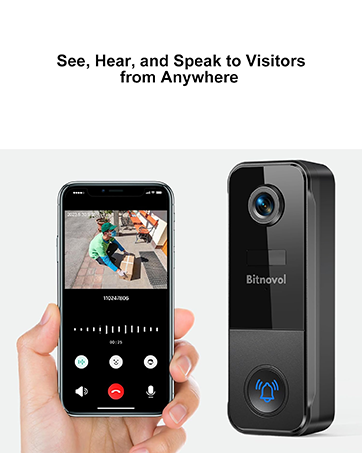
Image: A bitnovol 128GB Micro SD Card being inserted into a video doorbell.
Operating Instructions
The bitnovol 128GB Micro SD Card functions as a primary storage medium for your compatible devices.
- Data Storage: Store photos, videos, documents, and other digital files.
- Video Recording: Ideal for continuous video recording in surveillance cameras, dash cams, and action cameras. The card supports loop recording, which automatically overwrites the oldest footage when the memory capacity is full, ensuring uninterrupted recording.
- Data Transfer: Utilize the card for transferring files between devices. For optimal transfer speeds, use a compatible card reader with USB 3.0 interface.

Image: A bitnovol 128GB Micro SD Card actively recording in a surveillance camera setup.
Maintenance
The bitnovol 128GB Micro SD Card is engineered for durability and high endurance in various conditions.
- Environmental Protection: The card is designed to be temperature proof, water proof, shock proof, X-ray proof, and anti-magnetic. This reduces the need for extensive maintenance under normal operating conditions.
- Cleaning: If necessary, gently wipe the card's contacts with a soft, dry, lint-free cloth. Avoid using liquids or abrasive materials.
- Storage: When not in use, store the Micro SD card in its protective casing to prevent physical damage or exposure to extreme conditions.

Image: Icons representing the durability features of the bitnovol Micro SD Card, including resistance to temperature, water, shock, X-rays, and magnetic fields.
Troubleshooting
- Card Not Recognized:
- Ensure the card is fully and correctly inserted into the device's slot.
- Verify that your device is compatible with 128GB Micro SDXC cards.
- Try formatting the card within the device (Note: This will erase all data).
- Test the card in another compatible device or with a different card reader to determine if the issue is with the card or the device.
- Slow Performance:
- Ensure your device and card reader support the specified read (100MB/s) and write (25MB/s) speeds.
- Performance can vary based on host hardware, software, usage patterns, and available storage capacity.
- Avoid filling the card to its absolute maximum capacity, as this can sometimes affect performance.
- Data Corruption:
- Always safely eject the card from your computer or device before removing it.
- Avoid removing the card during data transfer or recording operations.
- If data corruption occurs frequently, consider re-formatting the card. If issues persist, the card may be faulty.
Specifications
| Feature | Detail |
|---|---|
| Brand | bitnovol |
| Model Name | 128GB Micro SD Card |
| Item Model Number | AZ-TF-128GB |
| Flash Memory Type | Micro SDHC |
| Memory Storage Capacity | 128 GB |
| Read Speed (Max) | 100 MB/s |
| Write Speed (Max) | 25 MB/s |
| Secure Digital Association Speed Class | Class 10, UHS-1 U3 |
| Special Features | Drop Proof, Magnetic Proof, Temperature Proof, Water Proof, X-Ray Proof |
| Hardware Interface | USB 2.0, USB 3.0 (via adapter) |
| Product Dimensions | 4.88"L x 2.95"W (Card dimensions: 11mm x 15mm x 1mm) |
| Item Weight | 0.36 g (0.014 ounces) |
| Compatible Devices | Action Dash VRS GOPRO Camera, Camera, Personal Computer, Smartphone, Tablet |

Image: Detailed technical specifications for the bitnovol 128GB Micro SD Card.
Warranty
The bitnovol 128GB Micro SD Card comes with a Lifetime Warranty, ensuring long-term reliability and peace of mind. Additionally, purchases are eligible for a 30-day free return period from the date of purchase.
Support
For any inquiries or technical assistance regarding your bitnovol 128GB Micro SD Card, 7*24-hour service support is available. Please refer to the bitnovol official website or your purchase platform for specific contact details and further assistance.
You can visit the official bitnovol store for more information: bitnovol Store on Amazon