
Langsdom BE10
Contents
Langsdom AirWave Open-Ear Bluetooth Sport Headphones User Manual
Model: BE10 | Brand: Langsdom
Introduction
Welcome to the user manual for your Langsdom AirWave Open-Ear Bluetooth Sport Headphones. These wireless earphones are designed to provide a comfortable and safe audio experience for your active lifestyle. Featuring a lightweight design, IPX5 Nano waterproof rating, and a built-in 32GB memory card, they are perfect for various activities including cycling and workouts. This manual will guide you through the setup, operation, maintenance, and troubleshooting of your headphones.
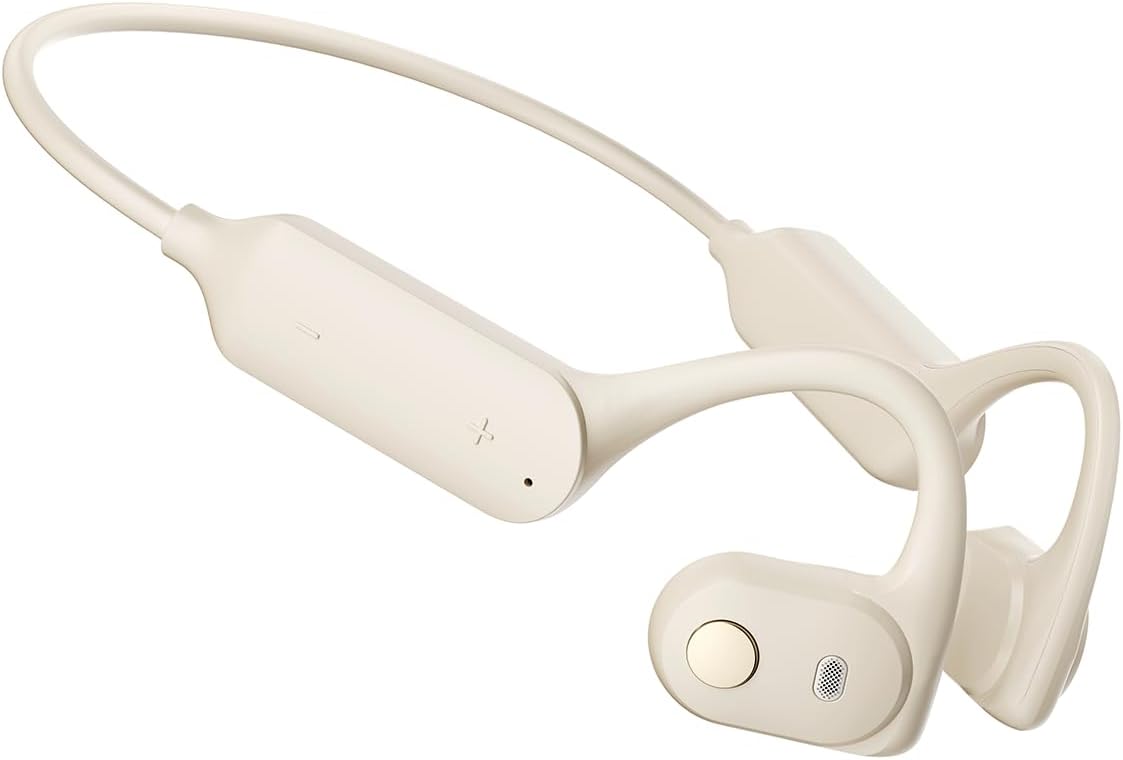
Figure 1: Langsdom AirWave Open-Ear Bluetooth Sport Headphones (Beige)
What's in the Box
Your Langsdom AirWave headphones package includes the following items:
- User Manual
- Magnetic charging cable
- Storage bag
Setup Guide
1. Charging the Headphones
Before first use, ensure your headphones are fully charged. Use the provided magnetic charging cable.
- Locate the magnetic charging port on the headphones.
- Connect the magnetic charging cable to the port.
- Connect the USB end of the cable to a compatible USB power source (e.g., computer USB port, USB wall adapter).
- The headphone is fully charged in approximately 1.5 hours.

Figure 2: Connecting the magnetic charging cable to the headphones.
Video 1: Demonstration of the AirWave headphone charging operation.
2. Powering On/Off
To power your headphones on or off, use the multifunction button or the touch area.
- **Power On:** Long press the multifunction button for about 2 seconds.
- **Power Off:** Long press the multifunction button for about 3 seconds.
- **Power On/Off Touch Area:** Press the multifunction button four times to toggle the touch area power on or off.
Video 2: How to manually power on/off the AirWave Open-Ear Sport Headphones.
Video 3: How to power on/off the AirWave headphones using the touch area.
3. Bluetooth Pairing
Follow these steps to pair your Langsdom AirWave headphones with your device:
- Ensure the headphones are powered off.
- Long press the headphone's multifunction button for about 2 seconds. The headphone will automatically enter pairing mode.
- On your device (smartphone, tablet, etc.), go to Bluetooth settings.
- Search for available Bluetooth devices and select "AirWave" to connect.
- Once connected, you will hear a confirmation tone.
Video 4: Instructions on how to pair AirWave Open-Ear Sport Headphones.
4. Extended Link (Multi-Device Connection)
The AirWave headphones support connecting to multiple devices. To switch between devices:
- If headphones are connected to Device A, disconnect them from Device A immediately.
- Turn on the Bluetooth on Device B.
- Search for "AirWave" and select to connect.
- Then, turn on the Bluetooth on Device A and select "AirWave" to connect.
- The headphones will now be connected to both devices, allowing for seamless switching.
Video 5: Guide on using the extended link feature for AirWave Open-Ear Sport Headphones.
Operating Instructions
1. Music Playback (MFB Operation)
Control your music directly from the headphones:
- **Play/Pause:** Press the headphone's multifunction button (MFB) once.
- **Next Song:** Press the MFB two times.
- **Previous Song:** Press the MFB three times.
Video 6: How to change music modes and control playback on AirWave headphones.
2. Volume Control
Adjust the volume using the touch-sensitive area on the headphones:
- **Increase Volume:** Slide your finger from the volume down button to the volume up button (slide about 1 second in the volume control area).
- **Decrease Volume:** Slide your finger from the volume up button to the volume down button (slide about 1 second in the volume control area).
Video 7: Demonstration of volume control on AirWave headphones.

Figure 3: Visual guide for touch and swipe controls.
3. Call Management (MFB Operation)
Manage phone calls with ease:
- **Answer/Hang Up Call:** Press the MFB once.
- **Reject Call:** Long press the MFB for about 2 seconds.
- **Switch Calls:** During a call, press the MFB twice to hang up the current call and answer an incoming one.
4. Built-in 32GB Memory Card (TF Mode)
Your headphones come with a built-in 32GB memory card, allowing you to store thousands of songs directly on the device. This enables music playback even without a connected phone.
- **Switch to TF Mode:** With the touch function enabled, simultaneously press and hold the "+" and "-" buttons for two seconds to open the TF card function.
- **Transferring Music:** The magnetic charging cable also functions as a data cable. You can directly connect it to a computer or use an OTG adapter to transfer music files.
- **Supported Music Formats:** MP3, WMA, WAV, APE, FLAC.
- **Important Note:** Downloading large audio files is not recommended and may affect playback performance.

Figure 4: The headphones feature a built-in 32GB memory for local music storage.
5. Open & Free Listening Experience
The lightweight design (only 26 grams) and open-ear audio allow you to enjoy your music while remaining aware of your surroundings. This feature is ideal for outdoor activities like cycling and workouts, enhancing both comfort and safety.

Figure 5: The open-ear design allows for situational awareness during activities.
Video 8: Demonstrates the use of AirWave Sport headphones in daily life scenarios, highlighting the open-ear design.
6. IPX5 Nano Waterproof Design
With double metal sound holes and nano-coating waterproof technology, these headphones are designed to withstand sweat, rain, and other sports scenarios, ensuring durability and peace of mind.
7. Enhanced Stereo Sound
Experience immersive sound quality thanks to the bionic conch sound guide structure and customized bio-diaphragm. The balanced tuning of high, medium, and low frequencies brings your music to life.

Figure 6: Diagram illustrating the internal components for powerful audio experience.
8. Upgraded Bluetooth 5.4 Chip
The upgraded Bluetooth 5.4 chip ensures a faster and more stable connection with stronger anti-interference capability, providing a seamless, high-quality audio experience.
9. Battery Life
Enjoy up to 26.5 hours of battery life on a single charge, thanks to the efficient power system design. This allows for extended music playback without frequent recharging.
Maintenance
Proper care and maintenance will extend the lifespan of your Langsdom AirWave headphones:
- **Cleaning:** Wipe the headphones with a soft, dry cloth. For stubborn dirt, a slightly damp cloth can be used, but ensure the headphones are completely dry before charging or storing.
- **Storage:** When not in use, store the headphones in the provided storage bag to protect them from dust and scratches. Avoid storing in extreme temperatures or high humidity.
- **Charging:** Always use the original magnetic charging cable. Do not attempt to force the cable into the port.
- **Water Exposure:** While IPX5 rated, avoid submerging the headphones in water. Dry them thoroughly if they get wet from sweat or rain.
Troubleshooting
If you encounter issues with your headphones, try the following solutions:
| Problem | Possible Cause | Solution |
|---|---|---|
| Headphones won't power on. | Low battery; Power button not pressed long enough. | Charge the headphones fully. Long press the multifunction button for 2 seconds. |
| Cannot pair with device. | Headphones not in pairing mode; Device Bluetooth off; Too far from device. | Ensure headphones are in pairing mode (long press MFB). Turn off/on device Bluetooth. Move headphones closer to device. |
| No sound or low volume. | Volume too low on headphones or device; Not connected properly. | Increase volume on both headphones and device. Re-pair the headphones. |
| Music transfer issues. | Incorrect file format; Cable connection issue. | Ensure music files are in supported formats (MP3, WMA, WAV, APE, FLAC). Check cable connection to computer/OTG adapter. |
Product Specifications
| Feature | Specification |
|---|---|
| Brand | Langsdom |
| Model Name | AirWare (BE10) |
| Connectivity Technology | Wireless (Bluetooth 5.4) |
| Ear Placement | Open Ear |
| Waterproof Rating | IPX5 Nano Waterproof |
| Built-in Memory | 32GB |
| Battery Life | Up to 26.5 hours |
| Weight | 26 grams (approx. 0.92 ounces) |
| Audio Driver Type | Dynamic Driver |
| Audio Driver Size | 14.2 Millimeters |
| Impedance | 32 Ohm |
| Material | Metal |
| Included Components | User Manual, Storage bag, Magnetic charging cable |
Warranty and Support
For detailed warranty information and customer support, please refer to the official Langsdom website or contact their customer service directly.
An official User Guide (PDF) is also available for download: Download User Guide PDF
Documents and downloads
Ask a question about this manual
Ask about setup, troubleshooting, compatibility, parts, safety, or missing instructions. Manuals+ will review the question and use this page’s manual context to help answer it.