
1. Introduction and Overview
The Sunshine SS-601G is a universal LCD mobile phone screen separator tool designed for efficient and safe screen removal without the need for heating. This innovative tool is suitable for a wide range of mobile phone models, providing a non-destructive method for screen disassembly. Its design ensures that internal cables and the phone's camera are protected during the process, making it an ideal solution for both professionals and beginners in mobile phone repair.

Figure 1: The Sunshine SS-601G Universal LCD Mobile Phone Screen Separator Tool. This image shows the complete assembly of the screen separator, ready for use.
2. Key Features
- Heat-Free Operation: Eliminates the need for heating, simplifying the screen disassembly process and reducing the risk of heat-related damage to sensitive components.

Figure 2: Illustration highlighting the heat-free screen separation capability of the tool.
- Universal Compatibility: The mobile phone clamping area is adjustable from 129 mm to 170 mm, accommodating various mobile phone models and sizes.

Figure 3: Depiction of the tool's ability for quick and heat-free screen removal, suitable for novices.
- Camera Groove Design: Features a dedicated groove to safely position the phone's camera, preventing damage during the screen removal process.
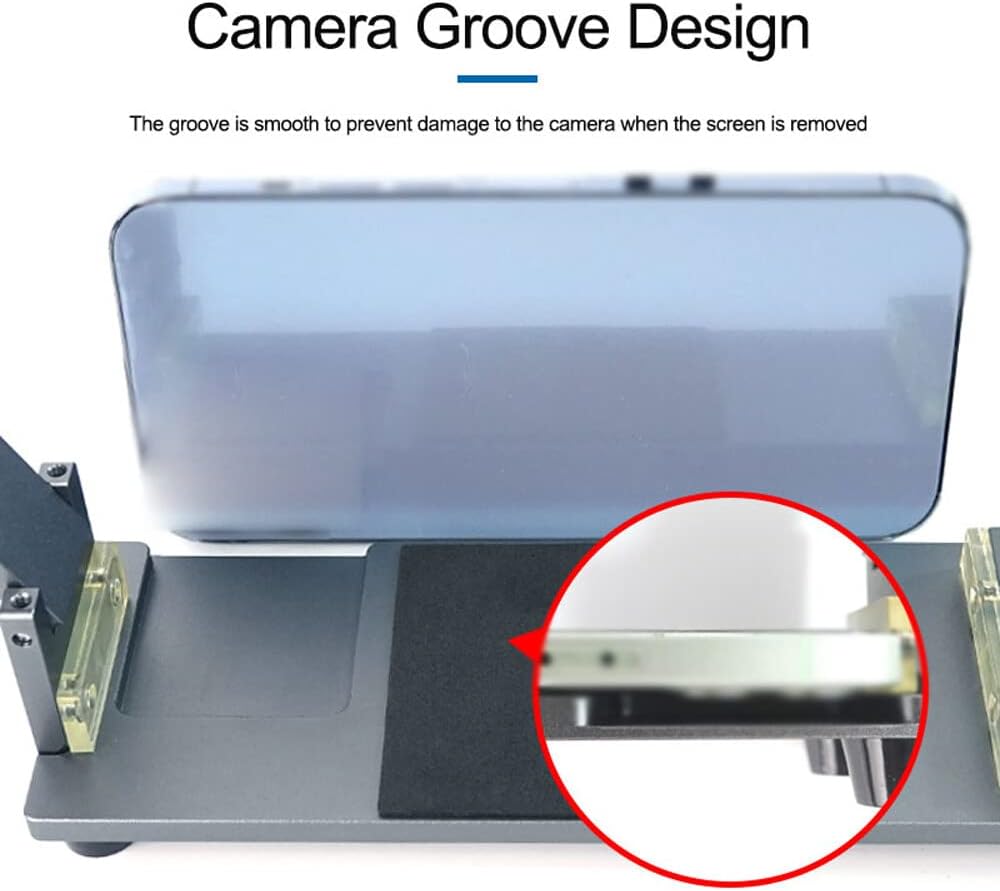
Figure 4: Close-up view of the camera groove designed to protect the phone's camera during disassembly.
- Protective Base and Pads: Equipped with a protective base and front/rear pads to prevent the mobile phone from slipping, falling, or getting scratched during operation.

Figure 5: Images illustrating the protective base and pads that ensure safety and non-destructive disassembly.
- Strong Suction Cup: A robust suction cup gently secures the mobile phone screen, ensuring stable absorption and preventing accidental detachment.
- Screw Tension Design: Allows for precise upward tension adjustment, slowly pulling the suction cup to prevent the screen from being pulled out abruptly.
- Adjustable Placement Area: The mobile phone placement area can be adjusted to fit various phone sizes, ensuring optimal positioning.
- Fixing Screw: A dedicated fixing screw allows for firm positioning and easy separation of the screen without damaging the frame or back cover.

Figure 6: Detailed breakdown of key features including strong suction cup, screw tension design, adjustable placement area, and fixing screw.
3. Setup
- Unpack the Tool: Carefully remove the Sunshine SS-601G screen separator from its packaging. Inspect all components for any signs of damage.
- Place on a Stable Surface: Position the tool on a clean, flat, and stable workbench to ensure secure operation.
- Adjust Clamping Range: Loosen the screws on the side clamps and adjust the mobile phone clamping area to match the width of your specific mobile phone model. The adjustable range is 129 mm to 170 mm. Tighten the screws once adjusted.
- Adjust Height (if necessary): The tool offers a height adjustment range of 0 to 40 mm. Adjust the upper arm's height to ensure the suction cup can make firm contact with the phone screen.
- Prepare the Phone: Ensure the mobile phone is powered off. Remove any SIM cards, memory cards, or external cases. Clean the screen surface to ensure optimal suction cup adhesion.
4. Operating Instructions
Follow these steps carefully to safely separate your mobile phone screen:
- Position the Phone: Place the mobile phone onto the protective base of the tool. Ensure the phone is centered and securely held by the side clamps. If your phone has a camera bump, align it with the dedicated camera groove to prevent damage.
- Attach the Suction Cup: Lower the upper arm until the strong suction cup makes full contact with the mobile phone screen. Press down firmly on the suction cup lever to create a strong vacuum seal.
- Apply Tension: Slowly turn the screw on the upper arm to apply upward tension. This will gradually pull the suction cup, gently lifting the screen from the phone body. Observe the screen carefully as it separates.
- Separate the Screen: Continue turning the screw until the screen is sufficiently separated. The heat-free design ensures a controlled and safe separation.
- Release and Remove: Once the screen is separated, release the suction cup by disengaging its lever. Carefully remove the screen from the tool.
- Disassemble Further (if needed): With the screen separated, you can proceed with further repair or component replacement as required.
5. Maintenance
- Cleaning: After each use, wipe down the tool with a soft, dry cloth to remove any dust or debris. For stubborn grime, a slightly damp cloth can be used, followed by immediate drying.
- Suction Cup Care: Ensure the suction cup is clean and free of oil or residue to maintain optimal suction power. If the suction cup loses effectiveness, clean it thoroughly with mild soap and water, then air dry.
- Lubrication: Periodically check the moving parts, such as the tension screw and clamping mechanisms. Apply a small amount of silicone-based lubricant if movement becomes stiff.
- Storage: Store the tool in a clean, dry environment, away from direct sunlight and extreme temperatures. Keep it in its original packaging or a protective case to prevent damage.
- Inspection: Regularly inspect the tool for any signs of wear, damage, or loose components. Do not use the tool if any part is broken or compromised.
6. Troubleshooting
| Problem | Possible Cause | Solution |
|---|---|---|
| Screen not separating | Insufficient tension applied; screen adhesive too strong; phone not properly secured. | Ensure the suction cup has a strong seal. Slowly increase tension. Verify the phone is firmly clamped. For very strong adhesive, gentle prying with a thin, non-metallic tool may be needed after initial separation. |
| Suction cup not holding | Screen surface is dirty or oily; suction cup is dirty or damaged; insufficient pressure applied to engage suction. | Clean the phone screen and the suction cup thoroughly. Ensure the suction cup is dry. Press down firmly on the suction cup lever to create a strong vacuum. Replace the suction cup if damaged. |
| Phone slipping in clamps | Clamps not tightened sufficiently; phone size outside clamping range; protective pads worn. | Ensure the side clamps are securely tightened. Verify your phone's dimensions are within the 129 mm ~ 170 mm clamping range. Inspect protective pads for wear and replace if necessary. |
7. Specifications

Figure 7: Diagram illustrating the key dimensions and adjustable ranges of the Sunshine SS-601G tool.
| Attribute | Detail |
|---|---|
| Brand | Sunshine |
| Product Name | Mobile Phone Screen Heating Free Screen Remove Tool |
| Model | SS-601G |
| Material | Aluminum Alloy |
| Clamping Range | 129 mm ~ 170 mm |
| Height Adjustment Range | 0 ~ 40 mm |
| Item Size (L x W x H) | 220 x 76 x 70 mm (8.7 x 3.0 x 2.8 inches) |
| Item Weight | 455 g (1.0 lb) |
| Package Size (L x W x H) | 230 x 85 x 73 mm (9.1 x 3.3 x 2.9 inches) |
| Package Weight | 510 g (1.1 lb) |

Figure 8: Summary table of product information and specifications.
8. Warranty and Support
Information regarding product warranty and customer support is not provided within this manual. For warranty claims, technical assistance, or further inquiries, please refer to the product packaging or contact the retailer/manufacturer directly.
You may also visit the official Sunshine website or contact their customer service for the most up-to-date information.