
1. Introduction
The MASTECH MS2109D is a precise and versatile 6000-count digital multimeter with True RMS capabilities, designed for comprehensive electrical diagnosis. It features a 23mm max jaw opening for clamp measurements, overload protection, and various functions including Diode/Continuity, NCV Detection, Backlight, Data Hold, and Auto Power Off. This manual provides detailed instructions for the safe and effective use of your MS2109D multimeter.
2. Safety Information
Always observe safety precautions when using electrical testing equipment. Failure to do so may result in injury or damage to the meter or equipment under test.
- Ensure the meter is in good working condition before use.
- Do not exceed the maximum input values for any function. The MS2109D is rated CAT III 600V.
- Use caution when working with voltages above 30V AC RMS, 42V peak, or 60V DC. These voltages pose a shock hazard.
- Always disconnect the test leads from the circuit before changing functions.
- Do not operate the meter if the battery cover is not in place or if the meter appears damaged.
- Use only the specified type of batteries (1.5V AAA x 3).
3. Product Features
- 6000 Counts Display
- True RMS Measurement
- Frequency Measurement (up to 1000Hz)
- Relative Measurement
- LED / Flashlight for illumination
- Duty Cycle / Inrush Current Measurement
- Overload Protection
- Diode and Continuity Test
- Non-Contact Voltage (NCV) Detection / Live Wire Recognition
- Max Jaw Opening: 23mm
- Auto Power Off for battery saving
- Data Hold function
- Backlight for easy reading in low light conditions
- Unit Display
4. Components and Parts Identification
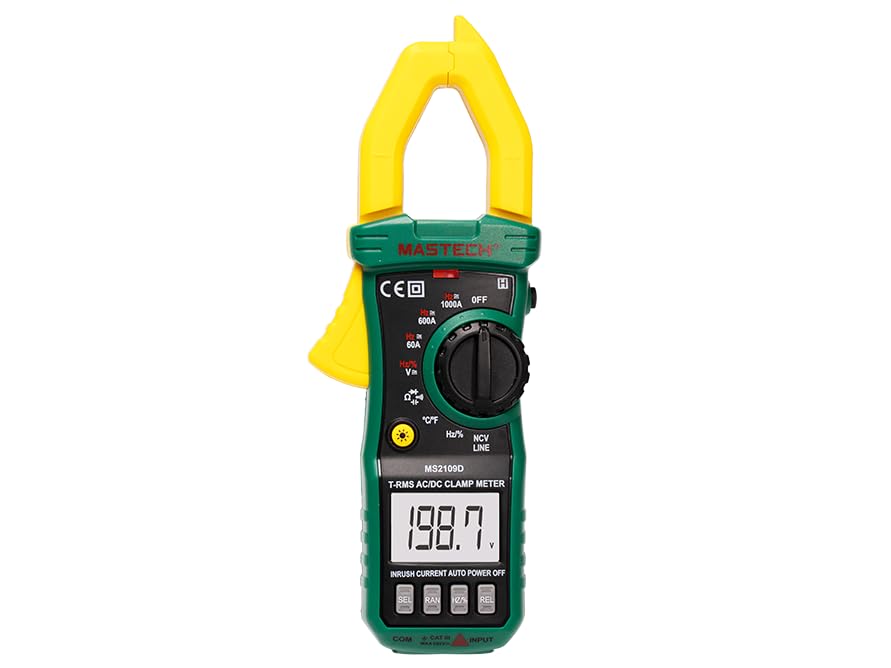
Figure 4.1: Front view of the MASTECH MS2109D Digital Multimeter, showing the clamp jaw, display, rotary switch, and input terminals.
- Clamp Jaw: Used for non-contact AC/DC current measurement.
- LCD Display: Shows measurement readings, units, and function indicators.
- Function Rotary Switch: Selects the desired measurement function.
- Function Buttons: Buttons for specific features like HOLD, SELECT, NCV, etc.
- Input Jacks: Terminals for connecting test leads (COM, VΩHz, A).
- Flashlight/LED: Provides illumination for the measurement area.
5. Setup
5.1 Battery Installation
- Ensure the meter is turned OFF.
- Locate the battery compartment on the back of the meter.
- Unscrew the battery compartment cover.
- Insert three 1.5V AAA batteries, observing the correct polarity (+/-) as indicated inside the compartment.
- Replace the battery cover and secure it with the screw.
5.2 Connecting Test Leads
- For most voltage, resistance, continuity, diode, frequency, and capacitance measurements, insert the black test lead into the 'COM' (common) jack and the red test lead into the 'VΩHz' jack.
- For current measurements using test leads (not clamp), refer to the specific current input jack (if available, typically 'A' or 'mA' for smaller currents). For the MS2109D, current is primarily measured via the clamp.
6. Operating Instructions
6.1 Power On/Off
Turn the rotary switch from 'OFF' to any desired function to power on the meter. To power off, turn the rotary switch back to 'OFF'. The meter features Auto Power Off to conserve battery life after a period of inactivity.
6.2 DC/AC Voltage Measurement (V)
- Set the rotary switch to the 'V' position. Use the 'SELECT' button to toggle between DCV and ACV if necessary.
- Connect the black test lead to the 'COM' jack and the red test lead to the 'VΩHz' jack.
- Connect the test probes in parallel to the circuit or component to be measured.
- Read the voltage value on the display.
6.3 AC/DC Current Measurement (A) - Clamp Function
- Set the rotary switch to the 'A' position (60A, 600A, or 1000A range). Use the 'SELECT' button to toggle between DCA and ACA.
- Open the clamp jaw by pressing the trigger.
- Enclose only one conductor of the circuit within the clamp jaw. Ensure the jaw is fully closed.
- Read the current value on the display.
6.4 Resistance Measurement (Ω)
- Set the rotary switch to the 'Ω' position.
- Connect the black test lead to 'COM' and the red test lead to 'VΩHz'.
- Ensure the circuit or component is de-energized before connecting the probes.
- Connect the test probes across the component to be measured.
- Read the resistance value on the display.
6.5 Diode and Continuity Test
- Set the rotary switch to the 'Diode/Continuity' position. Use 'SELECT' to toggle between functions.
- Connect the black test lead to 'COM' and the red test lead to 'VΩHz'.
- For Continuity: Connect probes across the circuit. A continuous beep indicates continuity (low resistance).
- For Diode Test: Connect the red probe to the anode and the black probe to the cathode of the diode. The display will show the forward voltage drop. Reverse the probes; an open circuit (OL) reading indicates a good diode.
6.6 Frequency (Hz) and Capacitance (F) Measurement
- Set the rotary switch to the 'Hz/%' or 'Capacitance' position. Use 'SELECT' to toggle if combined.
- Connect the black test lead to 'COM' and the red test lead to 'VΩHz'.
- For Capacitance: Ensure the capacitor is fully discharged before testing. Connect probes across the capacitor.
- For Frequency: Connect probes across the signal source.
- Read the value on the display.
6.7 Temperature Measurement (°C/°F)
- Set the rotary switch to the '°C/°F' position. Use 'SELECT' to toggle between Celsius and Fahrenheit.
- Connect the temperature probe (thermocouple) to the input jacks, observing polarity.
- Place the tip of the temperature probe on or near the object whose temperature is to be measured.
- Read the temperature value on the display.
6.8 Non-Contact Voltage (NCV) Detection
- Set the rotary switch to the 'NCV' position.
- Move the top end of the meter (where the NCV sensor is located) close to the live conductor.
- The meter will emit an audible beep and the NCV indicator light will flash when AC voltage is detected.
6.9 Data Hold and Backlight
- Data Hold: Press the 'HOLD' button to freeze the current reading on the display. Press again to release.
- Backlight: Press the 'Backlight' button (often combined with another function button) to turn the display backlight on or off for improved visibility in dark environments.
7. Maintenance
7.1 Cleaning
Wipe the meter casing with a damp cloth and mild detergent. Do not use abrasives or solvents. Ensure the meter is dry before use.
7.2 Battery Replacement
When the battery indicator appears on the display, replace the batteries as described in Section 5.1. Always use fresh 1.5V AAA batteries.
7.3 Storage
If the meter is not to be used for an extended period, remove the batteries to prevent leakage and store the meter in a cool, dry place away from direct sunlight and extreme temperatures.
8. Troubleshooting
- No Display: Check battery installation and ensure batteries are not depleted.
- 'OL' (Overload) Reading: The measured value exceeds the meter's range for the selected function. Select a higher range or ensure the input is within specifications.
- Inaccurate Readings: Check test lead connections, ensure proper function selection, and verify battery level.
- Meter Does Not Turn On: Ensure the rotary switch is moved from the 'OFF' position.
9. Specifications
9.1 General Specifications
- Max Display: 6000 Counts
- Safety Rating: CAT III 600V
- Power Source: 3 x 1.5V AAA Batteries (included)
- Dimensions: Approximately 7.64 x 2.83 x 1.38 inches (19.4 x 7.2 x 3.5 cm)
- Weight: Approximately 8.11 ounces (230g)
- Max Jaw Opening: 23mm
9.2 Measurement Specifications
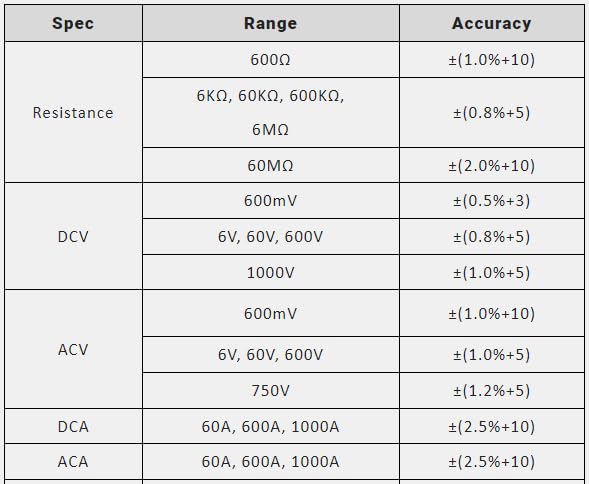
Figure 9.1: Measurement Specifications for Resistance, DCV, ACV, DCA, and ACA.
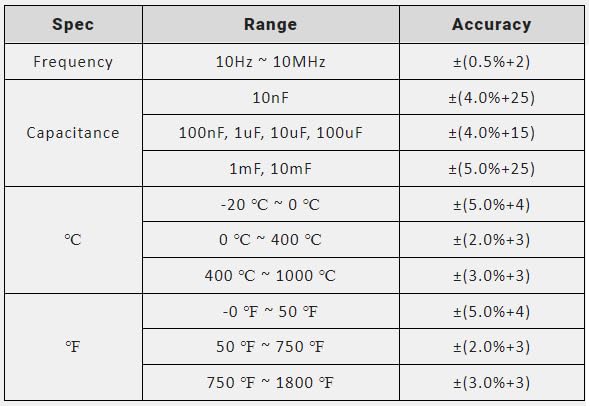
Figure 9.2: Measurement Specifications for Frequency, Capacitance, and Temperature (°C/°F).
10. What's in the Box
Upon opening the product packaging, you should find the following items:
- MASTECH MS2109D Digital Multimeter
- Carry bag
- Test leads (one pair)
- User manual (this document)
- Temperature probe
- 3 x 1.5V AAA battery pack (pre-installed or separate)
11. Warranty and Support
For warranty information and technical support, please refer to the warranty card included with your product or visit the official Mastech website. Keep your purchase receipt as proof of purchase for warranty claims.
If you encounter any issues not covered in this manual, please contact Mastech customer service for assistance.


