1. Product Overview
The De'Longhi Magnifica Plus ECAM320.60.W is an automatic coffee machine designed to deliver a wide range of coffee specialties with ease. Featuring an intuitive 3.5-inch color touchscreen and LatteCrema Hot technology, it ensures a rich and smooth coffee experience.
Key Features:
- Prepares 15 hot and cold coffee-based beverages.
- LatteCrema Hot system for smooth, rich milk foam with adjustable texture.
- Intuitive 3.5-inch color touchscreen with animated guidance.
- Personalize and save up to four user profiles for favorite drinks.
- Easy cleaning with removable, dishwasher-safe components.

Image 1.1: The intuitive 3.5-inch color touchscreen for beverage selection.
2. Setup
2.1 Unpacking and Placement
- Carefully remove the machine from its packaging.
- Place the machine on a stable, level surface away from water splashes and heat sources.
- Ensure adequate space around the machine for ventilation and access to components.
2.2 Initial Cleaning
- Wipe the exterior of the machine with a soft, damp cloth.
- Remove and wash the water tank, drip tray, and coffee grounds container with warm water and mild detergent. Rinse thoroughly.
- If included, wash the LatteCrema Hot milk carafe components.
2.3 Filling the Water Tank
- Remove the water tank from the machine.
- Fill the tank with fresh, cold tap water up to the MAX level indicator.
- Replace the water tank securely in the machine.
2.4 Filling the Bean Container
- Open the lid of the bean container located on top of the machine.
- Pour fresh coffee beans into the container. Do not overfill.
- Close the lid firmly to maintain bean freshness.
2.5 First Use / Priming
- Plug the machine into a suitable power outlet.
- Press the power button to turn on the machine.
- Follow the on-screen instructions for the initial rinsing cycle. This primes the internal circuits.
- Place a container under the coffee spouts to collect the water.
3. Operating Instructions
3.1 Control Panel Overview
The 3.5-inch color touchscreen provides access to all machine functions. Icons represent different beverages and settings. Touch an icon to select a function or beverage.
3.2 Making Coffee
- Place a cup under the coffee spouts.
- On the touchscreen, select your desired coffee beverage (e.g., Espresso, Coffee).
- Adjust the coffee strength and quantity if desired using the on-screen options.
- Press the 'Start' icon to begin brewing.
3.3 Making Milk-Based Drinks
- Fill the LatteCrema Hot milk carafe with fresh cold milk.
- Attach the milk carafe to the machine's milk spout.
- Place a cup under the coffee and milk spouts.
- Select your desired milk-based beverage (e.g., Cappuccino, Latte Macchiato) from the touchscreen.
- Adjust milk foam texture and coffee quantity if desired.
- Press the 'Start' icon. The machine will automatically froth the milk and brew the coffee.
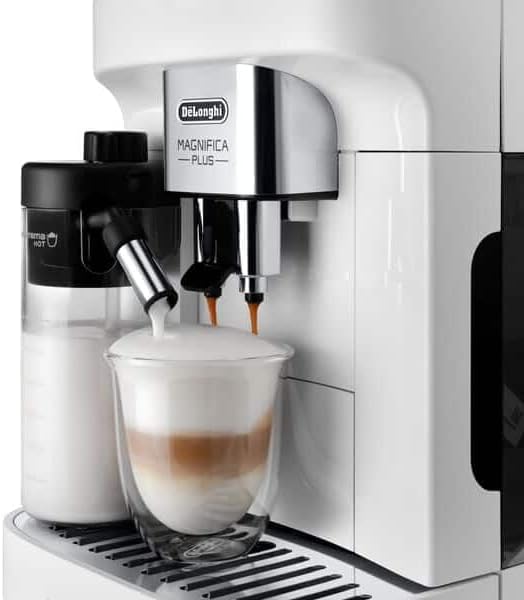
Image 3.1: The LatteCrema Hot system frothing milk for a beverage.
3.4 Customizing Drinks and User Profiles
- Customization: Before brewing, touch the beverage icon and use the on-screen sliders or buttons to adjust parameters like coffee strength, temperature, and milk quantity.
- User Profiles: The machine allows saving personalized drink settings to user profiles. Access the profile menu on the touchscreen to create, select, or modify profiles. This enables quick access to your preferred beverages.
4. Maintenance and Cleaning
Regular cleaning ensures optimal performance and extends the lifespan of your coffee machine.
4.1 Daily Cleaning
- Empty and rinse the drip tray and coffee grounds container daily.
- Wipe the exterior of the machine with a soft, damp cloth.
- After each milk-based drink, perform the quick rinse cycle for the LatteCrema Hot system as prompted by the machine.
4.2 Brew Unit Cleaning
- Turn off the machine and unplug it.
- Open the service door and remove the brew unit by pressing the two red release buttons.
- Rinse the brew unit thoroughly under running tap water until no coffee residue is visible. Do not use detergent.
- Allow the brew unit to air dry completely before reinserting.
4.3 Milk System Deep Cleaning
Beyond the daily rinse, periodically disassemble and clean the LatteCrema Hot milk carafe components with warm water and mild detergent. Refer to the machine's display for specific deep cleaning cycles.
4.4 Descaling
The machine will prompt you when descaling is required. Use only De'Longhi descaling solution. Follow the on-screen instructions precisely for the descaling cycle. Failure to descale regularly can damage the machine and void the warranty.
4.5 Water Filter Replacement
If a water filter is installed, the machine will indicate when it needs replacement, typically every two months. Replace the filter according to the instructions provided with the filter and on the machine's display.
5. Troubleshooting
This section addresses common issues you might encounter. For problems not listed here, contact customer support.
| Problem | Possible Cause | Solution |
|---|---|---|
| Machine does not turn on. | Not plugged in; power outlet fault. | Check power cord connection; try a different outlet. |
| Coffee not dispensing. | Water tank empty; brew unit clogged; coffee spouts blocked. | Fill water tank; clean brew unit; clean coffee spouts. |
| Milk not frothing correctly. | Milk carafe not clean; milk type unsuitable; milk too warm. | Clean milk carafe thoroughly; use cold, fresh milk (dairy or plant-based suitable for frothing). |
| "Descaling required" message. | Machine detects limescale buildup. | Perform a descaling cycle as per instructions in Section 4.4. |
| "Empty water tank" or "Fill bean container" message. | Water or beans are low/empty. | Refill the water tank or bean container. |
6. Specifications
Technical details for the De'Longhi Magnifica Plus ECAM320.60.W.
| Feature | Detail |
|---|---|
| Brand | De'Longhi |
| Model Number | ECAM320.60.W |
| Color | White |
| Dimensions (L x W x H) | 44 x 24 x 36 cm |
| Weight | 9.8 Kilograms |
| Water Tank Capacity | 1.9 Litres |
| Power | 1450 Watts |
| Voltage | 240 Volts |
| Material | Plastic |
| Special Feature | Automatic cleaning function |
7. Warranty and Support
For detailed warranty information, please refer to the warranty card included with your product or visit the official De'Longhi website. If you require technical assistance, spare parts, or have questions not covered in this manual, please contact De'Longhi customer support directly. Contact details can typically be found on the official website or in the product packaging.


