1. Introduction
This manual provides detailed instructions for installing and operating your Hilighting LED Light Kit, specifically designed for the LEGO Speed Champions Ford Mustang Dark Horse Sports Car Building Set (LEGO Model 76920). This light kit enhances the visual appeal of your LEGO model by adding vibrant lighting effects. Please note that the LEGO model itself is not included with this light kit.
2. Package Contents
Verify that all components are present before beginning installation:
- LED Light Strips and Individual LEDs
- Connecting Cables
- USB Power Cable
- Battery Box (batteries not included)
- Adhesive Squares (if applicable)
- Instruction Manual (this document)
Note: 3x AA batteries are required for battery box operation and are not supplied with the kit.
3. Safety Information
- This product contains small parts and is not suitable for children under 3 years old due to choking hazards.
- Ensure the power source (USB or batteries) provides 3-5V DC. Using an incorrect voltage may damage the lights.
- Do not expose the light kit to water or excessive moisture.
- Handle wires and LED components carefully to avoid damage.
- Disconnect power before performing any maintenance or adjustments.
4. Setup and Installation
Installation of the Hilighting LED Light Kit is designed to be straightforward. For detailed, step-by-step visual instructions, please refer to the official installation video or scan the QR code provided in the physical packaging to access the digital guide.

Image 1: The LEGO Ford Mustang model before and after the Hilighting LED light kit installation, demonstrating the illumination effect.
General Installation Steps:
- Prepare Your Model: Ensure your LEGO Ford Mustang model (76920) is fully assembled and accessible for light placement.
- Identify Light Placement: Refer to the specific instructions (digital guide/video) to identify where each LED and light strip should be placed on your model. Common areas include headlights, taillights, and undercarriage.
- Route Wires: Carefully route the thin connecting wires between LEGO bricks. Avoid pinching or bending wires sharply, as this can damage them.
- Connect Components: Connect the LEDs and light strips to the main expansion board or connecting cables as indicated in the instructions. Ensure connections are secure.
- Power Connection: Connect the USB power cable or the battery box to the main control unit.
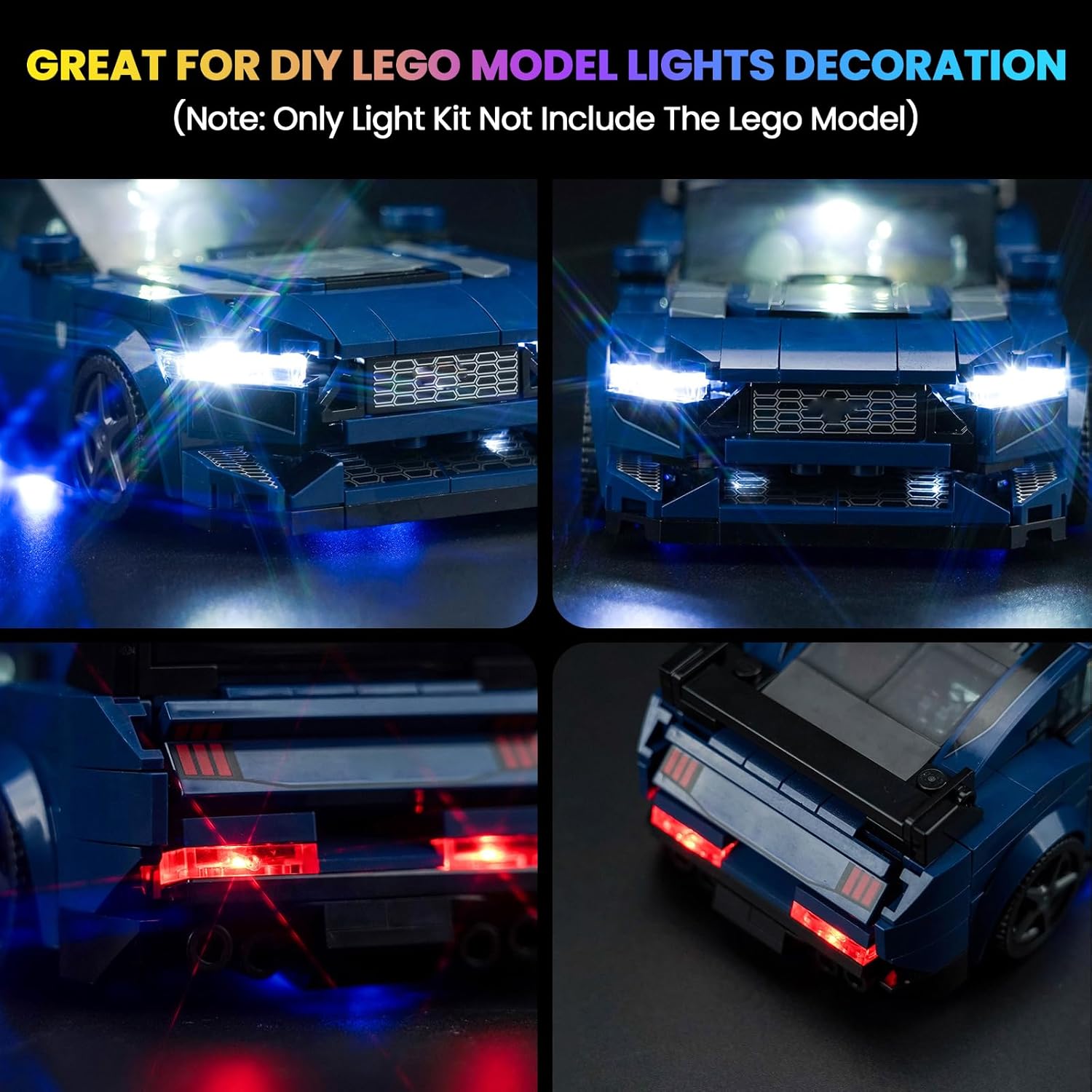
Image 2: Detailed view of the illuminated front and rear sections of the LEGO Ford Mustang model after light kit installation.
Installation Video Guide
Video 1: Official Hilighting installation guide for the LED Light Kit on the LEGO Speed Champions Ford Mustang Dark Horse model. This video demonstrates the step-by-step process of integrating the lights into the building set.
5. Operating Instructions
Once the light kit is fully installed and connected to a power source, the lights will illuminate. The kit supports two primary power methods:
- USB Power: Connect the provided USB cable to a 3-5V USB power adapter (e.g., phone charger, power bank, computer USB port).
- Battery Power: Insert 3x AA batteries (not included) into the battery box and connect the battery box to the light kit's main control unit.
Some light kits may feature a seven-color self-flashing mode or standard continuous illumination. Refer to your specific kit's instructions for any additional control features.
6. Maintenance
- Cleaning: Use a soft, dry cloth to gently wipe dust from the LED components and wires. Avoid using liquid cleaners.
- Wire Management: Periodically check that all wires are securely routed and not pinched or stressed.
- Battery Replacement: If using battery power, replace all batteries simultaneously when lights dim or cease to function. Ensure correct polarity.
- Storage: If storing the model for an extended period, disconnect the power source (remove batteries or unplug USB cable).
7. Troubleshooting
| Problem | Possible Cause | Solution |
|---|---|---|
| Lights do not turn on. | No power, loose connection, faulty component. | Check USB power source or replace batteries. Ensure all cables are securely connected. Inspect individual LEDs for visible damage. |
| Some lights are not working. | Loose connection to specific LED, damaged LED/wire. | Check connections for the non-working lights. Carefully inspect wires for breaks or pinches. |
| Lights are dim. | Low battery power. | Replace batteries with fresh ones or switch to USB power. |
If you encounter issues not listed here or require further assistance, please contact Hilighting customer support.
8. Specifications
| Feature | Detail |
|---|---|
| Brand | Hilighting |
| Model Number | US04-P62401-0307 |
| Compatible LEGO Set | LEGO Speed Champions Ford Mustang Dark Horse Sports Car Building Set (76920) |
| Light Source Type | Light Emitting Diode (LED) |
| Power Source | USB (3-5V) or 3x AA Batteries (not included) |
| Voltage | 5 Volts |
| Number of Light Sources | 7 (varies by specific kit design) |
| Bulb Features | Color-changing (for some models), standard illumination |
| Material | Plastic |
| Item Weight | Approximately 0.11 Kilograms (3.84 ounces) |
9. Warranty and Support
Hilighting provides lifetime technical support for this LED light kit. If you have any questions, concerns, or require assistance with installation or troubleshooting, please do not hesitate to contact our customer support team. We are committed to ensuring your satisfaction with our product.
For support, please visit the official Hilighting store on Amazon or contact us through the platform where you purchased the product.


