
1. Product Overview
The RWRAPS MS600 Series is a high-performance 600W adjustable switching power supply designed for various applications requiring stable and adjustable DC voltage and current. This series offers multiple output configurations, including 0-12V, 0-24V, 0-36V, 0-48V, 0-60V, 0-72V, 0-80V, 0-110V, and 0-220V, with corresponding current ratings up to 50A.
Key features include:
- Adjustable Output: Both voltage and current are adjustable to meet specific application requirements.
- High Stability: Designed for stable output with low ripple noise and minimal voltage fluctuations during operation.
- Integrated Cooling: Features a built-in cooling fan and temperature detector for efficient heat dissipation, ensuring optimal performance and longevity.
- Comprehensive Safety: Equipped with automatic overload cut-off, over-voltage cut-off, automatic thermal cut-off, and short circuit protection.
- Robust Components: Utilizes pure copper transformers and coils, along with large capacitance components for high-temperature resistance, enhancing safety and performance.
- Compact Design: Small form factor for easy integration into various setups.
2. Safety Information
WARNING: Improper installation or operation can lead to electric shock, fire, or damage to the unit and connected equipment. Always follow these safety guidelines.
- Ensure the power supply is disconnected from the main AC power source before any installation, wiring, or maintenance.
- Only qualified personnel should perform installation and wiring.
- Verify that the input voltage matches the specifications (100-120VAC or 200-240VAC) before connecting to the mains.
- Properly ground the unit using the designated ground terminal.
- Do not operate the power supply in wet or damp conditions.
- Ensure adequate ventilation around the unit to prevent overheating. Do not block the cooling fan or ventilation openings.
- Avoid touching internal components when the unit is powered on or recently powered off, as high voltages may still be present.
- Do not exceed the rated output voltage or current.
3. Setup and Installation
Follow these steps for safe and correct installation of your RWRAPS MS600 Series power supply.
3.1 Wiring Connections
Refer to the diagram below for proper terminal connections. Ensure all connections are secure to prevent loose contacts and potential hazards.

Image 1: Terminal block showing AC input, DC output, ground, and adjustment potentiometers for voltage and current.
- AC Input: Connect the AC mains power to the "N" (Neutral), "L" (Live), and Ground (⏚) terminals. The unit supports 100-120VAC or 200-240VAC input.
- DC Output: Connect your load to the "+V" (Positive) and "-V" (Negative) terminals.
- Ground Wire: Ensure the ground terminal (⏚) is properly connected to an earth ground.
3.2 Mounting
Mount the power supply in a location that allows for adequate airflow around the unit. Avoid enclosed spaces that could restrict ventilation. The unit's dimensions are provided below for planning purposes.
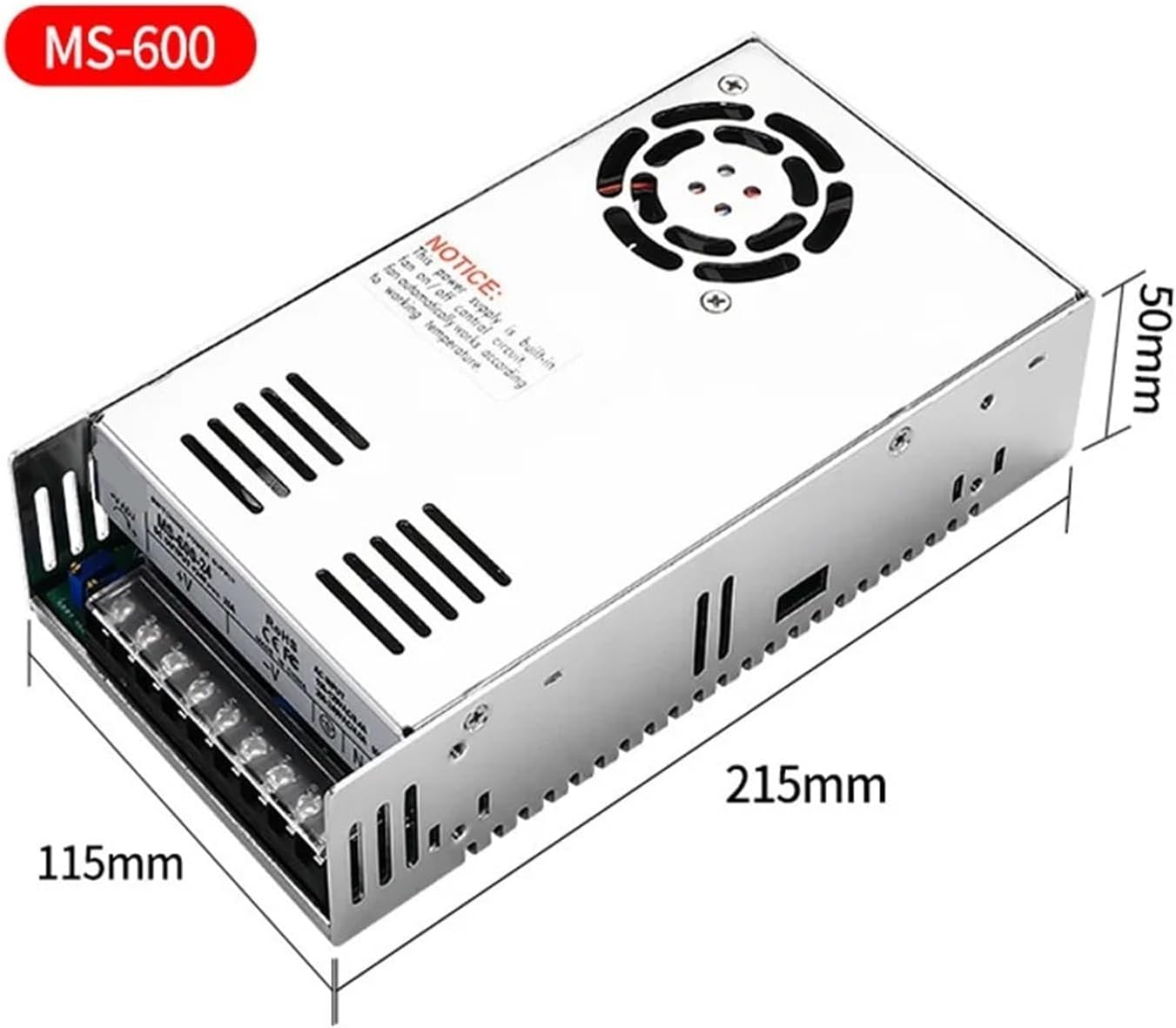
Image 2: Dimensions of the MS-600 power supply, showing approximate measurements of 215mm length, 115mm width, and 50mm height.
3.3 Internal Components Overview
The internal design emphasizes reliability and performance, featuring high-quality components.
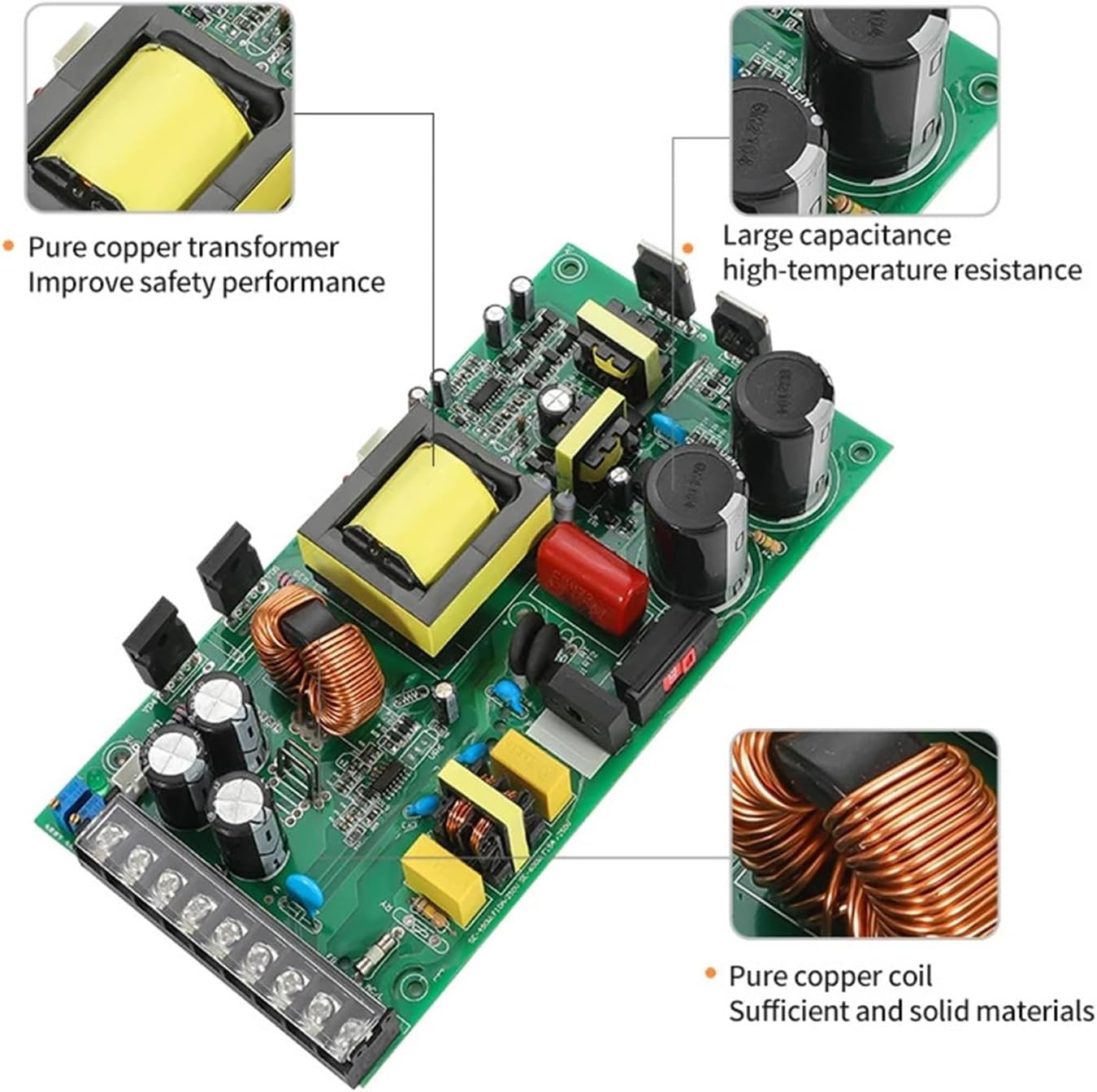
Image 3: Internal view of the power supply circuit board, highlighting a pure copper transformer, large capacitance components for high-temperature resistance, and pure copper coils for robust performance.
4. Operating Instructions
Once the power supply is correctly installed and wired, you can proceed with operation.
- Power On: Connect the AC input to the mains power. The power indicator light should illuminate.
- Voltage Adjustment: Use the potentiometer labeled "+V ADJ" (refer to Image 1) to adjust the output voltage to your desired level. Turn clockwise to increase voltage, counter-clockwise to decrease.
- Current Adjustment: Use the potentiometer labeled for current adjustment (refer to Image 1) to set the output current limit. This feature allows you to protect your load from overcurrent.
- Load Connection: Connect your DC load to the output terminals (+V and -V).
- Monitoring: Observe the behavior of your connected load. The power supply's built-in protections will activate if an overload, over-voltage, or short circuit condition occurs.
- Power Off: Disconnect the AC input from the mains power when the power supply is no longer needed.
5. Maintenance
Regular maintenance ensures the longevity and reliable operation of your power supply.
- Cleaning: Periodically clean the exterior of the unit with a soft, dry cloth. Ensure the ventilation openings and cooling fan are free from dust and debris. Do not use liquid cleaners.
- Ventilation: Regularly check that the cooling fan is operating correctly and that airflow is not obstructed. Overheating can reduce the lifespan of the unit.
- Connections: Periodically inspect all wiring connections for tightness and signs of wear or corrosion. Re-tighten if necessary.
- Storage: If storing the unit for an extended period, keep it in a dry, cool environment away from direct sunlight and extreme temperatures.
CAUTION: Do not attempt to open the power supply casing for internal cleaning or repairs unless you are a qualified technician. High voltages are present inside.
6. Troubleshooting
This section addresses common issues you might encounter with your RWRAPS MS600 Series power supply.
| Problem | Possible Cause | Solution |
|---|---|---|
| No output voltage/Power indicator off | No AC input power; Loose wiring; Internal fault. | Check AC power source and cable. Verify all input wiring connections. If problem persists, contact support. |
| Output voltage too low or unstable | Overload condition; Incorrect voltage adjustment; Faulty load. | Reduce load or check for short circuit in load. Adjust voltage potentiometer. Test with a different load. |
| Unit shuts down unexpectedly | Overload protection activated; Over-voltage protection activated; Thermal protection activated. | Reduce load. Check for short circuits. Ensure adequate ventilation and clear fan. Allow unit to cool down before restarting. |
| Cooling fan not operating | Unit not hot enough (temperature-controlled fan); Fan fault. | The fan operates automatically based on temperature. If the unit is hot and the fan is still not running, contact support. |
If you encounter issues not listed here or if the suggested solutions do not resolve the problem, please contact RWRAPS customer support.
7. Specifications
| Parameter | Details |
|---|---|
| Brand | RWRAPS |
| Model Series | MS-600 Series |
| Rated Power | 600W |
| Input Voltage | 100-120VAC / 200-240VAC, 50/60Hz (Auto-sensing or selectable, refer to unit label) |
| Output Voltage Range | Adjustable from 0V up to 12V, 24V, 36V, 48V, 60V, 72V, 80V, 110V, or 220V (depending on specific model variant) |
| Output Current Range | Adjustable from 0A up to 50A, 25A, 16.6A, 12.5A, 10A, 8.3A, 7.5A, 5.4A, or 2.7A (depending on specific model variant) |
| Cooling | Built-in cooling fan with temperature detection |
| Safety Features | Overload cut-off, Over-voltage cut-off, Thermal cut-off, Short circuit protection |
| Item Weight | Approximately 800 Grams |
| Dimensions (Approx.) | 215mm (L) x 115mm (W) x 50mm (H) |
8. Warranty and Support
For warranty information, technical support, or service inquiries, please contact your retailer or the manufacturer directly. Keep your purchase receipt as proof of purchase.
Manufacturer: RWRAPS
Please refer to the product packaging or the seller's information for specific contact details and warranty terms applicable to your region.