
1. Introduction
This manual provides detailed instructions for the safe and efficient operation of your DATOUBOSS 12V 1500W Pure Sine Wave Inverter. This device converts 12V DC battery power to 220V/230V AC household power, suitable for various applications including camping, RVs, trucks, and emergency power backup. It features a pure sine wave output, ensuring compatibility with sensitive electronics, and includes multiple protection functions for reliable performance.
2. Safety Information
Please read and understand all safety warnings and instructions before using the inverter. Failure to do so may result in electric shock, fire, or serious injury.
- Ensure proper ventilation around the inverter to prevent overheating.
- Do not expose the inverter to water, rain, or excessive moisture.
- Avoid operating the inverter in direct sunlight or near heat sources.
- Connect the inverter only to a 12V DC power source.
- Always connect the ground terminal to a proper earth ground.
- Do not open the inverter casing; there are no user-serviceable parts inside.
- Keep children away from the inverter during operation.
- Disconnect the inverter from the battery before performing any maintenance or cleaning.
Protection Features:
- High Temperature Protection: The inverter will shut down if internal temperature exceeds safe limits.
- High Voltage Protection: Protects against excessive input voltage.
- Low Voltage Protection: Prevents battery over-discharge with an alarm and shutdown.
- Overload Protection: Shuts down if connected devices draw too much power.
- Short-Circuit Protection: Safeguards against short circuits in the output.
- Galvanic Isolation: Provides electrical separation between input and output for enhanced safety.
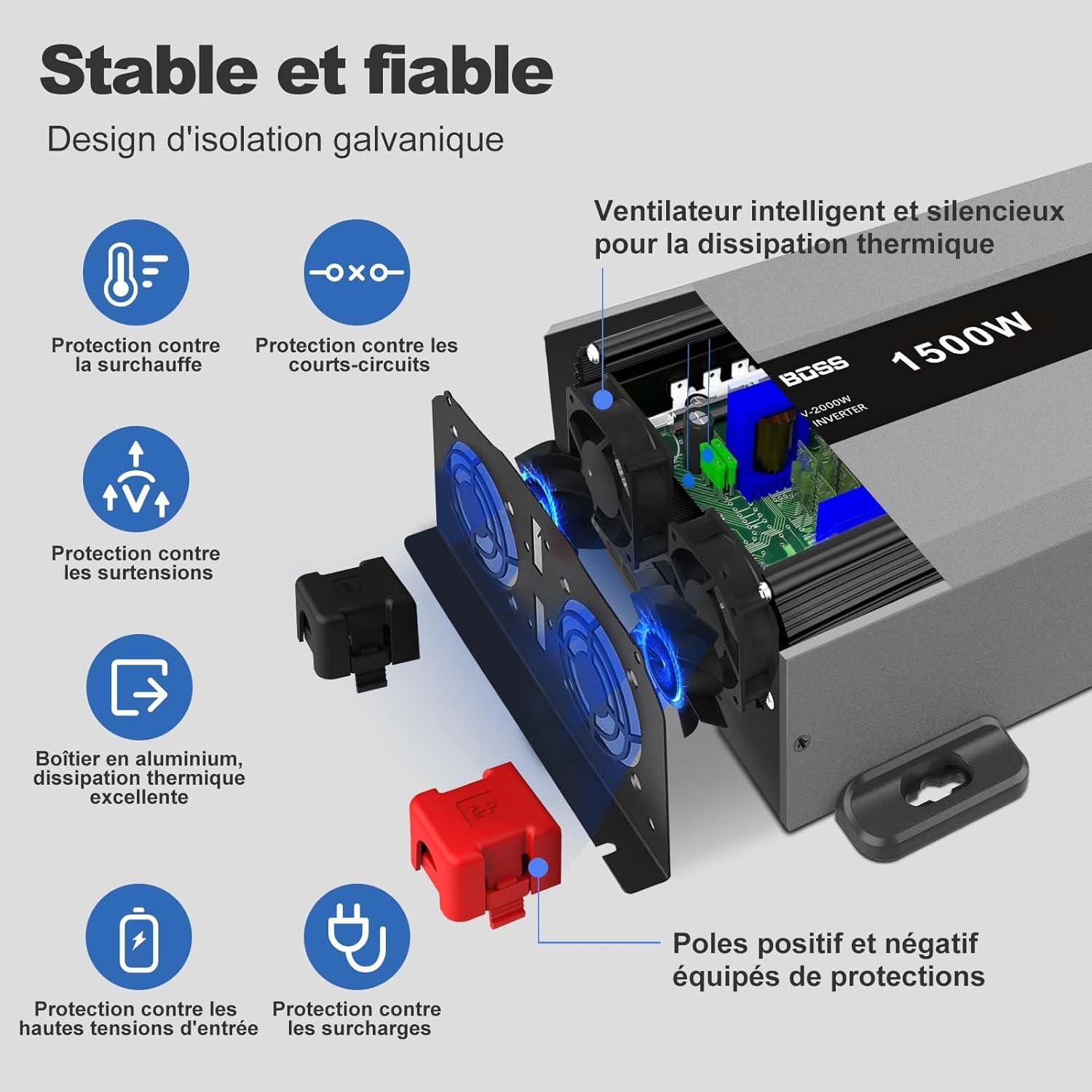
Image: Diagram illustrating the various safety protection features of the DATOUBOSS Pure Sine Wave Inverter, including overheat, short-circuit, overvoltage, overload, and high input voltage protection.
3. Product Features
- Pure Sine Wave Output: Provides clean and stable power, ideal for sensitive electronics, reducing interference.
- High Efficiency: Over 90% conversion efficiency from DC to AC, minimizing energy loss.
- Multiple Output Ports: Equipped with 2 EU AC outlets, 1 USB port, and 1 USB-C port for versatile charging.
- LCD Display: Real-time monitoring of input voltage, output voltage, and power status.
- Remote Control: Includes a wired remote switch for convenient power control from a distance.
- Intelligent Cooling Fan: Automatically activates when the internal temperature exceeds 45°C, ensuring optimal performance and longevity.
- Robust Design: Durable metal casing protects against shocks and impacts.
- Wide Compatibility: Supports various battery types including GEL, SLA, LI, FLD, AGM, CLA, and LiFePO4.
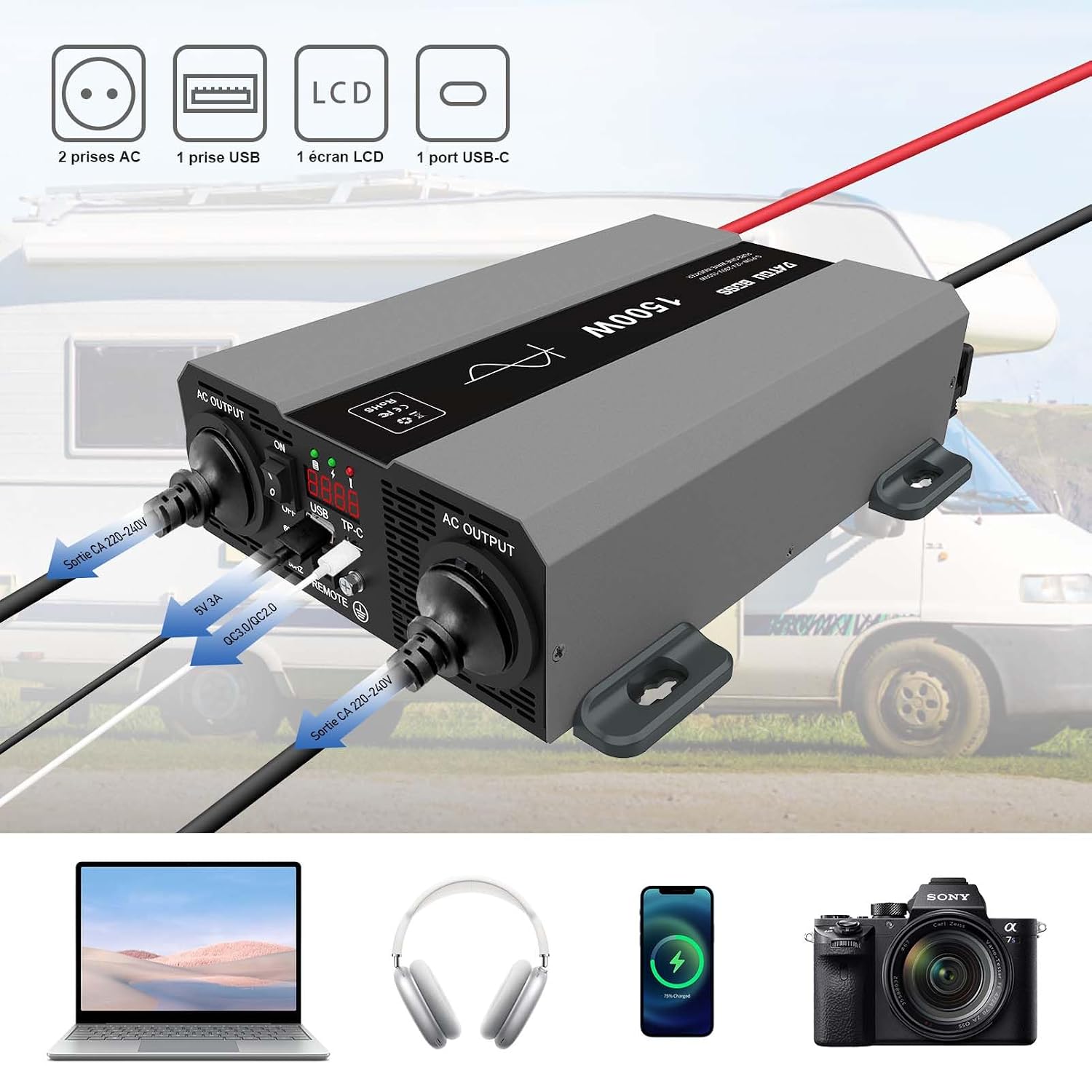
Image: The DATOUBOSS 12V 1500W Pure Sine Wave Inverter showing its two AC output sockets, USB port, USB-C port, and LCD screen. Below it, a laptop, headphones, smartphone, and camera are depicted, representing compatible devices.

Image: A close-up of the DATOUBOSS 12V 1500W Pure Sine Wave Inverter's front panel, highlighting the ON/OFF switch, USB and USB-C ports, remote control connection, and LCD display. A separate wired remote control unit is also shown.
4. Package Contents
Upon opening the package, verify that all items listed below are present and in good condition:
- DATOUBOSS 12V 1500W Pure Sine Wave Inverter
- Battery Connection Cables (Red for Positive, Black for Negative)
- Wired Remote Control Unit
- Mounting Brackets and Screws
- User Manual

Image: The DATOUBOSS 12V 1500W Pure Sine Wave Inverter displayed with its included accessories: a wired remote control, battery cables (red and black), mounting screws, and the user manual. Product dimensions are also indicated.
Video: An unboxing video demonstrating the contents of the DATOUBOSS Pure Sine Wave Inverter package, including the inverter unit, battery cables, remote control, and mounting hardware.
5. Setup and Installation
Follow these steps for proper installation of your inverter:
- Choose a Location: Select a dry, well-ventilated area away from direct sunlight, heat sources, and flammable materials. Ensure sufficient space around the inverter for airflow.
- Mount the Inverter: Use the provided mounting brackets and screws to securely attach the inverter to a stable surface.
- Connect Battery Cables:
- Ensure the inverter's power switch is in the "OFF" position.
- Connect the red (positive) battery cable to the positive (+) terminal of the inverter and then to the positive (+) terminal of your 12V battery.
- Connect the black (negative) battery cable to the negative (-) terminal of the inverter and then to the negative (-) terminal of your 12V battery.
- Tighten all connections securely to prevent loose contacts and sparking.
- Connect Ground Wire: Connect a ground wire (not included) from the inverter's ground terminal to a proper earth ground.
- Connect Remote Control (Optional): If using the remote control, plug its cable into the "REMOTE" port on the inverter.
Video: This video demonstrates the physical installation of the DATOUBOSS Pure Sine Wave Inverter, including mounting it to a surface and connecting the battery cables. It also shows the connection of the remote control.
6. Operation
- Power On: Flip the ON/OFF switch on the inverter to the "ON" position. The LCD display will illuminate, showing the input voltage and output voltage. The green LED indicator will light up. If using the remote control, ensure the inverter's main switch is ON, then use the remote switch to power the unit ON/OFF.
- Connect Devices: Plug your AC-powered devices into the AC output sockets. For USB-powered devices, use the USB or USB-C ports.
- Monitor Performance: Observe the LCD display for real-time voltage and power information. The LED indicators will show the operational status (green for normal, red for fault).
- Power Off: Before disconnecting any devices, switch the inverter to the "OFF" position.
Video: This video demonstrates the operation of the DATOUBOSS Pure Sine Wave Inverter, showing how to power it on, connect various appliances like a heater and an induction cooker, and monitor the output. It also shows the use of the remote control.
Video: This video illustrates the inverter's performance with different loads, including a hair dryer and a microwave, demonstrating the stable pure sine wave output and current draw.
7. Maintenance
Regular maintenance ensures the longevity and optimal performance of your inverter:
- Cleaning: Periodically clean the exterior of the inverter with a dry, soft cloth. Ensure ventilation openings are free from dust and debris.
- Connection Check: Regularly inspect all electrical connections (battery cables, ground wire) to ensure they are tight and free from corrosion.
- Storage: If storing the inverter for an extended period, disconnect it from the battery and store it in a cool, dry place.
8. Troubleshooting
If you encounter issues with your inverter, refer to the following common troubleshooting steps:
| Problem | Possible Cause | Solution |
|---|---|---|
| No power output / Inverter not turning on |
|
|
| Red LED indicator on / Alarm sounding |
|
|
| Output voltage unstable |
|
|
If the problem persists after following these steps, please contact customer support.
9. Specifications
| Feature | Specification |
|---|---|
| Brand | DATOUBOSS |
| Model Name | 12V1500W |
| Product Dimensions (L x W x H) | 31 x 23.5 x 8 cm |
| Weight | 3.5 Kilograms |
| Power Output | 1500 Watts (Rated) / 3000 Watts (Peak) |
| Input Voltage | 12 Volts DC |
| Output Voltage | 220V/230V AC |
| Output Waveform | Pure Sine Wave |
| Efficiency | >90% |
| Display Type | LCD |
| Total Power Outlets | 4 (2 EU AC, 1 USB, 1 USB-C) |
| Recommended Battery Capacity | 100 Ampere-hours (minimum for sustained use) |
| Cooling | Intelligent Fan (activates >45°C) |
| Certifications | CE, FCC, RoHS |
10. Warranty and Support
DATOUBOSS offers a 12-month warranty for this product. For any issues or inquiries during use, please contact our customer service team. We are committed to providing friendly and perfect service.
- Warranty Period: 12 Months
- Customer Support: Available for assistance with product operation, troubleshooting, and warranty claims.


