1. Product Overview
The ROLEDO 16 Pin to ISO Cable Adapter is designed to facilitate the connection of a 2-DIN car Android head unit with a 16-pin socket to a vehicle's existing ISO wiring system. This plug-and-play accessory simplifies the installation process, ensuring compatibility and proper functionality for your car radio setup.

Figure 1: The ROLEDO 16 Pin to ISO Cable Adapter, illustrating its primary components.
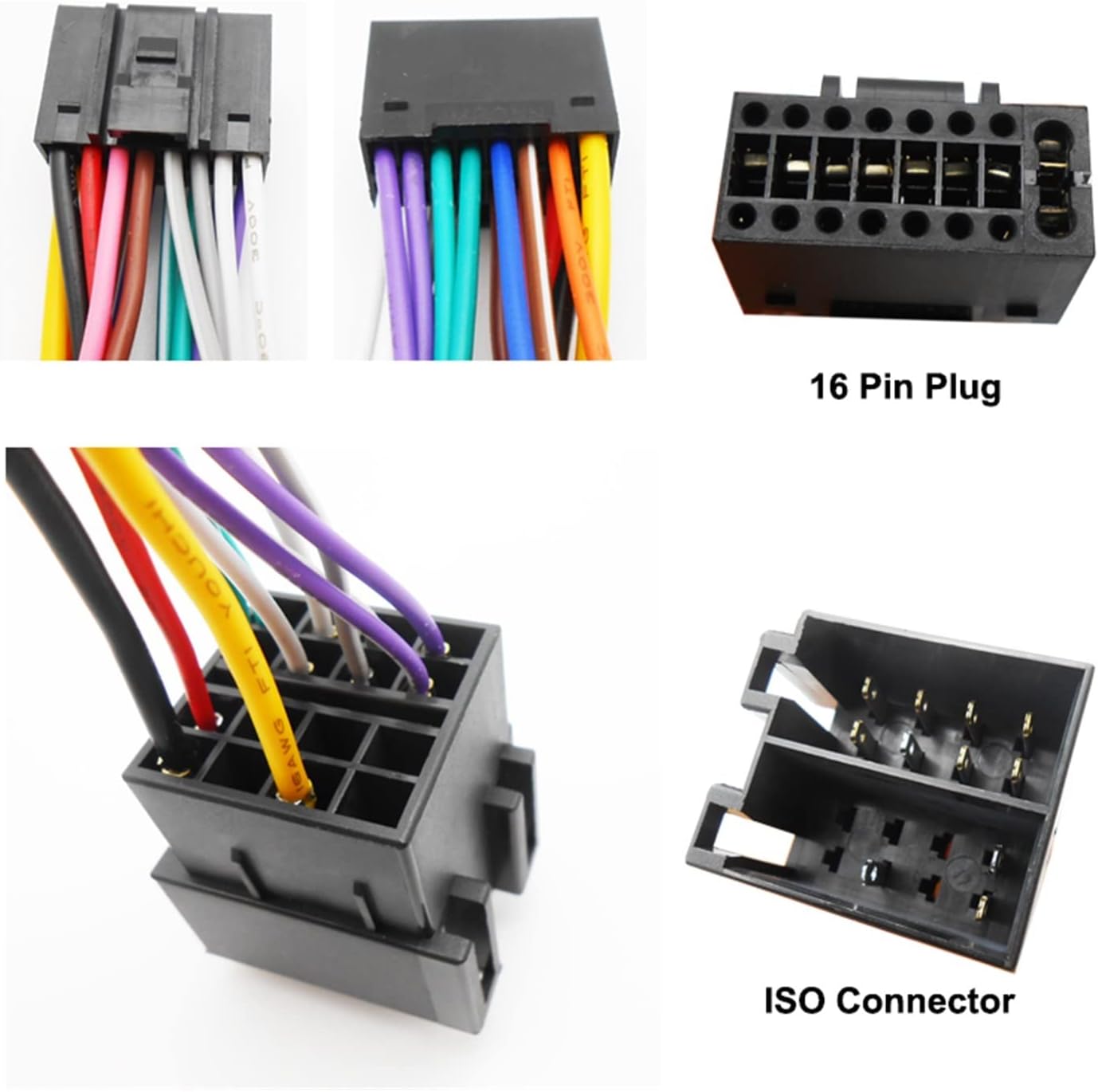
Figure 2: Detailed view of the 16-pin plug and the ISO female connector, showing the connection points.
2. Setup and Installation
This cable adapter is designed for straightforward plug-and-play installation. Ensure your car Android head unit has a 16-pin socket for compatibility.
2.1 Identifying Components
- 16-Pin Plug: Connects directly to the 16-pin socket on your car Android head unit.
- ISO Female Connector: Connects to the vehicle's standard ISO plug.
- Copper Wire Cable: Provides reliable electrical connections between the head unit and the vehicle's wiring system.
2.2 Connection Steps
- Ensure the vehicle's ignition is off and the battery is disconnected to prevent electrical shorts.
- Locate the 16-pin socket on the back of your 2-DIN car Android head unit.
- Carefully insert the 16-pin plug of the adapter into the corresponding socket on the head unit. Ensure it is fully seated.
- Locate the ISO plug in your vehicle's dashboard wiring harness.
- Connect the ISO female connector of the adapter to the vehicle's ISO plug.
- Reconnect the vehicle's battery and test the head unit's functionality.

Figure 3: Example of a 16-pin socket on a car Android head unit, where the adapter's plug connects.
2.3 Wiring Diagram and Pinout
Refer to the following diagrams for detailed wiring information and pin assignments. This information is crucial for understanding the function of each wire, especially for advanced installations or troubleshooting.

Figure 4: Detailed wiring diagram showing connections for speakers, ACC (+12V), GND (Ground), ILL (button backlight), auto antenna, steering wheel control (Key1, Key2), and camera control.

Figure 5: Pinout diagram illustrating wire colors and their corresponding functions, including speaker outputs, power, ignition, illumination, reverse, steering wheel control, and antenna power.
3. Operating Considerations
Once installed, the cable adapter enables the proper functioning of your 2-DIN car Android head unit by providing the necessary power and signal connections from the vehicle's ISO system.
3.1 Steering Wheel Control
The adapter includes two dedicated wires (Key1 and Key2) for steering wheel control functionality. These wires are not part of the standard ISO connector and must be connected separately to your car's steering wheel control function wires if you wish to utilize this feature. Consult your vehicle's wiring diagram for specific steering wheel control wire locations.
4. Maintenance
The ROLEDO 16 Pin to ISO Cable Adapter requires minimal maintenance. To ensure longevity and reliable performance:
- Ensure all connections remain secure and free from corrosion.
- Avoid exposing the cable to excessive heat, moisture, or physical stress.
- Do not attempt to modify the wiring harness, as this may damage the product or your vehicle's electrical system.
5. Troubleshooting
If you encounter issues after installation, consider the following common problems and solutions:
5.1 Head Unit Loses Settings After Installation
Problem: Your car Android head unit loses some settings (e.g., radio presets, clock time) after the vehicle is turned off or the ignition is cycled.
Solution: This issue often occurs because some ISO connectors may exchange the function of pin A4 (constant power/memory) and pin A7 (ignition switch). To resolve this, you may need to manually swap the wires for pin A4 and A7 on the ISO connector side of the adapter to match your vehicle's specific wiring configuration. Consult the wiring diagrams (Figure 4 and Figure 5) for reference.
5.2 Adapter Not Suitable for All Car Android Head Units
Problem: The adapter does not fit or function with your car Android head unit.
Solution: This harness adapter is specifically designed for car Android head units that feature a 16-pin socket. Verify that your head unit has this specific 16-pin socket type. If your head unit has a different connector, this adapter will not be compatible.
5.3 Steering Wheel Controls Not Functioning
Problem: After installation, the steering wheel control buttons do not operate the head unit.
Solution: Ensure that the Key1 and Key2 wires from the adapter are correctly connected to the corresponding steering wheel control wires in your vehicle. These wires are separate from the main ISO connector and require individual connection. Verify the correct wiring using your vehicle's specific wiring diagram.
6. Specifications
| Product Name | 16 Pin to ISO Cable Adapter |
| Brand | ROLEDO |
| Model Number (ASIN) | B0CXBZ15GK |
| Connector Type 1 | 16-pin plug (for head unit) |
| Connector Type 2 | ISO female connector (for vehicle harness) |
| Wire Material | Copper wire |
| Compatibility | 2-DIN car Android head units with 16-pin socket; vehicles with ISO plug |
| Date First Available | January 16, 2025 |
7. Warranty and Support
This product is subject to a 30-day return policy from the date of purchase. For any issues, questions, or support inquiries regarding the ROLEDO 16 Pin to ISO Cable Adapter, please contact the seller directly through the platform where the purchase was made. Provide your order details for faster assistance.