
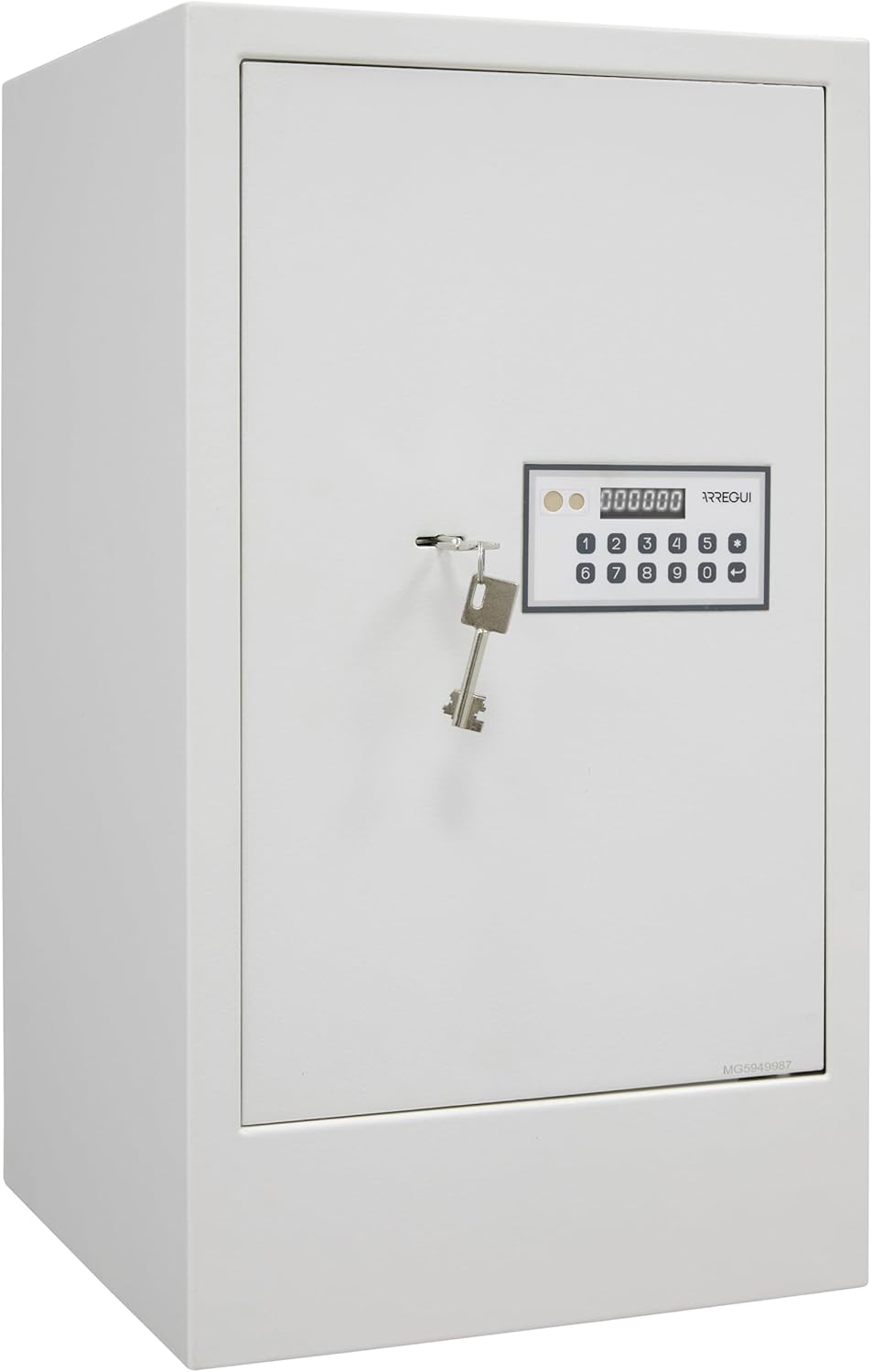
Introduction
This manual provides essential instructions for the proper installation, operation, and maintenance of your ARREGUI Magna 590090 Furniture Safe. Please read this manual thoroughly before using the safe to ensure optimal security and functionality. Keep this manual for future reference.
Safety Information
- Always keep the emergency keys in a secure location away from the safe. Do not store them inside the safe.
- Ensure the safe is securely anchored to a wall or floor to prevent unauthorized removal.
- Do not expose the safe to extreme temperatures or humidity.
- Replace batteries promptly when the low battery indicator appears to avoid lockout.
1. Setup and Installation
1.1 Unpacking and Contents
Carefully unpack the safe and verify all components are present. The package should include:
- ARREGUI Magna 590090 Safe
- Instruction Manual (this document)
- 2 User Keys
- 1 Emergency Key
- Mounting Screws and Anchors
- Removable Shelf
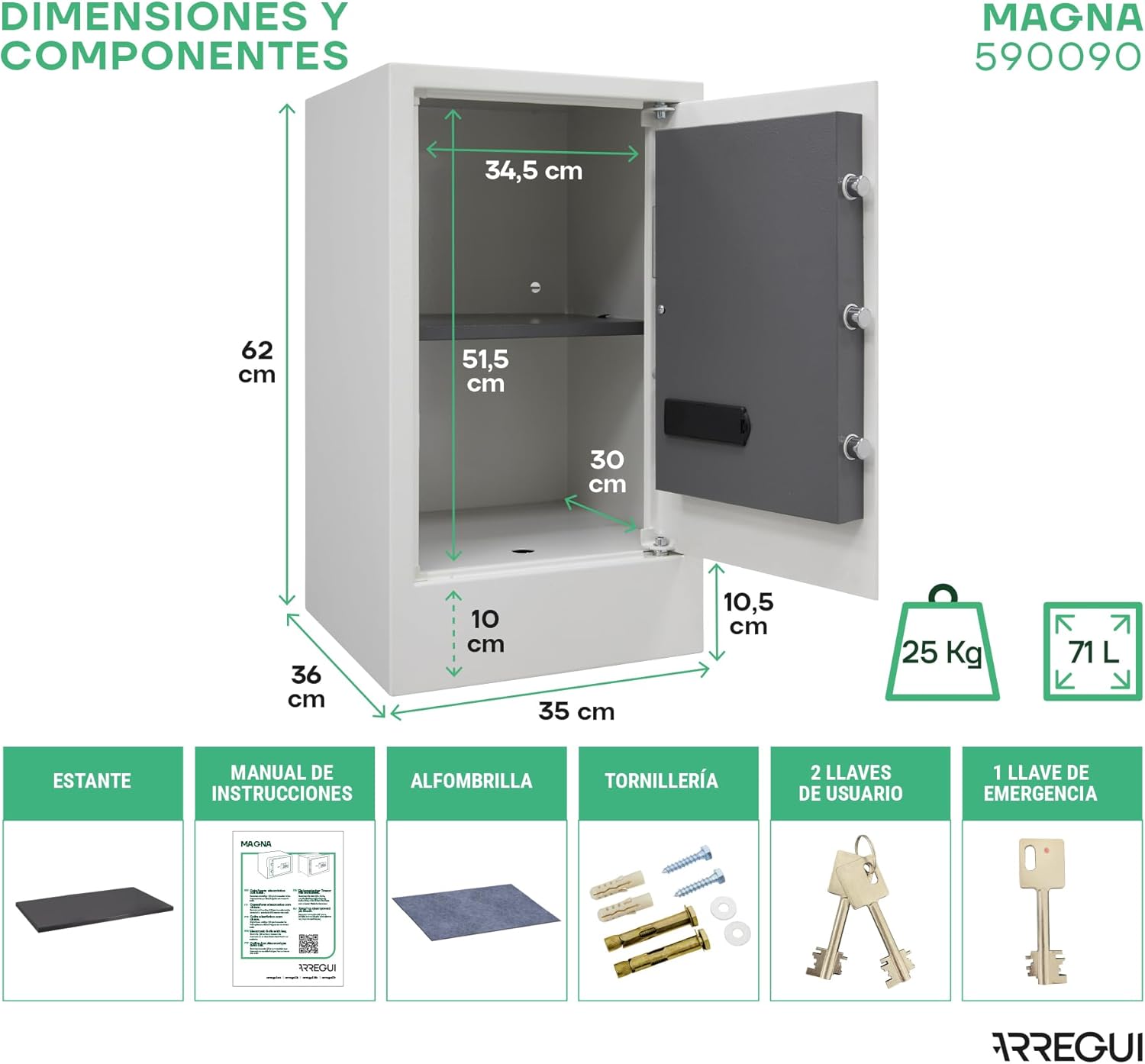
Figure 2: Safe Dimensions and Included Components
1.2 Battery Installation
The safe requires 4 AA 1.5V alkaline batteries (not included) for the electronic lock. Locate the battery compartment, usually on the inside of the safe door. Insert the batteries, ensuring correct polarity.
Important: Do not use rechargeable batteries as they may not provide sufficient power.
1.3 Initial Code Setting
Your safe comes with a factory default code or requires you to set an initial code upon first use. Refer to the specific instructions below to set your personal user code and master code.
- With the safe door open, locate the reset button (often a small button on the inside of the door or battery compartment).
- Press the reset button. The display should show "PROG" or similar, indicating it's ready for programming.
- Enter your desired user code (3 to 6 digits) on the keypad, then press the '#' or 'ENTER' button.
- Repeat the process to set a master code, if applicable, following the specific prompts on the display.
- Test the new code with the door open before closing it.
Note: The safe supports 1 master code and 1 user code, offering 1 million possible combinations.
1.4 Anchoring the Safe
For maximum security, it is highly recommended to anchor the safe to a wall, floor, or inside a cabinet. The safe features 2 pre-drilled holes in the base and 2 in the rear wall, each 9 mm in diameter. Use the provided mounting screws and anchors.
- Choose a suitable location for the safe.
- Mark the drilling points through the pre-drilled holes in the safe.
- Drill holes in the wall/floor using an appropriate drill bit.
- Insert the anchors into the drilled holes.
- Position the safe and secure it firmly with the mounting screws.
2. Operating Instructions
2.1 Opening the Safe (Normal Operation)
The ARREGUI Magna 590090 safe features a 2-factor security lock, requiring both a code and a key for opening.
- Enter your personal user code (or master code) on the electronic keypad. The 6-digit display will show help messages during entry.
- Once the correct code is entered, the display will indicate successful entry.
- Insert one of the user keys into the keyhole and turn it to unlock the safe.
- Pull the door open. The internal LED light will automatically turn on.

Figure 3: Opening the Safe with Code and Key
2.2 Closing and Locking the Safe
- Close the safe door firmly.
- Turn the key back to the locked position and remove it. The safe will automatically lock with its 3 nickel-plated steel bolts.
2.3 Changing the User/Master Code
To change an existing code:
- With the safe door open, press the reset button.
- Enter your new desired code (3 to 6 digits).
- Press the '#' or 'ENTER' button to confirm.
- Test the new code with the door open before closing.
2.4 Emergency Opening
In case of forgotten code, empty batteries, or keypad damage, the safe can be opened using one of the following emergency methods:
- Emergency Key: Insert the emergency key into the hidden emergency keyhole (usually behind a cover on the keypad panel) and turn it to open the safe.
- External Power Supply (9V Battery): If batteries are depleted, connect a 9V battery to the external power contacts on the keypad panel. This will temporarily power the keypad, allowing you to enter your code and open the safe. Replace the internal AA batteries immediately after opening.
3. Maintenance
3.1 Battery Replacement
The display will indicate a low battery level. Replace all 4 AA batteries promptly to ensure continuous operation and prevent lockout. Use only new, high-quality alkaline batteries.
3.2 Cleaning
Clean the safe's exterior with a soft, damp cloth. Do not use abrasive cleaners or solvents, as they may damage the finish or electronic components.
3.3 Internal Features
The safe includes a removable shelf for organizing contents and a 10 cm high base with a hidden storage box. The internal LED light activates automatically when the door is opened, providing visibility.

Figure 4: Interior Capacity with Removable Shelf and Hidden Base Compartment

Figure 5: Automatic Internal LED Light
4. Troubleshooting
- Safe does not open after entering code:
- Ensure you are turning the key after entering the correct code. Both steps are required.
- Check if batteries are low. Replace them if necessary.
- Try using the emergency key.
- Keypad is unresponsive:
- Check battery level. Use a 9V battery for external power if internal batteries are dead.
- If 3 incorrect codes are entered, the safe will lock for 5 minutes. Wait for the lockout period to expire.
- Low Battery Indicator:
- The display will show a low battery warning. Replace all 4 AA batteries immediately.
- Lost or forgotten code:
- Use the emergency key to open the safe. Once open, you can reset the code.
5. Specifications
| Feature | Detail |
|---|---|
| Model | ARREGUI Magna 590090 |
| External Dimensions (H x W x D) | 62 x 35 x 36 cm (24.41" x 13.78" x 14.17") |
| Internal Dimensions (H x W x D) | 51.5 x 34.5 x 30 cm (excluding base height) |
| Capacity | 71 Liters |
| Weight | 25 kg (55.1 lbs) |
| Material | Alloy Steel (6mm front, 2mm body thickness) |
| Lock Type | Electronic Combination Lock + Key (2-Factor Security) |
| Locking Bolts | 3 nickel-plated steel bolts, 20 mm diameter |
| Codes | 1 Master Code, 1 User Code (3-6 digits) |
| Display | 6-digit display with help messages and low battery indicator |
| Power | 4 x AA 1.5V alkaline batteries (not included) |
| Emergency Power | 9V battery external connection |
| Special Features | Removable shelf, 10 cm high base with hidden storage, internal LED light, anti-theft features. |
| Mounting | 2 base and 2 rear wall holes (9mm diameter) for anchoring |

Figure 6: Key Features of the Safe
6. Warranty Information
The ARREGUI Magna 590090 safe comes with a 3-year manufacturer's warranty. This warranty covers defects in materials and workmanship under normal use. Please retain your proof of purchase for warranty claims. For specific terms and conditions, refer to the warranty documentation provided with your product or contact customer support.
7. Customer Support
For technical assistance, spare parts, or any inquiries regarding your ARREGUI safe, please contact ARREGUI customer service. You may find contact information on the official ARREGUI website or through your retailer.
When contacting support, please have your model number (590090) and serial number (if available, typically found on a sticker inside the safe or on the packaging) ready.
For service assistance, you can visit the official ARREGUI website: www.arregui.es
