
1. Product Overview
This manual provides instructions for the safe and secure operation of your ARREGUI Magna 590090 Furniture Safe. This robust safe is designed for home or commercial use, offering secure storage with a dual-factor security lock system.
Key features include a reinforced steel construction with a 6mm thick front and 2mm thick body, a 71-liter capacity, a removable interior shelf, and a 10cm high base that contains a hidden storage compartment. The safe is equipped with an automatic LED interior light and a 2-factor security lock requiring both an electronic code and a key for opening.
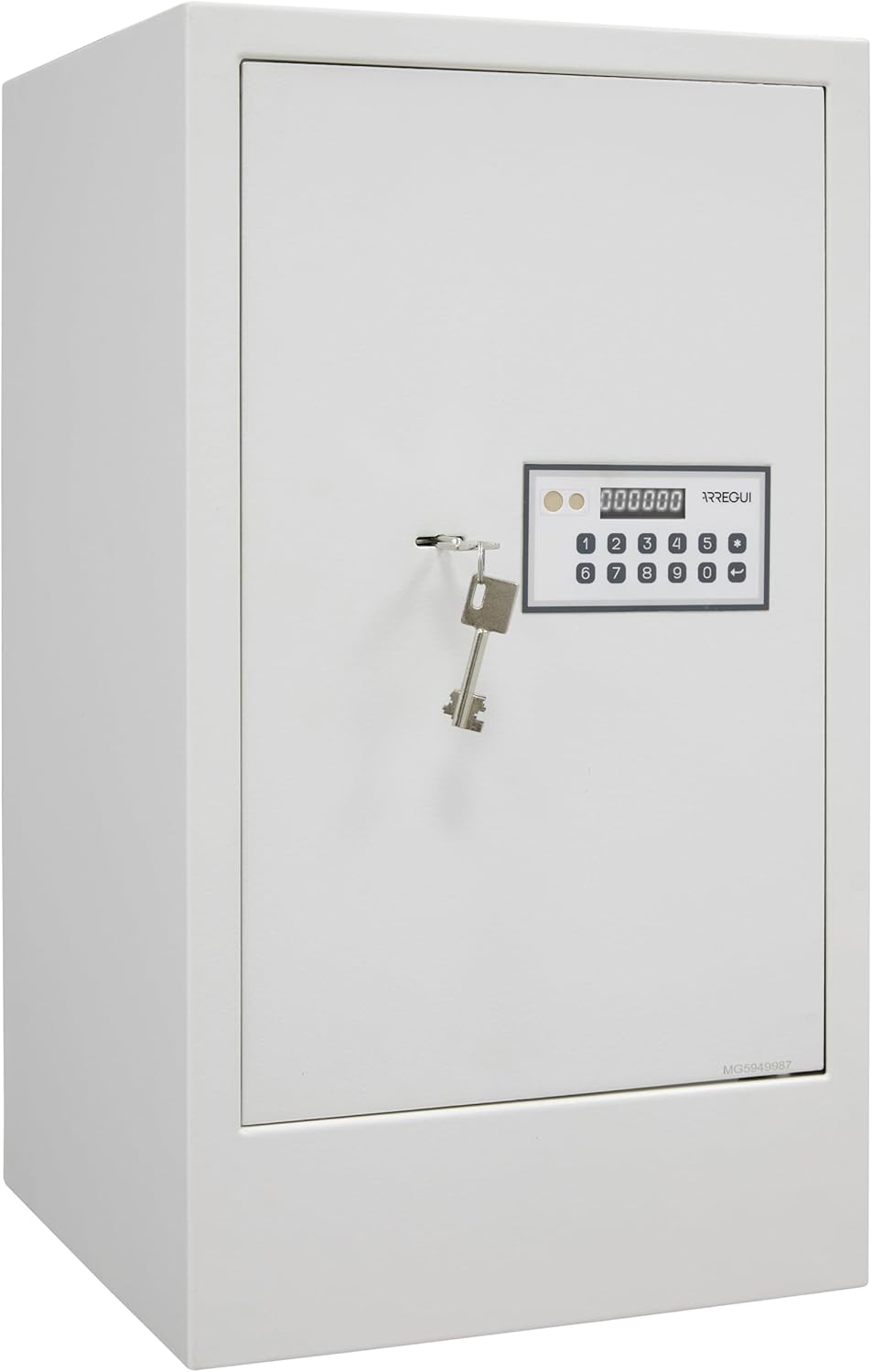
Image: Front view of the ARREGUI Magna 590090 Furniture Safe, showing the electronic keypad and key lock.
2. Setup
2.1 Unpacking
Carefully remove the safe from its packaging. Inspect the safe for any signs of damage. Retain all packaging materials until you have confirmed the safe is in working order.
2.2 Battery Installation
The safe requires 4 AA 1.5V alkaline batteries (not included) for the electronic lock. The battery compartment is typically located on the inside of the safe door. Open the safe using the emergency key (refer to Section 3.3 if needed), locate the battery compartment, insert the batteries according to the polarity markings, and close the compartment.
2.3 Anchoring the Safe
For maximum security, it is strongly advised to anchor the safe to a wall, floor, or shelf. The safe is equipped with two pre-drilled holes in the base and two in the rear wall, each 9 mm in diameter. Mounting screws and anchors are included.
- Choose a suitable location for the safe, ensuring it is on a stable surface.
- Mark the drilling points through the pre-drilled holes in the safe's base or rear.
- Move the safe and drill holes at the marked points using an appropriate drill bit for your wall/floor material.
- Insert the provided anchors into the drilled holes.
- Position the safe back over the holes and secure it tightly using the provided mounting screws.
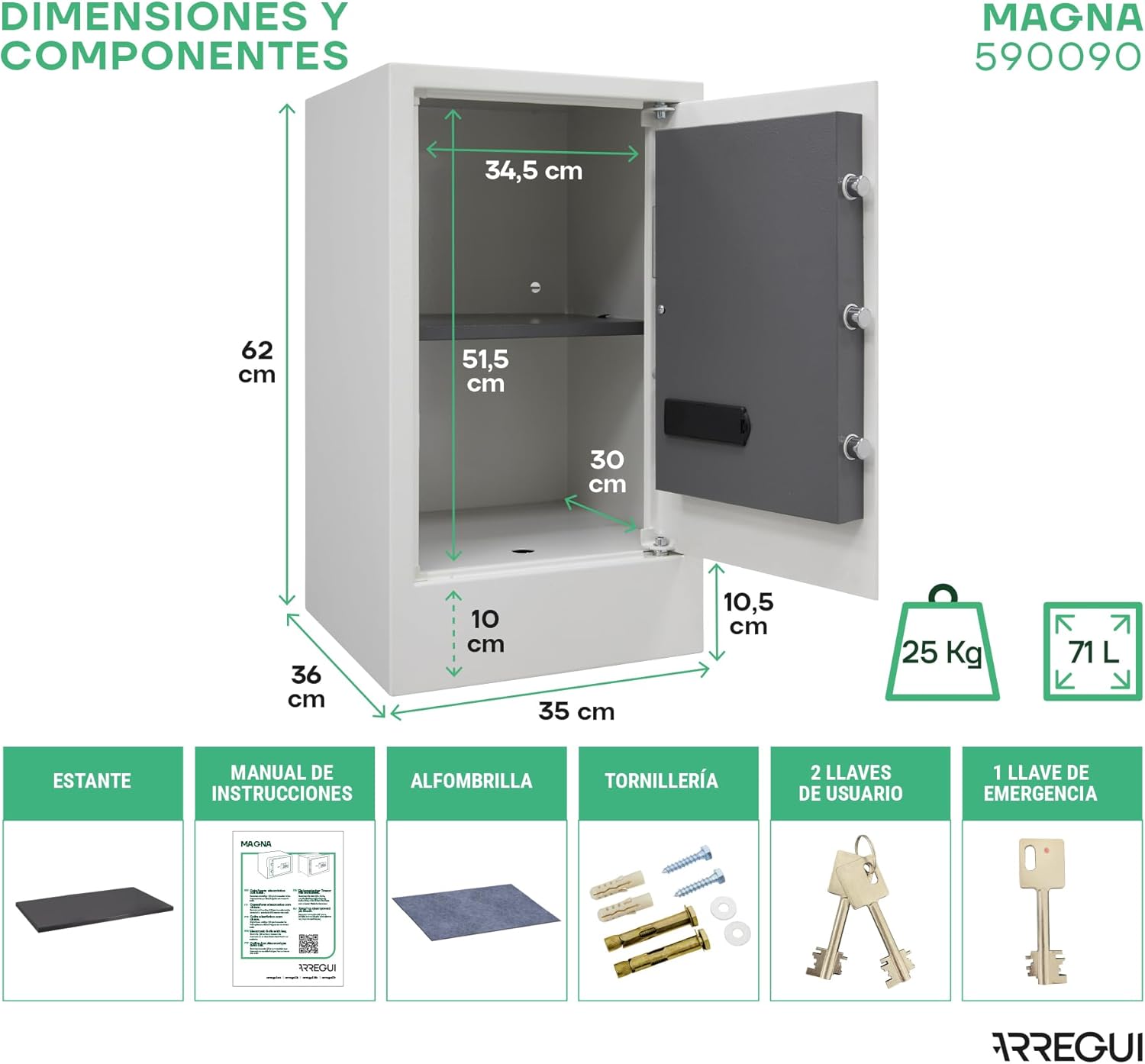
Image: Diagram showing the external dimensions of the safe and the locations of the anchoring holes on the base and rear wall.
2.4 Shelf Installation
The safe includes a removable interior shelf. Position the shelf on the internal supports at your desired height. The shelf can be removed if more vertical storage space is required.

Image: Interior view of the safe, illustrating the removable shelf and the hidden compartment within the 10cm high base.
3. Operating Instructions
3.1 Setting/Changing the Code
The safe supports two 6-digit opening codes: one master code and one user code, offering 1 million possible combinations. Refer to the specific instructions provided with your safe for the exact procedure to set or change these codes. Generally, this involves pressing a reset button inside the safe (with the door open), entering the new code on the keypad, and confirming it.
3.2 Opening the Safe (Normal Operation)
The ARREGUI Magna 590090 safe features a 2-factor security lock. To open the safe:
- Enter your 6-digit user or master code on the electronic keypad. The 6-digit display will show help messages during entry.
- Once the correct code is entered and confirmed, turn the key in the lock clockwise.
- Pull the door open.

Image: Illustration of entering the code on the keypad and turning the key to open the safe.
3.3 Emergency Opening
In situations such as forgotten codes, depleted batteries, or keypad damage, the safe can be opened using emergency methods:
Using the Emergency Key
Locate the emergency keyhole, usually hidden behind a cover on the keypad panel. Insert the emergency key and turn it to open the safe. This bypasses the electronic lock entirely.
Using External Power Supply (9V Battery)
If the internal batteries are depleted, you can temporarily power the keypad using a 9V battery. Locate the external power contacts on the keypad panel. Press a 9V battery firmly against these contacts. While holding the 9V battery, enter your code on the keypad and then turn the key to open the safe. Once open, replace the internal AA batteries.
4. Maintenance
4.1 Battery Replacement
The safe's display will indicate a low battery level. To ensure continuous operation, replace the 4 AA 1.5V alkaline batteries promptly when this indicator appears. Follow the battery installation steps in Section 2.2.
4.2 Cleaning
Clean the exterior of the safe with a soft, damp cloth. Avoid using abrasive cleaners or solvents, as these can damage the finish. Do not spray cleaning solutions directly onto the keypad or lock mechanism.
5. Troubleshooting
- Safe does not open with code:
- Ensure batteries are not depleted. Use external 9V power or emergency key if necessary.
- Verify the code entered is correct. - Keypad is unresponsive:
- Check battery level. Replace batteries if low.
- If 3 incorrect codes were entered, the safe will lock for 5 minutes. Wait for the lockout period to expire. - Forgotten code:
- Use the emergency key to open the safe. Once open, you can reset the user or master code. - Interior LED light not working:
- Check battery level. The LED light is powered by the same batteries as the keypad.
6. Specifications
| Feature | Specification |
|---|---|
| Model Number | 590090 |
| External Dimensions (H x W x D) | 62 x 35 x 36 cm (24.41" x 13.78" x 14.17") |
| Internal Dimensions (H x W x D) | 51.5 + 10 (base) x 34.5 x 30 cm |
| Capacity | 71 Liters |
| Weight | 25 kg (55 lbs) |
| Material | Alloy Steel |
| Front Thickness | 6 mm |
| Body Thickness | 2 mm |
| Lock Type | Electronic Combination Lock, Key |
| Locking Bolts | 3 nickel-plated steel bolts, 20 mm diameter |
| Power Supply | 4 x AA 1.5V alkaline batteries (not included) |
| Special Features | Anti-Theft, Interior LED Light, Removable Shelf, Hidden Base Compartment |
| Mounting Type | Wall Mount / Floor Mount |
| Included Components | Safe, instruction manual, 2 user keys, 1 emergency key, mounting material |

Image: Diagram highlighting key features such as body and front thickness, internal light, 6-digit display, removable shelf, emergency key, and locking bolts.
7. Warranty and Support
7.1 Warranty Information
The ARREGUI Magna 590090 Furniture Safe comes with a 3-year warranty. Please retain your proof of purchase for warranty claims.
7.2 Customer Support
For technical assistance, spare parts, or any inquiries regarding your safe, please contact ARREGUI customer support. You may need the serial number of your safe, which is typically located on the inside of the door or on the product label, for assistance with key duplication or specific troubleshooting.
