
1. Introduction
Thank you for choosing the VCHOO Electric Spin Scrubber Model 01. This cordless cleaning brush is designed to simplify your cleaning tasks with its powerful motor, adjustable handle, and versatile brush heads. Please read this manual thoroughly before first use to ensure safe and optimal operation of your device. Keep this manual for future reference.
Safety Information
- Always ensure the device is fully charged before use for optimal performance.
- Do not immerse the main body of the scrubber in water beyond the IPX7 waterproof level indicated.
- Keep out of reach of children and pets.
- Use only the provided charging cable and adapter.
- Do not attempt to disassemble or repair the device yourself. Contact customer support if issues arise.
- For stubborn stains, use with appropriate cleaning detergents as recommended.
2. Package Contents
Verify that all items are present in your package:
- VCHOO Electric Spin Scrubber Main Unit
- Adjustable Handle Extension (3-section design)
- 5 x Replaceable Brush Heads (various types)
- Charging Cable
- Damp-Proof Mesh Storage Bag

An overview of the VCHOO Electric Spin Scrubber, displaying the main unit, the adjustable handle extension, five distinct brush heads, a charging cable, and a mesh storage bag.
3. Product Features
- Powerful Cleaning: Equipped with a 74W motor, generating up to 45KG of pressure and speeds up to 550 RPM for efficient stain removal.
- Adjustable Long Handle: Features a 3-section design, adjustable from 31.89 to 43.3 inches, made from aviation-grade aluminum for comfortable reach.
- LED Digital Display: Clearly shows battery power level and current speed setting (Low/High).
- Versatile Brush Heads: Includes 5 replaceable brush heads suitable for various surfaces like glass, cars, tires, bathtubs, toilets, floors, and door frames.
- Fast Charging & Long Runtime: Charges in approximately 2.5 hours, providing 90-120 minutes of continuous use.
- IPX7 Waterproof: The brush head is designed to be waterproof for safe use in wet environments.
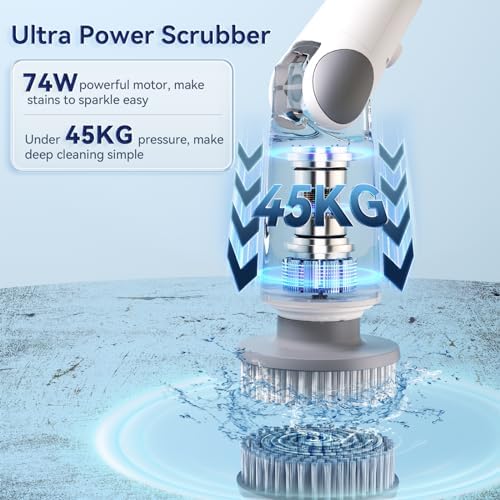
This image highlights the scrubber's powerful 74W motor, capable of generating nearly 45KG of pressure for deep cleaning.

The LED screen on the scrubber handle displays the current power level and allows for easy switching between low speed (450 RPM for daily cleaning) and high speed (550 RPM for deep cleaning).
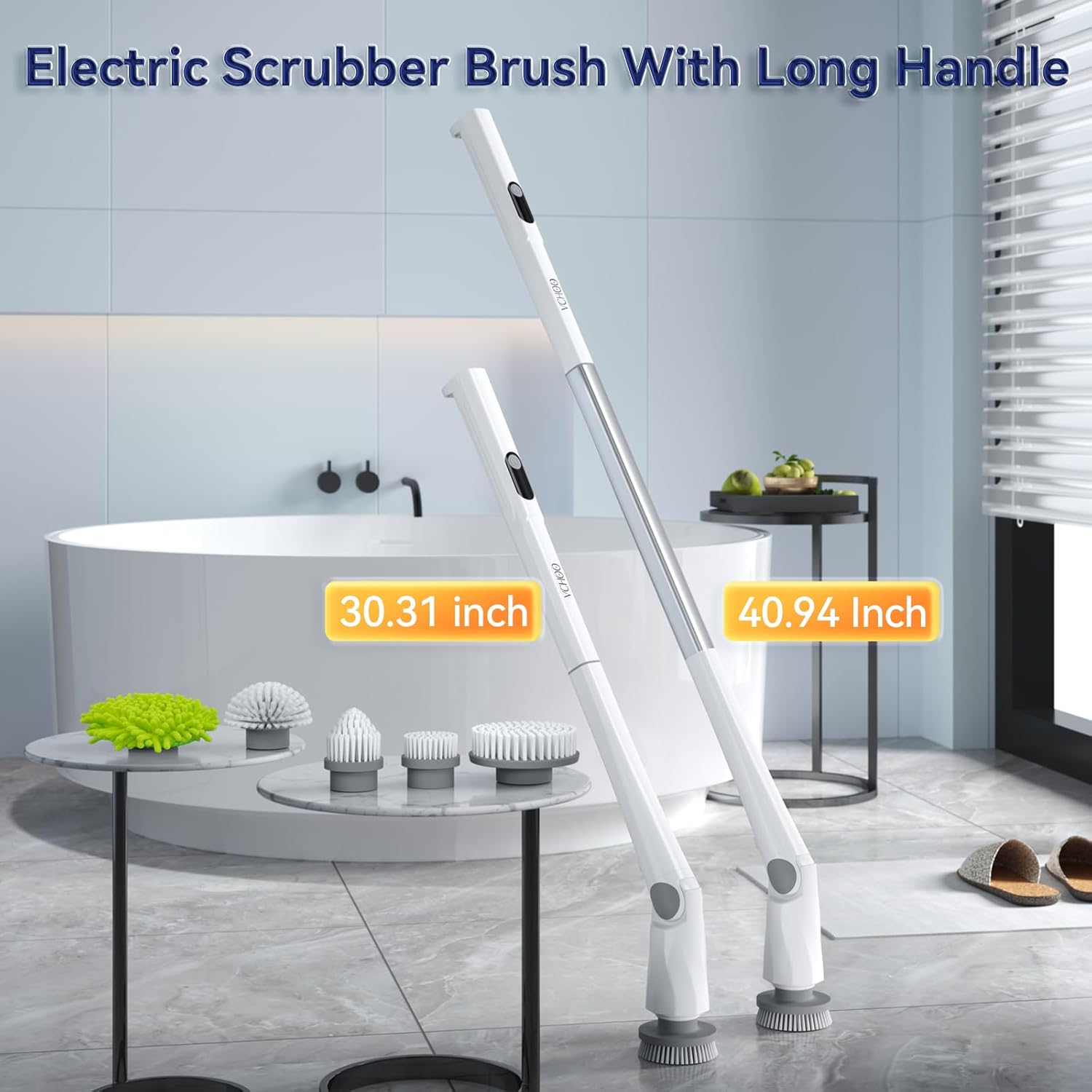
Demonstrates the scrubber's adjustable handle, which can extend from 31.89 inches to 43.3 inches. This feature is designed for comfortable use and reaching high or low areas.

This image visually confirms the IPX7 waterproof rating, indicating the scrubber head can be safely submerged in water for cleaning.

Showcases the versatility of the five replaceable brush heads, suitable for cleaning diverse surfaces such as bathtubs, floors, stovetops, sinks, and even car exteriors.
4. Setup
4.1 Assembling the Handle
- Unpack all components from the box.
- Connect the three sections of the handle by aligning the connectors and twisting gently until they lock into place. Ensure a secure fit.
- To adjust the length, press the release button on the handle and extend or retract the sections as needed.
4.2 Attaching Brush Heads
- Select the appropriate brush head for your cleaning task.
- Align the brush head with the rotating shaft on the scrubber unit.
- Push the brush head firmly onto the shaft until it clicks into place.
- To remove, pull the brush head off the shaft.
4.3 Initial Charging
- Before first use, fully charge the scrubber.
- Connect the charging cable to the charging port on the scrubber handle.
- Plug the other end of the cable into a suitable power adapter (not included) and then into a wall outlet.
- The LED display will show the charging status. A full charge typically takes about 2.5 hours.
- Once fully charged, disconnect the charging cable.

Illustrates the convenient charging process (2.5 hours for 90-120 minutes runtime) and storage method, including the damp-proof mesh bag.
5. Operating Instructions
5.1 Powering On/Off and Speed Selection
- Press the power button on the handle to turn the scrubber on. The LED display will illuminate.
- The scrubber will typically start in the default speed mode (Low or High).
- Press the power button again to switch between Low speed (450 RPM for daily cleaning) and High speed (550 RPM for deep cleaning).
- To turn off the scrubber, press and hold the power button for a few seconds.
5.2 Cleaning Tips
- Select the Right Brush: Choose the appropriate brush head for the surface you are cleaning. For example, softer brushes for delicate surfaces and stiffer brushes for tough grime.
- Apply Detergent: For best results, especially on stubborn stains, apply a suitable cleaning detergent to the surface before scrubbing.
- Maintain Firm Grip: The scrubber is powerful. Hold the handle firmly with one or both hands, especially when using the high-speed setting, to maintain control.
- Even Pressure: Apply even, moderate pressure. Let the scrubber's motor do the work. Excessive force is not necessary and may reduce battery life or damage surfaces.
- Reach Difficult Areas: Utilize the adjustable handle and angled brush head to reach corners, high walls, and low floors without straining.
6. Maintenance
6.1 Cleaning the Scrubber
- After each use, remove the brush head.
- Rinse the brush head thoroughly under running water to remove any dirt or detergent residue.
- Wipe the main scrubber unit and handle with a damp cloth. Do not submerge the entire unit.
- Ensure all parts are dry before storing.
6.2 Storage
- Store the scrubber in a cool, dry place away from direct sunlight.
- Use the provided damp-proof mesh bag for storing brush heads and accessories.
- For long-term storage, ensure the battery is partially charged (around 50%) to prolong its lifespan. Recharge every 3-6 months if not in use.
7. Troubleshooting
- Scrubber does not turn on: Ensure the battery is charged. Connect to the charger and check the LED display.
- Brush head not spinning effectively: Check if the brush head is securely attached. Ensure there is no obstruction or excessive debris preventing rotation. The battery might be low.
- Reduced power or short runtime: The battery may need a full charge. Battery performance can decrease over time with extensive use.
- Unusual noise or vibration: Turn off the device immediately. Check for any loose parts or foreign objects caught in the brush mechanism. If the issue persists, contact customer support.
8. Specifications
| Feature | Specification |
|---|---|
| Brand | VCHOO |
| Model Number | 01 |
| Color | White |
| Product Dimensions | 45.11 x 14 x 17.5 cm |
| Item Weight | 1.72 Kilograms |
| Material | Plastic |
| Motor Power | 74W |
| Pressure | Up to 45KG |
| Speed | Up to 550 RPM |
| Charging Time | Approx. 2.5 hours |
| Runtime | 90-120 minutes |
| Waterproof Rating | IPX7 (brush head) |
| Handle Adjustment | 31.89 to 43.3 inches |
9. Warranty and Support
VCHOO is committed to providing high-quality products and customer service. Your Electric Spin Scrubber Model 01 comes with:
- 24-Month Warranty: Covers manufacturing defects and malfunctions under normal use.
- 24-Hour Online Services: Dedicated support available to assist with any questions or issues you may encounter.
For warranty claims, technical support, or any inquiries, please contact VCHOO customer service through your purchase platform or the official VCHOO website.