
Introduction
This manual provides detailed instructions for the setup, operation, and maintenance of your Gerrit X5 Pro Max Smartwatch. Please read this manual thoroughly to ensure proper use and to fully utilize all features of your device.
Package Contents
Upon unboxing your Gerrit X5 Pro Max Smartwatch, please verify that all the following items are included:
- 1 x X5 Pro Max Smartwatch
- 1 x Magnetic Wireless Charger
- 1 x User Manual
- Additional Straps (may vary by package, typically includes silicone and metal options)

Image: The smartwatch, charging cable, and two types of straps (metal and silicone) neatly arranged within the product packaging.
Product Overview
The Gerrit X5 Pro Max Smartwatch is designed to integrate seamlessly into your daily life, offering a range of features from health monitoring to communication and entertainment.
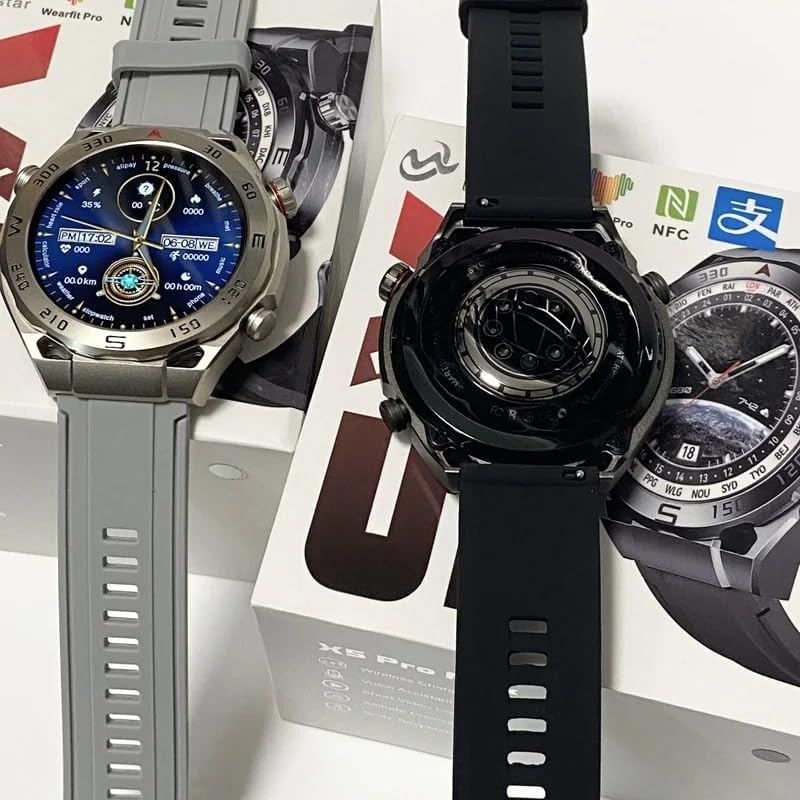
Image: Two Gerrit X5 Pro Max smartwatches, one silver with a grey strap and one black with a black strap, displayed to show both their front faces and the back casing with sensors.

Image: A close-up view of the silver Gerrit X5 Pro Max smartwatch face, displaying the current time, date, step count, and weather information.

Image: An infographic highlighting over 15 new features of the smartwatch, including icons for blood pressure, heart rate, motion timing, information viewing, call answering, touch control, alarm clock, IP67 waterproof rating, sleep monitoring, music playback, blood oxygen, weather forecast, brightening screen, and speech function.

Image: An infographic illustrating various data synchronization and life reminder functions, such as taking pictures by shaking, alarm clock, reading, sedentary reminders, drinking water reminders, movement tracking, telephone functions, travel reminders, medication reminders, heart rate monitoring, lookout, and upgrade options.

Image: A visual representation of the smartwatch's health monitoring capabilities, showing real-time measurement of heart rate, blood pressure, and blood oxygen levels on both the watch display and a connected smartphone application.

Image: A collage showcasing six distinct smartwatch dial patterns, demonstrating the customization options available for the watch face.

Image: A detailed close-up of the smartwatch's rear casing, highlighting the integrated temperature sensor and the design of the 'true clasp' or screw mechanism.

Image: A composite image illustrating key smartwatch features: a Bluetooth HD call interface, the NFC access control function interacting with a door lock, and a text overlay indicating 'IP67 Waterproof'.
Setup
1. Charging the Smartwatch
Before initial use, fully charge your smartwatch. Connect the magnetic wireless charger to a 5V/1A power source. Align the charger with the charging points on the back of the watch until it magnetically snaps into place and the charging indicator appears on the screen.
2. App Installation
Download and install the WearFit Pro application on your smartphone. The app is compatible with Android 5.0 and above, and iOS 10.0 and above. You can find the app on your device's respective app store.
3. Pairing with Your Smartphone
- Ensure Bluetooth is enabled on your smartphone.
- Open the WearFit Pro app and follow the on-screen instructions to add a new device.
- The app will search for available devices. Select 'X5 Pro Max' from the list.
- Confirm the pairing request on both your phone and the smartwatch.
Once paired, the smartwatch will synchronize data with your phone, including time, date, and notifications.
Operating Instructions
Basic Navigation
- Touch Screen: Swipe left/right, up/down to navigate through menus and features. Tap to select.
- Side Button(s): Typically used for power on/off, returning to the home screen, or accessing specific functions. Refer to on-screen prompts for exact functionality.
- Raise to Wake: Lift your wrist to automatically illuminate the screen.
Key Features
- Bluetooth Calls: After pairing, you can make and receive calls directly from your smartwatch. Use the built-in microphone and speaker for hands-free communication.
- NFC Access Control: Utilize the NFC function for access control. Follow instructions in the WearFit Pro app to link your watch with compatible NFC systems (e.g., property management office access).
- Health Monitoring: The smartwatch continuously monitors your heart rate, blood pressure, and blood oxygen levels. Access these readings via the watch interface or the WearFit Pro app for detailed historical data and analysis. Sleep monitoring tracks your sleep patterns and quality.
- Sports Modes: Select from multiple sports modes (e.g., walking, running, cycling) to track your exercise time, steps (pedometer), calorie consumption, and overall progress.
- Smart Reminders: Set customized alarms, inactivity reminders, and call reminders through the WearFit Pro app. The watch will vibrate to notify you.
- Information Push: Receive notifications from various apps like SMS, QQ, WeChat, Skype, Facebook, Twitter, Line, and WhatsApp directly on your watch.
- Music Control: Control music playback on your connected smartphone (play, pause, skip tracks) directly from your watch.
- Remote Photo: Use your smartwatch as a remote shutter for your smartphone camera.
- Watch Faces: Customize your watch face by selecting from various pre-installed options or downloading new ones via the WearFit Pro app. Some models support 3D dynamic dials.
- AI Voice Assistant: Access your smartphone's AI voice assistant directly from your watch for quick commands and queries.
- Language Settings: Change the interface language of your smartwatch. Supported languages include Chinese, English, French, German, Spanish, Russian, Portuguese, and more.
Maintenance
Water Resistance (IP67)
The Gerrit X5 Pro Max Smartwatch is rated IP67 waterproof, meaning it is resistant to dust and can withstand immersion in water up to 1 meter for 30 minutes. It is suitable for daily use, such as washing hands or light rain. However, it is not recommended for swimming, showering with hot water, or diving, as steam and high water pressure can damage the device.
Cleaning
Regularly clean your smartwatch and strap to prevent skin irritation and maintain device functionality. Use a soft, dry cloth to wipe the screen and body. For the strap, use a slightly damp cloth and mild soap if necessary, then rinse and dry thoroughly. Avoid using harsh chemicals or abrasive materials.
Charging Best Practices
- Use only the provided magnetic wireless charger.
- Avoid exposing the charger or watch to extreme temperatures.
- Do not attempt to charge the watch if it is wet.
Troubleshooting
Device Not Turning On
- Ensure the watch is fully charged. Connect it to the charger for at least 30 minutes.
- Press and hold the side button for several seconds to power on.
Unable to Pair with Smartphone
- Make sure Bluetooth is enabled on your phone and the watch.
- Ensure the WearFit Pro app is updated to the latest version.
- Restart both your smartphone and the smartwatch.
- Clear the Bluetooth cache on your phone (if applicable) and try pairing again.
- Ensure the watch is not already paired with another device.
Inaccurate Health Readings
- Ensure the watch is worn snugly on your wrist, not too tight or too loose.
- Keep the sensor clean and free from debris.
- Avoid excessive movement during measurements.
- Note that smartwatch health data is for reference only and should not be used for medical diagnosis.
Notifications Not Appearing
- Check if the watch is properly connected to your phone via Bluetooth.
- Verify notification permissions for the WearFit Pro app in your phone's settings.
- Ensure notification push is enabled within the WearFit Pro app for the desired applications.
Specifications

Image: A table summarizing the key product parameters of the X5 Pro Max Smartwatch.
| Feature | Specification |
|---|---|
| Product Name | X5 Pro Max Smartwatch |
| Brand | Gerrit |
| Model Number | Gerrit-X5 Pro MAX |
| Color | Black (also available in Silver) |
| Processor | Hs6621 |
| Bluetooth Version | 5.2 |
| Screen Size | 1.39 Inches Full Screen TFT HD |
| Screen Resolution | 390 x 435 |
| Battery Capacity | 220 mAh |
| Power Input | 5V/1A |
| Charging Interface | Magnetic Wireless Charging |
| Compatible System | Android 5.0+ / iOS 10.0+ |
| App Name | WearFit Pro |
| Water Resistance | IP67 |
| Fuselage Material | Zinc alloy/stainless steel + IML injection molding process |
| Strap Material | Liquid silicone + steel tape |
| Body Size | 51.5*45.8*12.5mm |
| Memory | 128MB |
Warranty and Support
Your Gerrit X5 Pro Max Smartwatch comes with a standard manufacturer's warranty. Please refer to the warranty card included in your package for specific terms and conditions. For technical support, troubleshooting assistance, or warranty claims, please contact your retailer or the manufacturer's customer service department. Contact information is typically provided on the product packaging or the official brand website.