
1. Introduction
Thank you for choosing the Kuulaa Magsafe Battery Pack. This slim, magnetic portable charger is designed to provide convenient and efficient power for your compatible devices, including iPhone 12 series and newer, and other devices via USB-C. With its 10000mAh capacity and PD 20W fast charging, it ensures your devices stay powered throughout the day. Please read this manual carefully before use to ensure optimal performance and safety.
2. Package Contents
Please verify that all items are present in your package:
- 1 x Kuulaa 10000mAh MagSafe Battery Pack (Model: KL-YD57)
- 1 x USB-C Charging Cable
- 1 x User Manual
3. Product Features
Ultra-Slim Design

The battery pack features a record-thin 0.47-inch profile, making it highly portable and easy to carry in pockets or bags without adding bulk.
Dual Charging Options
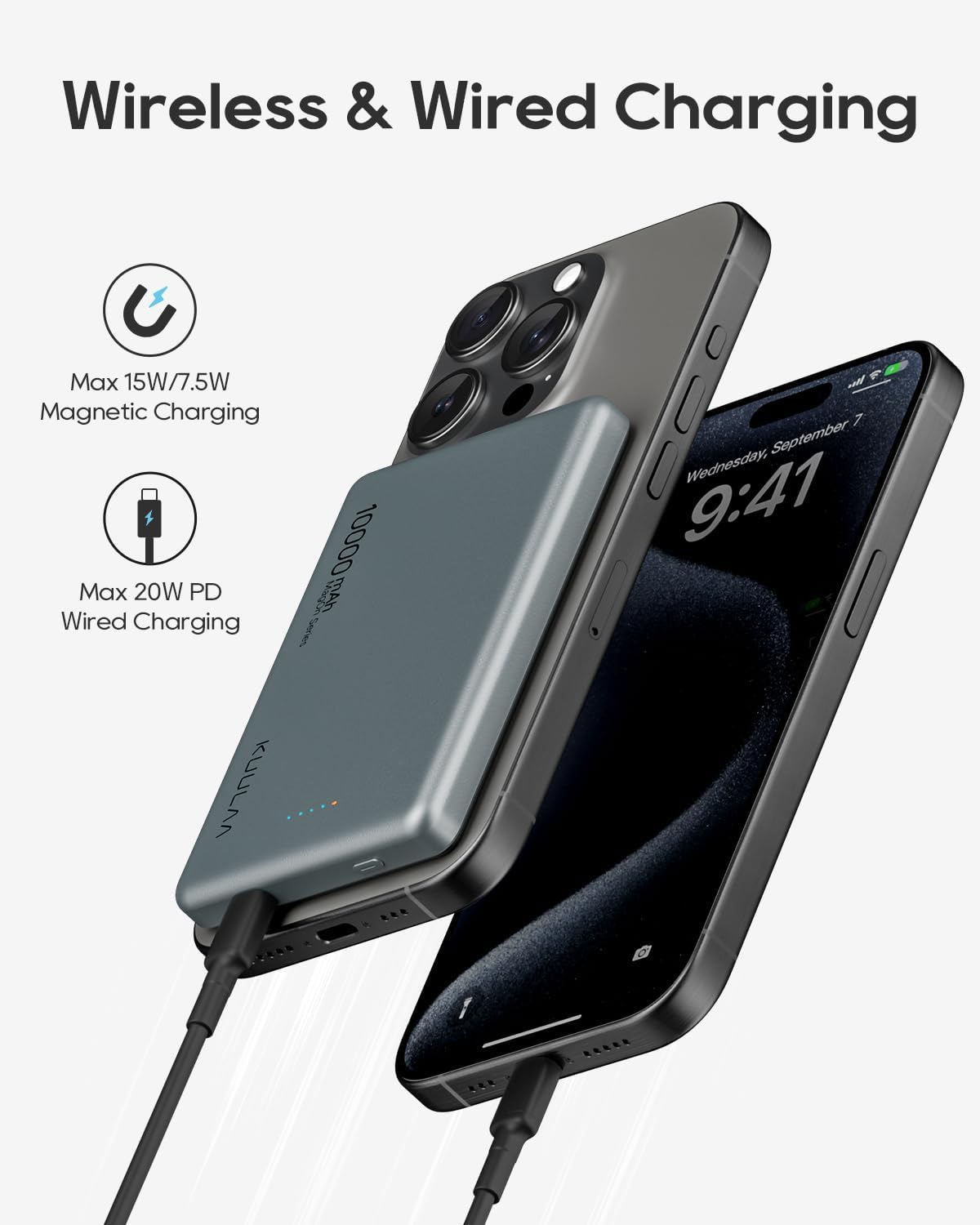
Supports both MagSafe wireless charging for compatible iPhones and 20W Power Delivery (PD) wired charging via its USB-C port, allowing simultaneous charging of two devices.
USB-C Fast Charging
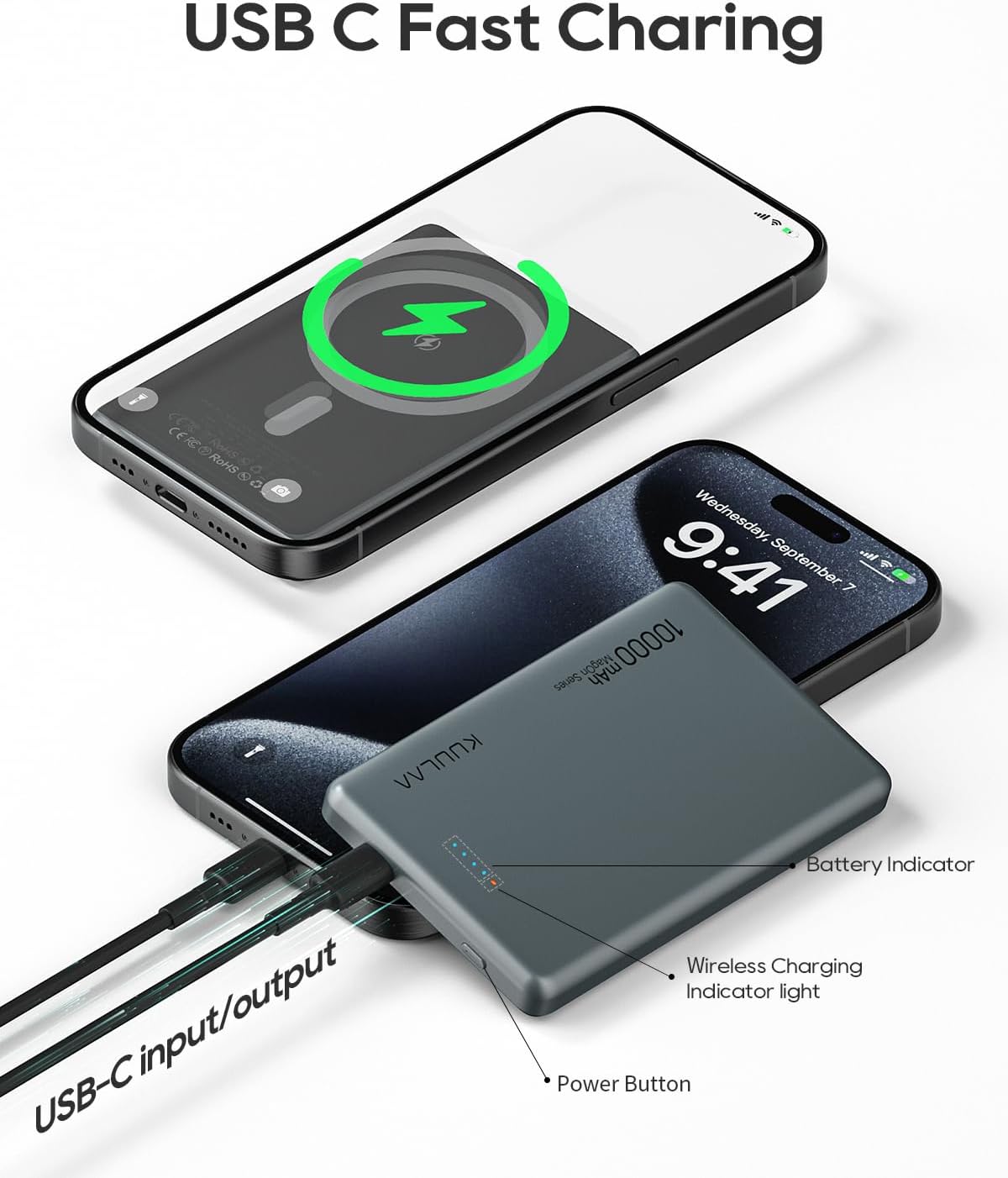
The USB-C port offers 20W PD fast charging, significantly reducing charging times for your devices. It also serves as the input for recharging the power bank itself.
Strong Magnetic Attachment

Equipped with strong magnets, the power bank securely attaches to MagSafe-compatible iPhones (iPhone 12 series and later) and MagSafe cases, ensuring stable wireless charging.
4. Setup and Initial Use
4.1 Charging the Power Bank
- Connect the provided USB-C charging cable to the USB-C port on the Kuulaa Magsafe Battery Pack.
- Plug the other end of the USB-C cable into a compatible USB-C power adapter (not included). A 20W PD adapter is recommended for fastest charging.
- The LED indicator lights on the power bank will illuminate to show the charging status. All four lights will be solid when fully charged.
4.2 Checking Battery Level
Press the power button once to check the current battery level indicated by the LED lights:
- 1 LED: 0-25% battery
- 2 LEDs: 25-50% battery
- 3 LEDs: 50-75% battery
- 4 LEDs: 75-100% battery
5. Operating Instructions
5.1 MagSafe Wireless Charging
- Ensure your iPhone is MagSafe compatible (iPhone 12 series or newer) or is using a MagSafe-compatible case.
- Align the Kuulaa Magsafe Battery Pack with the back of your iPhone. The magnets will snap into place, securing the connection.
- Wireless charging will automatically begin. The wireless charging indicator light on the power bank will illuminate.
- To stop wireless charging, simply detach the power bank from your iPhone. The power bank will automatically power off after a short period of inactivity or by pressing the power button twice.
5.2 Wired Charging (USB-C PD 20W)
- Connect one end of a USB-C to USB-C cable (or appropriate cable for your device) to the USB-C port on the Kuulaa Magsafe Battery Pack.
- Connect the other end of the cable to your device's charging port.
- Charging will begin automatically. The power bank will automatically power off after a short period of inactivity or by pressing the power button twice.
6. Maintenance
To ensure the longevity and optimal performance of your Kuulaa Magsafe Battery Pack, please follow these maintenance guidelines:
- Cleaning: Use a soft, dry cloth to wipe the surface of the power bank. Avoid using harsh chemicals, abrasive cleaners, or solvents.
- Storage: Store the power bank in a cool, dry place away from direct sunlight, extreme temperatures, and humidity.
- Charging Cycles: For optimal battery health, it is recommended to fully charge and discharge the power bank at least once every three months if not in regular use.
- Avoid Drops: Protect the device from drops, impacts, and excessive vibrations, which can damage internal components.
7. Troubleshooting
If you encounter any issues with your Kuulaa Magsafe Battery Pack, please refer to the following common problems and solutions:
| Problem | Possible Cause | Solution |
|---|---|---|
| Power bank not charging | Loose cable connection, faulty adapter, damaged cable, power bank fully discharged. | Ensure cables are securely connected. Try a different USB-C cable or power adapter. Allow a few minutes for the power bank to respond if deeply discharged. |
| Device not charging from power bank | Power bank low on battery, incorrect alignment (MagSafe), non-compatible device/case, loose cable. | Recharge the power bank. For MagSafe, ensure proper alignment and that your device/case is compatible. For wired, check cable connection and try a different cable. |
| Power bank gets warm during use | Normal operation, especially during fast charging or wireless charging due to energy conversion. | This is generally normal. If it becomes excessively hot to touch, disconnect immediately and contact support. Ensure adequate ventilation. |
| Magnetic attachment is weak | Non-MagSafe case, thick case, foreign objects between power bank and phone. | Ensure you are using a MagSafe-compatible iPhone or case. Remove any foreign objects. |
8. Specifications
| Feature | Detail |
|---|---|
| Model Number | KL-YD57 |
| Battery Capacity | 10000 Milliamp Hours (mAh) |
| Product Dimensions | 3.94 x 3.94 x 2.76 inches |
| Item Weight | 6 ounces |
| Connector Type | USB Type C |
| Special Features | Auto Shut-Off, LED Indicator Lights, Pocket Size, Slim, Wireless Charging |
| Wireless Charging Output | Up to 15W (7.5W for MagSafe compatible iPhones) |
| Wired Charging Output/Input | Up to 20W Power Delivery (PD) |
| Battery Type | Lithium Polymer |
9. Safety Information
Please observe the following safety precautions to prevent damage to the product or injury to yourself:
- Do not expose the power bank to water, moisture, or extreme temperatures (above 45°C/113°F or below 0°C/32°F).
- Do not disassemble, modify, or attempt to repair the device. This will void the warranty and may cause harm.
- Keep out of reach of children.
- Avoid dropping or subjecting the power bank to strong impacts.
- Do not place metal objects or magnetic cards between the power bank and your device during wireless charging, as this may interfere with charging or damage the card.
- This power bank is airplane-approved for carry-on luggage. Always check with your airline's regulations before traveling.

The Kuulaa Magsafe Battery Pack is designed with multiple protections and is approved for air travel, making it a reliable companion for your journeys.
10. Warranty and Support
The Kuulaa Magsafe Battery Pack comes with a 24-month warranty from the date of purchase, covering manufacturing defects. This warranty does not cover damage caused by misuse, accidents, unauthorized modifications, or normal wear and tear.
For warranty claims, technical support, or any inquiries, please contact the seller, KuulaaUS, through your Amazon order details. You may also visit the official Kuulaa Store on Amazon for more information and support resources: Kuulaa Store.
