Introduction
Thank you for choosing the MangoKit MD1 Portable DAB+ / FM Radio. This manual provides essential information for setting up, operating, and maintaining your radio. Please read it thoroughly before use to ensure optimal performance and safety.
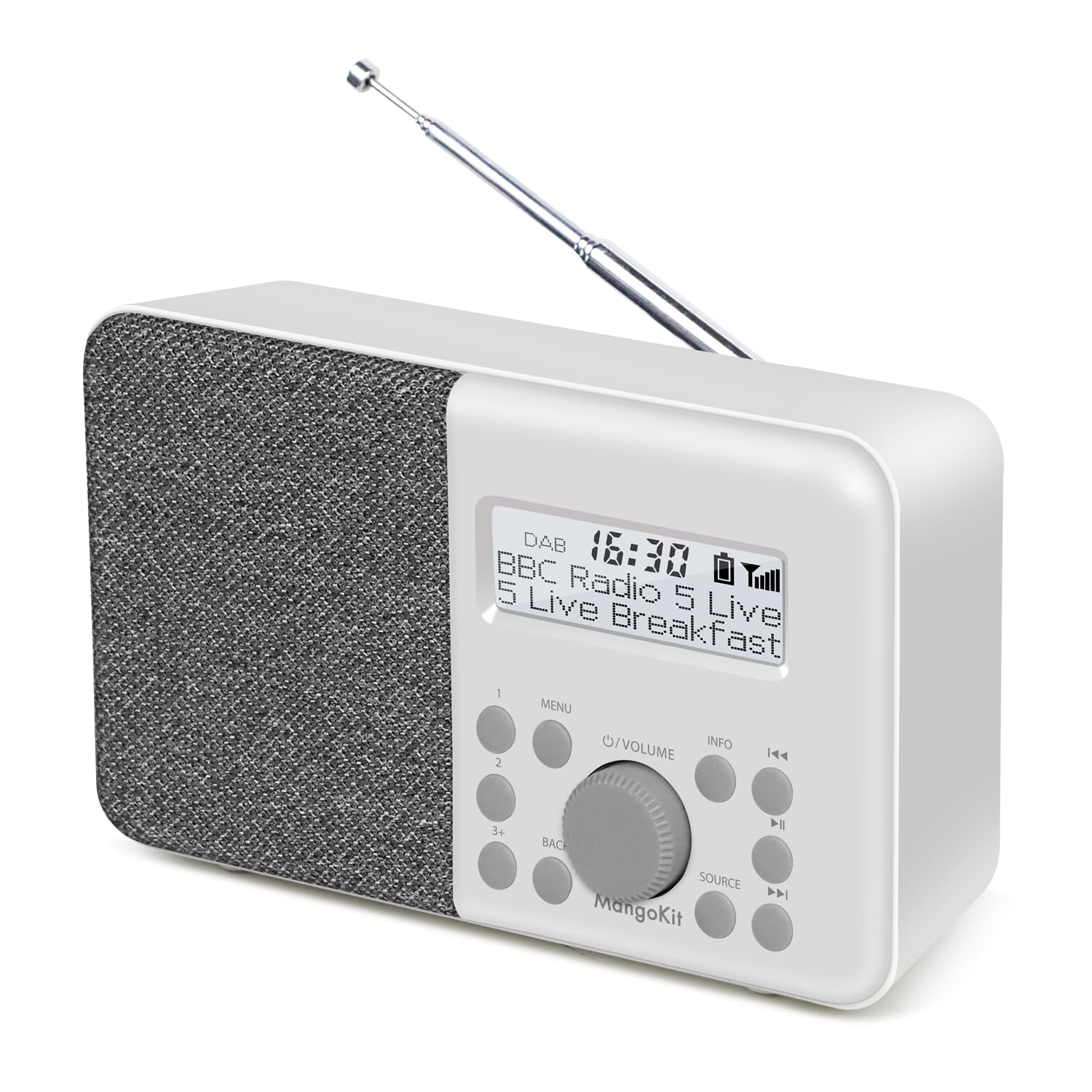
Image: The MangoKit MD1 radio positioned on a kitchen counter, showcasing its compact design and display.
What's in the Box
Upon unpacking, please ensure all the following items are present:
- 1 x MangoKit MD1 Radio
- 1 x USB-C Power Cable
- 1 x AC Power Adapter
- 1 x Multi-language User Manual (this document)
Product Overview
Familiarize yourself with the radio's components and controls.

Image: A close-up view of the MangoKit MD1 radio's front panel, highlighting the display, speaker grille, and control buttons.
Controls and Display:
- Display Screen: Shows station information, time, and menu options.
- Power Button: Turns the radio on or off.
- Volume Knob: Adjusts the audio volume.
- Menu Button: Accesses the radio's settings menu.
- Back Button: Returns to the previous menu or screen.
- Source Button: Switches between DAB/DAB+ and FM modes.
- Preset Buttons (1, 2, 3+): Quickly access saved radio stations.
- Tune/Select Buttons (<<, >>): Navigates through stations or menu options.
- Info Button: Displays additional information about the current broadcast.
- Headphone Jack: For private listening.
- USB-C Port: For power input.
- Telescopic Antenna: For optimal radio signal reception.
Setup
Powering the Radio:
The MD1 radio can be powered by either the included AC adapter or 4x AA batteries (not included).
- Mains Power:
- Connect the USB-C power cable to the USB-C port on the back of the radio.
- Connect the other end of the USB-C cable to the AC power adapter.
- Plug the AC power adapter into a standard wall outlet.
- Battery Power:
- Open the battery compartment cover on the back of the radio.
- Insert 4x AA batteries (not included), ensuring correct polarity (+/-).
- Close the battery compartment cover securely.

Image: The MangoKit MD1 radio placed on an outdoor table, demonstrating its portability with battery power.
Initial Power On:
- Extend the telescopic antenna for optimal reception.
- Press the Power button to turn on the radio.
- The radio will typically perform an automatic scan for DAB/DAB+ stations upon first use.
Operating Instructions
Switching Modes (DAB/DAB+ / FM):
Press the Source button to switch between DAB/DAB+ and FM radio modes.
DAB/DAB+ Radio Operation:
- Ensure the radio is in DAB/DAB+ mode.
- If it's the first time or if you've moved locations, perform a full scan:
- Press the Menu button.
- Use the Tune buttons (<<, >>) to navigate to "Full Scan" and press the Volume/Select knob to confirm.
- The radio will scan for available DAB/DAB+ stations.
- To browse stations, use the Tune buttons (<<, >>).
- Press the Info button to cycle through different display information (e.g., program type, signal strength, time).

Image: The MangoKit MD1 radio displaying a DAB+ station, illustrating the clear digital signal.
FM Radio Operation:
- Ensure the radio is in FM mode.
- To auto-scan for the next available station, press and hold the Tune buttons (<<, >>).
- To manually tune, press the Tune buttons (<<, >>) briefly to adjust the frequency in small increments.
- Press the Info button to cycle through different display information (e.g., RDS text, frequency).
Saving and Recalling Presets:
The radio supports up to 40 presets for your favorite DAB+ and FM stations.
- To Save a Preset:
- Tune to the desired station.
- Press and hold one of the Preset buttons (1, 2, or 3+).
- If you pressed 3+, use the Tune buttons to select a preset number (e.g., P03-P40) and press the Volume/Select knob to confirm.
- The display will confirm the station has been saved.
- To Recall a Preset:
- Press one of the Preset buttons (1, 2, or 3+) briefly.
- If you pressed 3+, use the Tune buttons to select the desired preset number and press the Volume/Select knob to confirm.
Setting Alarms:
The MD1 features two independent alarms with weekday/weekend modes.

Image: The MangoKit MD1 radio on a nightstand, showing the display set to "Dual Alarm 6:30".
- Press the Menu button.
- Navigate to "Alarm" and press the Volume/Select knob.
- Select "Alarm 1" or "Alarm 2".
- Configure the following settings using the Tune buttons and Volume/Select knob:
- Time: Set the desired alarm time.
- Mode: Choose "Daily", "Weekdays", "Weekends", or "Once".
- Source: Select "DAB", "FM", or "Buzzer".
- Volume: Set the alarm volume.
- Enable/Disable: Turn the alarm on or off.
- Press the Menu or Back button to exit.
Snooze Function:
When an alarm sounds, press any button (except Power) to activate the snooze function. The alarm will pause for a set period (usually 9 minutes) and then sound again.
Sleep Timer:
The sleep timer allows the radio to play for a set duration before automatically turning off.
- Press the Menu button.
- Navigate to "Sleep" and press the Volume/Select knob.
- Use the Tune buttons to select the desired sleep duration (e.g., 15, 30, 45, 60, 90 minutes, or Off).
- Press the Volume/Select knob to confirm.
Headphone Use:
For private listening, plug standard 3.5mm headphones into the headphone jack on the side of the radio. The internal speaker will automatically mute.

Image: A close-up of the MangoKit MD1 radio, showing a headphone jack with headphones connected, indicating private listening.
EQ Settings:
Adjust the audio equalization to suit your preferences.
- Press the Menu button.
- Navigate to "EQ" and press the Volume/Select knob.
- Select from available presets like "Music" or "Voice", or a custom setting if available.
- Press the Volume/Select knob to confirm.
Maintenance
- Cleaning: Use a soft, dry cloth to clean the radio's surface. Do not use abrasive cleaners or solvents.
- Antenna: Handle the telescopic antenna carefully to avoid damage.
- Storage: If storing the radio for an extended period, remove the batteries to prevent leakage.
- Environment: Keep the radio away from direct sunlight, heat sources, and moisture.
Troubleshooting
| Problem | Possible Cause | Solution |
|---|---|---|
| No power | Batteries are flat or incorrectly inserted; AC adapter not connected or faulty. | Replace batteries, check polarity. Ensure AC adapter is securely connected and working. |
| Poor DAB/FM reception | Antenna not extended; weak signal area; interference. | Fully extend the antenna. Reposition the radio. Perform a full scan in DAB mode. |
| No sound | Volume too low; headphones connected; mute activated. | Increase volume. Disconnect headphones. Check if mute is active. |
| Alarm not sounding | Alarm not enabled; incorrect time/day setting; volume too low. | Verify alarm settings (time, mode, source, volume, enable status). |
Specifications
- Model: MD1
- Brand: MangoKit
- Radio Bands: DAB/DAB+, FM
- Connectivity: Headphone Jack (3.5mm)
- Power Source: AC Power Adapter (USB-C), 4x AA Batteries (not included)
- Battery Life: Up to 10 hours (with suitable batteries)
- Presets: 40 (DAB/DAB+ and FM combined)
- Special Features: Dual Alarms, Snooze, Sleep Timer, EQ Settings
- Product Dimensions: 17.5 cm (L) x 10.5 cm (H) x 5.4 cm (D)
- Weight: 450g
- Color: Stone Grey
- Origin: China
Warranty and Support
MangoKit products are designed for reliability and performance. For warranty information or technical support, please refer to the contact details provided with your purchase or visit the official MangoKit website. Please retain your proof of purchase for warranty claims.
Note: Spare parts availability information is not provided by the manufacturer. Software updates are not applicable or information is not available.


