1. Introduction
The WOOX R6087-4pack EU Schuko Smart Plug is a home automation accessory designed to provide remote control over your electrical appliances via your smartphone. This smart plug integrates seamlessly with your existing Wi-Fi network, allowing you to manage connected devices from anywhere using the WOOX Home application. It also supports voice control through popular assistants like Amazon Alexa and Google Assistant, enhancing convenience and smart home integration. Each plug is equipped with a WB2S Wi-Fi module, supporting Wi-Fi and Bluetooth 4.2 IEEE 802.11b/g/n standards.
2. Important Safety Information
Please read and understand all safety instructions before using the WOOX Smart Plug. Failure to follow these instructions may result in electric shock, fire, or serious injury.
- Indoor Use Only: This device is designed for indoor use in dry locations. Do not expose to water or moisture.
- Electrical Rating: Do not exceed the maximum load of 3680W. Overloading may cause overheating and fire.
- Child Safety: The plug features a child safety shutter to prevent accidental contact with live parts. However, always keep electrical devices out of reach of children.
- Flammability: The product is made from UL94 V-0 750°C flame-retardant material for enhanced safety.
- Ventilation: Ensure adequate ventilation around the smart plug. Do not cover it or place it in enclosed spaces.
- Cleaning: Disconnect from power before cleaning. Use a dry, soft cloth. Do not use liquid cleaners.
- Disassembly: Do not attempt to disassemble or modify the smart plug. This will void the warranty and may cause damage or injury.
3. Product Overview
The WOOX R6087 Smart Plug is a compact device designed to fit standard EU Schuko outlets. It features a power button and an indicator light.

Image 3.1: Front view of the WOOX R6087 EU Schuko Smart Plugs. Each plug is white with a circular power button and the WOOX logo.
3.1. Package Contents
The WOOX R6087-4pack includes:
- 4 x WOOX R6087 EU Schuko Smart Plugs
- 1 x User Manual (this document)
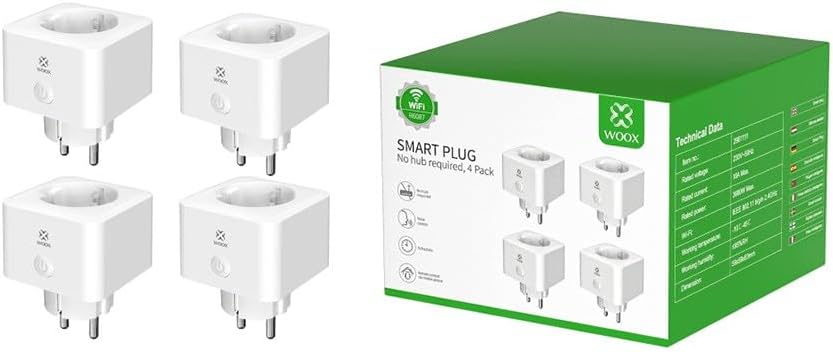
Image 3.2: WOOX R6087-4pack Smart Plugs and their retail packaging. The packaging highlights Wi-Fi connectivity and the "No hub required" feature.
3.2. Key Features
- Remote control via WOOX Home App (iOS/Android)
- Voice control compatibility with Amazon Alexa and Google Assistant
- Wi-Fi and Bluetooth 4.2 IEEE 802.11b/g/n connectivity
- Max power load of 3680W (16A)
- Child safety shutter
- Flame-retardant material (UL94 V-0 750°C)
- IP20 protection against dust and foreign objects
4. Setup Instructions
Follow these steps to set up your WOOX Smart Plug:
- Download the WOOX Home App: Search for "WOOX Home" in the Apple App Store (for iOS) or Google Play Store (for Android) and download the application.
- Register/Log In: Open the WOOX Home App and register for a new account or log in if you already have one.
- Plug In the Smart Plug: Insert the WOOX Smart Plug into a standard EU Schuko wall outlet.
- Enter Pairing Mode: The indicator light on the smart plug should start blinking rapidly (approximately 2 times per second). If it's not blinking, press and hold the power button on the plug for 5-10 seconds until it starts blinking rapidly.
- Add Device in App: In the WOOX Home App, tap the "+" icon in the top right corner to add a new device. Select "Electrical Outlet" or "Smart Plug" from the device list.
- Confirm Indicator Status: Confirm that the indicator light on the smart plug is blinking rapidly in the app.
- Connect to Wi-Fi: Enter your 2.4 GHz Wi-Fi network name and password. Ensure your smartphone is connected to the same 2.4 GHz Wi-Fi network. Note: 5 GHz Wi-Fi networks are not supported.
- Pairing: The app will begin the pairing process. Once connected, the indicator light on the smart plug will stop blinking and remain solid.
- Rename Device: You can rename the smart plug in the app for easier identification (e.g., "Living Room Lamp," "Kitchen Coffee Maker").
4.1. Voice Assistant Integration (Optional)
To connect with Amazon Alexa or Google Assistant:
- Ensure your WOOX Smart Plug is successfully set up in the WOOX Home App.
- Open your Amazon Alexa or Google Home app.
- Navigate to the "Skills" or "Works with Google" section.
- Search for "WOOX Home" and enable the skill/service.
- Link your WOOX Home account when prompted.
- Discover devices. Your smart plug should now be controllable via voice commands.
5. Operating Instructions
5.1. Manual Control
Press the power button on the front of the smart plug to manually turn the connected appliance ON or OFF.
5.2. App Control
Open the WOOX Home App on your smartphone. Tap on the smart plug's icon to toggle its power state (ON/OFF). The app also allows you to:
- Set Schedules: Create daily or weekly schedules for the plug to turn ON/OFF automatically.
- Set Timers: Set countdown timers for the plug to turn OFF after a specified duration.
- Create Scenes: Group multiple WOOX devices and control them with a single tap or command.
- Monitor Status: View the current ON/OFF status of the plug.
5.3. Voice Control
Once integrated with Amazon Alexa or Google Assistant, use voice commands such as:
- "Alexa, turn on [Plug Name]"
- "Hey Google, turn off [Plug Name]"
- "Alexa, set [Plug Name] to turn off in 30 minutes"
6. Maintenance
The WOOX Smart Plug requires minimal maintenance.
- Cleaning: Disconnect the smart plug from the power outlet before cleaning. Use a soft, dry cloth to wipe the surface. Do not use abrasive cleaners, solvents, or immerse the device in water.
- Storage: If not in use for an extended period, store the smart plug in a cool, dry place away from direct sunlight and extreme temperatures.
- Firmware Updates: Periodically check the WOOX Home App for available firmware updates for your smart plug. Keeping the firmware updated ensures optimal performance and security.
7. Troubleshooting
If you encounter issues with your WOOX Smart Plug, refer to the following common problems and solutions:
| Problem | Possible Cause | Solution |
|---|---|---|
| Smart plug not connecting to Wi-Fi. | Incorrect Wi-Fi password; 5 GHz Wi-Fi network; too far from router; Wi-Fi signal interference. |
|
| Smart plug frequently disconnects. | Weak Wi-Fi signal; network congestion; router issues. |
|
| Voice control not working. | Incorrect device name; WOOX Home skill not enabled; account not linked. |
|
| Plug is unresponsive. | Power outage; device malfunction. |
|
8. Technical Specifications
| Parameter | Value |
|---|---|
| Model | R6087 |
| Input Voltage | 100~230V AC |
| Max Load Current | 16A |
| Max Power Load | 3680W |
| Wi-Fi Module | WB2S |
| Wireless Standard | Wi-Fi and Bluetooth 4.2 IEEE 802.11b/g/n |
| Wireless Frequency | 2.412 ~ 2.472 GHz |
| Max Emission Power | 18.88 dBm |
| Connection Range (open space) | 30 meters |
| Operating Temperature | -10 °C ~ +45 °C |
| Working Humidity | 0 ~ 95% RH (non-condensing) |
| Voice Control Support | Google Assistant, Amazon Alexa |
| Child Safety Shutter | Yes |
| Flame Retardant Rating | UL94 V-0 750 °C |
| IP Rating | IP20 |
| Manufacturer | Woox |
9. Warranty and Support
For detailed warranty information, please refer to the warranty card included with your product or visit the official WOOX website. WOOX provides customer support for product inquiries, technical assistance, and warranty claims.
WOOX Official Website: www.wooxhome.com
Please have your model number (R6087) and purchase details ready when contacting support.


