
Shark HP150EU
Shark NeverChange Air Purifier HP150EU User Manual
Model: HP150EU
Introduction
This manual provides essential information for the safe and efficient operation, maintenance, and troubleshooting of your Shark NeverChange Air Purifier HP150EU. Please read it thoroughly before using the appliance and retain it for future reference.
The Shark NeverChange Air Purifier is designed to provide powerful cleaning and odor control, automatically monitoring air quality and adjusting its performance to improve your indoor environment. Its advanced 4-layer filtration system is engineered to capture and retain 99.97% of allergens and irritants, while Anti-Odor Technology helps neutralize odors for a fresher-smelling home.
Product Overview

Figure 1: Front view of the Shark NeverChange Air Purifier HP150EU, showcasing its compact design and digital display.
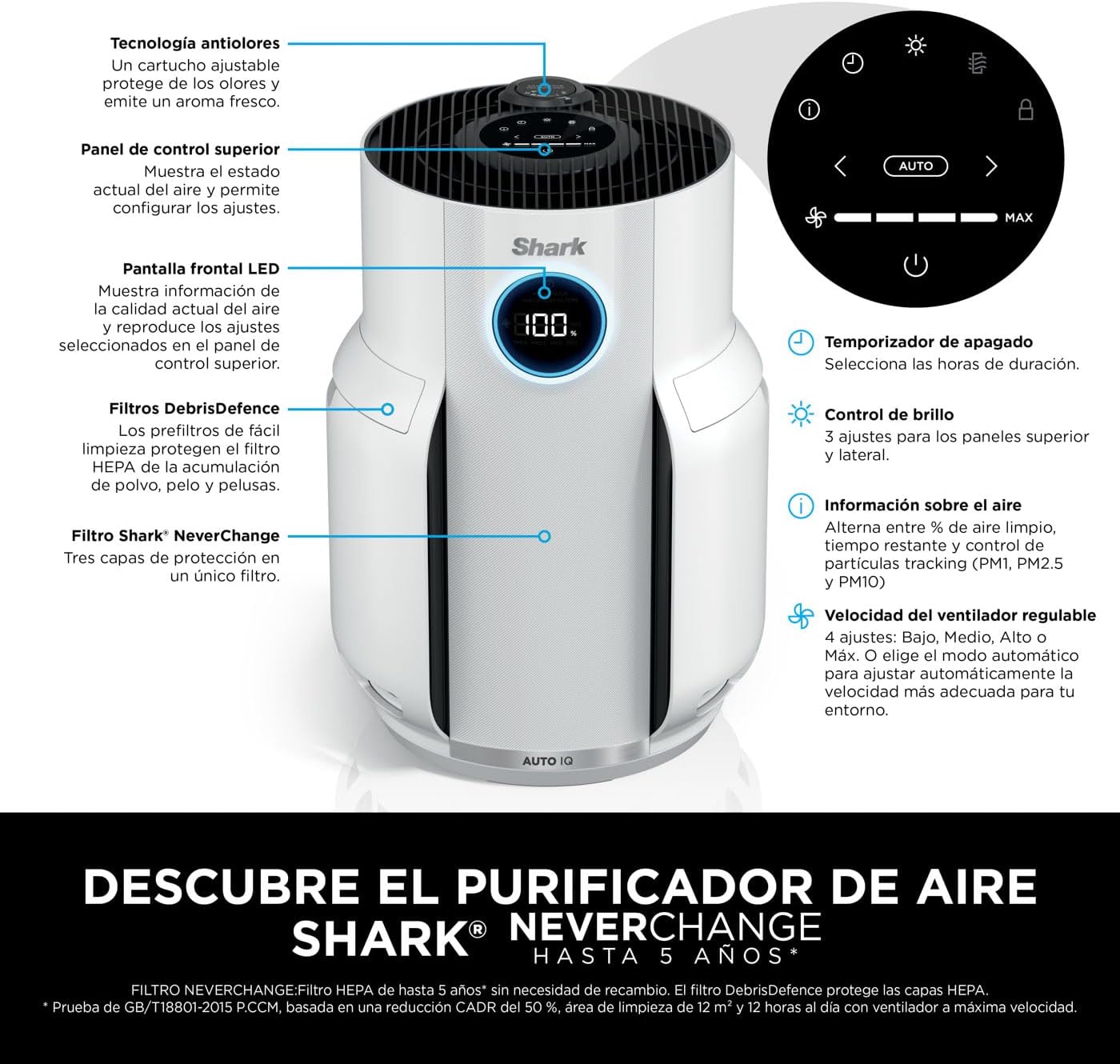
Figure 2: Top control panel and front LED display of the air purifier. The control panel includes buttons for power, fan speed, auto mode, timer, and brightness control. The LED display shows air quality percentage.
Key Features:
- Long-Lasting Filter: No need to replace your filter for up to 5 years (tested according to GB/T18801-2015 P.CCM, based on 50% CADR purchase, 12m2 cleaning surface and 12 hours daily use at maximum fan speed).
- 4-Layer Filter: Catches allergens and irritants, such as dust, pollen, pet dander and allergens. The Anti-Odor Technology spreads a fresh scent and neutralizes odors for a nice fresh-smelling home.
- Auto IQ Monitoring: Auto IQ monitors air quality and automatically responds to environmental changes by adjusting cleaning power throughout the day. See that the air quality improves on the LED display.
- Coverage: 60 m (with 1 air exchange per hour) / 12 m (4.8 air changes per hour). Quiet operation and dimmable lights for use at night.
- Included Components: 1x NeverChange up to 5 years long Air Purifier HP150 (EU plug), 1x NeverChange HEPA Filter, 1x Anti-Odor Technology Cartridge. Dimensions: H38.5cm x W23.7cm x D26.6cm. Weight: 3.3 kg. Color: White.
Setup
- Unpacking: Carefully remove the air purifier and all accessories from the packaging. Retain packaging for future storage or transport.
- Placement: Place the air purifier on a firm, level surface. Ensure there is at least 15 cm (6 inches) of clear space around all sides for optimal airflow. Avoid placing it near heat sources, direct sunlight, or in areas with high humidity.
- Filter Installation (Initial Setup):
The air purifier comes with a pre-installed NeverChange HEPA Filter and an Anti-Odor Technology Cartridge. Before first use, ensure these are correctly seated and any protective packaging is removed.

Figure 3: Diagram illustrating the four layers of the Shark NeverChange filtration system: DebrisDefence, Pet Particle Barrier, Activated Carbon, and NanoSeal HEPA.
To access the filter compartment, gently open the side panel. Verify the filter and odor cartridge are securely in place. Close the panel firmly.
- Power Connection: Plug the power cable into a standard electrical outlet. The unit will enter standby mode.
Operating Instructions
Control Panel Functions:
- Power Button (⏻): Press to turn the unit ON or OFF.
- Fan Speed (💨): Adjusts fan speed (Low, Medium, High, Max).
- Auto Mode (AUTO): Activates Auto IQ, allowing the purifier to automatically adjust fan speed based on detected air quality.
- Timer (⏱): Sets an operating timer for a specified duration.
- Brightness Control (🔆): Adjusts the brightness of the LED display and indicator lights.
- Information Display (ℹ): Cycles through air quality information such as percentage clean air, remaining filter life, and particle tracking (PM1, PM2.5, PM10).
Daily Use:
- Power On: Press the Power button. The unit will start in the last used mode or default to Auto mode.
- Monitor Air Quality: The front LED display will show the current air quality percentage. A higher percentage indicates cleaner air.

Figure 4: Close-up of the air purifier's LED display showing real-time air quality. The display changes color (red, orange, blue) to indicate different air quality levels, with 100% representing optimal air.
- Select Mode:
- Auto IQ Mode: Recommended for continuous use. The purifier intelligently adjusts fan speed based on detected pollutants.
- Manual Fan Speed: Use the Fan Speed button to select your desired fan intensity. Higher speeds provide faster purification but may generate more noise.
- Night Mode: For quiet operation and dimmable lights, adjust the brightness setting or select a lower fan speed.

Figure 5: The Shark NeverChange Air Purifier operating quietly in a bedroom at night, demonstrating its suitability for undisturbed sleep.
- Anti-Odor Technology: The integrated Anti-Odor Technology Cartridge continuously works to neutralize odors.
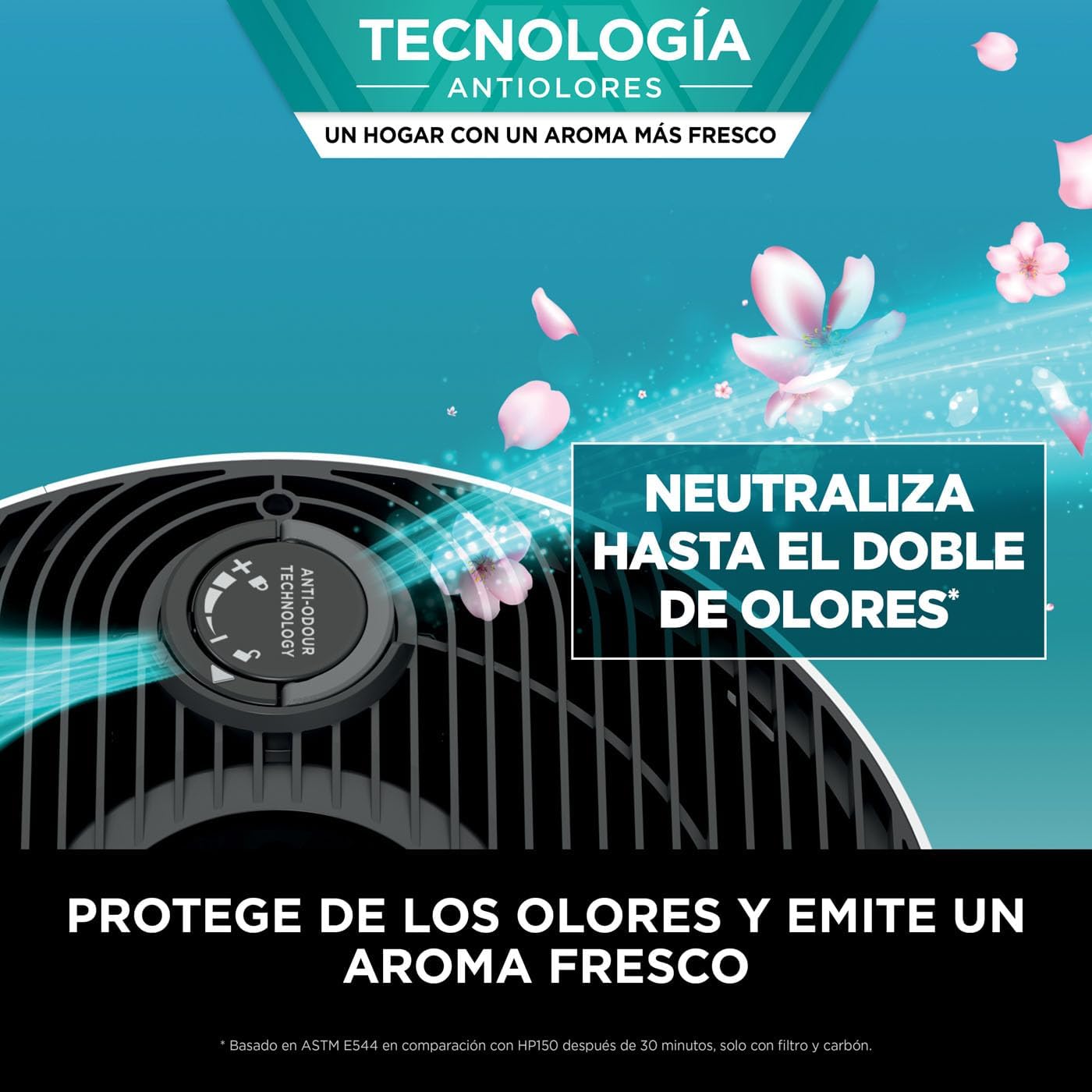
Figure 6: Close-up view of the Anti-Odor Technology dial on the top of the air purifier, indicating its function in neutralizing odors and releasing a fresh scent.
Maintenance
Regular maintenance ensures optimal performance and extends the life of your air purifier.
Cleaning the DebrisDefence Filter:
The DebrisDefence pre-filter is designed to capture larger particles and should be cleaned periodically to maintain HEPA filter efficiency.
- Power Off: Always unplug the air purifier before performing any maintenance.
- Access Filter: Open the side panel of the air purifier.
- Remove DebrisDefence: Gently pull out the DebrisDefence filter.

Figure 7: Step-by-step illustration of removing and cleaning the DebrisDefence filter. The filter can be easily vacuumed or wiped clean.
- Clean: Use a vacuum cleaner with a brush attachment or a soft cloth to remove accumulated dust and debris from the DebrisDefence filter. Do NOT wash the HEPA filter with water.
- Reinstall: Insert the clean DebrisDefence filter back into its slot and close the side panel securely.
HEPA Filter Replacement:
The Shark NeverChange HEPA filter is designed to last up to 5 years under normal operating conditions. The unit's display will indicate when filter replacement is needed. Refer to the information display for remaining filter life.
When replacement is necessary, use only genuine Shark NeverChange replacement filters (Model: HP150EU-FILTER, or as specified by Shark).
- Power Off and Unplug: Ensure the unit is off and unplugged.
- Access Filter: Open the side panel.
- Remove Old Filter: Carefully pull out the old HEPA filter. Dispose of it according to local regulations.
- Install New Filter: Insert the new Shark NeverChange HEPA filter, ensuring it is correctly oriented and seated.
- Reset Filter Life: After installing a new filter, plug in the unit and follow the instructions in the user manual (or on the display) to reset the filter life indicator.
Exterior Cleaning:
Wipe the exterior of the air purifier with a soft, damp cloth. Do not use abrasive cleaners or solvents. Ensure no moisture enters the air vents.
Troubleshooting
| Problem | Possible Cause | Solution |
|---|---|---|
| Unit does not turn on. | Not plugged in; power outlet issue; power button not pressed. | Ensure power cord is securely plugged into a working outlet. Press the power button firmly. |
| Air quality reading is consistently low. | High levels of pollutants; filter needs cleaning/replacement; sensor blocked. | Allow more time for purification. Clean the DebrisDefence filter. Check the HEPA filter life. Ensure air intake/output vents are not blocked. |
| Unusual noise from the unit. | Obstruction in fan; unit not on a level surface; filter not seated correctly. | Unplug and check for obstructions. Place on a stable, level surface. Re-seat the filter. |
| Odor not improving. | Anti-Odor Cartridge depleted; persistent strong odor source. | Ensure the Anti-Odor Technology Cartridge is correctly installed. Consider replacing the cartridge if odors persist after prolonged use. Address the source of the odor if possible. |
| Display not working or flickering. | Temporary electrical glitch; unit malfunction. | Unplug the unit for 5 minutes, then plug it back in. If the issue persists, contact customer support. |
If the problem persists after attempting these solutions, please contact Shark customer support.
Specifications
| Attribute | Detail |
|---|---|
| Model Number | HP150EU |
| Brand | Shark |
| Product Dimensions (H x W x D) | 38.5 cm x 23.7 cm x 26.6 cm (approx. 15.16 in x 9.33 in x 10.47 in) |
| Item Weight | 3.32 kg (approx. 7.32 lbs) |
| Coverage Area | 60 m (1 air exchange/hour) / 12 m (4.8 air changes/hour) |
| Filter Type | NeverChange 4-Layer HEPA Filter with Anti-Odor Technology |
| Power Source | Corded Electric |
| Color | White |
Warranty and Support
For warranty information, please refer to the warranty card included with your product or visit the official Shark website. Keep your purchase receipt as proof of purchase.
For technical support, replacement parts, or service inquiries, please contact Shark customer service through their official channels. Contact details can typically be found on the product packaging or the manufacturer's website.
Online Resources: For additional information, FAQs, and video tutorials, visit the official Shark support page for your model.
Ask a question about this manual
Ask about setup, troubleshooting, compatibility, parts, safety, or missing instructions. Manuals+ will review the question and use this page’s manual context to help answer it.