
Introduction
Thank you for choosing the SENSYNE 72-inch Phone Tripod & Selfie Stick. This versatile accessory is designed to enhance your mobile photography and videography experience, offering stability, extended reach, and convenient remote control. Please read this manual carefully to ensure proper setup and optimal use of your new device.
Package Contents
- 1 x SENSYNE 72-inch Phone Tripod & Selfie Stick
- 1 x Phone Holder
- 1 x Wireless Remote Control (CR2 battery included)
- 1 x GoPro Adapter

Image: Illustration of the SENSYNE 72-inch Phone Tripod, Phone Holder, Wireless Remote, and GoPro Adapter included in the package.
Setup Instructions
1. Unfolding the Tripod Base
- Gently pull the three legs of the tripod outwards until they are fully extended and stable.
- Ensure the tripod stands firmly on a flat surface before attaching any device.
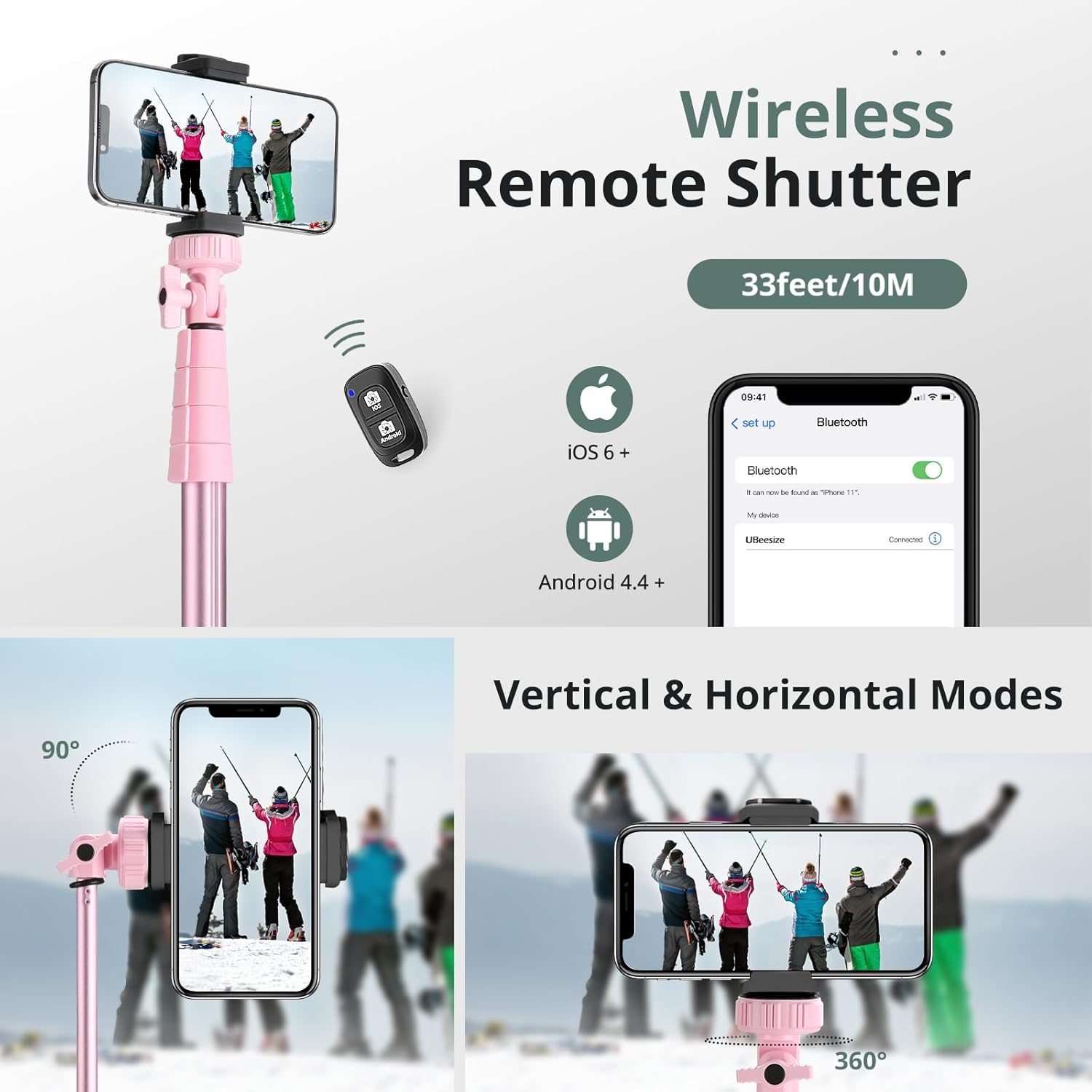
Image: A pink SENSYNE tripod with its legs extended, demonstrating stability. An inset shows a comparison between a stable SENSYNE tripod and a wobbly generic tripod.
2. Attaching the Phone Holder or GoPro Adapter
- Locate the universal 1/4-inch screw on top of the tripod pole.
- Screw the phone holder or the GoPro adapter onto this screw until it is securely fastened.
- For the phone holder, expand the clip and carefully insert your smartphone. The holder is compatible with most cellphones (2.3" - 5.7" width).

Image: A SENSYNE tripod with a smartphone securely mounted in the phone holder, ready for use.
3. Pairing the Wireless Remote
- Turn on the wireless remote control.
- On your smartphone, go to Bluetooth settings and search for available devices.
- Select "AB Shutter3" or a similar name to pair. Once paired, the remote is ready to use.

Image: A SENSYNE tripod with a phone mounted, alongside the wireless remote control and a smartphone screen showing Bluetooth pairing instructions.
Operating Instructions
1. Adjusting Height and Angle
- To extend the tripod pole, unlock the twist locks on each section and pull upwards. Lock them securely once the desired height (up to 72 inches) is reached.
- The phone holder features a 360-degree rotation and 90-degree tilt, allowing for both vertical and horizontal shooting modes. Adjust the angle by loosening the knob, setting the desired position, and tightening it firmly.
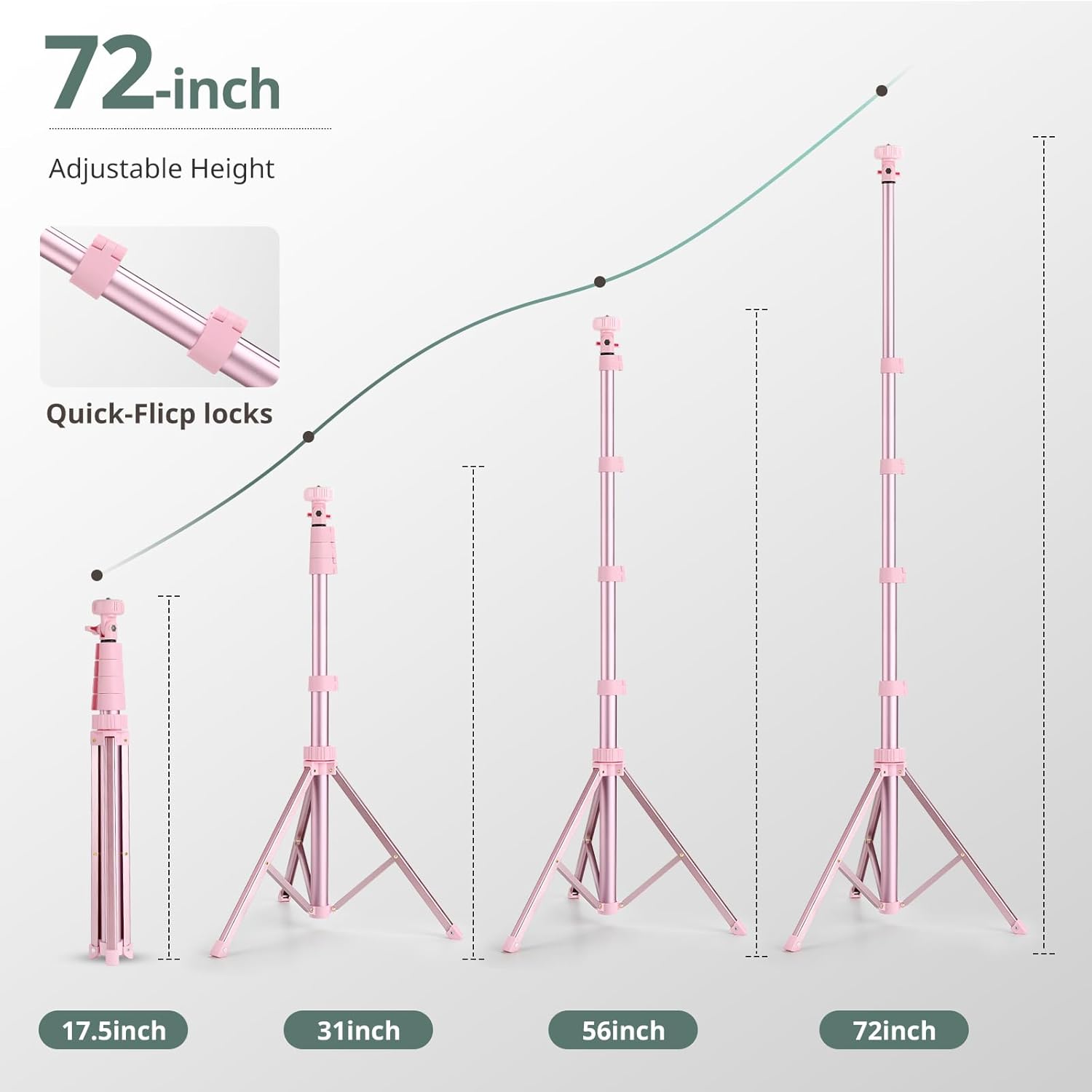
Image: An illustration showing the SENSYNE tripod extending to various heights, from 17.5 inches to 72 inches, highlighting the quick-flip locks.
2. Using the Wireless Remote
- Once paired, open your smartphone's camera app.
- Press the corresponding button on the remote (iOS or Android) to capture photos or start/stop video recording from up to 33 feet (10 meters) away.
Key Features
- 72-inch Extendable Height: Offers greater height options than standard tripods, extending from a minimum storage length of 20 inches to a full 72 inches.
- Stable & Reliable Design: Constructed from premium aluminum alloy with twist locks to prevent tilting or wobbling, ensuring a stable shooting experience.
- Versatile Phone Holder: Features a double-hole design and upgraded rubber protection for a soft, non-slip grip. Adjustable clip (2.3"-5.7") fits most smartphones.
- Wireless Remote Control: Compatible with most iOS and Android smartphones, with a range of up to 33 feet (10 meters). Ideal for selfies, group photos, vlogging, and live streaming.
- GoPro Compatibility: Includes an adapter for attaching GoPro cameras, expanding its utility for action shots.

Image: A collage of images showing the SENSYNE tripod being used for macro photography, video recording, as a selfie stick, and for outdoor activities with a GoPro.
Maintenance
- Clean the tripod and phone holder with a soft, dry cloth. Avoid abrasive cleaners or solvents.
- Store the tripod in a dry place away from extreme temperatures.
- If the remote control battery (CR2) needs replacement, carefully open the remote and insert a new battery, ensuring correct polarity.
- Regularly check all screws and connections to ensure they are tight and secure.
Troubleshooting
| Problem | Solution |
|---|---|
| Tripod is unstable. | Ensure all leg sections are fully extended and twist locks are tightened. Place on a flat, stable surface. |
| Phone holder does not grip phone securely. | Verify your phone's width is within the 2.3" - 5.7" range. Ensure the rubber protection is intact and the clip is fully engaged. |
| Wireless remote not pairing. | Check if the remote is turned on and its battery is functional. Ensure Bluetooth is enabled on your phone and try re-pairing. Move closer to the phone. |
| Remote not taking photos/videos. | Ensure the remote is successfully paired. Make sure your phone's camera app is open and active. Some apps may require specific settings for remote shutter use. |
Specifications
- Model Number: TBC001
- Material: Aluminum Alloy
- Minimum Height: 20 inches
- Maximum Height: 72 inches
- Item Weight: 1.54 pounds (0.7 kg)
- Phone Holder Compatibility: 2.3" - 5.7" width
- Wireless Remote Range: Up to 33 feet (10 meters)
- Remote Battery: 1 x CR2 (included)
- Compatible Devices: iPhone 15/15 Pro/15 Pro Max, iPhone 14/14 Pro/14 Pro Max, iPhone 13 Pro Max/13 Pro/13, iPhone SE, iPhone 12/12 Pro/12 Pro Max/12 Mini, iPhone 11/11 Pro Max/11 Pro, iPhone X/XS Max/XR/10, iPhone 8 Plus/8/7/7 Plus/6S/6, Samsung Galaxy S22/S21 Series, Galaxy Z Flip, NOTE, Google Pixel Series, One Plus Series, and other similar smartphones.

Image: A visual representation of the SENSYNE tripod's compatibility with various devices, including cameras, cell phones, and GoPro devices, shown in different usage scenarios.
Warranty and Support
SENSYNE provides a 12-month replacement service for any issues encountered with your product. For dedicated support or any inquiries, please contact our customer service team. Your satisfaction is our priority.
Contact us for any issues. Enjoy peace of mind with our 12-month replacement service and dedicated support.