
Hbada Hbada E3 Air
Hbada E3 Air Ergonomic Office Chair User Manual
Model: Hbada E3 Air
Important Safety Information
Always follow the assembly instructions carefully. Keep fingers and other body parts away from moving parts when adjusting the headrest, armrests, and lumbar support. Do not exceed the maximum weight capacity of the chair.
Product Overview
The Hbada E3 Air Ergonomic Office Chair is designed for optimal comfort and support during long periods of sitting. It features advanced adjustability for personalized ergonomics.

Figure 1: Hbada E3 Air Ergonomic Office Chair
Setup and Assembly
Before using the chair, ensure it is correctly assembled according to the provided assembly guide. Verify all components are securely fastened.
While specific assembly steps are not detailed here, general steps typically include:
- Attaching the casters to the chair base.
- Inserting the gas lift into the base.
- Attaching the seat mechanism to the seat cushion.
- Connecting the backrest to the seat assembly.
- Attaching the headrest and armrests.
Refer to the separate assembly instructions included with your product for detailed, step-by-step guidance.
Operating Instructions
1. Lumbar Support Adjustment
The Hbada E3 Air features a 3-zone elastic lumbar support with 8-way adjustment for personalized comfort. This includes rotation, front/back, and up/down adjustments.

Figure 2: 3-Zone Elastic Lumbar Support Features
- Height Adjustment: Pull back the lumbar cushion up and down adjustment function part with both hands. Push upward to adjust the height of the lumbar cushion, then push downward to the initial position. After pulling it to the top, it will automatically unlock. Push it down to the initial position to readjust the position.
- Rotation Adjustment: Use your hand to break both sides of the lumbar support to realize the lumbar support rotation function. Adjust the angle of both sides of the lumbar support package.
- Front/Back Adjustment: Pull back the lumbar support front and rear adjustment function part with both hands, and press forward to adjust the lumbar support front and rear position. The lumbar support will be automatically adjusted after pulling to the most front end. It will be unlocked automatically after pulling it to the front end and then push it back to the initial position to adjust the lumbar backrest position again.
Video 1: How to use Hbada E3's Lumbar Support? This video demonstrates the various adjustments for the lumbar support, including height, rotation, and front/back positioning.
2. Headrest Adjustment
The 3D Biaxial Adjustable Headrest offers precise neck support with dual-axis rotation and height adjustment.
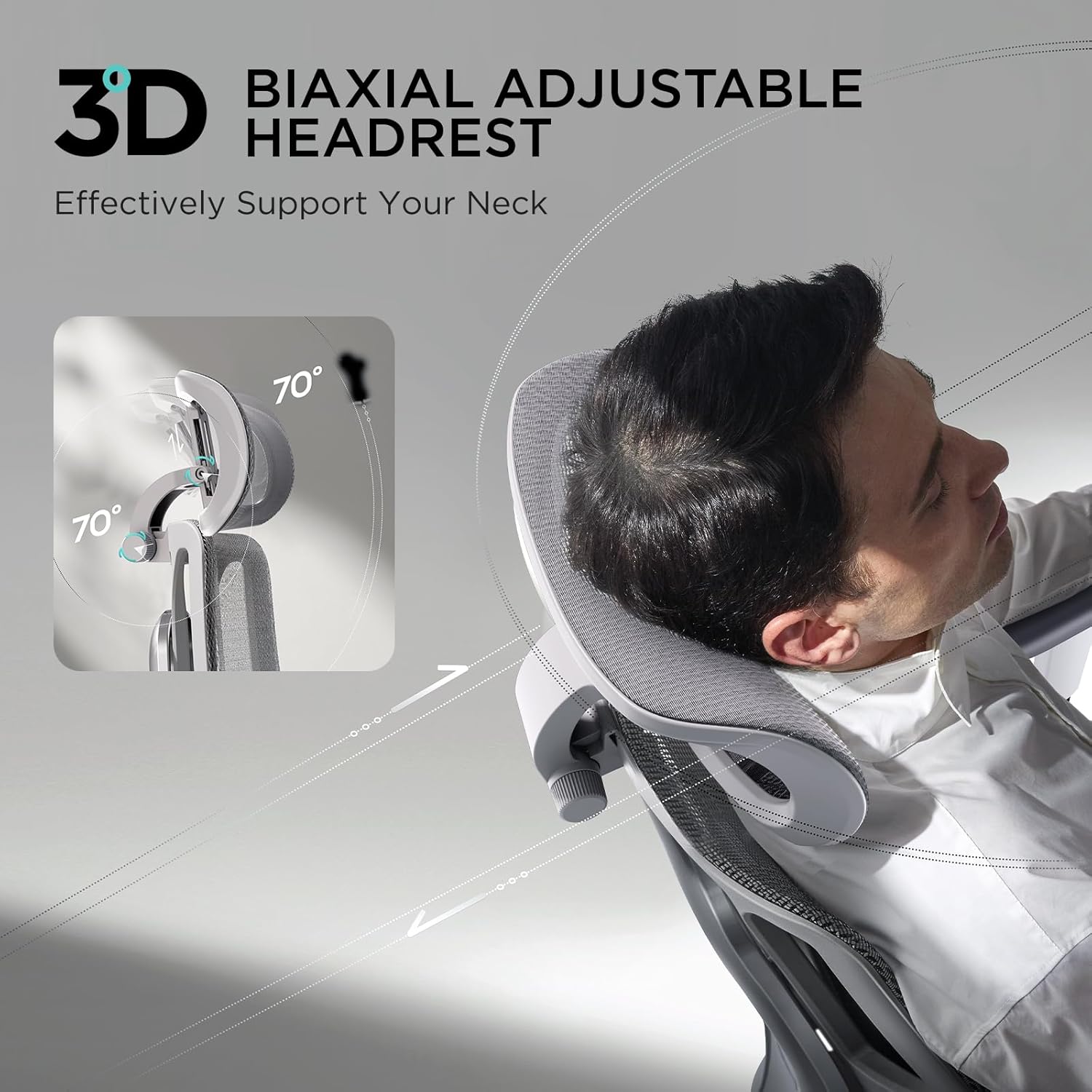
Figure 3: 3D Biaxial Adjustable Headrest
- Rotation: The headrest has a Dual-axis 70° rotation to precisely fit the neck.
- Height Adjustment: It can be adjusted up and down by 1.8 inches.
3. Armrest Adjustment
The 3D Adjustable Armrests provide flexible support for your arms, adapting to various postures.

Figure 4: 3D Adjustable Armrests
- Front/Back Adjustment: Armrests can be adjusted front and back by 1.97 inches.
- Height Adjustment: Armrests can be adjusted up and down by 2.8 inches.
- Left/Right Rotation: Armrests can be rotated left and right by 40°.
4. Reclining and Seat Depth Adjustment
The chair offers a comfortable reclining function and adjustable seat depth to accommodate different body types and preferences.

Figure 5: 140° Reclining and Auto Gravity-Sensing Chassis
- Reclining: The chair reclines up to 140°. To recline, lean the backrest backward and simultaneously pull out the operating lever. Insert the operating lever to fix the angle.
- Gravity-sensing Chassis: The chair features a gravity-sensing chassis for automatic adjustment of tilt resistance based on your weight.
- Seat Depth Adjustment: The seating depth is adjustable by 1.97 inches, supporting different leg lengths and postures.

Figure 6: Adjustable Seat Cushion Depth
5. Backrest Height Adjustment
The liftable backrest has a nine-position adjustment, allowing for 2.76 inches of up and down movement, suitable for individuals of varying heights.

Figure 7: Height-Adjustable Backrest
- Adjustment: When adjusted to the highest position, it automatically returns to the lowest level.
Video 2: Hbada E3 Ergonomic Office Chair Overview. This video provides a general overview of the chair's features and adjustments, including the T-Shape Support System, 3-zone elastic lumbar support, 3D biaxial adjustable headrest, 3D adjustable armrests, and 140-degree comfortable reclining.
Maintenance and Care
- Cleaning: Use a soft, damp cloth to wipe down the chair's surfaces. For mesh areas, a mild soap solution can be used, but ensure to rinse thoroughly and allow to air dry. Avoid harsh chemicals or abrasive cleaners.
- Inspection: Periodically check all screws and bolts to ensure they are tight. Re-tighten if necessary to maintain stability and safety.
- Caster Care: Keep casters free of hair and debris to ensure smooth movement.
Troubleshooting
| Problem | Possible Cause | Solution |
|---|---|---|
| Chair Squeaks/Creaks | Loose fasteners; lack of lubrication. | Tighten all screws and bolts. Apply a small amount of silicone lubricant to moving parts if necessary. |
| Gas Lift Not Functioning | Lever not fully engaged; gas cylinder malfunction. | Ensure the height adjustment lever is fully engaged. If the issue persists, contact customer support for a replacement gas cylinder. |
| Chair Wobbles | Uneven assembly; loose base components. | Re-check all assembly connections, especially where the base connects to the gas lift and seat mechanism. Ensure the floor is level. |
Specifications
| Feature | Detail |
|---|---|
| Brand | Hbada |
| Model Name | Hbada E3 Air |
| Color | Grey |
| Product Dimensions | 23.6"D x 23.6"W x 39.3"H |
| Item Weight | 58.9 pounds |
| Back Style | Open Back |
| Recommended Uses | Office |
| Fill Material | Foam |
| Reclining Angle | Up to 140° |
| Lumbar Support | 3-Zone Elastic, 8-way adjustment |
| Headrest | 3D Biaxial Adjustable (70° rotation, 1.8" up/down) |
| Armrests | 3D Adjustable (1.97" front/back, 2.8" up/down, 40° left/right) |
| Seat Depth | 1.97" adjustable |
| Backrest Height | 9-position adjustment (2.76" up/down) |
Warranty and Support
The Hbada E3 Air Ergonomic Office Chair comes with a 3-year free warranty. This warranty covers parts replacement but not repair.
Additionally, Hbada offers a 30-day no-questions-asked return policy. If the chair does not meet your requirements within 30 days of purchase, you can contact customer support for a return or exchange.
For any inquiries or support, please refer to the customer support information provided with your purchase or visit the official Hbada store online.
If you find that the price of the goods you purchased has been reduced within 15 days after purchase, Hbada promises to reimburse you at the reduced price.
Related documentsHbada E3 Air

Ask a question about this manual
Ask about setup, troubleshooting, compatibility, parts, safety, or missing instructions. Manuals+ will review the question and use this page’s manual context to help answer it.