
1. Introduction
This manual provides detailed instructions for the safe and effective use of your Azocek Multi-Functional USB Charger Adapter. This adapter is designed to convert your Dewalt 18V/20V batteries into a versatile power source for various electronic devices and DIY projects. Please read this manual thoroughly before operation and retain it for future reference.
2. Product Overview
The Azocek Multi-Functional USB Charger Adapter is a compact and robust device that extends the utility of your Dewalt 20V batteries. It features multiple output ports and integrated safety mechanisms.
Key Features:
- Multiple Charging Ports: Equipped with 2 USB-A ports (QC 18W Max) and 1 Type-C port (PD 30W Max) for simultaneous charging of up to three electronic devices.
- Multi-Function XT60 Port: Provides DC 20V/Max 20A (Resistive Load) output, ideal for quick plug-and-play power for various DIY applications.
- Battery Compatibility: Perfectly compatible with Dewalt 18V/20V batteries, including models like DCB205, DCB206, DCB204, DCB203, DCB200, DCB201.
- Enhanced Safety: Features overload, no-load power-off, over-current, and low-voltage protection. The XT60 port includes self-recovery over-current protection.
- User-Friendly Interface: Micro-action buttons control output modes, and two LED indicators display the product's operational status and low battery warnings.

Figure 1: Labeled components of the Azocek Multi-Functional USB Charger Adapter.
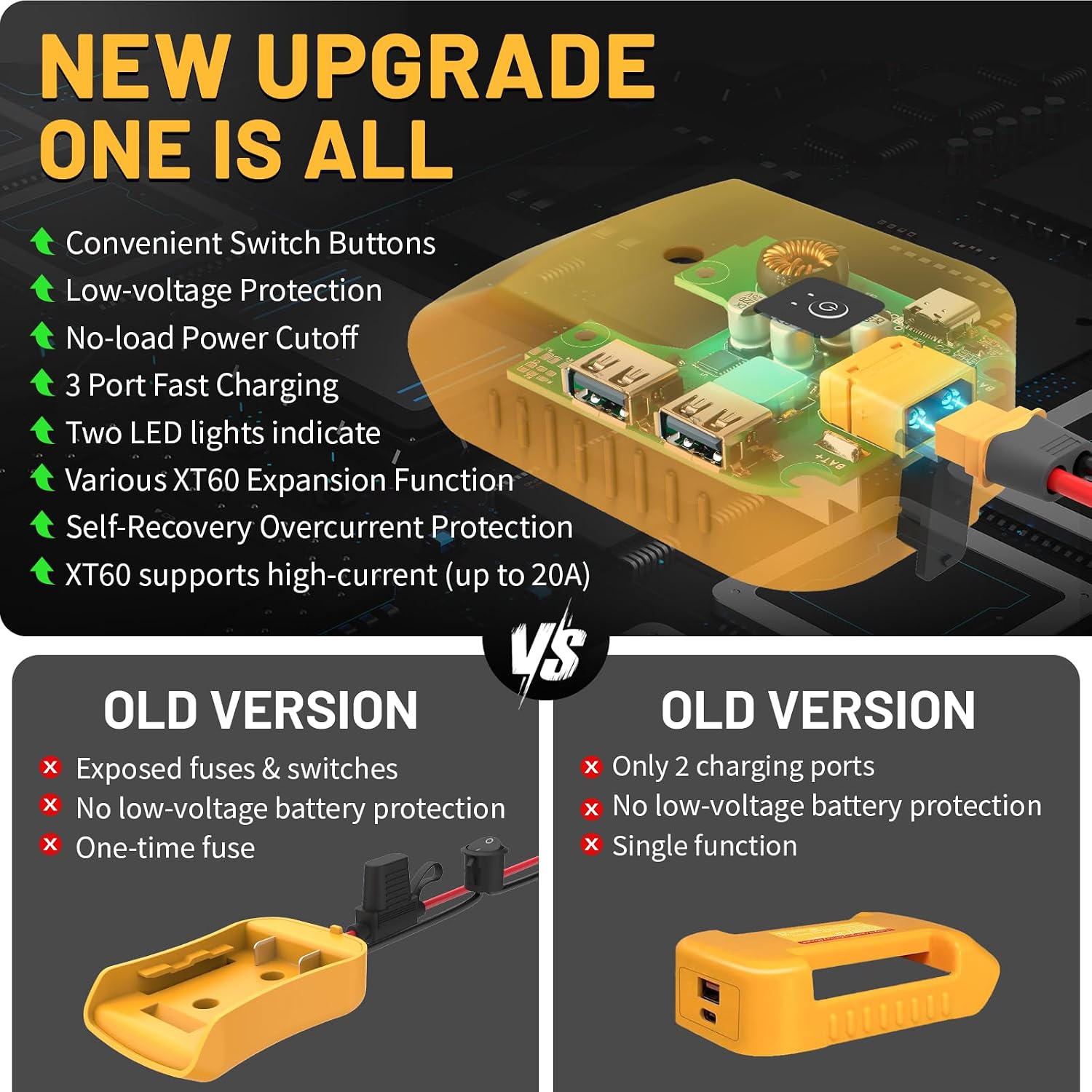
Figure 2: Overview of upgraded features and internal components.
3. Setup
To begin using your Azocek Multi-Functional USB Charger Adapter, follow these steps:
- Ensure your Dewalt 18V/20V battery is charged.
- Align the adapter with the battery terminals.
- Slide the adapter onto the battery until it clicks securely into place.
- Press the micro-action button on the adapter to activate it. The LED indicators will light up.
- Connect your electronic devices to the appropriate USB-A or Type-C ports, or connect your DIY project to the XT60 port.

Figure 3: Adapter dimensions and battery compatibility.
4. Operating Instructions
The adapter features a micro-action button and LED indicators for easy operation and monitoring.
Powering On/Off and Mode Selection:
- To Power On: Press the micro-action button. The LED indicators will illuminate.
- To Cycle Modes: Press the micro-action button repeatedly to cycle through the available output modes (e.g., USB-A/Type-C discharge, USB-A/Type-C/XT60 discharge).
- To Power Off: Long-press the micro-action button until the LEDs turn off.
LED Indicator Status:
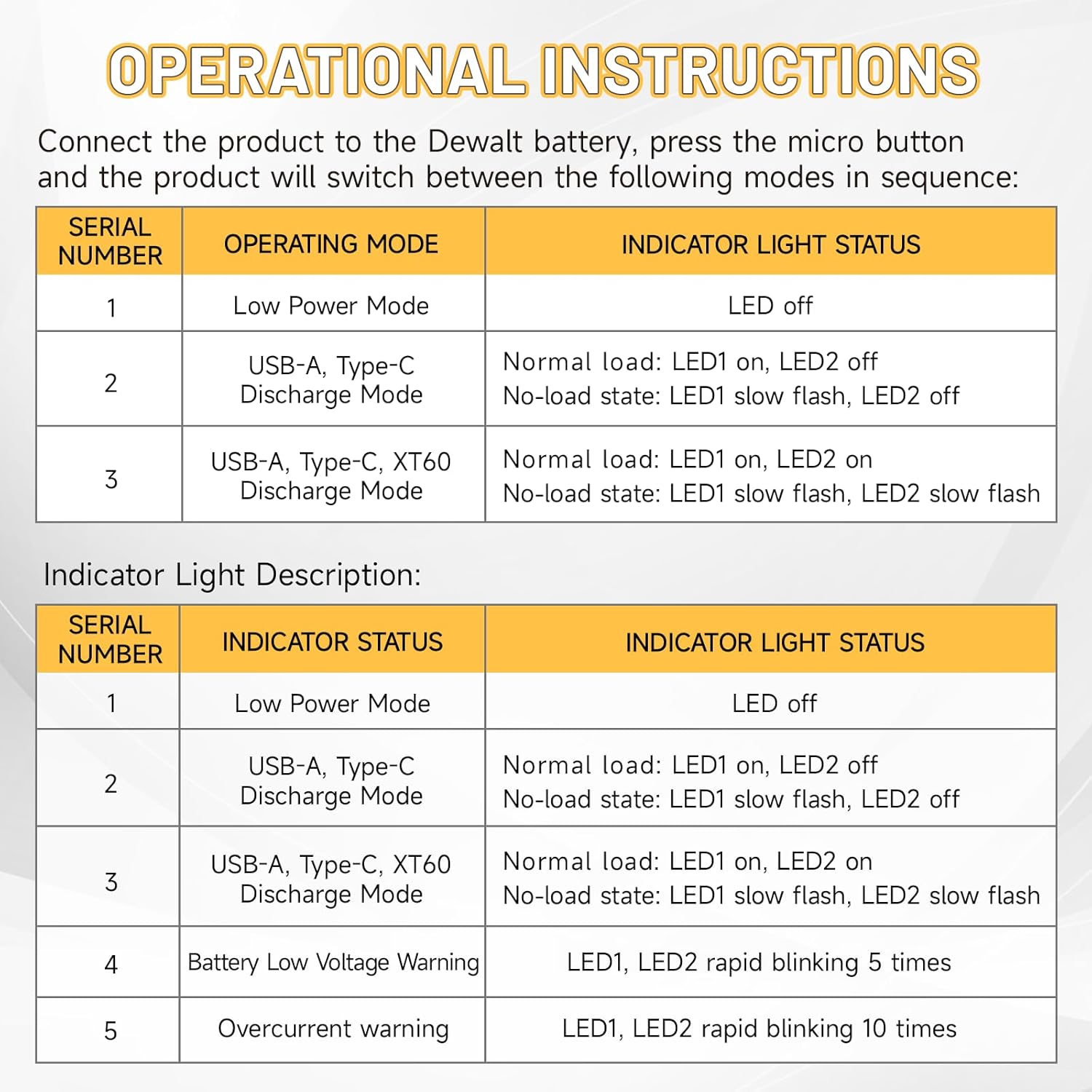
Figure 4: Operational modes and LED indicator descriptions.
- Low Power Mode: LED off.
- USB-A, Type-C Discharge Mode: LED1 on, LED2 off (Normal load); LED1 slow flash, LED2 off (No-load state).
- USB-A, Type-C, XT60 Discharge Mode: LED1 on, LED2 on (Normal load); LED1 slow flash, LED2 slow flash (No-load state).
- Battery Low Voltage Warning: LED1, LED2 rapid blinking 5 times (occurs when battery voltage drops to approximately 15V).
- Overcurrent Warning: LED1, LED2 rapid blinking 10 times.
Wider Application:
The XT60 port supports quick plugging and unplugging, allowing for fast replacement of power-using devices. It is suitable for a variety of multi-scenario uses, including LED work lights, electric toy cars, and other DIY projects.

Figure 5: XT60 port and its diverse applications.

Figure 6: Charging multiple devices at once.
Video Demonstration:
Video 1: Demonstration of the battery converter for power wheels and other applications.
5. Maintenance
To ensure the longevity and optimal performance of your Azocek Multi-Functional USB Charger Adapter, please observe the following maintenance guidelines:
- Keep the adapter clean and free from dust and debris. Use a dry, soft cloth for cleaning.
- Store the adapter in a dry environment, away from extreme temperatures and direct sunlight.
- When not in use for extended periods, remove the adapter from the battery to prevent any potential drain.
- Avoid dropping the adapter or subjecting it to strong impacts.
- Do not attempt to disassemble or repair the adapter yourself. Refer to qualified service personnel if needed.
6. Troubleshooting
If you encounter any issues with your adapter, refer to the following common problems and solutions:
- Adapter not powering on: Ensure the Dewalt battery is securely attached and sufficiently charged. Press the micro-action button firmly.
- Devices not charging: Check that the adapter is powered on and the correct output mode is selected. Verify that your charging cables are functional and properly connected.
- Low battery warning (LEDs blinking): This indicates the battery voltage has dropped to approximately 15V. Replace or recharge the Dewalt battery promptly to avoid damage and ensure continuous operation.
- Overcurrent warning (LEDs rapid blinking 10 times): The XT60 port has cut off output due to an overload (approximately 20A resistive load) or a short circuit. Disconnect the load, check for faults, and the output should automatically restore.
- Battery aging affecting performance: If the battery is aging, the low voltage protection threshold might be triggered prematurely due to voltage drop under load. Consider replacing the battery or using two batteries in parallel (if applicable) to increase load capacity.

Figure 7: Safety and protection features of the adapter.
7. Specifications
| Feature | Specification |
|---|---|
| Input Voltage | 18V/20V DC (Compatible with Dewalt batteries) |
| USB-A Output | QC 18W Max (when single port used) |
| Type-C Output | PD 30W Max (when single port used) |
| XT60 Port Output | DC 20V/Max 20A (Resistive Load) |
| Low Voltage Protection | Approx. 15V (LED blinks to warn) |
| Overcurrent Protection | XT60 port cuts off output at approx. 20A (resistive load) or short circuit, with self-recovery. |
| Material | V-0 grade flame retardant ABS |
| Dimensions | 4.45 x 3.15 x 2.05 inches |
| Item Weight | 5 ounces |
8. Warranty and Support
For warranty information, technical support, or any inquiries regarding your Azocek Multi-Functional USB Charger Adapter, please contact the seller or manufacturer directly through the platform where the product was purchased. Keep your purchase receipt or order details handy as proof of purchase may be required.