1. Introduction
This instruction manual provides essential information for the proper and safe use of your YUSTDA 15V AC/DC Adapter. This adapter is designed as a replacement power supply for compatible Digitnow B600, B600-US, B600US, B10A, B10A-03, and B10A03 wooden wireless Bluetooth vinyl record players and turntables.
The adapter features a wide input voltage range of 100-240VAC at 50/60Hz, making it suitable for worldwide use. It is manufactured with high-quality materials and incorporates multiple safety features, including over current protection, total power protection, over voltage protection, short circuit protection, and overheating protection with a smart chip. An anti-interference feature with isolation materials ensures stable operation. The product is certified with FCC, CE, and RoHS standards.

Figure 1: The YUSTDA 15V AC/DC Adapter, showing the main power brick, the AC input cord, and the DC output cord. This adapter is designed to provide stable power to compatible devices.
2. Setup
Follow these steps to correctly set up your YUSTDA AC/DC Adapter:
- Connect the AC Power Cord: Insert the two-prong end of the AC power cord into the AC input port on the adapter unit. Ensure it is firmly seated.
- Connect to Power Outlet: Plug the standard wall plug end of the AC power cord into a functional electrical wall outlet.
- Connect to Device: Insert the DC output plug (barrel connector) from the adapter into the 15V DC input port on your Digitnow B600 or B10A series turntable.
Once connected, the adapter's LED indicator light should illuminate, indicating that power is being supplied.

Figure 2: The YUSTDA adapter unit with the DC output cord, ready for connection to the target device. The AC input port is visible on the left side of the adapter.
3. Operating Instructions
The YUSTDA 15V AC/DC Adapter operates automatically once connected to a power source and a compatible device. It provides a stable 15V DC output to power your Digitnow turntable.
- Power Indicator: A blue LED light on the adapter unit indicates that the adapter is receiving AC power and is ready to supply DC power to your device.
- Automatic Voltage Regulation: The adapter is designed to handle input voltages from 100V to 240V, automatically adjusting to the local power supply.
- Safety Features: Built-in protections guard against over current, over voltage, short circuits, and overheating, ensuring safe operation for both the adapter and your connected device.

Figure 3: A close-up view of the YUSTDA adapter unit, highlighting the blue LED indicator light which confirms the adapter is powered on and functioning.
4. Maintenance
Proper care and maintenance will extend the lifespan of your adapter:
- Keep Dry: Avoid exposing the adapter to moisture, rain, or excessive humidity.
- Temperature Control: Do not operate the adapter in extremely hot or cold environments. Store it in a cool, dry place.
- Cleanliness: Keep the adapter free from dust and dirt. Use a soft, dry cloth for cleaning. Do not use liquid cleaners.
- Cable Care: Avoid bending or crimping the power cords excessively. Do not place heavy objects on the cords.
- Unplug When Not in Use: For extended periods of non-use, unplug the adapter from both the wall outlet and the device.
5. Troubleshooting
If you encounter issues with your adapter, refer to the following troubleshooting guide:
- No Power / LED Off:
- Ensure the AC power cord is securely connected to both the adapter and the wall outlet.
- Verify that the wall outlet is functional by plugging in another device.
- Check for any visible damage to the cords or adapter unit.
- Device Not Powering On / Charging:
- Confirm that the DC output plug is fully inserted into your Digitnow turntable's power input.
- Ensure your Digitnow turntable requires a 15V DC power supply. Using an incorrect voltage adapter can prevent operation or damage the device.
- If possible, test the turntable with its original adapter or another known compatible 15V adapter to rule out a device issue.
- Adapter Overheating:
- Unplug the adapter immediately.
- Ensure the adapter is in a well-ventilated area and not covered by anything that could trap heat.
- Avoid using the adapter in direct sunlight or near heat sources.
If problems persist after following these steps, contact the seller or manufacturer for further assistance.
6. Specifications
| Model | THS30W Series |
| Input Voltage | 100-240VAC, 50/60Hz |
| Output Voltage | 15VDC |
| Compatible Devices | Digitnow B600, B600-US, B600US, B10A, B10A-03, B10A03 Turntables |
| Cord Length | Total 10 Ft (approx. 4ft DC output, 6ft AC input) |
| Safety Certifications | FCC, CE, RoHS |
| Manufacturer | Shenzhen Waweis Technology Co., Ltd |
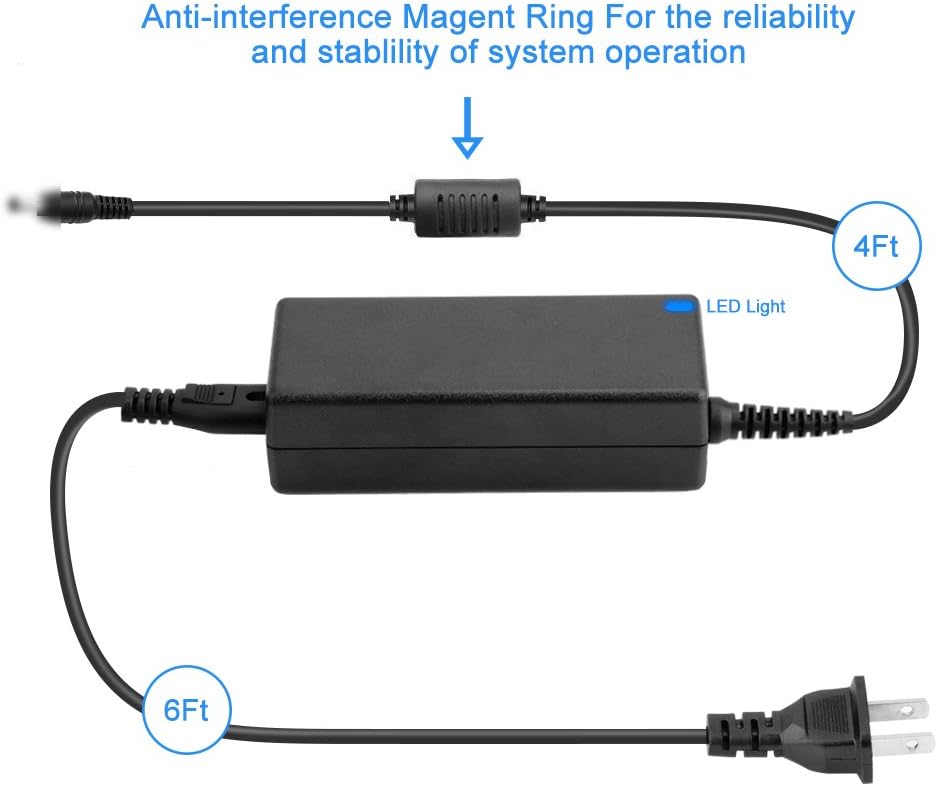
Figure 4: Diagram illustrating the approximate lengths of the DC output cord (4ft) and AC input cord (6ft), totaling 10ft. It also highlights the anti-interference ring on the DC cable for improved signal stability.
7. Warranty and Support
For information regarding product warranty, returns, or technical support, please refer to the documentation provided with your purchase or contact the seller directly. The manufacturer, Shenzhen Waweis Technology Co., Ltd, can also be contacted for specific product inquiries.


