
Ymiko Ymikovg3muyfhd6
Ymiko FM Transmitter with Fast Charging and CVC Noise Cancellation Car MP3 Player
Model: Ymikovg3muyfhd6
Introduction
Thank you for choosing the Ymiko FM Transmitter. This device allows you to transmit audio from your compatible devices to your car's FM radio, providing features such as fast charging for two devices, CVC noise cancellation for clearer communication, and music playback capabilities. Please read this manual carefully before use to ensure proper operation and to maximize your experience with the product.
Product Overview
Familiarize yourself with the components of your Ymiko FM Transmitter.
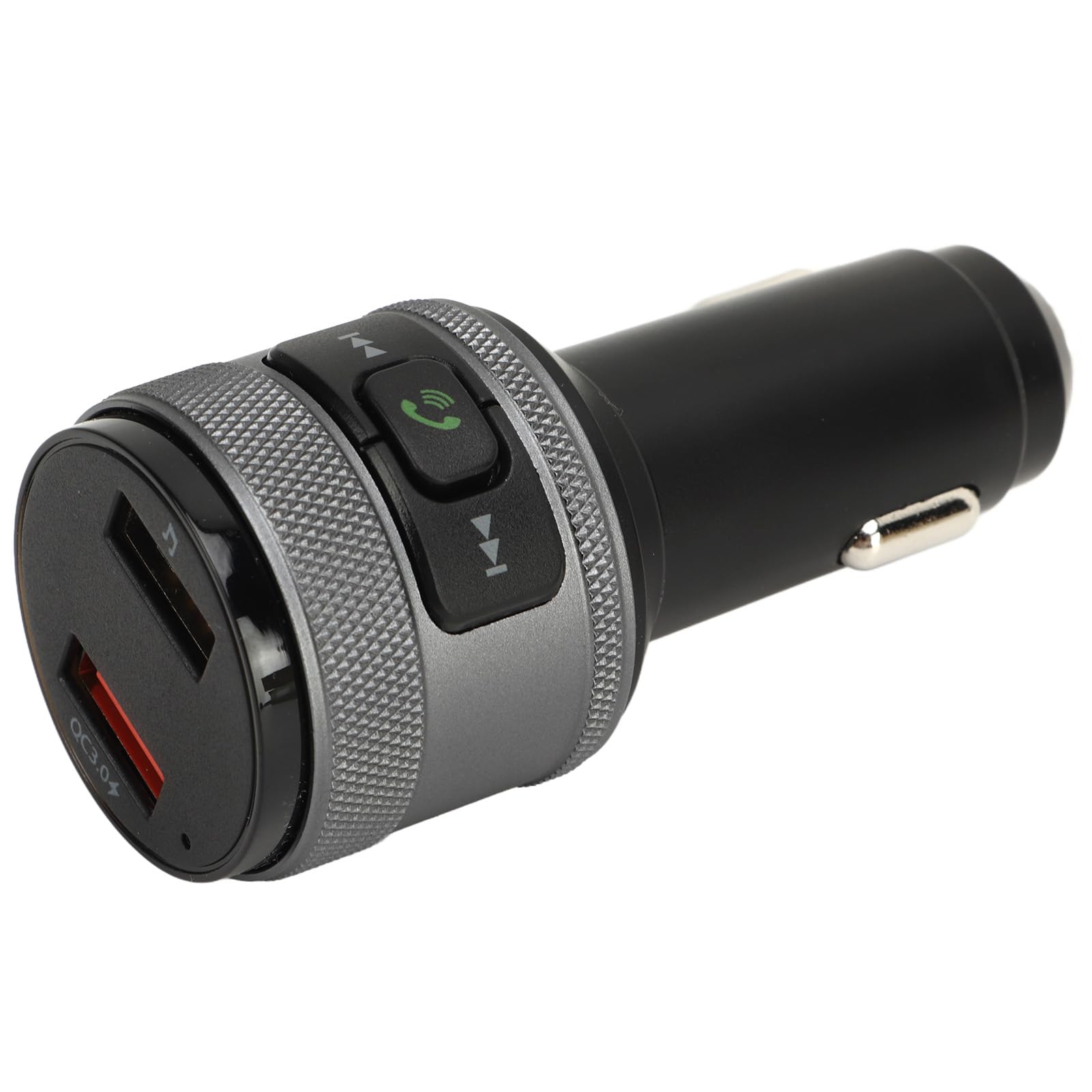
Figure 1: Angled view of the Ymiko FM Transmitter, showing its compact design and the control panel at the top.

Figure 2: Top view of the transmitter, highlighting the control buttons for calls and track navigation.

Figure 3: Side view illustrating the USB charging ports, including the QC3.0 fast charging port.

Figure 4: Bottom view displaying regulatory compliance markings and model information.
The device typically features a power plug for the car's cigarette lighter socket, an LED display for FM frequency, control buttons (e.g., for answering calls, skipping tracks, adjusting frequency), and USB ports for charging and potentially music playback from a USB drive.
Setup Instructions
- Insert into Car Socket: Plug the Ymiko FM Transmitter into your vehicle's 12V/24V cigarette lighter socket. The device will power on automatically.
- Tune Car Radio: Turn on your car's FM radio and find an empty, unused frequency. This should be a frequency with static or no broadcast signal.
- Match Transmitter Frequency: On the Ymiko FM Transmitter, adjust its FM frequency to match the empty frequency you found on your car radio. Refer to the device's display and controls for frequency adjustment.
- Connect Audio Source (USB): If playing music from a USB drive, insert the USB drive into the designated USB port on the transmitter. The device should automatically detect and begin playing audio files.
- Hands-Free Calls: The device features CVC noise cancellation for clearer calls. While the device is powered on and connected to your car's FM radio, it is ready to facilitate hands-free communication.
Operating Instructions
- Music Playback:
- From USB Drive: Insert a USB drive containing MP3/WMA files into the appropriate USB port. The device will automatically play music. Use the previous/next track buttons on the transmitter to navigate.
- Volume Adjustment: Adjust the volume via your car's radio controls.
- Hands-Free Calling:
- Answer/End Call: Press the dedicated call button (often marked with a phone icon) to answer an incoming call or end an ongoing call.
- Reject Call: Press and hold the call button to reject an incoming call.
- Redial: Double-press the call button to redial the last number.
- CVC Noise Cancellation: The built-in CVC noise cancellation technology helps reduce background noise for clearer call quality.
- Device Charging:
- QC3.0 Fast Charging: Use the designated QC3.0 USB port to charge compatible devices up to 4 times faster than standard chargers.
- Standard USB Charging: Other USB ports provide standard charging for various devices.
- Bass Boost: If your model includes a bass boost button (often marked with a 'B' or music note icon), press it to enhance the bass effect for a richer audio experience.
Maintenance
- Cleaning: Use a soft, dry cloth to clean the device. Do not use liquid cleaners or aerosols.
- Storage: Store the device in a cool, dry place when not in use.
- Avoid Extremes: Do not expose the device to extreme temperatures, direct sunlight, or excessive moisture.
- Handle with Care: Avoid dropping or subjecting the device to strong impacts.
Troubleshooting
| Problem | Possible Solution |
|---|---|
| No power/Device not turning on. |
|
| Poor sound quality/Static. |
|
| USB music not playing. |
|
| Devices not charging. |
|
Specifications
| Feature | Detail |
|---|---|
| Brand | Ymiko |
| Model | Ymikovg3muyfhd6 |
| Hardware Interface | Radiofrequency |
| Compatible Devices | Laptop, Smartphone, Tablet |
| Special Features | Hands-free calls and noise cancellation |
| Number of Products | 1 |
| Audio Output Mode | FM Transmission |
| Audio Output Type | FM |
| Power Source | Battery (likely referring to car battery via socket) |
| Batteries Required | No |
| Wireless Connection Type | Radiofrequency |
| Connector Type | USB |
| Supported Standards | FM |
| Rechargeable Battery Included | Yes (likely referring to the car's battery being used to power it) |
| Remote Control Included | No |
| Bluetooth Technology Supported | No |
| Package Dimensions | 11 x 7 x 5 cm; 78 g |
Note: The "Power Source: Battery" and "Rechargeable Battery Included: Yes" likely refer to the device drawing power from the car's battery when plugged into the cigarette lighter socket, as the device itself does not contain an internal battery.
Warranty and Support
For warranty information or technical support, please refer to the documentation provided with your purchase or contact the retailer/manufacturer directly. Keep your proof of purchase for any warranty claims.
Ask a question about this manual
Ask about setup, troubleshooting, compatibility, parts, safety, or missing instructions. Manuals+ will review the question and use this page’s manual context to help answer it.