Introduction
This manual provides essential information for the safe and efficient operation of your DuroMax XP16000iHT Tri Fuel Portable Digital Inverter Generator. The XP16000iHT is designed to deliver a massive 16,000 watts of clean, sine wave power, offering a versatile solution for whole-home backup, job site reliability, RV use, and off-grid energy needs. It supports operation on gasoline, propane, or natural gas, providing unmatched fuel flexibility.
Please read this manual thoroughly before operating the generator to ensure proper setup, safe usage, and optimal performance. Keep this manual for future reference.
Safety Information
Operating a generator requires adherence to strict safety guidelines to prevent injury or damage. Always prioritize safety.
- Carbon Monoxide (CO) Hazard: Generators produce carbon monoxide, a colorless, odorless, poisonous gas. Operate the generator ONLY outdoors and far away from windows, doors, and vents to prevent CO from building up indoors.
- CO Alert Technology: The DuroMax XP16000iHT is equipped with CO Alert technology, an advanced safety feature that automatically shuts down the generator if dangerous levels of carbon monoxide are detected. However, this is a safety feature and not a substitute for proper ventilation.
- Fire Hazard: Fuel is highly flammable. Always refuel in a well-ventilated area with the engine off and cool. Do not smoke or allow flames or sparks near the generator or fuel.
- Electrical Shock Hazard: Never operate the generator in wet conditions. Ensure all connections are secure and properly grounded.
- Hot Surfaces: The generator's engine and muffler become very hot during operation and remain hot for a period after shutdown. Avoid touching hot surfaces.
Product Overview
Key Features
- 16,000 Watts of Reliable Tri-Fuel Power: Power your whole home, RV, or job site with clean sine wave energy. Runs on gasoline, propane, or natural gas for maximum fuel flexibility.
- Dual 50-Amp Outlets for Whole-Home Backup: Equipped with TWO 50A plugs, allowing seamless connection to a transfer switch or generator interlock for full home power.
- Remote Start for Ultimate Convenience: Start and stop your generator remotely from inside your home, providing effortless operation during storms or outages.
- CO Alert Technology for Enhanced Safety: Advanced carbon monoxide detection automatically shuts off the generator if dangerous levels are detected.
- Quiet & Efficient Digital Inverter Technology: Low noise levels make it perfect for home use, RVs, and outdoor events, while inverter technology ensures clean, stable power for sensitive electronics.
- Quick-Connect Fuel System: Easily switch between gasoline, propane, and natural gas in seconds with the user-friendly front-facing fuel selector.
- DuroMax Heavy-Duty Engine: Built to Last – Powered by a durable DuroMax engine, ensuring long-lasting performance and reliability in any situation.
- Smart Digital Control Center: Monitor voltage, frequency, fuel levels, and runtime in real-time with the intuitive LCD display.
Product Visuals

Figure 1: Front-side view of the DuroMax XP16000iHT Tri Fuel Portable Digital Inverter Generator, showcasing its compact design and control panel.

Figure 2: Close-up view of the fully loaded control panel, featuring push-button start, digital multimeter, household outlets, and 50 Amp outlets.
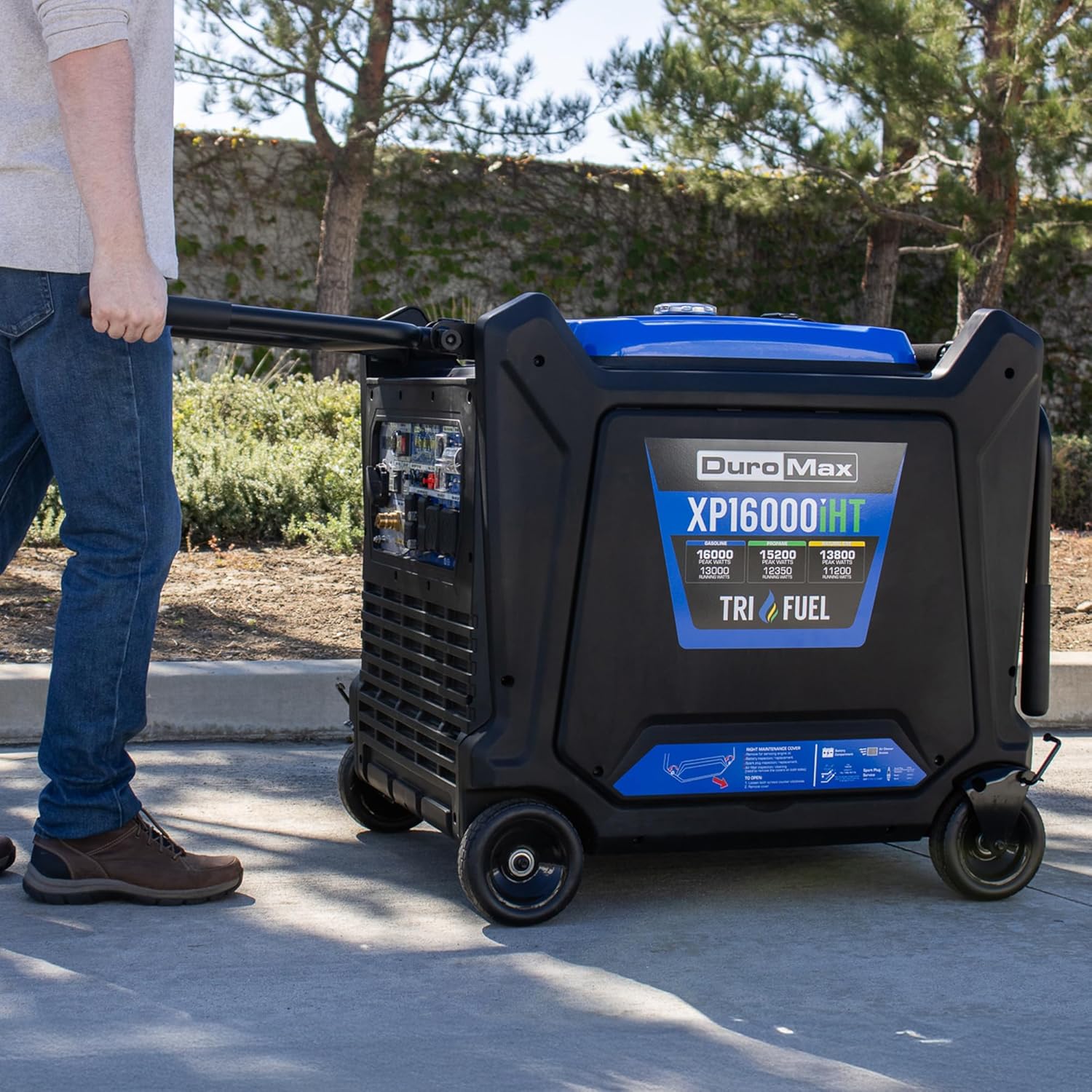
Figure 3: Illustration of the generator's tri-fuel capability, showing options for Gasoline, Propane, and Natural Gas with their respective peak and running watts.
Setup Instructions
Follow these steps to prepare your DuroMax XP16000iHT generator for its first use.
Unboxing and Initial Assembly
- Read the Manual: Before beginning assembly, thoroughly read the instruction manual specific to your generator model. This will provide detailed diagrams and safety warnings.
- Remove Shipping Brace: Locate and remove any shipping braces or protective packaging materials securing the engine or frame. These are typically red brackets that need to be unbolted.
- Attach Support Brackets: If your model includes a wheel and handle kit, attach the support brackets to the generator frame using the provided hardware.
- Attach the Handles: Secure the handles to the support brackets. Ensure they are firmly attached for safe maneuvering.
- Attach the Wheels: Install the wheels onto the axle, securing them with the appropriate washers and cotter pins.

Figure 4: Diagram showing the dimensions of the generator and a list of included accessories such as the oil funnel, spark plug wrench, tool set, battery tender cord, propane hose & regulator, natural gas hose with quick connect, remote control, and product manual.
Fuel and Oil Preparation
- Take Your Generator Outside: Always move the generator to a well-ventilated outdoor area before adding fuel or oil, and before starting. Ensure it is away from open doors, windows, and vents.
- Connect the Battery: The battery ships disconnected for safety. Connect the battery terminals according to the instructions in your manual.
- Add Oil: The engine is shipped from the factory without oil. Fill the engine with 10W30 oil (recommended) using the provided oil funnel. Do not overfill.
- Select Your Fuel: The XP16000iHT is a Tri-Fuel generator.
- If using Gasoline, carefully fill the fuel tank.
- If using Propane, connect the propane regulator and hose to the generator's propane inlet and to your propane tank.
- If using Natural Gas, connect the natural gas hose with quick connect to the generator's natural gas inlet and to your natural gas supply.
- Check the Quick Start Guide: Refer to the handy Quick Start Guide attached to your generator for model-specific startup instructions. Startup procedures may vary slightly between models.
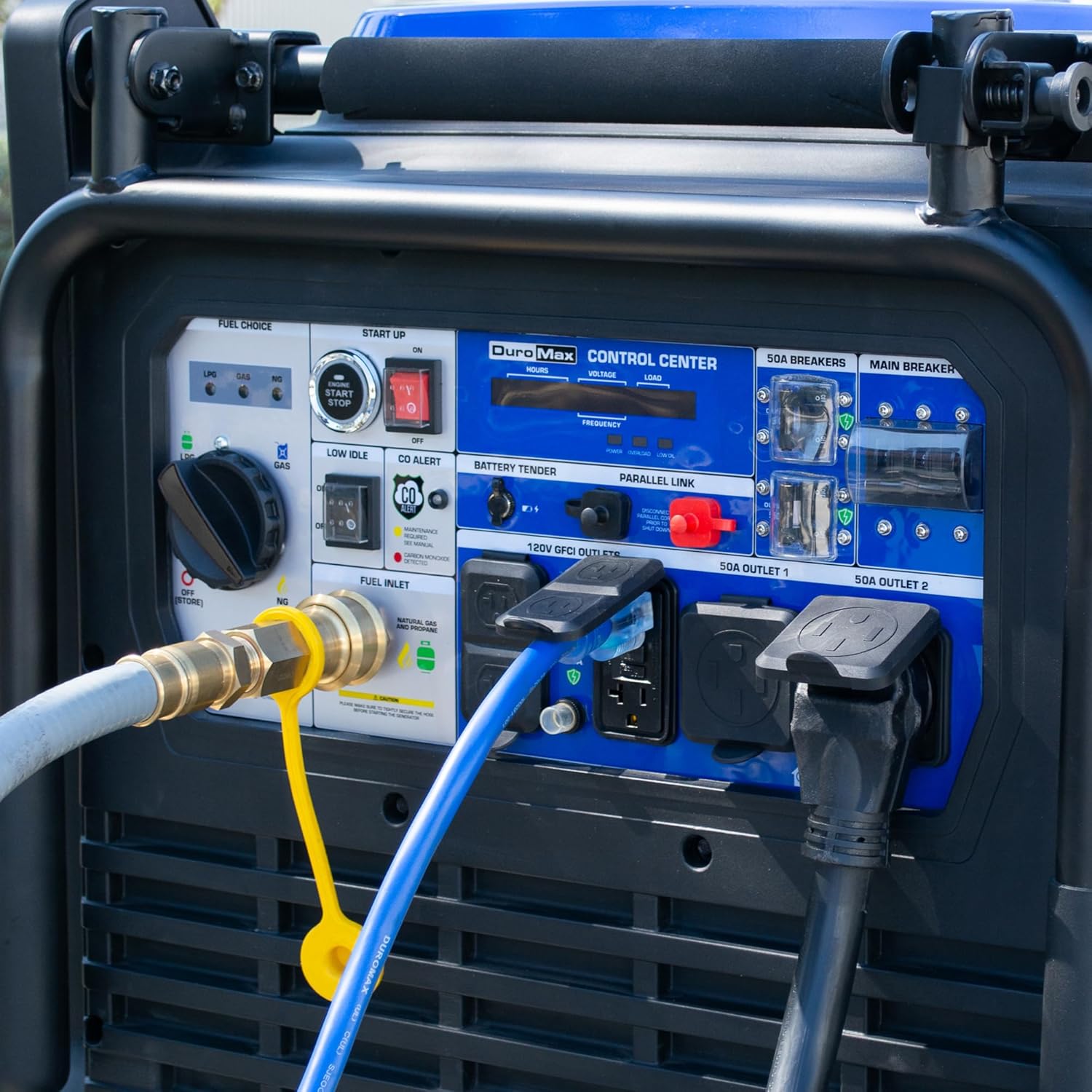
Figure 5: A user connecting the natural gas hose with quick connect to the generator's fuel inlet, demonstrating the ease of fuel type switching.
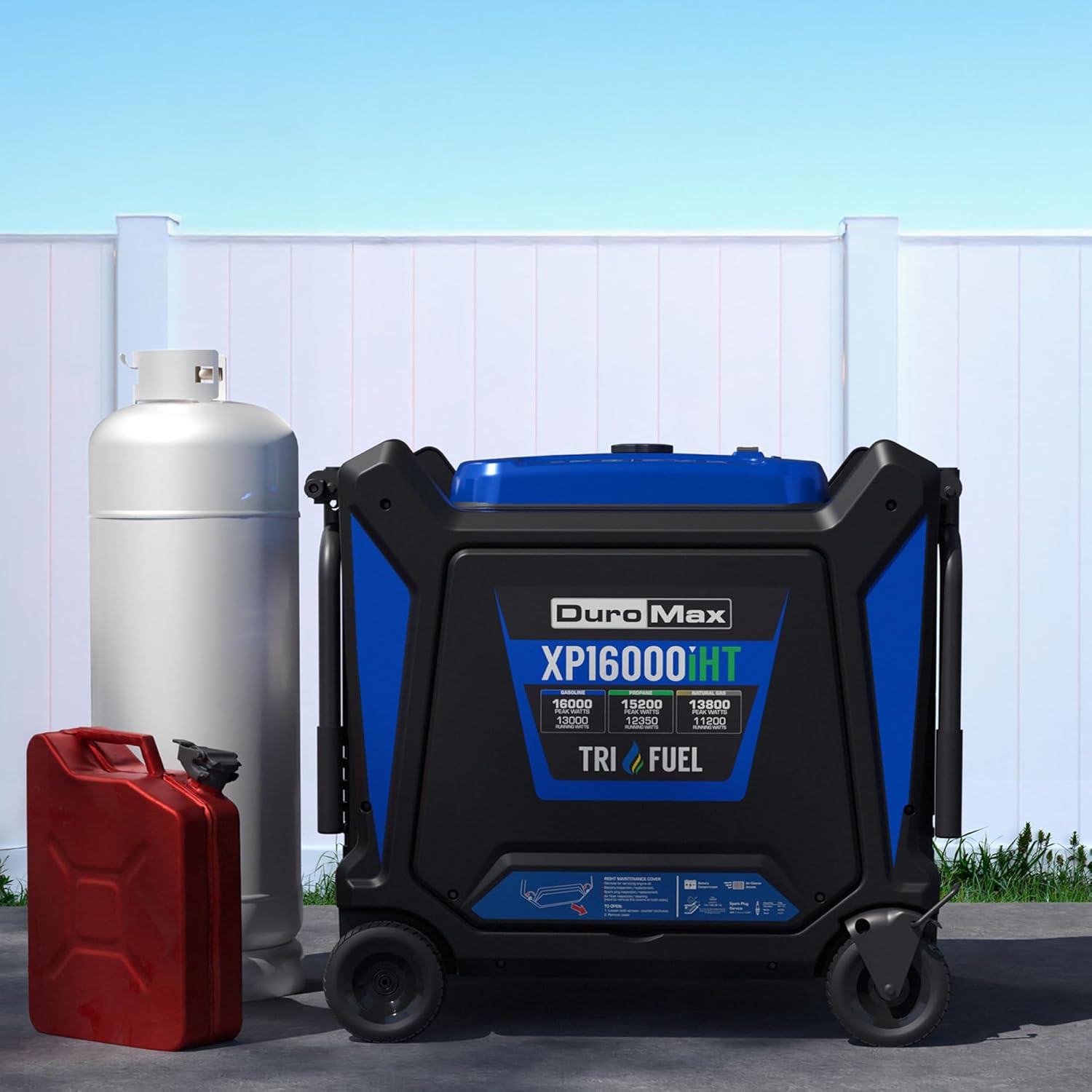
Figure 6: A hand holding the remote start key fob, highlighting the convenience of starting and stopping the generator remotely.
Operating Instructions
Starting the Generator
Once the generator is set up and fueled, you can start it using the electric start or remote start feature.
- Ensure the generator is on a level surface outdoors, away from any structures or openings.
- Confirm the fuel valve is open and the fuel selector is set to the desired fuel type (Gasoline, Propane, or Natural Gas).
- Press the "Engine Start/Stop" button on the control panel or use the remote start key fob to start the engine.
- Allow the engine to warm up for a few minutes before connecting any loads.
Video 1: DuroMax Unboxing Video. This video demonstrates the unboxing and initial setup steps for a DuroMax generator, including attaching wheels and handles, adding oil, and connecting fuel sources. While the video features a different model (HX series), the general setup principles apply.
Connecting Loads
- Connect your appliances or transfer switch to the appropriate outlets on the control panel. The XP16000iHT features dual 50-amp outlets for heavy-duty applications.
- Do not overload the generator. Refer to the generator's rated wattage and the power requirements of your devices.
Maintenance
Regular maintenance is crucial for the longevity and reliable operation of your generator. Always refer to the detailed maintenance schedule in your full user manual.
- Oil Changes: Perform initial oil change after the first 20 hours of operation, then every 100 hours or annually.
- Air Filter: Inspect and clean the air filter regularly. Replace if damaged.
- Spark Plug: Inspect and clean the spark plug periodically. Replace if worn or fouled.
- Fuel System: For long-term storage, drain the gasoline fuel tank and carburetor, or use a fuel stabilizer. Propane and natural gas do not require draining.
- General Inspection: Regularly check for loose fasteners, damaged wires, or any signs of wear and tear.
Troubleshooting
If your generator experiences issues, consult the troubleshooting section of your comprehensive user manual. Common issues often relate to fuel, oil, or spark plug conditions.
- Engine Not Starting: Check fuel level, oil level, spark plug condition, and battery connection. Ensure the fuel selector is correctly set.
- No Power Output: Check circuit breakers on the control panel. Ensure the generator is not overloaded.
- CO Alert Shutdown: If the CO Alert system activates, move the generator to a more open outdoor area and allow it to cool before attempting to restart. Investigate potential sources of CO buildup.
Specifications
| Attribute | Value |
|---|---|
| Brand | DuroMax |
| Model Name | DuroMax XP16000iHT 16,000-Watt Tri Fuel Portable Digital Inverter Generator |
| Wattage | 16000 watts (Peak) / 13000 watts (Running) |
| Fuel Type | Gasoline, Propane, Natural Gas |
| Power Source | Fuel Powered |
| Voltage | 240 Volts |
| Special Features | CO Sensor, Digital Display, Portable, Remote Start, Tri-Fuel |
| Engine Type | 4 Stroke |
| Ignition System Type | Electric start |
| Tank Volume | 10.5 Gallons |
| Engine Displacement | 744 Cubic Centimeters |
| Runtime | 18 hours |
| Total Power Outlets | 2 (50A) + 4 (120V GFCI) |
| Product Dimensions (L x W x H) | 38.3" x 30.8" x 34.4" |
| Item Weight | 505 pounds |
| Material | Copper, Steel |
Warranty and Support
DuroMax is committed to providing reliable power solutions. Your XP16000iHT generator comes with a 5-Year Warranty, ensuring long-term peace of mind.
For technical assistance, parts, or warranty claims, please contact DuroMax customer support. Our USA-based service team is available to help you with any questions or issues you may encounter.
- Customer Support: Refer to your product manual for specific contact information or visit the official DuroMax website.
- Authorized Installer Network: For professional setup and integration with your home's electrical system, consider utilizing DuroMax's authorized installer network.
- Nationwide Service Centers: Fast and reliable maintenance is available through nationwide service centers.
For more information and resources, visit the DuroMax Store on Amazon.


