
Introduction
This manual provides comprehensive instructions for the installation, operation, and maintenance of your Fonus Air Vent Car Phone Mount. Please read this manual carefully before use to ensure proper functionality and safety.
The Fonus Air Vent Car Phone Mount is designed for secure and convenient phone placement in your vehicle. It features a robust air vent attachment mechanism and broad compatibility with various smartphone models.
Product Overview
The Fonus Air Vent Car Phone Mount is engineered for stability and ease of use. Key components include a phone cradle with non-slip rubber pads, an adjustable knob for positioning, and a durable metal vent hook for secure attachment.

Figure 1: Components of the Fonus Air Vent Car Phone Mount. This image highlights the rubber pad for phone protection, the adjust knob for angle customization, and the solid metal hook for vent attachment. It also shows examples of compatible and incompatible air vent types.
The mount features a triangular 3-point lock system to ensure your phone remains stable even on uneven roads. The stainless steel vent hook is designed for durability and a firm grip on your vehicle's air vent louvers.

Figure 2: Detailed view of the sturdy phone holder mechanism, illustrating the sawtooth fine texture for enhanced grip, the strong clamping arms, and the protective rubber support pads.
Setup and Installation
- Identify Compatible Air Vent: The mount is designed for horizontal or vertical air vent louvers. Avoid circular or unusually shaped vents that may not provide a secure grip. Refer to Figure 1 for examples of compatible and incompatible vent types.
- Attach to Air Vent:
- Locate the solid metal hook on the back of the mount.
- Gently push the hook onto one of your car's air vent louvers.
- Ensure the hook is securely latched onto the louver. The rubber pad on the hook helps prevent scratches and provides a stable connection.
- Adjust Angle: Use the adjustable knob to set the desired viewing angle for the phone cradle. Tighten the knob to secure the angle.

Figure 3: Illustration of compatible air vent designs and the precise dimensions of the mount's vent hook for proper fitment.

Figure 4: Detailed view of the stainless steel vent hook, demonstrating its secure attachment to an air vent louver, highlighting the silicone anti-skip pad for stability.
Operating Instructions
- Inserting Your Phone:
- Press the one-button release located on the back of the cradle. The side clips will automatically extend.
- Place your phone into the cradle. The mount is compatible with devices between 4-6.5 inches (including case). The side clips support a range of 2.1-3.7 inches, and the foot-support clamp extends up to 0.67 inches.
- Gently push the side clips inward until they securely grip your phone. The triangular 3-point lock system will hold your phone firmly.
- Removing Your Phone: Press the one-button release on the back of the cradle, and the side clips will extend, allowing you to safely remove your phone.
- Adjusting Phone Orientation: The ball joint allows for 360-degree rotation. Adjust your phone to a vertical or horizontal viewing position as needed. Vertical placement is generally recommended for optimal stability.

Figure 5: Demonstration of the one-hand operation feature, showing how to easily place and remove a phone from the mount by pressing the release button.

Figure 6: Visual guide to adjusting the phone's orientation using the ball joint, displaying both vertical and horizontal mounting options.
Maintenance
- Cleaning: Wipe the mount with a soft, damp cloth to remove dust and debris. Avoid using harsh chemicals or abrasive cleaners, as these may damage the finish or rubber components.
- Inspection: Periodically check the vent hook and phone cradle for any signs of wear or damage. Ensure all moving parts operate smoothly.
- Storage: If removing the mount for an extended period, store it in a clean, dry place away from direct sunlight and extreme temperatures.
Troubleshooting
- Problem: The mount feels loose on the air vent.
- Solution: Ensure the metal hook is fully engaged with the air vent louver. The mount is designed for specific vent types (refer to Figure 1 and Figure 3). If your vent type is incompatible, the mount may not secure properly. Ensure the adjustable knob is tightened.
- Problem: My phone does not fit or is not held securely.
- Solution: Verify your phone's dimensions. The mount accommodates devices between 4-6.5 inches (including case), with side clips supporting 2.1-3.7 inches and foot support extending up to 0.67 inches. Press the one-button release to fully extend the clips before inserting your phone, then ensure the clips are gently but firmly closed around the device.
- Problem: The mount wobbles while driving.
- Solution: Confirm that the vent hook is securely attached and the adjustable knob is tightened. For optimal stability, vertical phone placement is recommended, especially on bumpy roads. The triangular 3-point lock system is designed to minimize wobble.
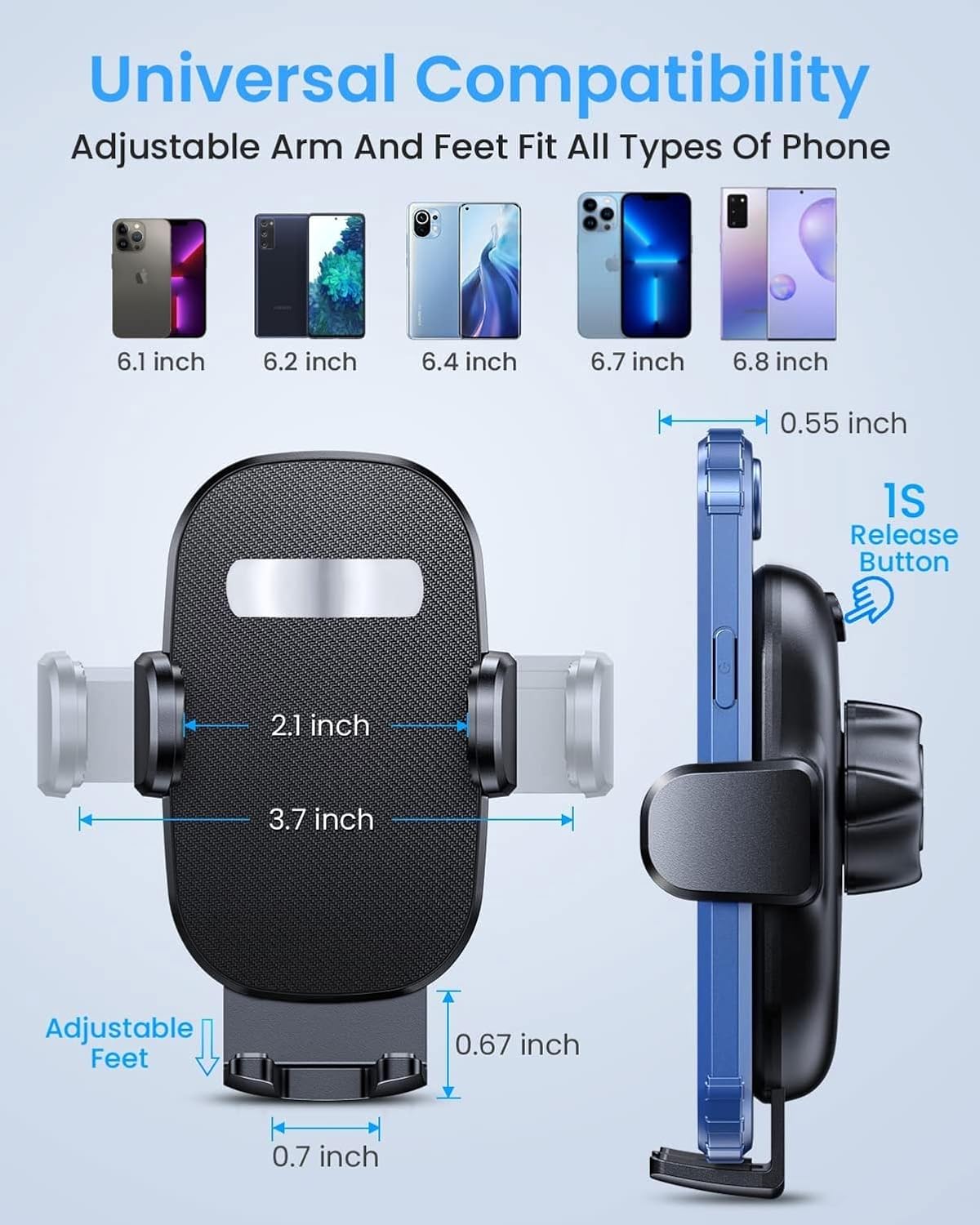
Figure 7: Detailed compatibility diagram illustrating the adjustable range of the mount's arms and feet to fit various phone sizes, from 4 to 6.5 inches.

Figure 8: Visual representation of the mount's "Triangle Stability" design, emphasizing its firm grip on the air vent to maintain phone stability during driving, even through breakdowns, sharp turns, or bumpy roads.
Specifications
| Feature | Detail |
|---|---|
| Product Name | Fonus Air Vent Car Phone Mount |
| Model | Air Vent Car Mount |
| Compatibility | Smartphones 4-6.5 inches (with case); Side clips: 2.1-3.7 inches; Foot support: up to 0.67 inches extension. |
| Attachment Type | Air Vent Hook (Stainless Steel) |
| Adjustability | 360-degree rotation (ball joint), adjustable viewing angle |
| Release Mechanism | One-button quick release |
| Material | ABS plastic, stainless steel, rubber/silicone |
| Item Weight | 4 ounces |
| Package Dimensions | 3 x 2 x 1 inches |
| ASIN | B0CX74VJPC |
| Manufacturer | Fonus |
Warranty and Support
For warranty information or technical support, please contact Fonus customer service through the retailer where the product was purchased or visit the official Fonus website. Please have your product model and ASIN (B0CX74VJPC) available when contacting support.
This product is designed for durability and reliability. If you encounter any issues not covered in this manual, please reach out to our support team for assistance.