
1. Introduction
Thank you for choosing the BOYI TD21 Hot-Swappable Mechanical Numeric Keypad. This 21-key mini numpad offers versatile connectivity options (Bluetooth 5.0, 2.4GHz wireless, and wired USB Type-C), hot-swappable Gateron Yellow switches, and customizable RGB backlighting. Designed for efficiency and personalization, this manual provides detailed instructions for setup, operation, maintenance, and troubleshooting to ensure optimal performance.

Overview of the BOYI TD21 Hot-Swappable Mechanical Numeric Keypad, showcasing its compact design and RGB lighting.
2. Setup Instructions
2.1 Package Contents
Before proceeding, please ensure all items are present in the package:
- BOYI TD21 Numeric Keypad
- USB Type-C Cable
- 2.4GHz Wireless Dongle (adaptor)
- Keycap Puller
- Extra Gateron Switches
- User Manual (this document)
2.2 Charging the Keypad
The keypad is equipped with a built-in Lithium Ion battery. For optimal performance, fully charge the keypad before first use.
- Connect the provided USB Type-C cable to the keypad's Type-C port.
- Connect the other end of the USB cable to a powered USB port on your computer or a USB wall adapter.
- The charging indicator light will show the charging status.

The USB Type-C port for charging and wired connection.
2.3 Connectivity Modes
The TD21 keypad supports three connection modes: Wired, 2.4GHz Wireless, and Bluetooth 5.0.
- Wired Mode: Connect the keypad directly to your computer using the provided USB Type-C cable. This mode also charges the keypad.
- 2.4GHz Wireless Mode:
- Insert the 2.4GHz wireless dongle into an available USB port on your computer.
- Switch the keypad to 2.4GHz mode (refer to the "Operating Instructions" section for key combinations).
- The keypad should automatically connect.
- Bluetooth 5.0 Mode:
- Switch the keypad to Bluetooth mode (refer to the "Operating Instructions" section for key combinations).
- On your device (computer, tablet, etc.), search for Bluetooth devices and select "BOYI TD21" to pair.
- The keypad can connect to up to two Bluetooth devices simultaneously.

Visual representation of the keypad's tri-mode connection capabilities: Bluetooth, 2.4GHz wireless, and wired USB-C.
3. Operating Instructions
3.1 Basic Keypad Functions
The TD21 is a 21-key numeric keypad with fully programmable keys. Standard numeric and function keys are available.
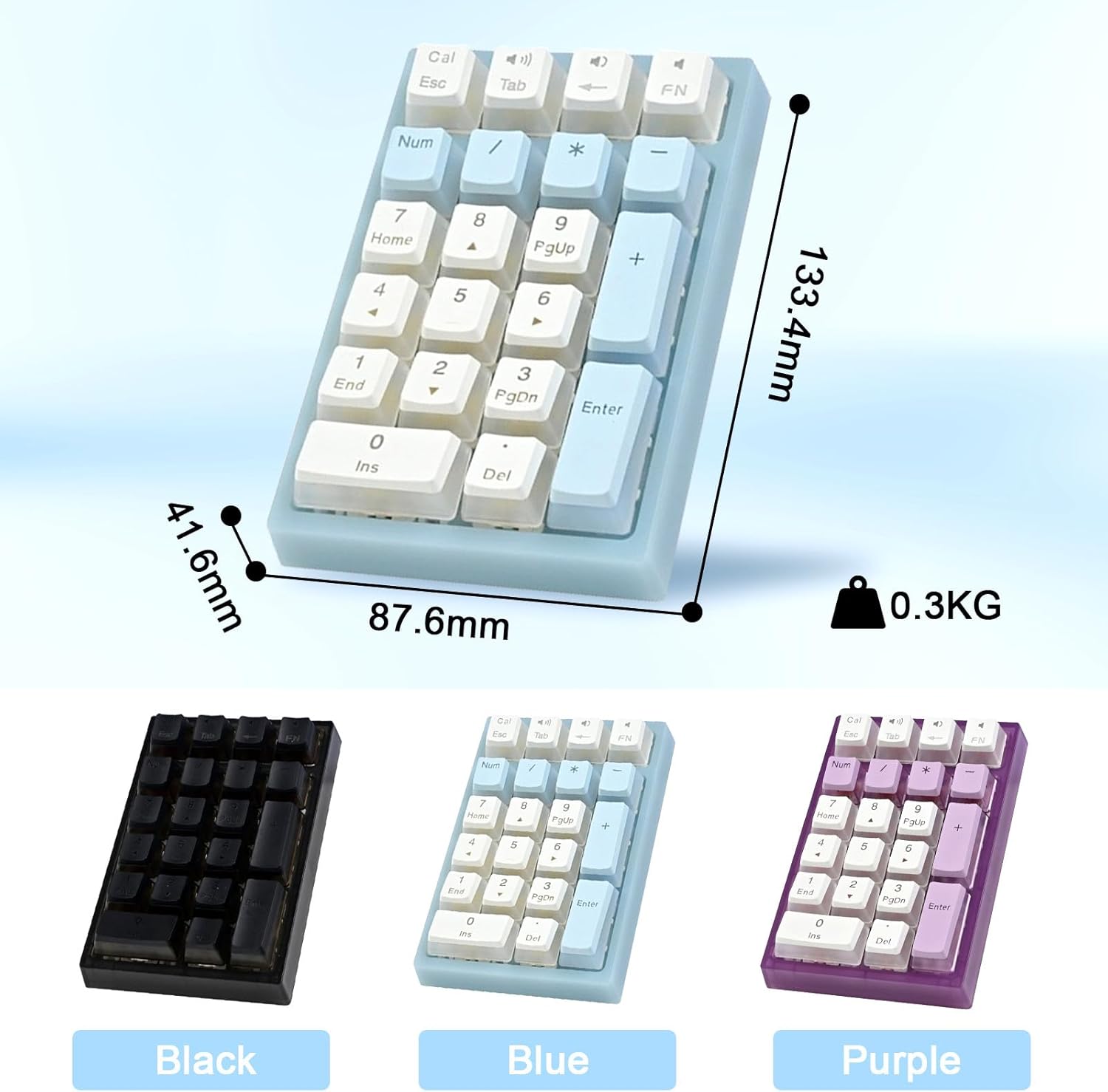
The compact design of the TD21 keypad, suitable for various setups.
3.2 RGB Backlight Effects
The keypad features multiple RGB backlight effects. To cycle through these effects:
- Press FN + 5 to switch between different backlight modes (e.g., Breathing Mode, Streaming light change, Starlight, Single light, Constant Light Mode, Raindrop Slide).
- Brightness and speed of the backlight can also be adjusted. Refer to the software driver for advanced customization.

The keypad displaying various RGB backlight modes.
3.3 Hot-Swappable Switches
The TD21 keypad is equipped with hot-swappable Gateron Yellow switches, allowing you to change switches without soldering. It is compatible with most 3-pin and 5-pin mechanical switches available on the market.
- Use the provided keycap puller to carefully remove the keycap from the desired switch.
- Use a switch puller (not included) to gently pull the switch straight up from the PCB.
- Align the pins of the new switch with the holes on the PCB and press down firmly until it clicks into place. Ensure pins are not bent.
- Replace the keycap.

Detail of the hot-swappable switch socket, compatible with 3-pin and 5-pin switches.
3.4 Software Customization
The BOYI TD21 keypad supports a software driver for advanced customization, including key remapping and personalized RGB lighting effects.
- Visit the official BOYI website: www.boyikeyboard.com/Download.html
- Download the "BOYI TD21 Software Driver" file.
- Install the software and follow the on-screen instructions to customize your keypad.

The software driver allows for macro programming and customized RGB effects.
4. Maintenance
4.1 Cleaning the Keypad
Regular cleaning helps maintain the keypad's appearance and functionality.
- Keycaps: Use the provided keycap puller to remove keycaps. Clean them with a mild soap solution and water, then dry thoroughly before reattaching.
- Keypad Surface: Use a soft, lint-free cloth slightly dampened with water or a mild cleaning solution. Avoid harsh chemicals or abrasive materials.
- Between Keys: Use compressed air to remove dust and debris from between the keys.
Caution: Ensure the keypad is powered off and disconnected from any power source before cleaning. Do not immerse the keypad in water or any liquids.

The PBT double shot keycaps are durable and resistant to oils, making them easier to maintain.
5. Troubleshooting
5.1 Connectivity Issues
- Keypad not responding in Wired Mode:
- Ensure the USB Type-C cable is securely connected to both the keypad and the computer.
- Try a different USB port on your computer.
- Test with a different USB Type-C cable if available.
- 2.4GHz Wireless connection unstable or not connecting:
- Ensure the 2.4GHz dongle is properly inserted into a USB port.
- Verify the keypad is switched to 2.4GHz mode.
- Move the keypad closer to the dongle to reduce interference.
- Try plugging the dongle into a different USB port.
- Bluetooth connection issues:
- Ensure the keypad is in Bluetooth pairing mode.
- On your device, remove any previous pairings of the "BOYI TD21" and attempt to pair again.
- Ensure your device's Bluetooth is enabled and discoverable.
- Try restarting both the keypad and your device.
5.2 Backlight Not Working or Incorrect
- Ensure the keypad is sufficiently charged, as low battery can affect backlight performance.
- Press FN + 5 to cycle through backlight modes and ensure it's not set to an "off" or very dim mode.
- If using the software, check backlight settings there.
5.3 Keys Not Registering
- Check the connection mode (wired, 2.4G, Bluetooth) and ensure it's correctly set and connected.
- If a specific key is not working, try removing and re-inserting its switch to ensure it's properly seated in the hot-swap socket.
- If the issue persists, try replacing the switch with one of the extra Gateron switches provided.
6. Specifications
| Model Number | TD21 |
| Brand | BOYI |
| Connectivity Technology | Bluetooth 5.0, 2.4GHz Wireless, Wired (USB Type-C) |
| Key Count | 21 Keys |
| Switches | Hot-swappable Gateron Yellow Mechanical Switches |
| Keycaps | PBT OEM Profile Pudding Keycaps |
| Backlighting | RGB |
| Battery | 1 Lithium Ion battery (included) |
| Item Weight | 10.2 ounces (approx. 0.29 kg) |
| Package Dimensions | 5.67 x 5.08 x 1.81 inches |
| Material | Polycarbonate |
| Compatible Devices | Gaming Console (and generally computers with USB/Bluetooth) |
7. Warranty Information
BOYI products are manufactured to high quality standards. For specific warranty details regarding your TD21 Numeric Keypad, please refer to the warranty card included in your product packaging or visit the official BOYI website. Please retain your proof of purchase for warranty claims.
8. Customer Support
Should you encounter any issues or have questions regarding your BOYI TD21 Numeric Keypad, please contact our customer support team.
- Online Store: Visit the official BOYI Store on Amazon for product information and support options: BOYI Store
- Email Support: For direct assistance, you can email our support team at: boyiservice2020@163.com

Contact information for BOYI customer support.
