
1. Introduction
This manual provides essential instructions for the safe and effective use of your Fitfiu Fitness MC-100C Folding Treadmill. Please read all instructions carefully before assembly, operation, or maintenance to ensure proper function and user safety. Keep this manual for future reference.

Figure 1: The Fitfiu Fitness MC-100C Treadmill in its operational state.
2. Important Safety Instructions
To reduce the risk of serious injury, always follow basic precautions when using this treadmill. Failure to do so may result in personal injury or damage to the equipment.
- Read all instructions: Familiarize yourself with the entire manual before use.
- Supervision: Do not leave children or pets unattended near the treadmill.
- Medical consultation: Consult a physician before starting any exercise program.
- Proper attire: Wear appropriate athletic footwear and clothing. Avoid loose clothing that could get caught.
- Stable surface: Place the treadmill on a flat, stable surface with adequate clearance around it.
- Emergency stop: Always attach the safety key clip to your clothing before starting. The treadmill will stop if the safety key is dislodged.
- Power cord: Keep the power cord away from heated surfaces and ensure it is not pinched or damaged.
- Weight limit: Do not exceed the maximum user weight of 120 kg.
- Maintenance: Perform regular maintenance as described in this manual.
3. Assembly and Setup
The Fitfiu Fitness MC-100C Treadmill is designed for straightforward assembly. Most components are pre-assembled. Follow these general steps:
- Unpacking: Carefully remove all components from the packaging.
- Unfolding: The treadmill arrives in a folded position. Gently lower the running deck until it locks into place. Ensure all locking mechanisms are secure.
- Handlebar and Console: Raise the handlebar assembly and secure it with the provided pins or bolts. Connect any necessary console cables.
- Placement: Position the treadmill on a level surface, ensuring at least 0.6 meters (2 feet) of clear space on all sides and 2 meters (6.5 feet) at the rear for safety.
- Power Connection: Plug the power cord into a grounded electrical outlet.
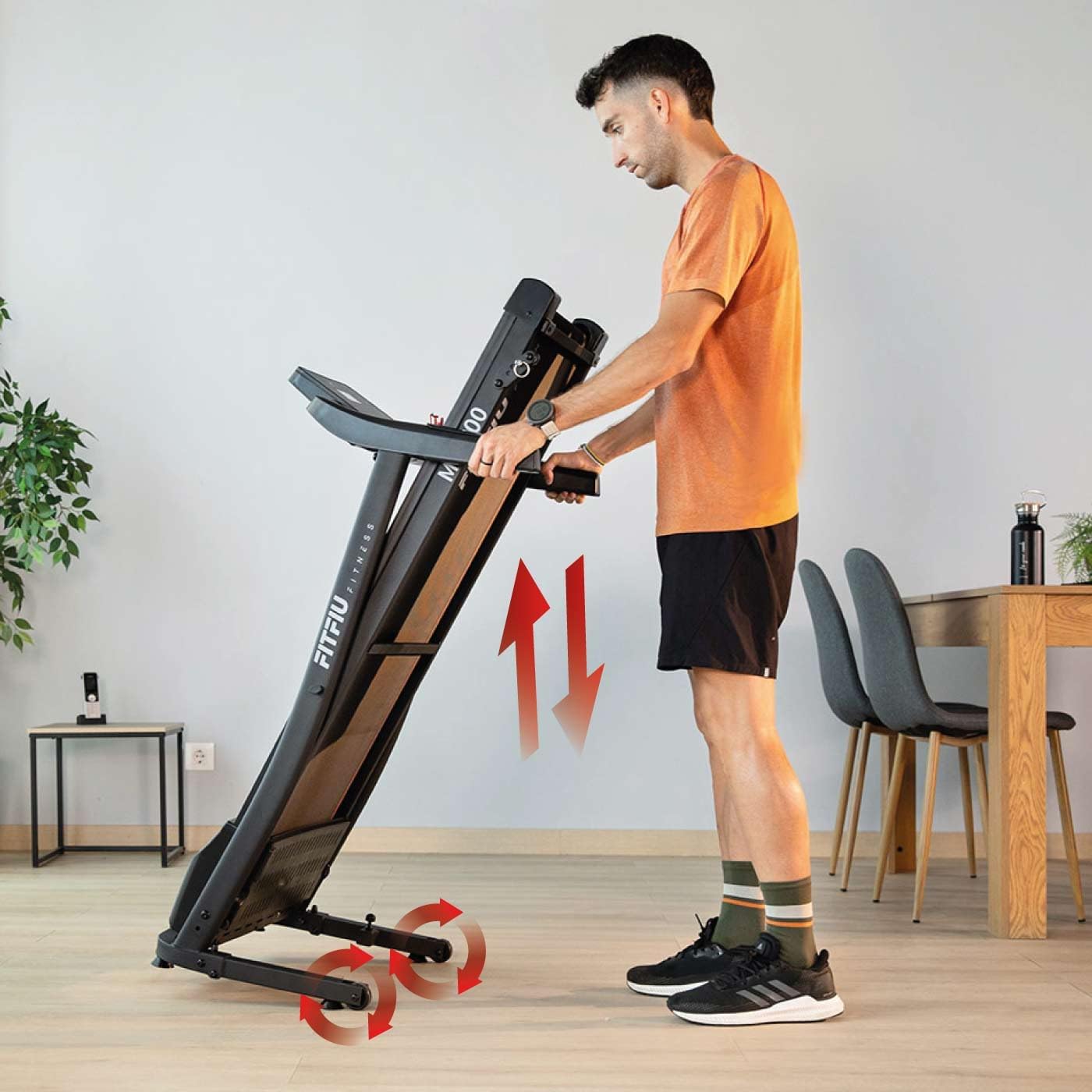
Figure 2: Illustration of the Fitfiu Fitness MC-100C Treadmill's vertical folding mechanism for storage, showing wheels for easy movement.
To fold the treadmill for storage, lift the running deck until it clicks into the vertical storage position. The integrated wheels allow for easy relocation.
4. Operating Instructions
4.1. Control Panel Overview

Figure 3: Close-up of the Fitfiu Fitness MC-100C Treadmill control panel, displaying 12 pre-set programs (P1-P12) and the safety key.
The control panel features an LED display and various buttons for controlling your workout. Key functions include:
- Display: Shows speed, time, distance, calories, and pulse.
- Start/Stop: Initiates and pauses/stops the treadmill belt.
- Speed +/-: Adjusts the running speed.
- Program (P): Selects from 12 pre-set workout programs.
- Mode (M): Cycles through display modes or sets target values.
- Safety Key: Magnetic key that must be in place for the treadmill to operate. Pulling it off will stop the belt.
4.2. Starting a Workout
- Ensure the treadmill is plugged in and the safety key is attached to the console and your clothing.
- Step onto the side rails of the treadmill.
- Press the Start button. The belt will begin moving at a low speed.
- Carefully step onto the moving belt and adjust the speed using the Speed +/- buttons to your desired pace.
- To stop, press the Stop button or pull the safety key.
4.3. Using Pre-set Programs
The MC-100C offers 12 pre-set programs (P1-P12) that automatically adjust speed over time.
- From standby mode, press the Program (P) button repeatedly to cycle through the available programs.
- Once your desired program is displayed, press Start to begin the workout.
4.4. Manual Incline Adjustment
The treadmill features 3 levels of manual incline to simulate different terrains.
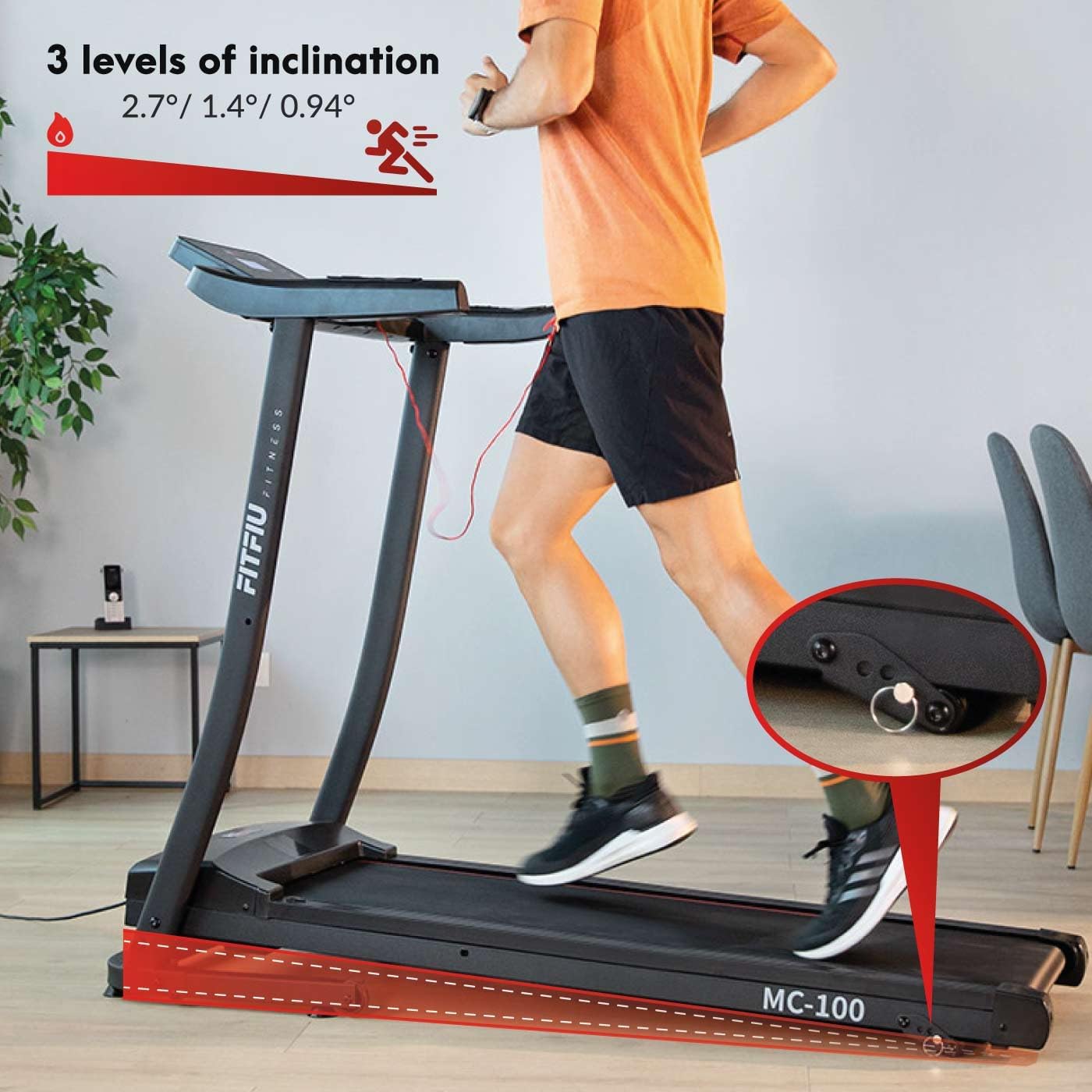
Figure 4: Image demonstrating the 3 manual incline levels (2.7°, 1.4°, 0.94°) of the Fitfiu Fitness MC-100C Treadmill, with a close-up of the adjustment pin.
To adjust the incline:
- Ensure the treadmill is stopped and unplugged for safety.
- Locate the incline adjustment pins at the rear of the treadmill.
- Lift the rear of the treadmill slightly and remove the pins.
- Adjust the support bars to the desired incline level (e.g., 2.7°, 1.4°, or 0.94°).
- Reinsert the pins securely to lock the incline in place.
4.5. Kinomap Compatibility
The MC-100C Treadmill is compatible with the Kinomap application, allowing for interactive training experiences. Place your tablet or smartphone on the integrated holder for easy viewing.

Figure 5: Fitfiu Fitness MC-100C Treadmill with a tablet and smartphone displaying the Kinomap app, illustrating virtual training integration.
5. Maintenance
Regular maintenance ensures the longevity and optimal performance of your treadmill.
5.1. Cleaning
- Daily: Wipe down the console and handlebars with a damp cloth after each use.
- Weekly: Clean the running belt and deck to remove dust and debris. Ensure the treadmill is unplugged before cleaning.
5.2. Running Belt Lubrication
The running belt requires periodic lubrication to reduce friction and wear. The frequency depends on usage.
- Frequency: Lubricate every 25 hours of use or every 3 months, whichever comes first.
- Procedure:
- Unplug the treadmill.
- Loosen the rear roller bolts to slightly lift the belt.
- Apply a thin line of 100% silicone lubricant (specifically designed for treadmills) under the center of the belt.
- Tighten the rear roller bolts and plug in the treadmill.
- Run the treadmill at a low speed (e.g., 3 km/h) for 5 minutes to distribute the lubricant.
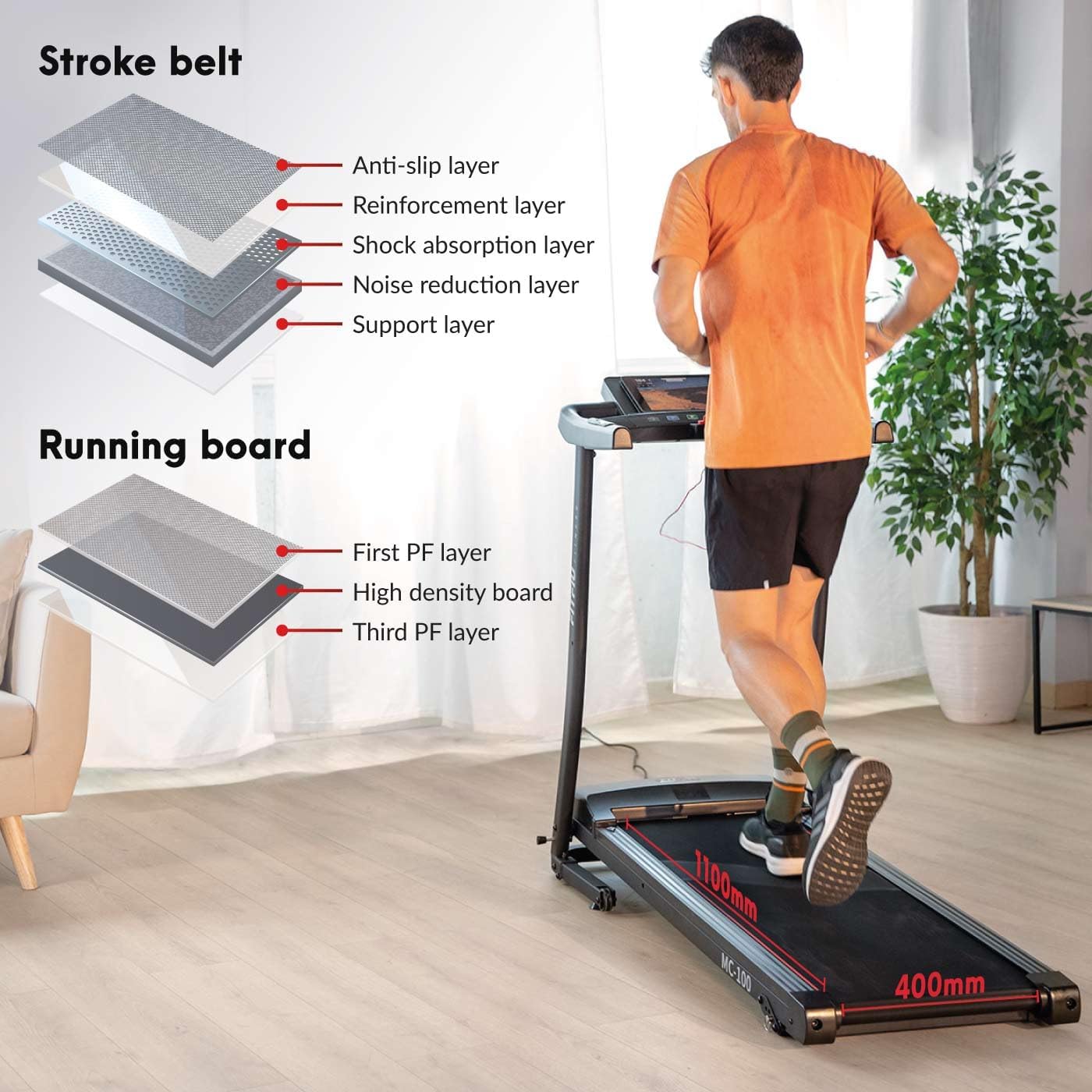
Figure 6: Diagram illustrating the multi-layered structure of the Fitfiu Fitness MC-100C Treadmill's running belt and running board, detailing anti-slip, reinforcement, shock absorption, noise reduction, and support layers.
5.3. Belt Tension and Alignment
If the belt slips or drifts to one side, it may need adjustment. Refer to the detailed instructions in the full product manual for precise belt tensioning and alignment procedures.
6. Troubleshooting
This section addresses common issues you might encounter with your treadmill.
| Problem | Possible Cause | Solution |
|---|---|---|
| Treadmill does not start | Power cord unplugged, safety key not in place, circuit breaker tripped. | Check power connection, ensure safety key is correctly inserted, reset circuit breaker if necessary. |
| Running belt slips | Belt too loose, insufficient lubrication. | Adjust belt tension (refer to full manual), lubricate the running belt. |
| Excessive noise | Loose components, worn belt, motor issue. | Check and tighten all bolts and screws. Lubricate belt. If noise persists, contact customer support. |
| Inaccurate display readings | Sensor issue, loose connection. | Ensure all console connections are secure. If problem persists, contact customer support. |
7. Specifications
Technical details for the Fitfiu Fitness MC-100C Treadmill:
| Feature | Specification |
|---|---|
| Model | MC-100C |
| Brand | Fitfiu Fitness |
| Motor Power | 900 W (1.2 HP) |
| Maximum Speed | 10 km/h |
| Running Surface | 32 x 102 cm |
| Maximum User Weight | 120 kg |
| Incline Levels | 3 manual levels (2.7°, 1.4°, 0.94°) |
| Number of Programs | 12 |
| Display Type | LED |
| Display Size | 75 mm |
| Product Dimensions (L x W x H) | 130 x 60 x 132 cm |
| Folded Dimensions (L x W x H) | 60 x 132 x 60 cm |
| Item Weight | 23 kg |
| Frame Material | Alloy Steel |
| Main Material | Stainless Steel |
| Color | Grey |
| Power Type | Electric Current |
| Included Components | 1 MC-100C Treadmill |
| Recommended Use | Running |
| Target Audience | Adult |
8. Warranty and Support
For information regarding warranty coverage, technical support, or replacement parts, please refer to the official Fitfiu Fitness website or contact their customer service department. Keep your purchase receipt as proof of purchase.