
Introduction
This user manual provides essential information for the setup, operation, maintenance, and troubleshooting of your MOSEN 88-key digital piano keyboard. Designed for both beginners and intermediate players, this instrument offers a rich musical experience with its semi-weighted keys and versatile features.
Key features include:
- 88 high-quality semi-weighted keys with adjustable touch response.
- 380 tones, 128 rhythms, and 88 demo songs for diverse musical exploration.
- Record/play/reset modes for practice and composition.
- Flexible connectivity options: headphone jack for private practice, stereo RCA outputs, USB, and Bluetooth.
- Integrated DREAM audio source for an authentic sound experience.
- Portable design with included keyboard stand and sustain pedal.
Setup
Carefully unpack all components from the packaging. Ensure all items listed in the "What's in the Box" section are present before proceeding with assembly.
Package Contents:
- MOSEN 88-Key Digital Piano Keyboard
- Keyboard Stand
- Sustain Pedal
- Music Rest
- Power Adapter
Assembling the Keyboard Stand:
The keyboard stand is designed for easy assembly. It is recommended to have two people for initial setup to ensure stability and proper height adjustment. Follow these steps:
- Unfold the X-style keyboard stand.
- Adjust the stand to your desired height. Ensure the locking mechanism is securely engaged to prevent accidental collapse.
- Carefully place the MOSEN digital piano keyboard onto the stand, ensuring it is centered and stable on the support arms.

Figure 1: MOSEN 88-key digital piano keyboard with included stand and sustain pedal.

Figure 2: Dimensions of the MOSEN digital piano, illustrating its compact design for easy setup.
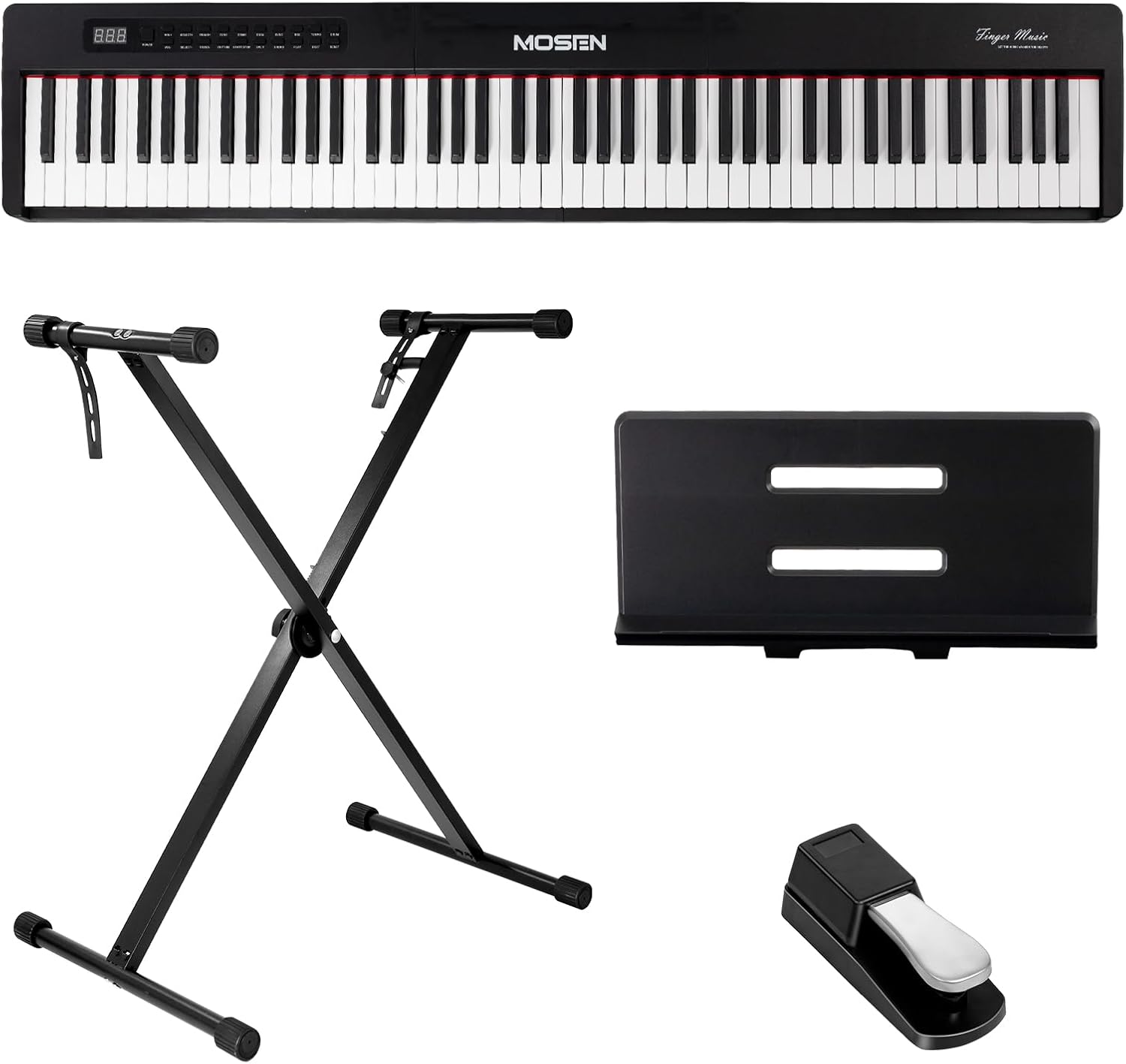
Figure 3: All components included in the MOSEN digital piano package: keyboard, stand, music rest, and sustain pedal.

Figure 4: Visual guide for adjusting the keyboard stand height. Ensure the knob is tightened for stability.
Connecting the Sustain Pedal and Power:
- Connect the sustain pedal cable to the "PEDAL" jack on the rear of the keyboard.
- Connect the power adapter to the "USB DC 5V" port or the dedicated DC power socket (if available) and plug it into a wall outlet.
- Press the "ON/OFF" button to power on the keyboard.

Figure 5: Overview of the connectivity ports including DC power socket, audio input/output, headphone jack, pedal jack, and USB transfer jack.
Operating Instructions
Your MOSEN digital piano offers a wide range of functions to enhance your musical journey.
Basic Operation:
- Power On/Off: Press the "ON/OFF" button located on the control panel.
- Volume Control: Use the "VOL-" and "VOL+" buttons to adjust the master volume.
- Tone Selection: The piano features 380 different tones. Use the "SELECT-" and "SELECT+" buttons to browse and choose your desired instrument sound.
- Rhythm Selection: Access 128 rhythms using the dedicated "RHYTHM" button and then "SELECT-" and "SELECT+" to choose.
- Demo Songs: The keyboard includes 88 demo songs. Press the "DEMO" button to start playback.

Figure 6: The control panel of the MOSEN digital piano, highlighting the 88 keys, 380 sounds, and 128 rhythms.

Figure 7: Close-up of the multi-function buttons for various controls like Power, Volume, Select, Transpose, Tone, Demo, Start/Stop, Dual, Split, Sync, Chord, Record, Play, Tempo, Beat, Drum, and Reset.
Advanced Features:
- Semi-Weighted Keys: The 88 semi-weighted keys provide a realistic piano feel, offering sensitive sound changes based on your touch. This allows for expressive playing, similar to an acoustic grand piano.
- DREAM Audio Source: The core of the MOSEN piano utilizes the French DREAM top sound source digital sampling, delivering a realistic listening experience.
- Recording Function: Use the "REC" button to record your performance and "PLAY" to listen back. This feature is excellent for self-assessment and practice.
- Metronome: Activate the built-in metronome to assist with timing and rhythm practice.
- Dual Timbre Mode: Combine two different instrument sounds simultaneously for richer textures.
- Split Mode: Divide the keyboard into two sections, allowing two different instrument sounds to be played independently on each half.
- Transpose: Adjust the pitch of the entire keyboard up or down without changing your finger positions.
- Bluetooth Connectivity: Connect your device via Bluetooth for audio streaming or MIDI functionality, expanding your musical possibilities.

Figure 8: A user experiencing the authentic sound of the MOSEN digital piano with its 88 high-quality semi-weighted keys.

Figure 9: The semi-weighted keys of the MOSEN digital piano, designed for fluid precision and expressive play.
Figure 10: Illustration of key features including Record Mode, Metronome, Chord function, and Function keys for musical mastery.

Figure 11: Close-up of a finger pressing a key on the MOSEN digital piano, demonstrating the key action.
Maintenance
Proper care and maintenance will ensure the longevity and optimal performance of your MOSEN digital piano.
- Cleaning: Use a soft, dry cloth to wipe down the surface of the keyboard and keys. For stubborn dirt, slightly dampen the cloth with water and a mild soap solution, then wipe dry immediately. Avoid abrasive cleaners or solvents.
- Storage: When not in use, store the keyboard in a cool, dry place away from direct sunlight, extreme temperatures, and high humidity.
- Protection: Consider using a dust cover to protect the keys and control panel from dust and spills.
- Handling: Always handle the keyboard with care. Avoid dropping it or placing heavy objects on top of it.
Troubleshooting
If you encounter any issues with your MOSEN digital piano, refer to the following common problems and their solutions:
Common Issues:
- Keyboard does not power on:
- Ensure the power adapter is securely connected to both the keyboard and a working power outlet.
- Verify that the power outlet is functional by plugging in another device.
- If using battery power, ensure batteries are correctly inserted and have sufficient charge.
- Press and hold the "ON/OFF" button for a few seconds.
- Keys are unresponsive or produce no sound:
- Check the master volume level.
- Ensure headphones are not plugged in if you intend to use the built-in speakers.
- Verify that a tone is selected and not set to a silent or very low volume tone.
- If specific keys are unresponsive, gently clean around the key with a soft, dry cloth to remove any debris.
- Sound is distorted or unclear:
- Check the volume level; excessive volume can cause distortion.
- Ensure all cables (power, pedal, audio) are securely connected.
- If using external speakers, check their connections and volume levels.
- Difficulty assembling the stand:
- Refer to the assembly steps in the "Setup" section.
- Ensure all parts of the stand are correctly aligned before tightening screws or engaging locking mechanisms.
- It is recommended to have two people for stand assembly to ensure proper alignment and stability.
If the issue persists after attempting these solutions, please contact MOSEN customer support for further assistance.
Specifications
| Feature | Detail |
|---|---|
| Brand | MOSEN MUSIC |
| Model Name | MSP-45 |
| Number of Keys | 88 |
| Key Type | Semi-Weighted |
| Tones | 380 |
| Rhythms | 128 |
| Demo Songs | 88 |
| Connectivity Technology | Auxiliary, USB, Bluetooth |
| Connector Type | 3.5mm Jack, RCA |
| Headphones Jack | Yes |
| Power Source | Corded Electric |
| Item Weight | 20.5 pounds |
| Package Dimensions | 50 x 15 x 4.75 inches |
| Body Material | Plastic |
| Color | Black |
| Skill Level | All |
| Special Feature | Built-In Speaker |
Warranty and Support
MOSEN MUSIC is committed to providing high-quality products and excellent customer service.
- Customer Service: MOSEN MUSIC offers 24-hour global service for any inquiries or assistance you may need.
- Return Policy: Enjoy a 30-day free return policy for your peace of mind.
- Protection Plans: Extended protection plans are available for purchase to cover your investment for 3 or 4 years.
- Contact: For detailed support or to explore additional products, please visit the official MOSEN MUSIC Store: MOSEN MUSIC Store.

Figure 12: MOSEN MUSIC Customer Care details, including 24-hour global service and a 30-day free return policy.


