
1. Important Compatibility Information
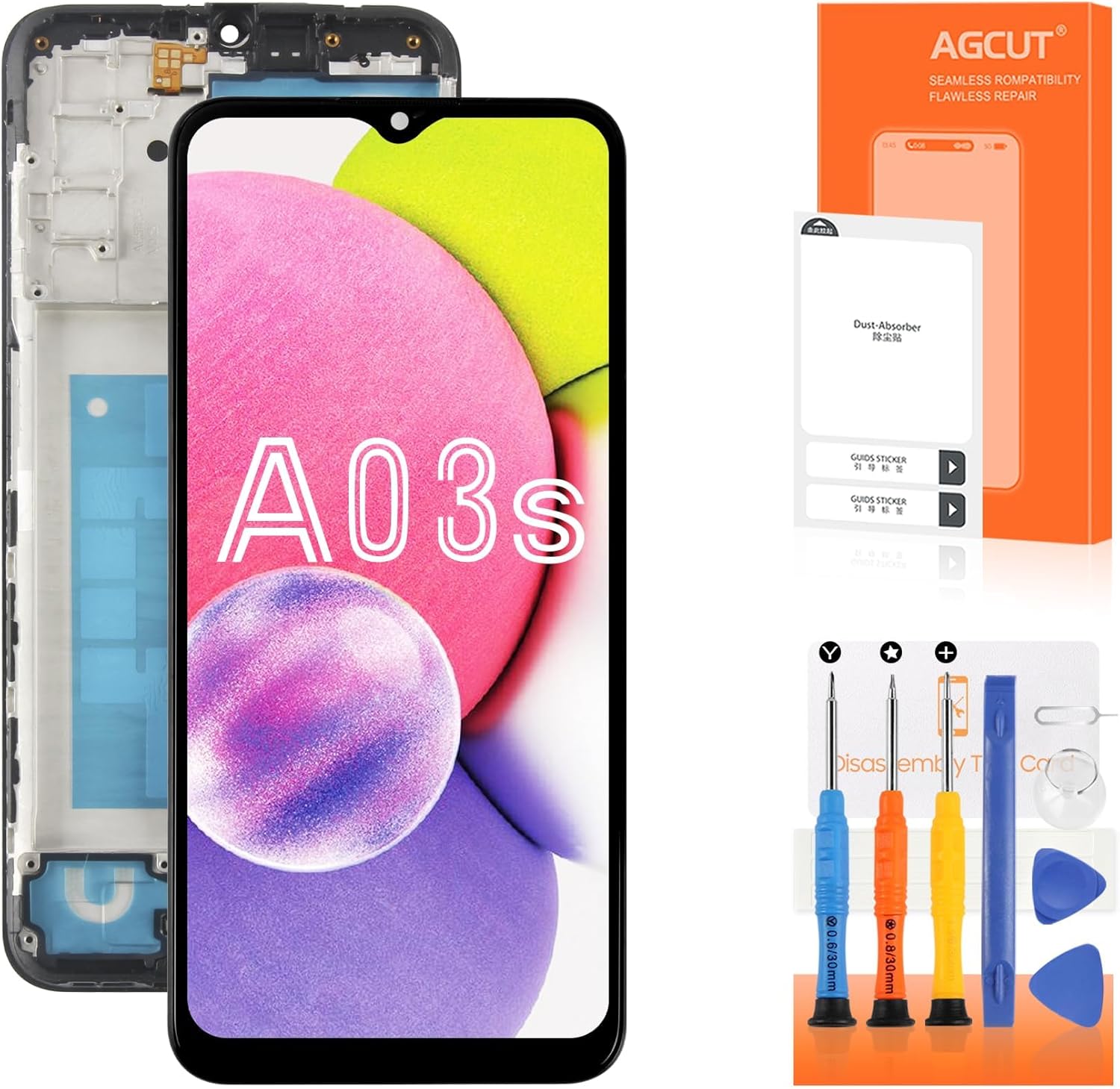
This LCD screen replacement is specifically designed for the following Samsung Galaxy A03s models:
- SM-A037F
- SM-A037M
- SM-A037M/DS
Important: This screen is NOT compatible with Samsung Galaxy A03s models A037A, A037W, A037G, or A037U. Please verify your phone's model number before proceeding with installation.
The screen features a 6.5-inch display with a resolution of 720x1600 pixels and a pixel density of 270 ppi.

2. Package Contents
Please ensure all the following items are included in your package:
- 1x AGCUT LCD Screen Replacement with Frame for Samsung Galaxy A03s
- 1x Set of Removal Tools (various screwdrivers, pry tools, suction cup)
- 1x HD Glass Screen Protector
- 1x Dust Removal Sticker Kit
- 1x Double-sided Adhesive Tape
- 1x Disassembly Tool Card
- 1x Explosion-proof Box (packaging)

3. Setup and Pre-Installation Steps
Before beginning the installation, it is crucial to perform the following steps:
- Power Off Device: Ensure your Samsung Galaxy A03s is completely powered off before starting any disassembly.
- Test the Screen: Before full installation, connect the new LCD screen's flex cables to your phone's motherboard. Power on the device to test the display, touch functionality, and ensure there are no dead pixels or lines. Do not remove any protective films or labels until testing is complete and successful.
- Watch Installation Videos: Non-professional installation is not recommended. For detailed visual guidance, it is highly recommended to watch relevant installation videos on platforms like YouTube. Search for "Samsung Galaxy A03s screen replacement with frame installation guide."
- Prepare Workspace: Work in a clean, well-lit, and static-free environment.

4. Installation Instructions (Operating)
This screen replacement comes with a frame, which simplifies the installation process compared to screen-only replacements. The frame provides a pre-assembled structure, reducing the risk of damage during installation.
- Disassemble Old Screen: Carefully remove the back cover, battery, and any components obstructing access to the old screen assembly. Disconnect all flex cables from the old screen.
- Remove Old Frame (if applicable): If your original screen was not integrated with a frame, you will need to transfer internal components to the new frame. If your old screen was also with a frame, remove the entire old frame assembly.
- Transfer Components: Transfer necessary components (e.g., earpiece speaker, front camera, vibration motor, buttons) from your old phone frame to the new screen's frame.
- Connect New Screen: Carefully connect the new screen's flex cables to the corresponding connectors on the phone's motherboard.
- Reassemble Device: Reinstall the battery, back cover, and any other components in reverse order of disassembly. Ensure all screws are tightened appropriately.
- Final Test: Power on your device and perform a thorough test of all screen functions, including touch, display quality, and brightness.
For detailed, step-by-step visual instructions, refer to the recommended YouTube installation videos.

5. Maintenance
To ensure the longevity and optimal performance of your new screen, follow these maintenance guidelines:
- Protect from Drops: Avoid dropping your device, as this can cause cracks or internal damage to the screen.
- Use Screen Protector: Apply the included HD glass screen protector to add an extra layer of defense against scratches and minor impacts.
- Clean Gently: Clean the screen with a soft, lint-free cloth. For stubborn smudges, lightly dampen the cloth with water or a screen-specific cleaning solution. Avoid harsh chemicals or abrasive materials.
- Avoid Extreme Temperatures: Do not expose your device to extreme hot or cold temperatures, as this can affect screen performance and lifespan.
6. Troubleshooting Common Issues
This replacement screen is designed to resolve various display issues. If you encounter problems after installation, consider the following:
- Incorrect Screen Response: If the touch screen is unresponsive or registers incorrect inputs, ensure all flex cables are securely connected. Re-seat the connectors if necessary.
- Display Issues (e.g., pixel distortion, wrong colors, frozen LCD): These can indicate a loose connection or a faulty screen. Re-test the screen before final installation. If issues persist, contact support.
- Dead Pixels or Lines: The screen undergoes strict quality control to prevent these issues. If observed during pre-installation testing, do not proceed with full installation and contact support.
- No Display: Double-check all connections, especially the main display flex cable. Ensure the battery is charged.

Screen Performance Characteristics:
- High Brightness: The replacement screen offers enhanced brightness for clear visibility.
- High Resolution: Experience sharp and detailed visuals with the screen's high resolution.
- High Sensitivity: The touch screen provides responsive and accurate input.


7. Specifications
| Feature | Specification |
|---|---|
| Compatible Models | Samsung Galaxy A03s (SM-A037F, SM-A037M, SM-A037M/DS) |
| Screen Size | 6.5 inches |
| Resolution | 720x1600 pixels |
| Pixel Density | 270 ppi |
| Color | Black |
| Item Weight | 6 ounces |
| Package Dimensions | 7.64 x 4.13 x 1.22 inches |
| Manufacturer | AGCUT |
8. Warranty Information
Specific warranty details are not provided in the product information. Please refer to the seller's return policy or contact the seller directly for information regarding product warranty and guarantees.
9. Support
If you encounter any difficulties during installation or experience issues with the product that cannot be resolved using the troubleshooting steps, please:
- Consult additional online resources, such as detailed video tutorials on YouTube.
- Contact the seller directly for technical assistance or product support.