
1. Important Safety Instructions
Please read all instructions carefully before using this appliance. Keep this manual for future reference.
- Do not touch hot surfaces. Use handles or knobs.
- To protect against electrical shock, do not immerse cord, plugs, or toaster in water or other liquid.
- Close supervision is necessary when any appliance is used by or near children.
- Unplug from outlet when not in use and before cleaning. Allow to cool before putting on or taking off parts.
- Do not operate any appliance with a damaged cord or plug, or after the appliance malfunctions or has been damaged in any manner.
- Do not use outdoors.
- Do not let cord hang over edge of table or counter, or touch hot surfaces.
- Do not place on or near a hot gas or electric burner, or in a heated oven.
- Do not use appliance for other than intended use.
- Oversize foods, metal foil packages, or utensils must not be inserted in a toaster as they may create a fire or risk of electric shock.
- A fire may occur if toasters are covered or touching flammable material, including curtains, draperies, walls, and the like, when in operation.
- Do not attempt to dislodge food when toaster is plugged in.
- Always attach plug to appliance first, then plug cord into the wall outlet. To disconnect, turn any control to 'off', then remove plug from wall outlet.
- This appliance is for household use only.
2. Product Overview
The Aigostar Retro 2 Slice Toaster is designed for efficient and even toasting of various bread types. It features extra-wide slots and multiple functions for customized results.

Image 1: Front view of the Aigostar Retro 2 Slice Toaster in white, with two slices of golden-brown toast emerging from the slots. The control panel with buttons and browning dial is visible on the side.
Components:
- Toasting Slots: Two extra-wide slots (1.6 inches) to accommodate various bread types.
- Toasting Lever: Lowers and raises bread into the toasting slots.
- Browning Control Dial: Adjusts the toast shade from 1 (lightest) to 6 (darkest).
- Function Buttons: Cancel, Bagel, Reheat, Defrost.
- Removable Crumb Tray: Located at the bottom for easy cleaning.
- Cord Storage: Integrated under the base for tidy storage.

Image 2: Top-down view of the toaster highlighting the 1.6-inch extra-wide slots. The removable crumb tray is shown partially pulled out from the side, demonstrating its accessibility for cleaning.
3. Setup
- Unpack the toaster and remove all packaging materials.
- Place the toaster on a stable, flat, heat-resistant surface, away from flammable materials.
- Ensure the crumb tray is fully inserted.
- Plug the power cord into a standard electrical outlet.
- Before first use, operate the toaster without bread on the highest browning setting (6) for a few minutes to burn off any manufacturing residues. A slight odor or smoke may be present; this is normal. Allow the toaster to cool completely.
4. Operating Instructions
Basic Toasting:
- Place up to two slices of bread into the toasting slots.
- Select your desired browning level using the browning control dial (1-6). Refer to Section 5 for details on browning settings.
- Press the toasting lever down until it locks into place. The toaster will begin toasting.
- When the toasting cycle is complete, the toast will automatically pop up.
- To remove smaller items, use the high-lift lever feature by gently pushing the toasting lever upwards after the cycle is complete.

Image 3: A hand demonstrating the use of the high-lift lever, raising the toast higher out of the slots for easier and safer retrieval of smaller items.
5. Functions
The toaster includes four specialized function buttons for versatile toasting.

Image 4: Close-up view of the toaster's control panel, clearly showing the 'Cancel', 'Bagel/Muffin', 'Reheat', and 'Defrost' buttons, illustrating the 4-in-1 toasting functions.
- Cancel Button: Press this button at any time to stop the toasting cycle and eject the bread.
- Bagel/Muffin Function: This function toasts the cut side of bagels or muffins while gently warming the other side. To use, insert the bagel/muffin with the cut side facing inwards towards the center of the toaster. Select your desired browning level, press the toasting lever down, then press the 'Bagel/Muffin' button.
- Reheat Function: Use this function to warm up previously toasted bread without further browning. Insert the bread, press the toasting lever down, then press the 'Reheat' button.
- Defrost Function: This function thaws and then toasts frozen bread. Insert frozen bread, select your desired browning level (a slightly higher setting may be needed for frozen items), press the toasting lever down, then press the 'Defrost' button.
6. Browning Settings
The browning control dial allows you to select from 6 different shade settings, from light to dark.
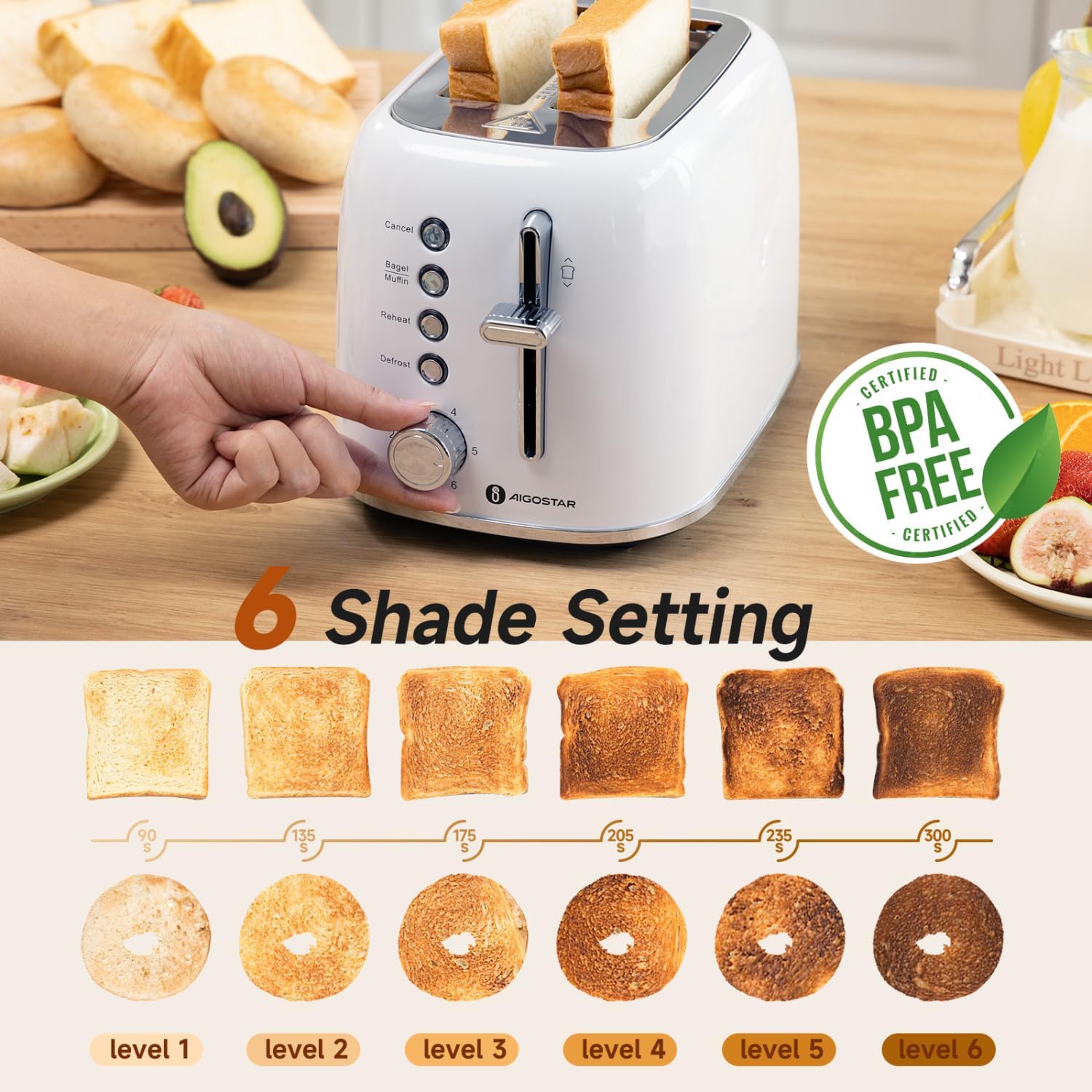
Image 5: An illustration showing the browning control dial on the toaster and examples of toast shades from level 1 (lightest) to level 6 (darkest), including both regular toast and bagels.
- Setting 1-2: For light toast.
- Setting 3-4: For medium toast.
- Setting 5-6: For dark toast.
Experiment with different settings to find your preferred toast shade. Thicker bread or frozen items may require a higher setting.
7. Cleaning and Maintenance
Regular cleaning ensures optimal performance and extends the life of your toaster.
- Always unplug the toaster from the power outlet and allow it to cool completely before cleaning.
- Crumb Tray: Pull out the removable crumb tray from the bottom of the toaster. Discard crumbs and wipe the tray clean with a damp cloth. Dry thoroughly before reinserting.
- Exterior: Wipe the exterior of the toaster with a soft, damp cloth. Do not use abrasive cleaners or metal scouring pads, as these can scratch the surface.
- Interior: Do not insert any objects into the toasting slots to clean. If food becomes lodged, unplug the toaster and carefully turn it upside down to shake out the contents.
- Cord Storage: The power cord can be wrapped around the cord storage area under the base for neat storage.

Image 6: Top panel shows a hand pulling out the removable crumb tray from the toaster's base. The bottom panel shows the underside of the toaster with the power cord neatly wrapped around the integrated cord storage area.
8. Troubleshooting
If you encounter issues with your toaster, refer to the following common problems and solutions:
| Problem | Possible Cause | Solution |
|---|---|---|
| Toaster does not turn on. | Not plugged in; power outage; faulty outlet. | Ensure toaster is securely plugged in. Check circuit breaker or try another outlet. |
| Bread does not toast evenly. | Uneven bread thickness; crumb buildup. | Ensure bread slices are of similar thickness. Clean the crumb tray regularly. |
| Toast is too light or too dark. | Incorrect browning setting. | Adjust the browning control dial to a higher or lower setting. |
| Smoke coming from toaster. | Food lodged in slots; crumb buildup; first use residue. | Immediately press 'Cancel' and unplug. Allow to cool. Remove any lodged food or clean crumb tray. (First use smoke is normal). |
| Toasting lever does not stay down. | Toaster not plugged in; internal malfunction. | Ensure the toaster is plugged into a live outlet. If problem persists, contact customer support. |
9. Specifications
- Brand: Aigostar
- Model: Retro 2 Slice Toaster
- Color: Pearl White
- Material: Stainless Steel
- Product Dimensions: 11"D x 7"W x 7"H (approximately 27.9cm D x 17.8cm W x 17.8cm H)
- Slot Width: 1.6 inches (approximately 4.06 cm)
- Browning Settings: 6 levels
- Functions: Cancel, Bagel, Reheat, Defrost

Image 7: The toaster placed on a shelf, with dimensions indicated as 11.14 inches (depth) and 7.28 inches (width), demonstrating its compact size for storage.
10. Warranty and Support
For warranty information or customer support, please refer to the documentation included with your purchase or visit the official Aigostar website. You can also visit the Aigostar Store on Amazon for further assistance.


